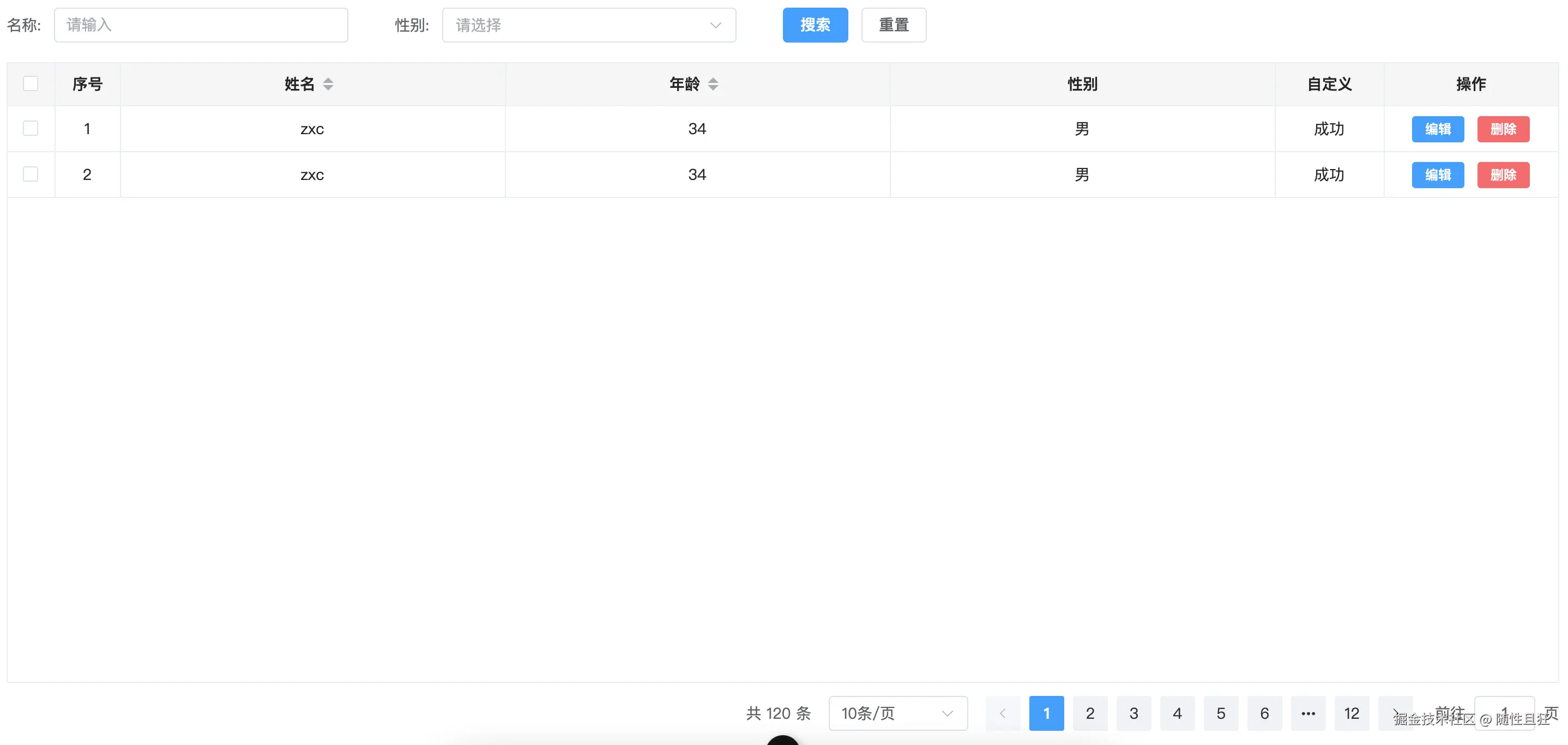
一、customTable.vue组件
<template>
<div class="columns-table">
<div class="columns-table-main">
<el-table
ref="tableRef"
row-key="id"
show-overflow-tooltip
tooltip-effect="dark"
:data="tableData"
v-loading="loading"
:element-loading-text="loadingText"
:border="tableBorder"
:height="tableHeight"
:max-height="tableMaxHeight"
:empty-text="emptyText"
:empty-image="emptyImage"
:default-expand-all="defaultExpandAll"
@selection-change="selectionChange"
@sort-change="sortChange"
:header-cell-style="{
'fond-size': '14px',
height: '40px',
'font-weight': 'bold',
color: 'rgba(0,0,0,0.85)',
'background-color': '#F5F5F5',
'text-align': 'center',
}"
:cell-style="{
'text-align': 'center',
height: '40px',
color: 'rgba(0,0,0,0.85)',
}"
>
<el-table-column
v-if="selection"
:reserve-selection="reserveSelection"
type="selection"
width="45"
fixed
align="center"
>
</el-table-column>
<el-table-column
v-if="showIndex"
type="index"
label="序号"
width="60"
align="center"
>
<template #default="scope">
<span>{{ (currentPage - 1) * pageSize + scope.$index + 1 }}</span>
</template>
</el-table-column>
<template v-for="(item, index) in columns">
<template v-if="item.type === 'slot'">
<el-table-column
:key="index"
:width="item.width"
:min-width="item.minWidth"
:prop="item.prop"
:label="item.label"
:align="item.align ? item.align : 'left'"
:fixed="item.fixed ? item.fixed : false"
>
<template #default="scope" v-if="item.slotType == 'options'">
<el-button
type="primary"
text
v-for="(btn, ind) in item.buttons"
:key="ind"
:disabled="scope.row[btn.key]"
@click="btn.fn(scope.row)"
>{{ btn.text }}</el-button
>
</template>
<template #default="scope" v-else>
<slot
:name="item.slotType"
:row="scope.row"
:label="item.label"
:index="scope.$index"
:column="scope.column"
/>
</template>
</el-table-column>
</template>
<template v-else>
<el-table-column
:key="index"
:sortable="item.sortable"
:prop="item.prop"
:label="item.label"
:width="item.width"
:min-width="item.minWidth || '80'"
:align="item.align ? item.align : 'left'"
:fixed="item.fixed ? item.fixed : false"
></el-table-column>
</template>
</template>
</el-table>
</div>
<div class="columns-table-page">
<el-pagination
v-if="showPagination"
:total="total"
v-model:current-page="currentPage"
v-model:page-size="pageSize"
:page-sizes="pageSizes"
background
layout="total, sizes, prev, pager, next, jumper"
></el-pagination>
</div>
</div>
</template>
<script setup>
import { ref, onMounted } from "vue";
let loading = defineModel("loading");
const emits = defineEmits(["selection-change", "sort-change"]);
const props = defineProps({
total: {
type: Number,
default: 0,
},
pageSizes: {
type: Array,
default: () => [10, 20, 50, 100],
},
tableData: {
type: Array,
default: () => [],
},
columns: {
type: Array,
default: () => [],
},
loadingText: {
type: String,
default: () => "正在加载中...",
},
tableBorder: {
type: Boolean,
default: () => true,
},
tableHeight: {
type: String,
default: () => "auto",
},
tableMaxHeight: {
type: String,
default: () => "500px",
},
emptyText: {
type: String,
default: () => "暂无数据",
},
emptyImage: {
type: String,
default: () => "https://img.yzcdn.cn/vant/empty-block.png",
},
showSummary: {
type: Boolean,
default: () => true,
},
defaultExpandAll: {
type: Boolean,
default: () => false,
},
selection: {
type: Boolean,
default: () => true,
},
reserveSelection: {
type: Boolean,
default: () => true,
},
showPagination: {
type: Boolean,
default: () => true,
},
showIndex: {
type: Boolean,
default: () => false,
},
checkData: {
type: Array,
default: () => [],
},
});
const tableRef = ref(null);
const selectionChange = (info) => {
emits("selection-change", info);
};
const sortChange = (info) => {
emits("sort-change", info);
};
const pageSize = defineModel("pageSize");
const currentPage = defineModel("currentPage");
onMounted(() => {
if (props.checkData.length > 0) {
props.tableData.forEach((item) => {
if (props.checkData.includes(item.id)) {
tableRef.value.toggleRowSelection(item, true);
} else {
tableRef.value.toggleRowSelection(item, false);
}
});
} else {
tableRef.value.clearSelection();
}
});
const clearSelectionFun = () => {
tableRef.value.clearSelection();
};
defineExpose({
clearSelectionFun,
});
</script>
<style lang="scss" scoped>
.columns-table {
display: flex;
flex-direction: column;
.columns-table-main {
margin-bottom: 12px;
}
.columns-table-page {
display: flex;
justify-content: flex-end;
}
}
</style>
二、Home.vue 调用示例
<template>
<custom-table
v-model:loading="loading"
:tableData="tableData"
:columns="columns"
:showIndex="tableConfig.showIndex"
:selection="tableConfig.selection"
:tableHeight="tableConfig.tableHeight"
v-model:pageSize="pageConfig.pageSize"
v-model:currentPage="pageConfig.currentPage"
:total="pageConfig.total"
:pageSizes="pageConfig.pageSizes"
@sort-change="sortChange"
@selection-change="selectionChange"
>
<!-- 自定义插槽,可以将插槽中的数据传递出来,status插槽名称,info slot中配置的属性 -->
<template v-slot:status="info">
{{ info.row.status ? "成功" : "成功" }}
</template>
</custom-table>
</template>
<script setup>
import CustomTable from "../components/CustomTable.vue"
import { ref, watch, watchEffect, reactive } from "vue"
// 表格相关
// 可以写在hooks里面
const loading = ref(false)
const tableConfig = ref({
showIndex: true,
selection: true,
tableHeight: "calc(100vh - 300px)",
})
const tableData = ref([])
const editFun = (row) => {}
const deleteFun = (row) => {}
const columns = ref([
{
label: "姓名",
prop: "name",
sortable: true,
},
{
label: "年龄",
prop: "age",
sortable: true,
},
{
label: "性别",
prop: "sex",
},
{
label: "自定义",
type: "slot",
slotType: "status",
width: 100,
},
{
label: "操作",
type: "slot", // 插槽
slotType: "options", // 自定义内容
width: 160,
buttons: [
{
text: "编辑",
fn: editFun,
},
{
text: "删除",
fn: deleteFun,
},
],
},
])
const getTableData = () => {
loading.value = true
setTimeout(() => {
tableData.value = [
{
id: 1,
name: "zxc",
age: 34,
sex: "男",
status: 1,
address: "北京",
},
{
id: 2,
name: "zxc",
age: 34,
sex: "男",
status: 0,
address: "北京",
},
]
loading.value = false
}, 1000)
}
const sortChange = (info) => {}
const selectionChange = (info) => {}
// 分页相关
const pageConfig = reactive({
pageSize: 10,
currentPage: 1,
total: 120,
pageSizes: [10, 20, 50, 100],
})
watch(
[() => pageConfig.currentPage, () => pageConfig.pageSize],
([newCurrent, newSize], [oldCurrent, oldSize]) => {
if (newCurrent !== oldCurrent || newSize !== oldSize) {
getTableData()
}
},
{
immediate: true,
}
)
</script>
三、封装带查询条件的 CustomTable.vue
<template>
<div class="columns-table">
<div class="columns-table-search" v-if="searchFormData.length">
<el-form :model="formData" label-suffix=":">
<div class="columns-table-form">
<div
v-for="(item, index) in searchFormData"
:key="index"
class="columns-table-item"
>
<el-form-item
:label="item.label"
:prop="item.prop"
v-if="item.type === 'input'"
>
<el-input
v-model="formData[item.prop]"
placeholder="请输入"
clearable
></el-input>
</el-form-item>
<el-form-item
:label="item.label"
:prop="item.prop"
v-if="item.type === 'select'"
>
<el-select
v-model="formData[item.prop]"
placeholder="请选择"
clearable
>
<el-option
v-for="option in item.options"
:key="option.id"
:label="option.label"
:value="option.value"
></el-option>
</el-select>
</el-form-item>
</div>
<div class="columns-table-item btns">
<el-button type="primary" @click="handleSearch">搜索</el-button>
<el-button type="default" @click="handleReset">重置</el-button>
</div>
</div>
</el-form>
</div>
<div class="columns-table-main">
<el-table
ref="tableRef"
row-key="id"
show-overflow-tooltip
tooltip-effect="dark"
:data="tableData"
v-loading="loading"
:element-loading-text="loadingText"
:border="tableBorder"
:height="tableHeight"
:max-height="tableMaxHeight"
:empty-text="emptyText"
:empty-image="emptyImage"
:default-expand-all="defaultExpandAll"
@selection-change="selectionChange"
@sort-change="sortChange"
:header-cell-style="{
'fond-size': '14px',
height: '40px',
'font-weight': 'bold',
color: 'rgba(0,0,0,0.85)',
'background-color': '#F5F5F5',
'text-align': 'center',
}"
:cell-style="{
'text-align': 'center',
height: '40px',
color: 'rgba(0,0,0,0.85)',
}"
>
<el-table-column
v-if="selection"
:reserve-selection="reserveSelection"
type="selection"
width="45"
fixed
align="center"
>
</el-table-column>
<el-table-column
v-if="showIndex"
type="index"
label="序号"
width="60"
align="center"
>
<template #default="scope">
<span>{{ (currentPage - 1) * pageSize + scope.$index + 1 }}</span>
</template>
</el-table-column>
<template v-for="(item, index) in columns">
<template v-if="item.type === 'slot'">
<el-table-column
:key="index"
:width="item.width"
:min-width="item.minWidth"
:prop="item.prop"
:label="item.label"
:align="item.align ? item.align : 'left'"
:fixed="item.fixed ? item.fixed : false"
>
<template #default="scope" v-if="item.slotType == 'options'">
<el-button
:type="btn.type ? btn.type : 'primary'"
size="small"
v-for="(btn, ind) in item.buttons"
:key="ind"
:disabled="scope.row[btn.key]"
@click="btn.fn(scope.row)"
>{{ btn.text }}</el-button
>
</template>
<template #default="scope" v-else>
<slot
:name="item.slotType"
:row="scope.row"
:label="item.label"
:index="scope.$index"
:column="scope.column"
/>
</template>
</el-table-column>
</template>
<template v-else>
<el-table-column
:key="index"
:sortable="item.sortable"
:prop="item.prop"
:label="item.label"
:width="item.width"
:min-width="item.minWidth || '80'"
:align="item.align ? item.align : 'left'"
:fixed="item.fixed ? item.fixed : false"
></el-table-column>
</template>
</template>
</el-table>
</div>
<div class="columns-table-page">
<el-pagination
v-if="showPagination"
:total="total"
v-model:current-page="currentPage"
v-model:page-size="pageSize"
:page-sizes="pageSizes"
background
layout="total, sizes, prev, pager, next, jumper"
></el-pagination>
</div>
</div>
</template>
<script setup>
import { ref, onMounted } from "vue";
let loading = defineModel("loading");
const emits = defineEmits([
"selection-change",
"sort-change",
"search",
"reset",
]);
const props = defineProps({
searchFormData: {
type: Array,
default: () => [],
},
total: {
type: Number,
default: 0,
},
pageSizes: {
type: Array,
default: () => [10, 20, 50, 100],
},
tableData: {
type: Array,
default: () => [],
},
columns: {
type: Array,
default: () => [],
},
loadingText: {
type: String,
default: () => "正在加载中...",
},
tableBorder: {
type: Boolean,
default: () => true,
},
tableHeight: {
type: String,
default: () => "auto",
},
tableMaxHeight: {
type: String,
default: () => "1000px",
},
emptyText: {
type: String,
default: () => "暂无数据",
},
emptyImage: {
type: String,
default: () => "https://img.yzcdn.cn/vant/empty-block.png",
},
showSummary: {
type: Boolean,
default: () => true,
},
defaultExpandAll: {
type: Boolean,
default: () => false,
},
selection: {
type: Boolean,
default: () => true,
},
reserveSelection: {
type: Boolean,
default: () => true,
},
showPagination: {
type: Boolean,
default: () => true,
},
showIndex: {
type: Boolean,
default: () => false,
},
checkData: {
type: Array,
default: () => [],
},
});
const tableRef = ref(null);
const selectionChange = (info) => {
emits("selection-change", info);
};
const sortChange = (info) => {
emits("sort-change", info);
};
const pageSize = defineModel("pageSize");
const currentPage = defineModel("currentPage");
const formData = ref({});
onMounted(() => {
if (props.checkData.length > 0) {
props.tableData.forEach((item) => {
if (props.checkData.includes(item.id)) {
tableRef.value.toggleRowSelection(item, true);
} else {
tableRef.value.toggleRowSelection(item, false);
}
});
} else {
tableRef.value.clearSelection();
}
if (props.searchFormData.length > 0) {
props.searchFormData.forEach((item) => {
formData.value[item.prop] = "";
});
}
});
const clearSelectionFun = () => {
tableRef.value.clearSelection();
};
const handleSearch = () => {
emits("search", formData.value);
};
const handleReset = () => {
for (let key in formData.value) {
formData.value[key] = "";
}
emits("search", {});
};
defineExpose({
clearSelectionFun,
});
</script>
<style lang="scss" scoped>
.columns-table {
display: flex;
flex-direction: column;
.columns-table-main {
margin-bottom: 12px;
}
.columns-table-page {
display: flex;
justify-content: flex-end;
}
.columns-table-form {
display: flex;
align-items: center;
gap: 3%;
flex-wrap: wrap;
.columns-table-item {
width: 22%;
}
.btns {
align-self: flex-start;
justify-self: flex-end;
}
}
}
</style>
四、适用 Home.vue
<template>
<custom-table
v-model:loading="loading"
:tableData="tableData"
:columns="columns"
:showIndex="tableConfig.showIndex"
:selection="tableConfig.selection"
:tableHeight="tableConfig.tableHeight"
v-model:pageSize="pageConfig.pageSize"
v-model:currentPage="pageConfig.currentPage"
:total="pageConfig.total"
:pageSizes="pageConfig.pageSizes"
@sort-change="sortChange"
@selection-change="selectionChange"
:search-form-data="[
{ label: '名称', prop: 'name', type: 'input' },
{
label: '性别',
prop: 'sex',
type: 'select',
options: [{ id: 1, label: '选项1', value: '1' }],
},
]"
@search="handleSearch"
>
<!-- 自定义插槽,可以将插槽中的数据传递出来,status插槽名称,info slot中配置的属性 -->
<template v-slot:status="info">
{{ info.row.status ? "成功" : "成功" }}
</template>
</custom-table>
</template>
<script setup>
import CustomTable from "../components/CustomTable.vue"
import { ref, watch, watchEffect, reactive } from "vue"
// 表格相关
// 可以写在hooks里面
const loading = ref(false)
const tableConfig = ref({
showIndex: true,
selection: true,
tableHeight: "calc(100vh - 130px)",
})
const tableData = ref([])
const editFun = (row) => {}
const deleteFun = (row) => {}
const columns = ref([
{
label: "姓名",
prop: "name",
sortable: true,
},
{
label: "年龄",
prop: "age",
sortable: true,
},
{
label: "性别",
prop: "sex",
},
{
label: "自定义",
type: "slot",
slotType: "status",
width: 100,
},
{
label: "操作",
type: "slot", // 插槽
slotType: "options", // 自定义内容
width: 160,
buttons: [
{
text: "编辑",
fn: editFun,
},
{
text: "删除",
type: 'danger',
fn: deleteFun,
},
],
},
])
const getTableData = () => {
// searchParams
loading.value = true
setTimeout(() => {
tableData.value = [
{
id: 1,
name: "zxc",
age: 34,
sex: "男",
status: 1,
address: "北京",
},
{
id: 2,
name: "zxc",
age: 34,
sex: "男",
status: 0,
address: "北京",
},
]
loading.value = false
}, 1000)
}
const sortChange = (info) => {}
const selectionChange = (info) => {}
// 分页相关
const pageConfig = reactive({
pageSize: 10,
currentPage: 1,
total: 120,
pageSizes: [10, 20, 50, 100],
})
const searchParams = ref({
currentPage: pageConfig.currentPage,
pageSize: pageConfig.pageSize,
})
const handleSearch = (info) => {
if (Object.keys(info).length === 0) {
searchParams.value = {}
} else {
for (const key in info) {
if (info[key]) {
searchParams.value[key] = info[key]
} else {
delete searchParams.value[key]
}
}
}
if (pageConfig.currentPage !== 1) {
pageConfig.currentPage = 1
} else {
getTableData()
}
}
watch(
[() => pageConfig.currentPage, () => pageConfig.pageSize],
([newCurrent, newSize], [oldCurrent, oldSize]) => {
if (newCurrent || newSize) {
getTableData()
}
},
{
immediate: true,
}
)
</script>