背景:
- AI助手返回的markdown格式文本,渲染成markdown文件,并将代码高亮展示
- markdown格式文本中JSON配置,按照自定义组件样式展示
markdown展示图
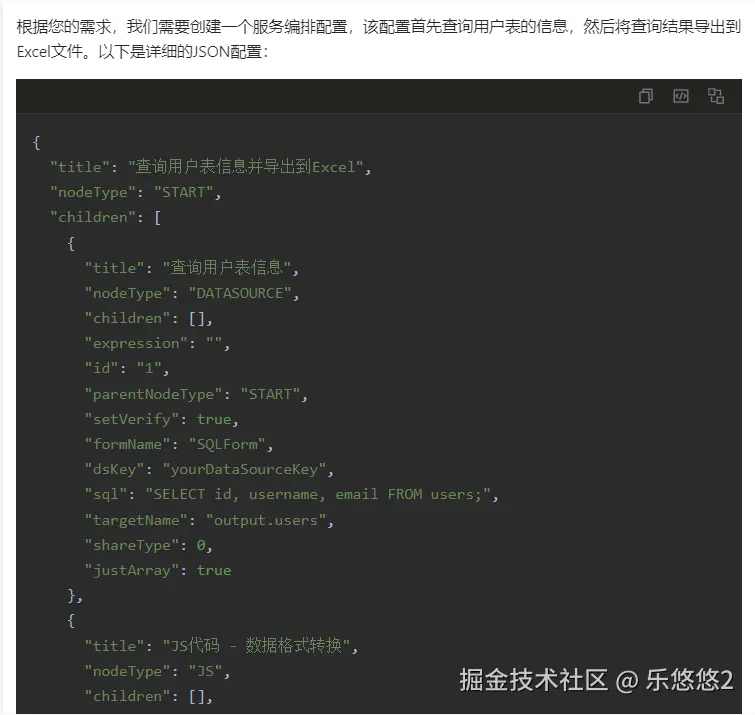
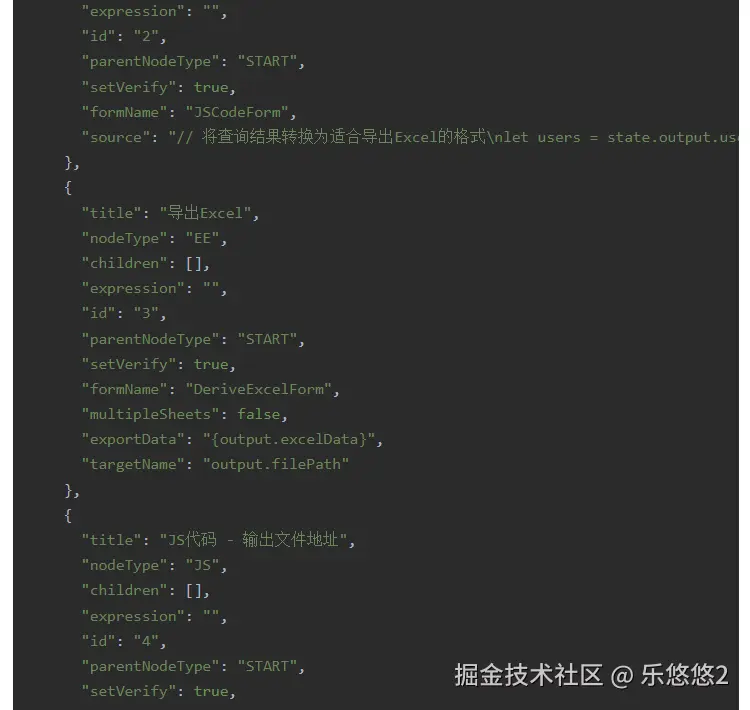

将JSON渲染成自定义组件效果图
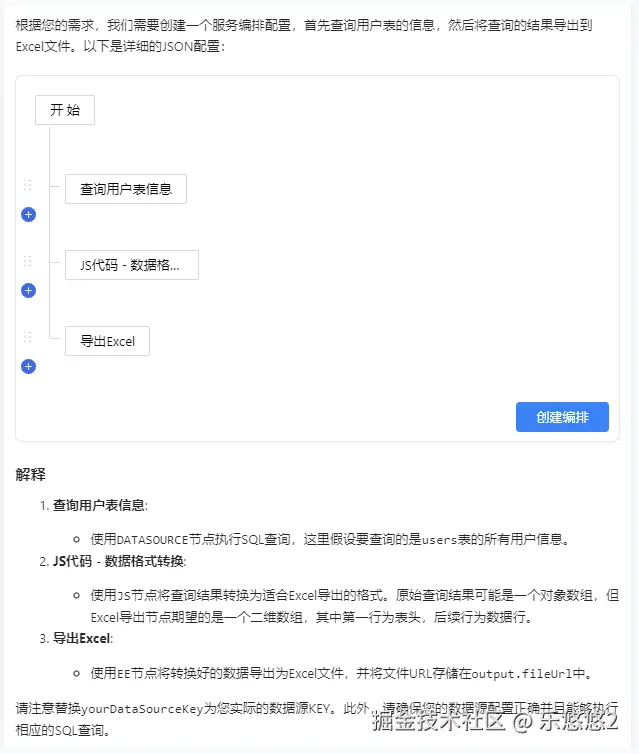
解决思路
- 引入marked、marked-highlight、highlight.js渲染markdown格式文本
- 使用react-dom/server的ReactDOMServer将React组件渲染成静态HTML标签
- 代码块添加按钮、事件
详细实现
import { useEffect, useState } from 'react'
import ReactDOMServer from 'react-dom/server';
import { Button, message } from 'antd';
import StaticDraggerTree from '@/components/DraggerTree/StaticTree'
import { Provider } from 'react-redux';
import { Marked, Renderer } from 'marked'
import { markedHighlight } from 'marked-highlight'
import hljs from 'highlight.js'
import 'highlight.js/styles/base16/darcula.css'
import './index.less';
const mockStore = {
subscribe: () => {},
dispatch: () => {},
getState: () => ({}),
};
const AIDialogue = (props) => {
const { content } = props;
const [parseHtml, setParseHtml] = useState('')
function removeCodeBlockMarker(code) {
return code.replace(/```[\w\s-]*\n([\s\S]+?)\n```/g, '$1');
}
const renderer = new Renderer()
renderer.code = function (code, lang) {
const highlightedCode = hljs.highlightAuto(removeCodeBlockMarker(code.raw)).value;
let isServiceOrch = false;
try{
if (code.lang == 'json') {
const dataJson = JSON.parse(removeCodeBlockMarker(code.raw));
if (dataJson) {
isServiceOrch = true;
}
}
}catch(e){
console.log(e)
}
if (isServiceOrch) {
const randomId = Math.random().toString(36).substring(2, 10)
const jsonObj = JSON.parse(removeCodeBlockMarker(code.raw));
const children = jsonObj.children || jsonObj.defaultConfig?.children;
const reactEle = ReactDOMServer.renderToString(
<div class="mermaid-block" data-mermaid-id={randomId}>
<Provider store={mockStore}>
<StaticDraggerTree nodeTreeData={{children}} />
</Provider>
<Button class="so-service-action" data-action="create" data-mermaid-id={randomId}>
创建编排
</Button>
<div class="mermaid-code-view" id={`mermaid-code-${randomId}`}>
{/* 大模型生成的原始json,创建编排时使用。此处不需展示,故隐藏 */}
<pre style={{"display": "none"}}><coderaw class="hljs language-mermaid">{removeCodeBlockMarker(code.raw)}</coderaw></pre>
</div>
</div>
);
return `${reactEle}`
}
else {
if (code.lang) {
return `<pre><code class="hljs language-${code.lang}">${highlightedCode}</code></pre>`
} else {
return `<pre><code class="hljs">${highlightedCode}</code></pre>`
}
}
}
const marked = new Marked(
markedHighlight({
langPrefix: 'hljs language-',
highlight(code, lang) {
const language = hljs.getLanguage(lang) ? lang : 'plaintext'
return hljs.highlight(code, { language }).value
}
})
)
marked.use({
extensions: [
{
name: 'thinkBlock',
level: 'block',
start(src) {
return src.match(/<think>/i)?.index
},
tokenizer(src) {
const rule = /^<think>([\s\S]*?)<\/think>/i
const match = rule.exec(src)
if (match) {
return {
type: 'thinkBlock',
raw: match[0],
text: match[1].trim()
}
}
},
renderer(token) {
return `<think>${token.text}</think>`
}
}
]
})
marked.setOptions({
renderer,
highlight: function (code) {
return hljs.highlightAuto(code).value
},
gfm: true,
pedantic: false,
sanitize: false,
tables: true,
breaks: false,
smartLists: true,
smartypants: false,
})
const addCodeBlockButtons = (outputIndex) => {
const outputDiv = document.getElementById(`outPut${outputIndex}`)
if (!outputDiv) return
const preBlocks = outputDiv.querySelectorAll('pre:not(.processed)')
console.log("preBlocks:", preBlocks)
preBlocks.forEach((preBlock, i) => {
const blockIndex = `${outputIndex}_${i}`
preBlock.id = `output_pre_${blockIndex}`
const div = document.createElement('div')
div.classList.add('insert-code-btn')
div.innerHTML = `
<div class="inner-btns">
<div class="copybtn-icn" id="codeCopy_${blockIndex}" title="复制">
<svg viewBox="0 0 24 24" fill="currentColor"><path d="M6.9998 6V3C6.9998 2.44772 7.44752 2 7.9998 2H19.9998C20.5521 2 20.9998 2.44772 20.9998 3V17C20.9998 17.5523 20.5521 18 19.9998 18H16.9998V20.9991C16.9998 21.5519 16.5499 22 15.993 22H4.00666C3.45059 22 3 21.5554 3 20.9991L3.0026 7.00087C3.0027 6.44811 3.45264 6 4.00942 6H6.9998ZM5.00242 8L5.00019 20H14.9998V8H5.00242ZM8.9998 6H16.9998V16H18.9998V4H8.9998V6Z"/></svg>
</div>
<div class="copybtn-icn" id="codeInsert_${blockIndex}" title="插入">
<svg viewBox="0 0 24 24" fill="currentColor"><path d="M3 3H21C21.5523 3 22 3.44772 22 4V20C22 20.5523 21.5523 21 21 21H3C2.44772 21 2 20.5523 2 20V4C2 3.44772 2.44772 3 3 3ZM4 5V19H20V5H4ZM20 12L16.4645 15.5355L15.0503 14.1213L17.1716 12L15.0503 9.87868L16.4645 8.46447L20 12ZM6.82843 12L8.94975 14.1213L7.53553 15.5355L4 12L7.53553 8.46447L8.94975 9.87868L6.82843 12ZM11.2443 17H9.11597L12.7557 7H14.884L11.2443 17Z"/></svg>
</div>
<div class="copybtn-icn" id="codeReplace_${blockIndex}" title="替换">
<svg viewBox="0 0 1024 1024" fill="currentColor"><path d="M480.036571 464.018286v-384a16.018286 16.018286 0 0 0-16.091428-16.018286h-384a16.018286 16.018286 0 0 0-15.945143 16.018286v384c0 8.777143 7.168 15.945143 16.018286 15.945143h384c8.777143 0 15.945143-7.094857 15.945143-15.945143zM399.945143 144.018286v256h-256v-256h256zM512 156.013714v71.972572h220.013714V384h-44.032a8.045714 8.045714 0 0 0-6.363428 12.8l80.018285 106.642286a8.045714 8.045714 0 0 0 12.8 0l79.945143-106.642286a8.045714 8.045714 0 0 0-6.363428-12.8h-44.032V208.018286a51.931429 51.931429 0 0 0-51.931429-52.004572H512zM175.981714 640a8.045714 8.045714 0 0 1-6.363428-12.8l79.945143-106.642286a8.045714 8.045714 0 0 1 12.8 0l80.018285 106.642286a8.045714 8.045714 0 0 1-6.363428 12.8h-44.032v156.013714H512v71.972572H272.018286a51.931429 51.931429 0 0 1-52.004572-51.931429V640h-44.032z m784.018286 303.981714v-384a16.018286 16.018286 0 0 0-16.018286-15.945143h-384a16.018286 16.018286 0 0 0-15.945143 15.945143v384c0 8.850286 7.094857 16.018286 15.945143 16.018286h384c8.850286 0 16.018286-7.168 16.018286-16.018286z m-80.018286-320v256h-256v-256h256z"></path></svg>
</div>
</div>`
preBlock.prepend(div)
preBlock.classList.add('processed')
})
}
function codeBlockButtonEvent(outputIndex) {
const outputDiv = document.getElementById(`outPut${outputIndex}`)
if (!outputDiv) return
const preBlocks = outputDiv.querySelectorAll('pre')
preBlocks.forEach((preBlock, i) => {
const blockIndex = `${outputIndex}_${i}`
const codeCopyBtn = document.getElementById(`codeCopy_${blockIndex}`)
if (codeCopyBtn && !codeCopyBtn.dataset.listenerAdded) {
codeCopyBtn.addEventListener('click', e => {
e.stopPropagation()
const codeElement = preBlock.querySelector('code')
const code = codeElement?.textContent || ''
props.onCopy ? props.onCopy({
message: code,
id: props.id,
chatId: props.chatId
}) : null;
})
codeCopyBtn.dataset.listenerAdded = 'true'
}
const codeInsertBtn = document.getElementById(`codeInsert_${blockIndex}`)
if (codeInsertBtn && !codeInsertBtn.dataset.listenerAdded) {
codeInsertBtn.addEventListener('click', e => {
e.stopPropagation()
const codeElement = preBlock.querySelector('code')
const code = codeElement?.textContent || ''
props.onCodeInsert ? props.onCodeInsert(code) : null;
})
codeInsertBtn.dataset.listenerAdded = 'true'
}
const codeReplaceBtn = document.getElementById(`codeReplace_${blockIndex}`)
if (codeReplaceBtn && !codeReplaceBtn.dataset.listenerAdded) {
codeReplaceBtn.addEventListener('click', e => {
e.stopPropagation()
const codeElement = preBlock.querySelector('code')
const code = codeElement?.textContent || ''
props.onCodeReplace ? props.onCodeReplace(code) : null;
})
codeReplaceBtn.dataset.listenerAdded = 'true'
}
})
}
useEffect(() => {
let contentMock = "根据您的需求,我们需要创建一个服务编排配置,该配置首先查询用户表的信息,然后将查询结果导出到Excel文件。以下是详细的JSON配置:\n\n```json\n{\n \"title\": \"查询用户表信息并导出到Excel\",\n \"nodeType\": \"START\",\n \"children\": [\n {\n \"title\": \"查询用户表信息\",\n \"nodeType\": \"DATASOURCE\",\n \"children\": [],\n \"expression\": \"\",\n \"id\": \"1\",\n \"parentNodeType\": \"START\",\n \"setVerify\": true,\n \"formName\": \"SQLForm\",\n \"dsKey\": \"yourDataSourceKey\", # 替换为实际的数据源ID\n \"sql\": \"SELECT id, username, email FROM users;\", # 替换为实际的SQL查询语句\n \"targetName\": \"output.users\",\n \"shareType\": 0,\n \"justArray\": true\n },\n {\n \"title\": \"JS代码 - 数据格式转换\",\n \"nodeType\": \"JS\",\n \"children\": [],\n \"expression\": \"\",\n \"id\": \"2\",\n \"parentNodeType\": \"START\",\n \"setVerify\": true,\n \"formName\": \"JSCodeForm\",\n \"source\": \"// 将查询结果转换为适合导出Excel的格式\\nlet users = state.output.users;\\nlet excelData = [['ID', 'Username', 'Email']];\\nusers.forEach(user => {\\n excelData.push([user.id, user.username, user.email]);\\n});\\nstate.output.excelData = excelData;\\nreturn state;\"\n },\n {\n \"title\": \"导出Excel\",\n \"nodeType\": \"EE\",\n \"children\": [],\n \"expression\": \"\",\n \"id\": \"3\",\n \"parentNodeType\": \"START\",\n \"setVerify\": true,\n \"formName\": \"DeriveExcelForm\",\n \"multipleSheets\": false,\n \"exportData\": \"{output.excelData}\",\n \"targetName\": \"output.filePath\"\n },\n {\n \"title\": \"JS代码 - 输出文件地址\",\n \"nodeType\": \"JS\",\n \"children\": [],\n \"expression\": \"\",\n \"id\": \"4\",\n \"parentNodeType\": \"START\",\n \"setVerify\": true,\n \"formName\": \"JSCodeForm\",\n \"source\": \"// 返回文件路径\\nstate.output.response = {\\n filePath: state.output.filePath,\\n status: 'Success'\\n};\\nreturn state;\"\n }\n ],\n \"expression\": null,\n \"id\": \"0\",\n \"parentNodeType\": null,\n \"setVerify\": null,\n \"formName\": null\n}\n```\n\n### 配置说明\n\n1. **查询用户表信息**:\n - 使用`DATASOURCE`节点执行SQL查询,查询用户表的所有记录。\n\n2. **JS代码 - 数据格式转换**:\n - 使用`JS`节点将查询结果转换为适合导出Excel的格式。这里我们将查询结果转换成了一个二维数组的形式,其中第一行为表头,后续行为数据行。\n\n3. **导出Excel**:\n - 使用`EE`节点将转换好的数据导出为Excel文件,并将文件路径存储在`output.filePath`中。\n\n4. **JS代码 - 输出文件地址**:\n - 最后一步再次使用`JS`节点,将文件路径和其他相关信息构造成最终的响应对象,方便查看和使用。\n\n请注意替换`yourDataSourceKey`为您实际的数据源ID,并调整SQL查询语句以适应您数据库的实际表结构。"
setParseHtml(marked.parse(contentMock));
setTimeout(() => {
addCodeBlockButtons(props.id)
codeBlockButtonEvent(props.id)
setupMermaidActions()
}, 100);
}, [content])
return (
<>
<div className="ai-markdown">
<div className="markdown-view" dangerouslySetInnerHTML={{ __html: parseHtml }} id={'outPut' + props.id}></div>
</div >
</>
);
};
export default AIDialogue;



