1.profile标签的maven-assembly-plugin not found from xxx(私服网站)
解决思路
在dependencies中添加依赖,因为依赖如果本地没有会去我们导入的镜像中下载到本地,这样就解决了profile标签无法加载的问题
<dependency>
  <groupId>org.apache.maven.plugins</groupId>
  <artifactId>maven-assembly-plugin</artifactId>
  <version>3.3.0</version>
</dependency>
2.pom文件中导入镜像,如果远端镜像有依赖但是无法加载,那么就把那个远端镜像放到第一个位置,然后
清理缓存再试试
<repositories>
    <repository>
        <id>data-releases</id>
        <name>Data Platform Releases</name>
        <url>xxx</url>
        <releases>
            <enabled>true</enabled>
        </releases>
        <snapshots>
            <enabled>false</enabled>
        </snapshots>
    </repository>
    <repository>
        <id>releases</id>
        <name>Data Platform Releases</name>
        <url>xxx</url>
        <releases>
            <enabled>true</enabled>
        </releases>
        <snapshots>
            <enabled>false</enabled>
        </snapshots>
    </repository>

    <repository>
        <id>aliyun</id>
        <name>aliyun</name>
        <url>http://maven.aliyun.com/nexus/content/repositories/central/</url>
        <layout>default</layout>
    </repository>
</repositories>
3.etl项目依赖了common的依赖包,那么我们需要先把common项目install下来然后etl项目reload即可。
4.拉取下来没有不显示module项目格式怎么办?
依次next即可
5.yarn报错due to AM Container for appattempt17195452424672556551_000002 exited with exitCode: 1
报错:Job job17195452424672556551 failed with state FAILED due to: Application application17195452424672556551 failed 2 times (global limit =4; local limit is =2)
due to AM Container for appattempt17195452424672556551_000002 exited with exitCode: 1
查看yarn日志
发现SLF4J的路径有两个,就说明导入了两个SLF4J依赖
解决方法:把common中导入的那个依赖a删掉或者把etl项目中对应的依赖删掉,重新打包再部署即可。
6.maven选择package打包,会跑test下面的main方法,怎么解决?
第1种
修改pox.xml文件
<build>
        <plugins>
            <plugin>
                <groupId>org.apache.maven.plugins</groupId>
                <artifactId>maven-surefire-plugin</artifactId>
                <configuration>
                    <skip>true</skip>
                </configuration>
            </plugin>
        </plugins>
    </build>
第2种(亲测有效)
选中小闪电,test就被划掉了。然后点击install就会跳过test了
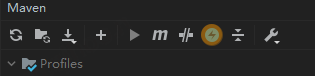
7.maven依赖也导入了,但是代码java文件就是显示的是红色J标记
解决方案:
File>>project structure>>Modules
然后将java文件标记为Sources
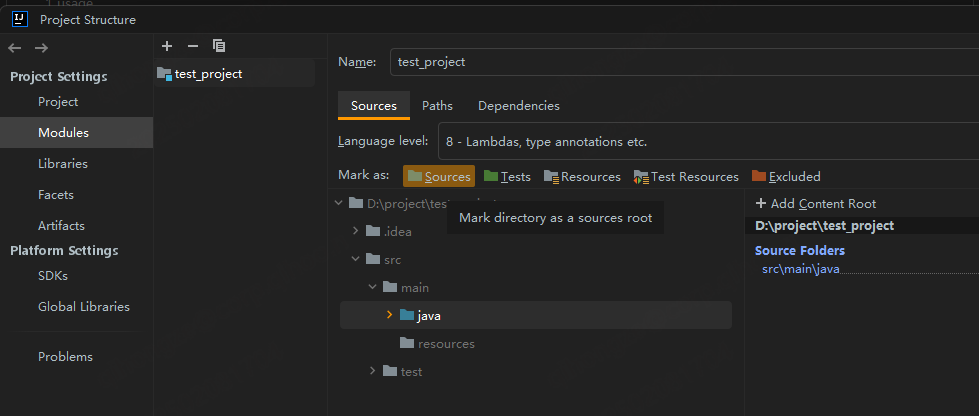
8.maven无法获取flink-shaded-asm
解决思路如下:
先把user settings和local reposit的override恢复到默认
再把maven下的importing添加如下内容到VM options for importer 然后点击ok 即可
-Dmaven.wagon.http.ssl.insecure -Dmaven.wagon.http.ssl.allowall
9.maven的clean等操作报错Error running 'stats [clean]': No valid Maven installation found. Either set the home directory in the configuration dialog or set the M2_HOME environment variable on your system
原因: 大概率是maven的路径配错了,要么是环境变量问题,要么是idea导入的maven有问题
解决:修改maven的home地址后,会显示正确的version
10.no class 和 no such method
no class found ---原因:少包
no such method ---原因:冲突
因为底层框架创建实例不是new一个对象,而是用的反射