- 你是否也会因为
el-tooltip组件的繁琐使用而想要一个简单易用的指令呢?
- 你是否想要一个类似
el-table中show-overflow-tooltip文字溢出功能的独立tooltip呢?
那就开始今日份v-tooltip指令的封装吧~
- 在项目目录中的自定义指令文件夹
directive里添加 tooltip.js
import { createApp, ref, h } from 'vue'
import { ElTooltip } from 'element-plus';
const INIT_CONFIG = {
isCommon: false,
visible: false,
triggeringRef: {},
placement: 'top',
content: '',
effect: 'light',
offset: 6,
showArrow: true,
rawContent: false
}
const CONFIG = ref({
visible: false,
triggeringRef: {},
placement: 'top',
content: '',
effect: 'light',
offset: 0,
showArrow: true,
rawContent: false,
disabled: false
})
const synopsis = createApp({
setup() {
return () => h(ElTooltip, {
ref: 'elTooltipRef',
isCommon: CONFIG.value.isCommon,
visible: CONFIG.value.visible,
virtualTriggering: true,
virtualRef: CONFIG.value.triggeringRef,
placement: CONFIG.value.placement,
content: CONFIG.value.content,
effect: CONFIG.value.effect,
offset: CONFIG.value.offset,
showArrow: CONFIG.value.showArrow,
rawContent: CONFIG.value.rawContent,
disabled: CONFIG.value.disabled,
});
}
});
const DIV = document.createElement("div")
const tipInstance = synopsis.mount(DIV)
document.body.appendChild(tipInstance.$el);
function tipMouseenterHandler (el) {
const binding = this.binding;
if (binding.value.isCommon || el.target.scrollWidth > el.target.offsetWidth || el.target.scrollHeight > el.target.offsetHeight) {
binding.arg ? CONFIG.value.placement = binding.arg : INIT_CONFIG.placement;
if (binding.value) {
if (Object.prototype.toString.call(binding.value) === '[object Object]') {
Object.keys(CONFIG.value).forEach(key => CONFIG.value[key] = binding.value[key] !== undefined ? binding.value[key] : INIT_CONFIG[key]);
} else {
CONFIG.value.content = binding.value;
}
}
CONFIG.value.visible = true;
CONFIG.value.triggeringRef = el.target;
}
}
function tipMouseleaveHandler (el) {
CONFIG.value.visible = false;
CONFIG.value.triggeringRef = null;
}
function tipClickHandler(el) {
const binding = this.binding;
if (binding.value.isCommon || el.target.scrollWidth > el.target.offsetWidth || el.target.scrollHeight > el.target.offsetHeight) {
binding.arg ? CONFIG.value.placement = binding.arg : INIT_CONFIG.placement;
if (binding.value) {
if (Object.prototype.toString.call(binding.value) === '[object Object]') {
Object.keys(CONFIG.value).forEach(key => CONFIG.value[key] = binding.value[key] ? binding.value[key] : INIT_CONFIG[key]);
if (binding.value.content === undefined) {
const content = [...this.children].find(item => item.classList.contains('el-tooltip__popper'));
CONFIG.value.content = content.innerHTML;
}
} else {
CONFIG.value.content = binding.value;
}
}
CONFIG.value.visible = true;
CONFIG.value.triggeringRef = el.target;
}
}
export default {
install(app) {
app.directive('tooltip', {
mounted(el, binding) {
el.binding = binding;
el.addEventListener('mouseenter', tipMouseenterHandler);
el.addEventListener('mouseleave', tipMouseleaveHandler, false);
},
updated(el, binding) {
el.binding = binding;
},
beforeUnmount(el) {
el.removeEventListener('mouseenter', tipMouseenterHandler);
el.removeEventListener('mouseleave', tipMouseleaveHandler);
}
})
}
}
main.js 配置
import { GlobDirective, ToolTip } from './directive/tooltip.js';

const app = createApp(App)
    .use(ToolTip);
- 使用方式
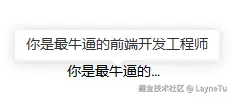
<div style="padding: 100px;background-color: #fff;">
    <p v-tooltip="'你是最牛逼的前端开发工程师'" style="width: 100px; overflow: hidden; text-overflow: ellipsis; white-space: nowrap">你是最牛逼的前端开发工程师</p>
</div>
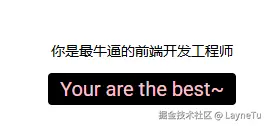
<div style="padding: 100px;background-color: #fff;">
    <p v-tooltip="{
        content: `<div style='font-size: 20px;color: pink;'>Your are the best~</div>`,
        isCommon: true,
        placement: 'bottom',
        effect: 'dark',
        offset: 10,
        showArrow: false,
        rawContent: true,
        disabled: false
    }" style="width: fit-content;">你是最牛逼的前端开发工程师</p>
</div>