创建项目
# 创建项目目录并初始化
mkdir my-utils && cd my-utils
pnpm init -y

# 安装核心依赖(仅需 2 个包!)
pnpm add -D tsup typescript
创建项目结构
my-utils/
├── src/
│   ├── index.ts          # 主入口
│   ├── math.ts           # 数学工具
│   └── string.ts         # 字符串工具
├── package.json
添加示例代码
export const add = (a: number, b: number) => a + b;
export const multiply = (a: number, b: number) => a * b;
export const capitalize = (str: string) => str.charAt(0).toUpperCase() + str.slice(1);
export * from './math';
export * from './string';
配置 package.json
{
  "name": "my-utils",
  "version": "1.0.3",
  "main": "index.js",
  "scripts": {
    "build": "tsup src/index.ts --format cjs,esm --dts",
    "test": "echo \"Error: no test specified\" && exit 1"
  },
  "devDependencies": {
    "tsup": "^8.5.0",
    "typescript": "^5.8.3"
  },
  "publishConfig": {
    "registry": "http://xxx"
  },
  "files": [
    "dist"
  ],
  "exports": {
    ".": {
      "import": "./dist/index.mjs",
      "require": "./dist/index.js"
    }
  }
}
打包生成dist
npm run build
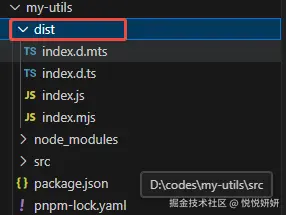
发包 npm publish
安装包

import { add } from "my-utils";
console.log("add", add(5, 8));