cnpm install @fullcalendar/vue3 @fullcalendar/core @fullcalendar/daygrid
<template>
<div class="right_container">
<div class="header_container">
<el-date-picker
v-model="dateValue"
type="month"
value-format="YYYY-MM"
placeholder="选择月"
@change="dateChange"
:clearable="false"
size="default"
style="width: 100px"
>
</el-date-picker>
</div>
<div class="full_calendar_container">
<FullCalendar ref="calendarRef" :options="calendarOptions" />
</div>
</div>
</template>
<script setup lang="ts">
import { ref, watch, onMounted, reactive, toRefs } from 'vue';
import FullCalendar from '@fullcalendar/vue3';
import dayGridPlugin from '@fullcalendar/daygrid';
import zhLocale from '@fullcalendar/core/locales/zh-cn';
import { flightTaskManageApi } from '@/api/flightTaskManage';
import { ElMessage } from 'element-plus';
const getCurrentYearMonth = (useUTC = false) => {
const now = new Date();
const year = useUTC ? now.getUTCFullYear() : now.getFullYear();
const month = (useUTC ? now.getUTCMonth() : now.getMonth()) + 1;
const formattedMonth = month.toString().padStart(2, '0');
return `${year}-${formattedMonth}`;
};
const state = reactive({
loading: false,
dateValue: getCurrentYearMonth(),
dataList: [] as any[],
});
const { loading, dateValue, dataList } = toRefs(state);
const calendarRef = ref();
const calendarOptions: any = ref({
plugins: [dayGridPlugin],
initialView: 'dayGridMonth',
locales: [zhLocale],
locale: 'zh-cn',
fixedWeekCount: false,
showNonCurrentDates: true,
headerToolbar: {
left: 'prev',
center: 'title',
right: 'next',
},
dayHeaderContent: (args: any) => {
const weekDays = ['日', '一', '二', '三', '四', '五', '六'];
return weekDays[args.date.getDay()];
},
dayCellContent: (args: any) => {
return {
html: `<div class="day-cell">
${args.dayNumberText.padStart(2, '0')}
</div>`,
};
},
eventTimeFormat: {
hour: '2-digit',
minute: '2-digit',
second: '2-digit',
meridiem: 'short',
},
initialDate: calendarRef.value,
dayHeaderClassNames: 'custom-header',
dayCellClassNames: 'custom-cell',
height: '100%',
});
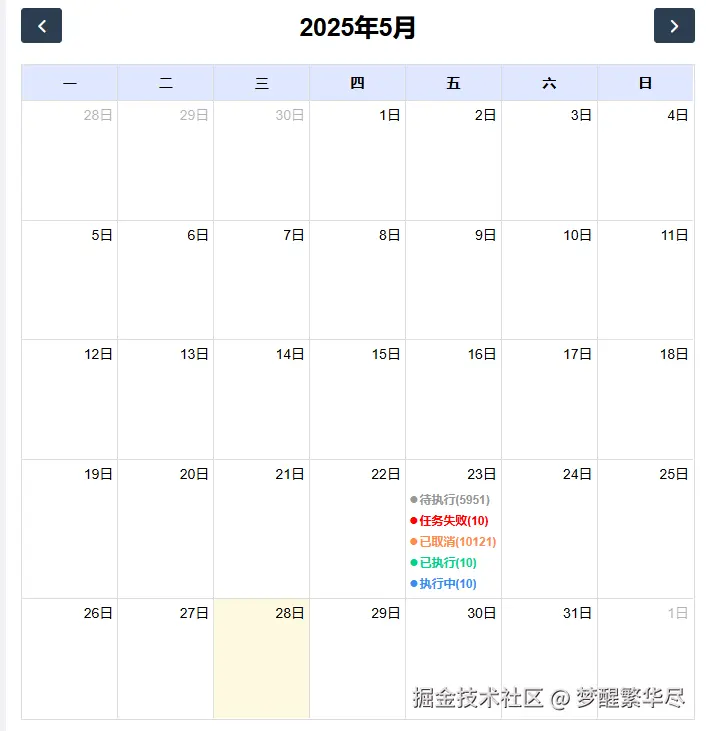
const template = {
temp1: {
title: '已执行',
start: '2025-05-23',
color: '#fff',
textColor: '#00D188',
classNames: ['temp1'],
},
temp2: {
title: '执行中',
start: '2025-05-23',
color: '#fff',
textColor: '#348CF2',
classNames: ['temp2'],
},
temp3: {
title: '任务失败',
start: '2025-05-23',
color: '#fff',
textColor: '#FF0000',
classNames: ['temp3'],
},
temp4: {
title: '已取消',
start: '2025-05-23',
color: '#fff',
textColor: '#FF8C4A',
classNames: ['temp4'],
},
temp5: {
title: '待执行',
start: '2025-05-23',
color: '#fff',
textColor: '#979797',
classNames: ['temp5'],
},
};
const matchList = ref([
{
time: '2025-05-23',
type: '1',
num: 10,
},
{
time: '2025-05-23',
type: '2',
num: 10,
},
{
time: '2025-05-23',
type: '3',
num: 10,
},
{
time: '2025-05-23',
type: '4',
num: 10121,
},
{
time: '2025-05-23',
type: '5',
num: 5951,
},
]);
const dateChange = (val: string) => {
console.log(val);
gotoToday(val);
getDataList();
};
const getDataList = async () => {
loading.value = true;
const params = {
date: dateValue.value,
};
try {
const { msg, data, code } = await flightTaskManageApi().getDataList(params);
if (code == 1000) {
dataList.value = data.list;
} else {
ElMessage({
message: msg,
type: 'error',
});
}
} catch (err) {
console.log(err);
} finally {
loading.value = false;
}
};
onMounted(() => {
getDataList();
});
const getCalendarApi = () => {
return calendarRef.value.getApi();
};
const refreshCalendar = () => {
const calendarApi = getCalendarApi();
calendarApi.render();
calendarApi.updateSize();
};
const gotoToday = (val: string) => {
getCalendarApi().gotoDate(val);
};
const refreshEvents = () => {
const calendarApi = getCalendarApi();
calendarApi.getEvents().forEach((event: any) => event.remove());
setTimeout(() => {
calendarApi.addEvent({
id: '1',
title: '第一个任务',
start: '2025-04-23',
allDay: true,
color: '#FECACA',
textColor: '#6B7280',
});
}, 0);
};
watch(dataList, (newVal, oldVal) => {
const calendarApi = getCalendarApi();
calendarApi.getEvents().forEach((event: any) => event.remove());
matchList.value.forEach((item: any) => {
let temp: any;
switch (item.type) {
case '1':
temp = template.temp1;
break;
case '2':
temp = template.temp2;
break;
case '3':
temp = template.temp3;
break;
case '4':
temp = template.temp4;
break;
case '5':
temp = template.temp5;
break;
}
let obj = {
...temp,
title: `${temp.title}(${item.num})`,
start: item.time,
};
calendarApi.addEvent(obj);
});
});
</script>
<style scoped lang="scss">
.right_container {
height: 100%;
flex: 90;
background-color: #fff;
padding: 15px;
display: flex;
flex-direction: column;
.header_container {
margin-bottom: 15px;
display: flex;
align-items: center;
justify-content: space-between;
}
.full_calendar_container {
flex: 1;
}
::v-deep .fc {
--fc-daygrid-day-frame-height: 115px;
}
::v-deep .fc-daygrid-day {
height: var(--fc-daygrid-day-frame-height);
min-height: var(--fc-daygrid-day-frame-height);
overflow: hidden;
position: relative;
}
::v-deep .temp1 {
font-weight: bold;
display: flex;
align-items: center;
&::before {
content: '●';
color: #00d188;
font-size: 16px;
}
}
::v-deep .temp2 {
font-weight: bold;
display: flex;
align-items: center;
&::before {
content: '●';
color: #348cf2;
font-size: 16px;
}
}
::v-deep .temp3 {
font-weight: bold;
display: flex;
align-items: center;
&::before {
content: '●';
color: #ff0000;
font-size: 16px;
}
}
::v-deep .temp4 {
font-weight: bold;
display: flex;
align-items: center;
&::before {
content: '●';
color: #ff8c4a;
font-size: 16px;
}
}
::v-deep .temp5 {
font-weight: bold;
display: flex;
align-items: center;
&::before {
content: '●';
color: #979797;
font-size: 16px;
}
}
// 表头星期的样式
::v-deep .fc .fc-col-header-cell-cushion {
padding: 8px 4px;
}
::v-deep .fc-col-header .fc-scrollgrid-sync-inner {
background: #dfe7ff;
}
}
</style>