MCP架构
MCP中文文档
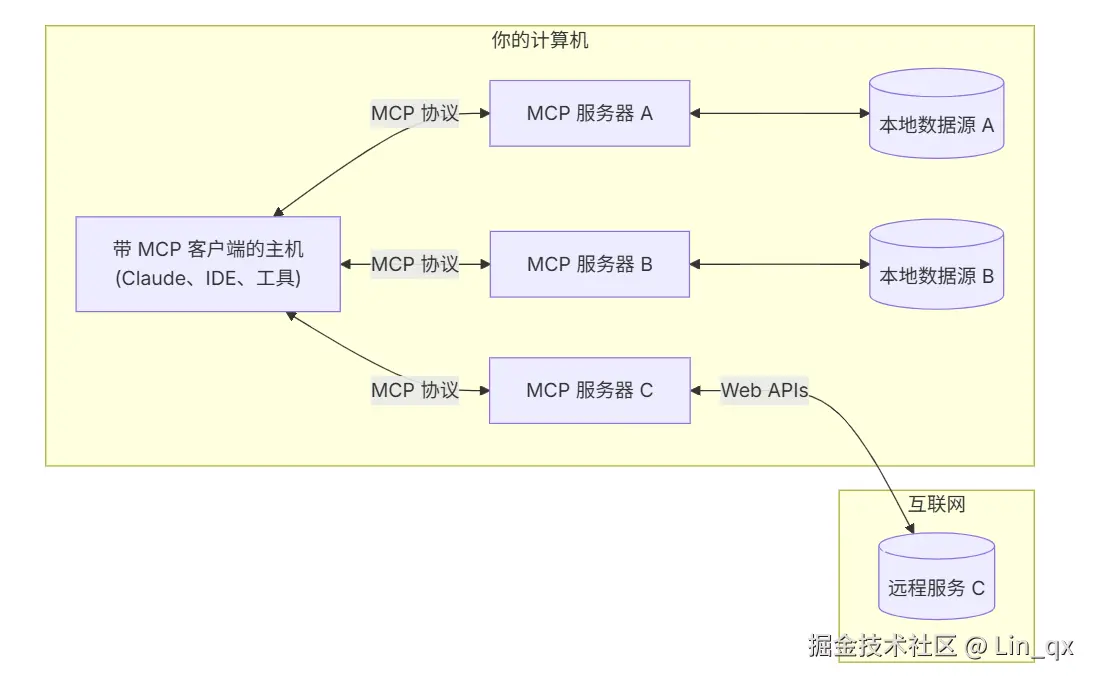
- MCP Hosts: 如 Claude Desktop、IDE 或 AI 工具,希望通过 MCP 访问数据的程序
- MCP Clients: 维护与服务器一对一连接的协议客户端
- MCP Servers: 轻量级程序,通过标准的 Model Context Protocol 提供特定能力
- 本地数据源: MCP 服务器可安全访问的计算机文件、数据库和服务
- 远程服务: MCP 服务器可连接的互联网上的外部系统(如通过 APIs)
数据流
- Prompt到达client
- client请求server,server选择合适的Function返回给client(可以根据需要,写自己的Function)
- client和model交互
- 返回结果
Server
<parent>
<groupId>org.springframework.boot</groupId>
<artifactId>spring-boot-starter-parent</artifactId>
<version>3.4.5</version>
<relativePath/>
</parent>
<properties>
<maven.compiler.source>17</maven.compiler.source>
<maven.compiler.target>17</maven.compiler.target>
<project.build.sourceEncoding>UTF-8</project.build.sourceEncoding>
<java.version>17</java.version>
<spring-ai.version>1.0.0</spring-ai.version>
</properties>
<dependencies>
<dependency>
<groupId>org.springframework.boot</groupId>
<artifactId>spring-boot-starter-web</artifactId>
</dependency>
<dependency>
<groupId>org.springframework.ai</groupId>
<artifactId>spring-ai-starter-model-ollama</artifactId>
</dependency>
<dependency>
<groupId>org.springframework.ai</groupId>
<artifactId>spring-ai-starter-model-openai</artifactId>
</dependency>
<dependency>
<groupId>org.springframework.ai</groupId>
<artifactId>spring-ai-starter-mcp-server</artifactId>
</dependency>
<dependency>
<groupId>org.springframework.ai</groupId>
<artifactId>spring-ai-starter-mcp-server-webmvc</artifactId>
</dependency>
<dependency>
<groupId>org.projectlombok</groupId>
<artifactId>lombok</artifactId>
<optional>true</optional>
</dependency>
<dependency>
<groupId>org.springframework.boot</groupId>
<artifactId>spring-boot-starter-test</artifactId>
<scope>test</scope>
</dependency>
</dependencies>
<dependencyManagement>
<dependencies>
<dependency>
<groupId>org.springframework.ai</groupId>
<artifactId>spring-ai-bom</artifactId>
<version>${spring-ai.version}</version>
<type>pom</type>
<scope>import</scope>
</dependency>
</dependencies>
</dependencyManagement>
# 端口
server.port=8080
# 不用但是要写,不然会报错
spring.ai.openai.base-url=https://api.gptsapi.net
spring.ai.openai.api-key=@{ollama.api-key}
spring.ai.openai.chat.options.model=gpt-3.5-turbo
# MCP 服务
spring.ai.mcp.server.name=music-mcp-server
#后续需要使用这个地址
spring.ai.mcp.server.sse-message-endpoint= /mcp/recommend
spring.ai.mcp.server.type = async
public interface RecommendService {
    String recommendInfo();
    String recommendJpop();
}

@Service
public class RecommendServiceImpl implements RecommendService {
    @Tool(description = "推荐中国风音乐")
    @Override
    public String recommendInfo() {
        return "推荐音乐人河图,河山万里,图一个你!";
    }
    @Tool(description = "推荐日本音乐")
    @Override
    public String recommendJpop() {
        return "JPOP领军人物米津玄师,你值得拥有!";
    }
}
@Configuration
public class ToolCallbackProviderConfig {
    @Bean
    public ToolCallbackProvider recommendTools(RecommendService recommendService) {
        return MethodToolCallbackProvider.builder().toolObjects(recommendService).build();
    }
}
Client
<parent>
<groupId>org.springframework.boot</groupId>
<artifactId>spring-boot-starter-parent</artifactId>
<version>3.4.5</version>
<relativePath/>
</parent>
<properties>
<maven.compiler.source>17</maven.compiler.source>
<maven.compiler.target>17</maven.compiler.target>
<project.build.sourceEncoding>UTF-8</project.build.sourceEncoding>
<java.version>17</java.version>
<spring-ai.version>1.0.0</spring-ai.version>
</properties>
<dependencies>
<dependency>
<groupId>org.springframework.boot</groupId>
<artifactId>spring-boot-starter-web</artifactId>
</dependency>
<dependency>
<groupId>org.springframework.ai</groupId>
<artifactId>spring-ai-starter-model-ollama</artifactId>
</dependency>
<dependency>
<groupId>org.springframework.ai</groupId>
<artifactId>spring-ai-starter-model-openai</artifactId>
</dependency>
<dependency>
<groupId>org.springframework.ai</groupId>
<artifactId>spring-ai-autoconfigure-mcp-client</artifactId>
</dependency>
<dependency>
<groupId>org.springframework.ai</groupId>
<artifactId>spring-ai-starter-mcp-client-webflux</artifactId>
</dependency>
<dependency>
<groupId>org.springframework.ai</groupId>
<artifactId>spring-ai-starter-mcp-server</artifactId>
</dependency>
<dependency>
<groupId>org.springframework.ai</groupId>
<artifactId>spring-ai-starter-mcp-server-webmvc</artifactId>
</dependency>
<dependency>
<groupId>org.projectlombok</groupId>
<artifactId>lombok</artifactId>
<optional>true</optional>
</dependency>
<dependency>
<groupId>org.springframework.boot</groupId>
<artifactId>spring-boot-starter-test</artifactId>
<scope>test</scope>
</dependency>
</dependencies>
<dependencyManagement>
<dependencies>
<dependency>
<groupId>org.springframework.ai</groupId>
<artifactId>spring-ai-bom</artifactId>
<version>${spring-ai.version}</version>
<type>pom</type>
<scope>import</scope>
</dependency>
</dependencies>
</dependencyManagement>
spring.application.name=mcp-client
spring.ai.openai.api-key=your_openai_api_key_here
spring.ai.ollama.base-url=http://localhost:11434
spring.ai.ollama.chat.model=qwen3
spring.mvc.async.request-timeout=0
spring.codec.charset=UTF-8
spring.codec.max-in-memory-size=1MB
server.port=8081
spring.ai.mcp.client.name=mcp-client
spring.ai.mcp.client.sse.connections.server1.url=http://localhost:8080
spring.ai.mcp.client.toolcallback.enabled = true
@RestController
public class McpController {
    @Autowired
    private OllamaChatModel ollamaChatModel;
    @Autowired
    private ToolCallbackProvider toolCallbackProvider;

    @GetMapping("/mcp/generate")
    public String generate(@RequestParam(value = "message", defaultValue = "推荐一首歌") String message) {
        ChatClient chatClient = ChatClient.builder(ollamaChatModel)
                .defaultToolCallbacks(toolCallbackProvider.getToolCallbacks())
                .build();
        ChatClient.CallResponseSpec call = chatClient.prompt(message).call();
        return call.content();

    }
}
测试