背景
因 SOX 项目审计,检查到我们使用 Jenkins 开源版本作为发版工具,但 Jenkins 的密码策略不符合基本的安全要求,例如密码长度不能小于 8 个字符,需要包含大小写字母、数字和特殊字符,需要进行整改。
目标
选择正确的方案,满足 Jenkins 的密码策略要求。
实现
使用 2FA 双因素认证插件
在 Jenkins 插件管理搜索 MFA 安装。
插件安全完成后,在系统管理出现新的选项 2FA Global Configurations。
在配置里面勾选 Enable 2FA for all users 和 Mobile Authenticator 表示对所有用户开启 2FA 认证。
接下来我们进行测试,进入登录页面。
输入用户和密码后,弹出二维码,手机下载 Authenticator 软件,扫码。
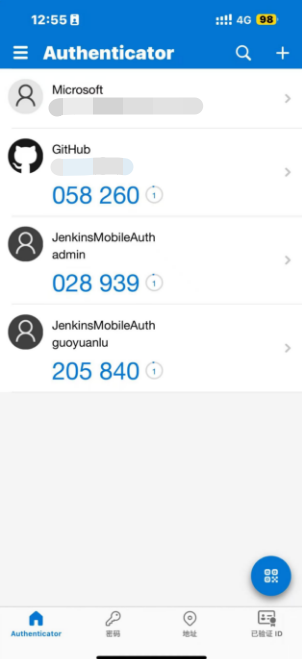
输入 6 位动态验证码
登陆成功。

一个验证码只能被一个手机APP绑定,更换APP设备需要管理员从系统管理 reset 重置二维码绑定。
整个流程下来,使用 2FA 双因素认证插件是没有问题的,但是,这个插件是收费的,并且对 Jenkins 版本有要求,笔者公司的 Jenkins 版本为 2.356,没办法安装。
基于 Jenkins 官方源码改造
直接 git clone 官方源码,找到设置密码的代码位置。
修改后台代码,路径:
hudson.security.HudsonPrivateSecurityRealm。
public class HudsonPrivateSecurityRealm extends AbstractPasswordBasedSecurityRealm implements ModelObject, AccessControlled {

    //...
    @Extension @Symbol("password")
        public static final class DescriptorImpl extends UserPropertyDescriptor {
            @NonNull
            @Override
            public String getDisplayName() {
                return Messages.HudsonPrivateSecurityRealm_Details_DisplayName();
            }

            @Override
            public Details newInstance(StaplerRequest req, JSONObject formData) throws FormException {
                if (req == null) {
                    // Should never happen, see newInstance() Javadoc
                    throw new FormException("Stapler request is missing in the call", "staplerRequest");
                }
                String pwd = Util.fixEmpty(req.getParameter("user.password"));
                String pwd2 = Util.fixEmpty(req.getParameter("user.password2"));

                if (pwd == null || pwd2 == null) {
                    // one of the fields is empty
                    throw new FormException("Please confirm the password by typing it twice", "user.password2");
                }

                // will be null if it wasn't encrypted
                String data = Protector.unprotect(pwd);
                String data2 = Protector.unprotect(pwd2);

                if (data == null != (data2 == null)) {
                    // Require that both values are protected or unprotected; do not allow user to change just one text field
                    throw new FormException("Please confirm the password by typing it twice", "user.password2");
                }

                if (data != null /* && data2 != null */ && !MessageDigest.isEqual(data.getBytes(StandardCharsets.UTF_8), data2.getBytes(StandardCharsets.UTF_8))) {
                    // passwords are different encrypted values
                    throw new FormException("Please confirm the password by typing it twice", "user.password2");
                }

                if (data == null /* && data2 == null */ && !pwd.equals(pwd2)) {
                    // passwords are different plain values
                    throw new FormException("Please confirm the password by typing it twice", "user.password2");
                }

                /********** 新增密码复杂度 start **********/
                // Validate password complexity
                if (pwd.length() < 8) {
                    throw new FormException("Password must be at least 8 characters long", "user.password");
                }

                // Check if it contains at least one lowercase letter
                if (!pwd.matches(".*[a-z].*")) {
                    throw new FormException("Password must contain at least one lowercase letter", "user.password");
                }

                // Check if it contains at least one uppercase letter
                if (!pwd.matches(".*[A-Z].*")) {
                    throw new FormException("Password must contain at least one uppercase letter", "user.password");
                }

                // Check if it contains at least one digit
                if (!pwd.matches(".*[0-9].*")) {
                    throw new FormException("Password must contain at least one digit", "user.password");
                }

                // Check if it contains at least one special character (common set)
                if (!pwd.matches(".*[!@#$%^&*(),.?\":{}|<>].*")) {
                    throw new FormException("Password must contain at least one special character (e.g., !@#$%^&*()-_=+[]{}|;:'\",.<>?/)", "user.password");
                }

                /********** 新增密码复杂度 end **********/

                if (data != null) {
                    String prefix = Stapler.getCurrentRequest().getSession().getId() + ':';
                    if (data.startsWith(prefix)) {
                        return Details.fromHashedPassword(data.substring(prefix.length()));
                    }
                }

                User user = Util.getNearestAncestorOfTypeOrThrow(req, User.class);
                // the UserSeedProperty is not touched by the configure page
                UserSeedProperty userSeedProperty = user.getProperty(UserSeedProperty.class);
                if (userSeedProperty != null) {
                    userSeedProperty.renewSeed();
                }

                return Details.fromPlainPassword(Util.fixNull(pwd));
            }

            @Override
            public boolean isEnabled() {
                // this feature is only when HudsonPrivateSecurityRealm is enabled
                return Jenkins.get().getSecurityRealm() instanceof HudsonPrivateSecurityRealm;
            }

            @Override
            public UserProperty newInstance(User user) {
                return null;
            }
        }
    }
}
修改页面代码,路径:
core/src/main/resources/hudson/security/HudsonPrivateSecurityRealm/Details/config.jelly。
<?jelly escape-by-default='true'?>
<j:jelly xmlns:j="jelly:core" xmlns:x="jelly:xml" xmlns:f="/lib/form">
    <f:entry title="${%Password}:">
        <input id="password" class="jenkins-input" name="user.password" type="password" value="${instance.protectedPassword}" />
        <span id="passwordHint" style="color:red;"></span>
    </f:entry>
    <f:entry title="${%Confirm Password}:">
        <input id="password2" class="jenkins-input" name="user.password2" type="password" value="${instance.protectedPassword}" />
        <span id="confirmPasswordHint" style="color:red;"></span>
    </f:entry>

    <!-- 新增密码复杂度校验 -->
    <script type="text/javascript">
        // <![CDATA[
        document.getElementById('password').addEventListener('input', function() {
            var password = this.value;
            var hintElement = document.getElementById('passwordHint');
            var result = checkPasswordStrength(password);
            if (result) {
                hintElement.textContent = result;
                hintElement.style.display = 'inline';
            } else {
                hintElement.textContent = '';
                hintElement.style.display = 'none';
            }
        });

        function checkPasswordStrength(password) {
            // Check password length
            if (password.length < 8) {
                return "Password must be at least 8 characters long";
            }

            // Check for at least one uppercase letter
            if (!/[A-Z]/.test(password)) {
                return "Password must contain at least one uppercase letter";
            }

            // Check for at least one lowercase letter
            if (!/[a-z]/.test(password)) {
                return "Password must contain at least one lowercase letter";
            }

            // Check for at least one digit
            if (!/\d/.test(password)) {
                return "Password must contain at least one digit";
            }

            // Check for at least one special character (common set)
            if (!/[!@#$%^&*()\-_=+$${}|;:',.<>?/\\]/.test(password)) {
                return "Password must contain at least one special character (e.g., !@#$%^&*()-_=+[]{}|;:'\",.<>?/)";
            }

            // Password meets all criteria
            return null; // Password is valid
        }

        document.getElementById('password2').addEventListener('input', function() {
            var password = document.getElementById('password').value;
            var confirmPassword = this.value;
            var hintElement = document.getElementById('confirmPasswordHint');
            if (password !== confirmPassword) {
                hintElement.textContent = "Please confirm the password by typing it twice";
                hintElement.style.display = 'inline';
            } else {
                hintElement.textContent = '';
                hintElement.style.display = 'none';
            }
        });
        // ]]>
    </script>
</j:jelly>
官方源码并没有 Dockerfile 文件,笔者从 Jenkins 镜像反向查到对应的 Docker 源码: github.com/jenkinsci/d…
FROM eclipse-temurin:11.0.19_7-jdk-centos7 as jre-build

# Generate smaller java runtime without unneeded files
# for now we include the full module path to maintain compatibility
# while still saving space (approx 200mb from the full distribution)
RUN jlink \
         --add-modules ALL-MODULE-PATH \
         --no-man-pages \
         --compress=2 \
         --output /javaruntime

FROM centos:centos7.9.2009

RUN sed -e 's|^mirrorlist=|#mirrorlist=|g' \
        -e 's|^#baseurl=http://mirror.centos.org|baseurl=https://mirrors.aliyun.com|g' \
        -i.bak /etc/yum.repos.d/CentOS-Base.repo

RUN yum install -y \
    curl \
    fontconfig \
    freetype \
    git \
    unzip \
    which \
  && yum clean all

RUN curl -s https://packagecloud.io/install/repositories/github/git-lfs/script.rpm.sh -o /tmp/script.rpm.sh \
  && bash /tmp/script.rpm.sh \
  && rm -f /tmp/script.rpm.sh \
  && yum install -y \
    git-lfs \
  && yum clean all \
  && git lfs install

ENV LANG='en_US.UTF-8' LANGUAGE='en_US:en' LC_ALL='en_US.UTF-8'

ARG TARGETARCH
ARG COMMIT_SHA

ARG user=jenkins
ARG group=jenkins
ARG uid=1000
ARG gid=1000
ARG http_port=8080
ARG agent_port=50000
ARG JENKINS_HOME=/var/jenkins_home
ARG REF=/usr/share/jenkins/ref

ENV JENKINS_HOME $JENKINS_HOME
ENV JENKINS_SLAVE_AGENT_PORT ${agent_port}
ENV REF $REF

# Jenkins is run with user `jenkins`, uid = 1000
# If you bind mount a volume from the host or a data container,
# ensure you use the same uid
RUN mkdir -p $JENKINS_HOME \
  && chown ${uid}:${gid} $JENKINS_HOME \
  && groupadd -g ${gid} ${group} \
  && useradd -N -d "$JENKINS_HOME" -u ${uid} -g ${gid} -l -m -s /bin/bash ${user}

# Jenkins home directory is a volume, so configuration and build history
# can be persisted and survive image upgrades
VOLUME $JENKINS_HOME

# $REF (defaults to `/usr/share/jenkins/ref/`) contains all reference configuration we want
# to set on a fresh new installation. Use it to bundle additional plugins
# or config file with your custom jenkins Docker image.
RUN mkdir -p ${REF}/init.groovy.d

# Use tini as subreaper in Docker container to adopt zombie processes
ARG TINI_VERSION=v0.19.0
COPY ../tini_pub.gpg "${JENKINS_HOME}/tini_pub.gpg"
RUN curl -fsSL "https://github.com/krallin/tini/releases/download/${TINI_VERSION}/tini-static-${TARGETARCH}" -o /sbin/tini \
  && curl -fsSL "https://github.com/krallin/tini/releases/download/${TINI_VERSION}/tini-static-${TARGETARCH}.asc" -o /sbin/tini.asc \
  && gpg --no-tty --import "${JENKINS_HOME}/tini_pub.gpg" \
  && gpg --verify /sbin/tini.asc \
  && rm -rf /sbin/tini.asc /root/.gnupg \
  && chmod +x /sbin/tini

# jenkins version being bundled in this docker image
ARG JENKINS_VERSION
ENV JENKINS_VERSION ${JENKINS_VERSION:-2.356}

# jenkins.war checksum, download will be validated using it
#ARG JENKINS_SHA=1163c4554dc93439c5eef02b06a8d74f98ca920bbc012c2b8a089d414cfa8075

# Can be used to customize where jenkins.war get downloaded from
#ARG JENKINS_URL=https://repo.jenkins-ci.org/public/org/jenkins-ci/main/jenkins-war/${JENKINS_VERSION}/jenkins-war-${JENKINS_VERSION}.war

# could use ADD but this one does not check Last-Modified header neither does it allow to control checksum
# see https://github.com/docker/docker/issues/8331
#RUN curl -fsSL ${JENKINS_URL} -o /usr/share/jenkins/jenkins.war \
#  && echo "${JENKINS_SHA}  /usr/share/jenkins/jenkins.war" >/tmp/jenkins_sha \
#  && sha256sum -c --strict /tmp/jenkins_sha \
#  && rm -f /tmp/jenkins_sha
COPY war/target/jenkins.war /usr/share/jenkins/jenkins.war

ENV JENKINS_UC https://updates.jenkins.io
ENV JENKINS_UC_EXPERIMENTAL=https://updates.jenkins.io/experimental
ENV JENKINS_INCREMENTALS_REPO_MIRROR=https://repo.jenkins-ci.org/incrementals
RUN chown -R ${user} "$JENKINS_HOME" "$REF"

ARG PLUGIN_CLI_VERSION=2.12.11
ARG PLUGIN_CLI_URL=https://github.com/jenkinsci/plugin-installation-manager-tool/releases/download/${PLUGIN_CLI_VERSION}/jenkins-plugin-manager-${PLUGIN_CLI_VERSION}.jar
RUN curl -fsSL ${PLUGIN_CLI_URL} -o /opt/jenkins-plugin-manager.jar

# for main web interface:
EXPOSE ${http_port}

# will be used by attached agents:
EXPOSE ${agent_port}

ENV COPY_REFERENCE_FILE_LOG $JENKINS_HOME/copy_reference_file.log

ENV JAVA_HOME=/opt/java/openjdk
ENV PATH "${JAVA_HOME}/bin:${PATH}"
COPY --from=jre-build /javaruntime $JAVA_HOME

COPY ../jenkins-support /usr/local/bin/jenkins-support
COPY ../jenkins.sh /usr/local/bin/jenkins.sh
COPY ../jenkins-plugin-cli.sh /bin/jenkins-plugin-cli

RUN chmod +x /usr/local/bin/jenkins-support \
    && chmod +x /usr/local/bin/jenkins.sh \
    && chmod +x /bin/jenkins-plugin-cli

USER ${user}

ENTRYPOINT ["/sbin/tini", "--", "/usr/local/bin/jenkins.sh"]

# metadata labels
LABEL \
    org.opencontainers.image.vendor="Jenkins project" \
    org.opencontainers.image.title="Official Jenkins Docker image" \
    org.opencontainers.image.description="The Jenkins Continuous Integration and Delivery server" \
    org.opencontainers.image.version="${JENKINS_VERSION}" \
    org.opencontainers.image.url="https://www.jenkins.io/" \
    org.opencontainers.image.source="https://github.com/jenkinsci/docker" \
    org.opencontainers.image.revision="${COMMIT_SHA}" \
    org.opencontainers.image.licenses="MIT"
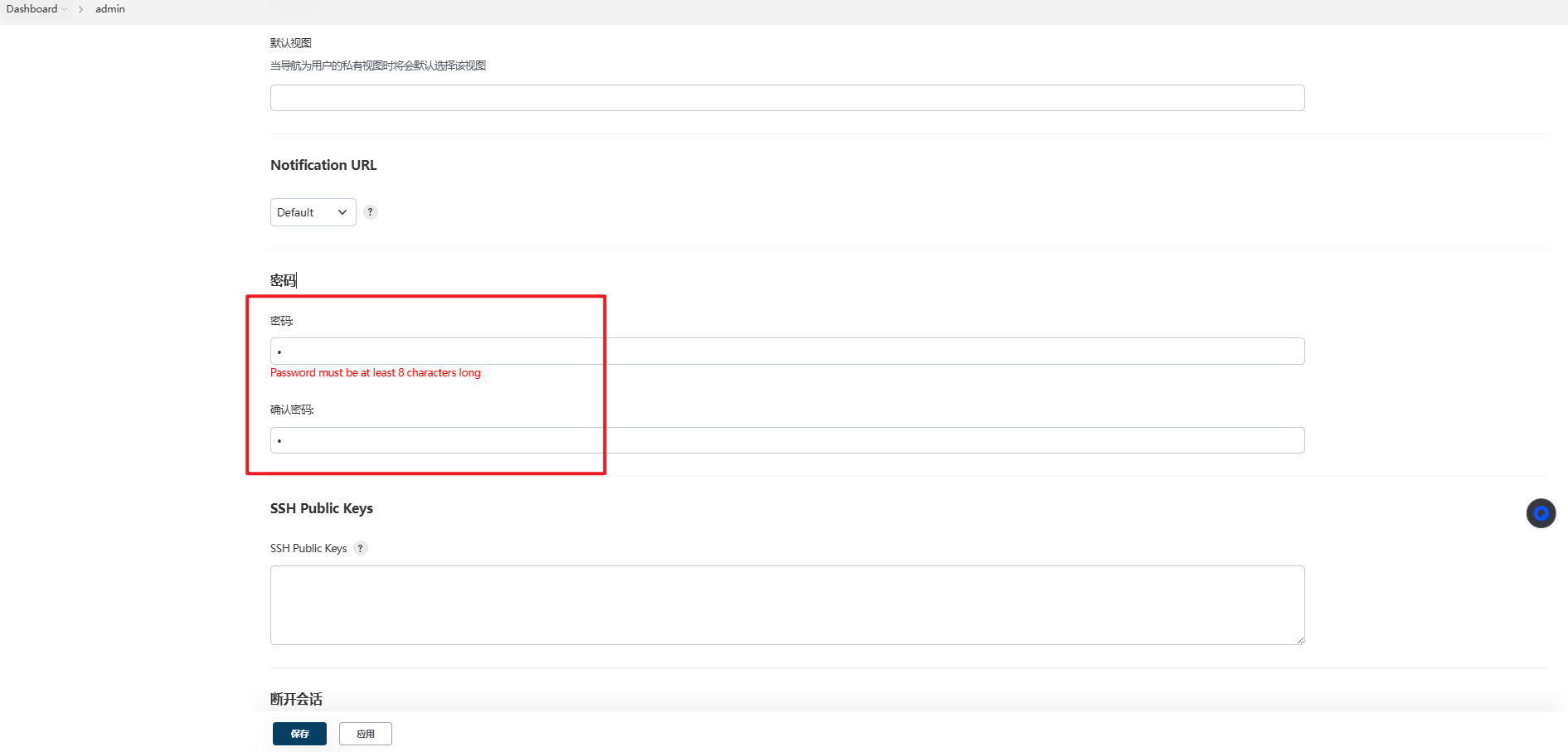
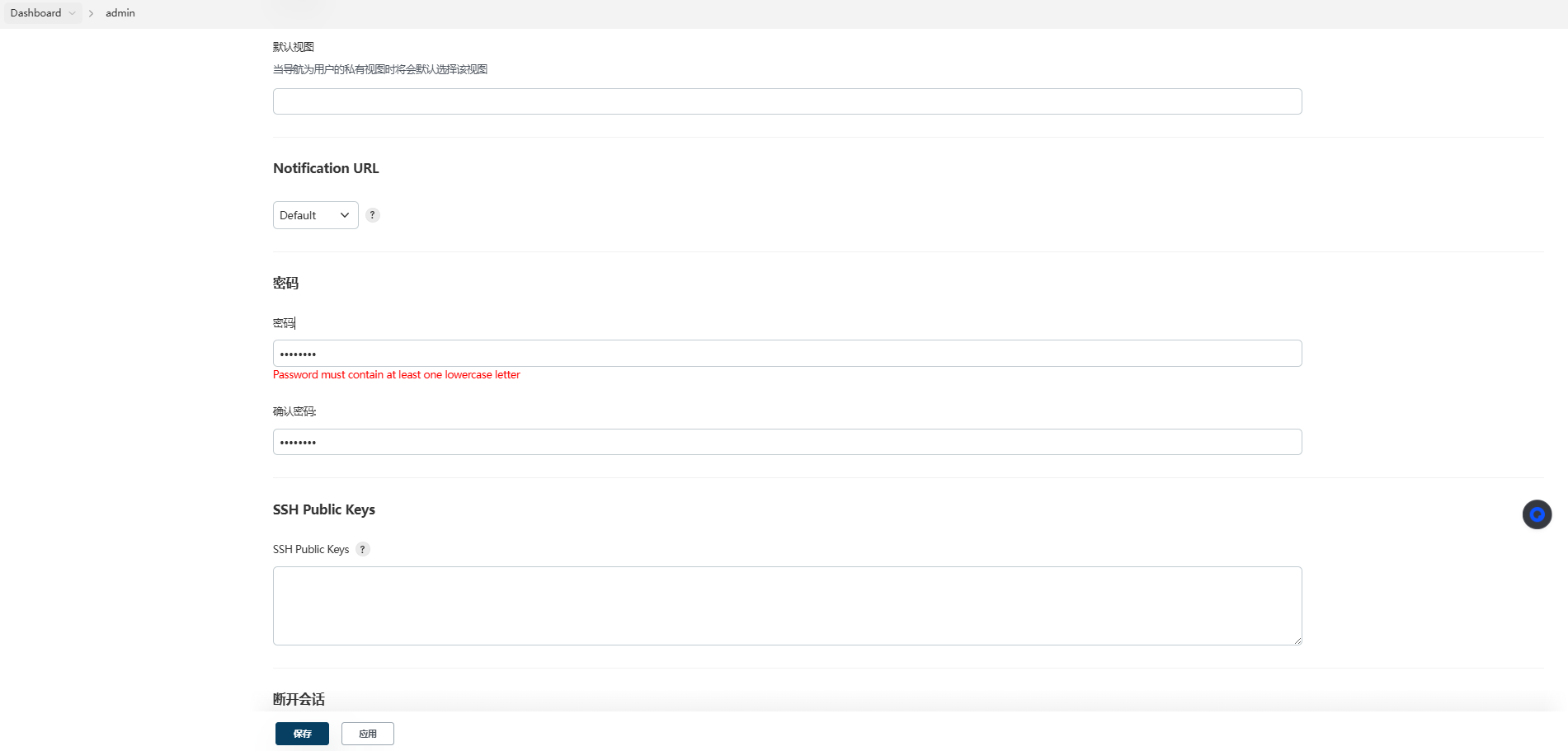
构建镜像的问题解决了,直接部署升级测试,效果如下。
密码长度校验:
小写字母校验:
大写字母校验:
特殊字符校验:
验证通过,笔者也把修改完的 Jenkins 镜像上传到了 Docker Hub,地址为: hub.docker.com/r/shiyindax…。
如果您对版本有要求,可以按上述的步骤自行编译镜像。
产出
Jenkins 是最常用的版本发布工具,有些企业在安全审计层面,规定 Jenkins 需要满足基本的密码策略要求,我们可以选择 2FA 双因素插件或者二次开发解决。前者需要一定费用,并且不支持低版本,后者只需要小小的改动就能解决。
本文涉及的代码完全开源,感兴趣的伙伴可以查阅 jenkins。