js按周查询(获取一月多少周 起止时间-结束时间)
目录
[TOC]
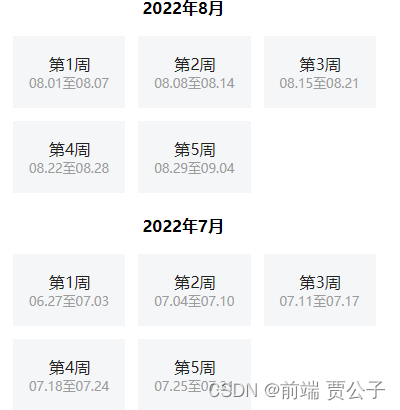
效果图
微信小程序为例 按周查询近半年的信息
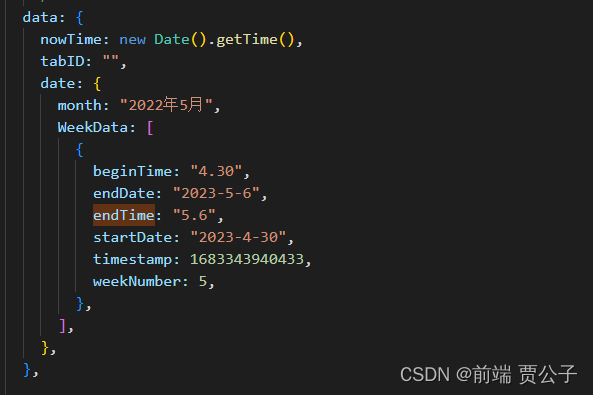
数据结构
获取六个月前周的数据
这段代码是一个函数,名为 getWeeksSixMonthsAgo() ,它的作用是获取六个月前的日期,并将这段时间分成每周一组,最后将结果按月份分组。
代码的具体解释如下:
-
创建一个空数组
weeks来存储结果。 -
获取当前日期和六个月前的日期。
-
获取当前日期下一周的结束日期。
-
定义一个函数
getNextWeek,用于获取下一周的起始和结束日期。 -
使用循环,从六个月前的日期开始,直到结束日期大于当前周的结束日期为止。在每次循环中,将下一周的起始和结束日期添加到
weeks数组中,并更新startDate为下一周的起始日期。 -
使用
reduce函数将周分组成月和日期。在每次迭代中,获取起始日期和结束日期的年、月、日,并将它们组合成一个表示月份的字符串。然后将每周的起始日期、结束日期等信息添加到对应的月份中。 -
将分组后的数据转换为数组,即将对象转换为数组形式。这里使用
Object.entries()方法将分组后的对象转换为数组,并使用map()方法将每个月份和对应的周数据组成一个新的对象。 -
最后,将结果数组反转,并将其设置为数据的属性。
整个函数的作用是将六个月前至今的日期按周分组,并按月份进行分组,最后返回一个按月份和周数据组成的数组。
日期方法:
new Date():创建一个表示当前日期和时间的Date对象。setMonth():设置Date对象的月份。在代码中,我们使用now.getMonth() - 6来获取当前日期的六个月前的日期。getDate():获取Date对象的日期。getDay():获取Date对象的星期几。getFullYear():获取Date对象的年份。数组方法:
push():将一个或多个元素添加到数组的末尾,并返回新的长度。在代码中,我们使用weeks.push(getNextWeek(startDate))将每周的起始和结束日期添加到数组weeks中。reduce():对数组中的每个元素执行一个回调函数,并将结果汇总为单个值。在代码中,我们使用weeks.reduce()将周分组成月。对象方法:
entries():返回一个给定对象自身可枚举属性的键值对数组。在代码中,我们使用Object.entries(groupedWeeks)将分组后的数据转换为数组。
// pages/weekly/weekly.js
Page({
  /**
   * 页面的初始数据
   */
  data: {
    nowTime: new Date().getTime(),
    tabID: "",
    date: {
      month: "2022年5月",
      WeekData: [
        {
          beginTime: "4.30",
          endDate: "2023-5-6",
          endTime: "5.6",
          startDate: "2023-4-30",
          timestamp: 1683343940433,
          weekNumber: 5,
        },
      ],
    },
  },

  /**
   * 生命周期函数--监听页面加载
   */
  onLoad(options) {
    this.getWeeksSixMonthsAgo();
  },

  // 选择日期 && 收集日期
  testTabClick(e) {
    let item = e.currentTarget.dataset.item;
    let { startDate, endDate } = item;

    let timeObj = {
      start_time: startDate + " " + "00:00:00",
      end_time: endDate + " " + "23:59:59",
      tabIndex: 1,
      type: "week",
    };
    if (this.data.nowTime <= item.id) return;
    this.setData({
      tabID: item.endTime,
    });
    wx.setStorageSync("timeObj", JSON.stringify(timeObj));
    setTimeout(() => {
      wx.switchTab({
        url: "/pages/reportForm/index",
      });
    }, 300);
  },
  getWeeksSixMonthsAgo() {
    // 创建一个数组来存储结果
    const weeks = [];

    // 获取当前日期和六个月前的日期
    const now = new Date();
    const sixMonthsAgo = new Date(now);
    sixMonthsAgo.setMonth(now.getMonth() - 6);

    // 获取当前日期下周的结束日期
    const currentWeekEnd = new Date(now);
    currentWeekEnd.setDate(now.getDate() - now.getDay() + 6);

    // 获取下一周的起始和结束日期
    const getNextWeek = (date) => {
      const start = new Date(date);
      const end = new Date(date);
      end.setDate(date.getDate() + 6);
      return { startDate: start, endDate: end };
    };

    // 循环直到结束日期大于当前周的结束日期
    let startDate = new Date(sixMonthsAgo);
    while (startDate <= currentWeekEnd) {
      weeks.push(getNextWeek(startDate));
      startDate.setDate(startDate.getDate() + 7);
    }
    console.log(weeks);
    // 使用reduce函数将周分组成月和日期
    const groupedWeeks = weeks.reduce((result, week) => {
      const startDate = week.startDate;
      const endDate = week.endDate;
      const startYear = startDate.getFullYear();
      const startMonth = startDate.getMonth() + 1;
      const endMonth = endDate.getMonth() + 1;
      const startDay = startDate.getDate();
      const endDay = endDate.getDate();

      const month = `${startYear}年${startMonth}月`;
      result[month] = result[month] || [];
      // Math对象的ceil()方法用于将它的参数向上舍入到最接近的整数,即它返回大于或等于该参数的最小整数
      const weekNumber = Math.ceil(startDay / 7);

      result[month].push({
        beginTime: `${startMonth}.${startDay}`,
        endTime: `${endMonth}.${endDay}`,
        timestamp: endDate.getTime(),
        startDate: `${startYear}-${startMonth}-${startDay}`,
        endDate: `${endDate.getFullYear()}-${endMonth}-${endDay}`,
        weekNumber: weekNumber,
      });

      return result;
    }, {});
    console.log(groupedWeeks);

    // 将分组后的数据转换为数组(简单说就是 Object.entries() 可以把一个对象的键值以数组的形式遍历出来,结果和 for…in 一致,但不会遍历原型属性。)
    const result = Object.entries(groupedWeeks).map(([month, WeekData]) => ({
      month,
      WeekData,
    }));

    console.log(result, "--------");
    this.setData({
      date: [...result].reverse(),
    });
  },
});
全部代码
js
// pages/weekly/weekly.js
Page({
  /**
   * 页面的初始数据
   */
  data: {
    nowTime: new Date().getTime(),
    tabID: "",
    date: {
      month: "2022年5月",
      WeekData: [
        {
          beginTime: "4.30",
          endDate: "2023-5-6",
          endTime: "5.6",
          startDate: "2023-4-30",
          timestamp: 1683343940433,
          weekNumber: 5,
        },
      ],
    },
  },

  /**
   * 生命周期函数--监听页面加载
   */
  onLoad(options) {
    this.getWeeksSixMonthsAgo();
  },

  // 选择日期 && 收集日期
  testTabClick(e) {
    let item = e.currentTarget.dataset.item;
    let { startDate, endDate } = item;

    let timeObj = {
      start_time: startDate + " " + "00:00:00",
      end_time: endDate + " " + "23:59:59",
      tabIndex: 1,
      type: "week",
    };
    if (this.data.nowTime <= item.id) return;
    this.setData({
      tabID: item.endTime,
    });
    wx.setStorageSync("timeObj", JSON.stringify(timeObj));
    setTimeout(() => {
      wx.switchTab({
        url: "/pages/reportForm/index",
      });
    }, 300);
  },
  getWeeksSixMonthsAgo() {
    // 创建一个数组来存储结果
    const weeks = [];

    // 获取当前日期和六个月前的日期
    const now = new Date();
    const sixMonthsAgo = new Date(now);
    sixMonthsAgo.setMonth(now.getMonth() - 6);

    // 获取当前周的结束日期
    const currentWeekEnd = new Date(now);
    currentWeekEnd.setDate(now.getDate() - now.getDay() + 12);

    // 获取下一周的起始和结束日期
    const getNextWeek = (date) => {
      const start = new Date(date);
      const end = new Date(date);
      end.setDate(date.getDate() + 6);
      return { startDate: start, endDate: end };
    };

    // 初始化起始日期和结束日期
    let startDate = new Date(sixMonthsAgo);
    let endDate = new Date(startDate);
    endDate.setDate(startDate.getDate() + 6);

    // 循环直到结束日期大于当前周的结束日期
    while (endDate <= currentWeekEnd) {
      weeks.push(getNextWeek(startDate));
      startDate.setDate(startDate.getDate() + 7);
      endDate.setDate(endDate.getDate() + 7);
    }

    // 使用reduce函数将周分组成月
    const groupedWeeks = weeks.reduce((result, week) => {
      const startDate = week.startDate;
      const endDate = week.endDate;
      const startYear = startDate.getFullYear();
      const startMonth = startDate.getMonth() + 1;
      const endMonth = endDate.getMonth() + 1;
      const startDay = startDate.getDate();
      const endDay = endDate.getDate();

      const month = `${startYear}年${startMonth}月`;
      result[month] = result[month] || [];

      const weekNumber = Math.ceil(startDay / 7);

      result[month].push({
        beginTime: `${startMonth}.${startDay}`,
        endTime: `${endMonth}.${endDay}`,
        timestamp: endDate.getTime(),
        startDate: `${startYear}-${startMonth}-${startDay}`,
        endDate: `${endDate.getFullYear()}-${endMonth}-${endDay}`,
        weekNumber: weekNumber,
      });

      return result;
    }, {});

    // 将分组后的数据转换为数组
    const result = Object.entries(groupedWeeks).map(([month, WeekData]) => ({
      month,
      WeekData,
    }));

    console.log(result, "--------");
    this.setData({
      date: [...result].reverse(),
    });
  },
});
wxml
<!-- pages/weekly/weekly.wxml -->
<view class="weekly">
    <view class="text-wrapper_1 flex-col">
        <text class="text_3">注:最多可查看最近6个月的数据</text>
    </view>
    <view class="block" wx:for="{{date}}" wx:key="index">
        <view class="mon">
            <text class="txte">{{item.month}}</text>
        </view>
        <view class="box_1 flex-row  ">
            <view
                class=" text-group_5 flex-col {{nowTime<= item2.id? 'disbag':''}}{{tabID == item2.endTime? 'active':''}} "
                wx:for="{{item.WeekData}}" wx:for-item="item2" wx:for-index="index2" wx:key="endTim"
                bind:tap="testTabClick" data-item='{{item2}}'>
                <view class="text_14  {{tabID == item2.endTime? 'activetext':''}}">
                    第{{item2.weekNumber}}周
                </view>
                <view class="text_15  {{tabID == item2.endTime? 'activetext':''}}">
                    {{item2.beginTime}}-{{item2.endTime}}
                </view>
            </view>
        </view>
    </view>
</view>
wxss
/* pages/weekly/weekly.wxss */
.disbag {
    background: #CFCFCF !important;
}

.text-wrapper_1 {
    background-color: #f5fcf8;
    padding: 16rpx 334rpx 16rpx 32rpx;
    margin-bottom: 32rpx;
}

.text-wrapper_1 .text_3 {
    overflow-wrap: break-word;
    color: #00b652;
    font-size: 26rpx;
    letter-spacing: 0.10833333px;
    text-align: left;
    white-space: nowrap;
    line-height: 36rpx;
}

.block .box_1 .active {
    color: #fff !important;
    background: -webkit-linear-gradient(top, #0ba360 0%, #0ba360 100%);
    font-size: 30rpx;
    font-weight: 600;
}

.weekly {
    background-color: #fff;
    padding: 0 10rpx;
    box-sizing: border-box;
}

.mon {
    width: 270rpx;
    height: 55rpx;
    margin: 0 auto;
    margin-top: 65rpx;
    margin-bottom: 40rpx;
}

.flex-row {
    display: flex;
}

.flex-col {
    display: flex;
    flex-direction: column;
}

.txte {
    font-size: 45rpx;
    font-weight: 600;
}

.box_1 {
    display: flex;
    flex-wrap: wrap;
    justify-items: center;
    border-radius: 6px;
    padding: 10rpx;
    color: #9b9b9b;
    box-sizing: border-box;
    /* justify-content: space-between; */
    padding-right: 0;

}


.box_1 .text-group_5 {
    display: flex;
    width: 164rpx;
    height: 110rpx;
    justify-content: center;
    margin-right: 13.5rpx;
    background: #F4F6F7;
    border-radius: 12rpx;
    margin-bottom: 25rpx;
}

.text_14 {
    color: #222222;
    font-size: 30rpx;
    text-align: center;
    line-height: 42rpx;
    font-weight: 600;
}

.text_15 {

    text-align: center;
    font-size: 24rpx;
    font-weight: 400;
    color: #9B9B9B;
    line-height: 34rpx;
}

.activetext {

    text-align: center;
    /* font-size: 24rpx; */
    font-weight: 600;
    color: #fff;
    line-height: 34rpx;
}