微信小程序六位密码框的实现
首先来看一下效果
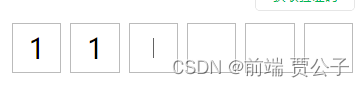
wxml
   <!-- 验证码框 -->
    <view class="register_photocode">
        <input type="number" class="register_photocode_input" maxlength="6" bindinput="bindPhotoCode" focus="{{isphotocode}}"></input>
        <view class="register_photocode_ul">
            <view class="register_photocode_li" wx:for="{{6}}">
                <view wx:if="{{smsnumber_arr.length===index}}" class="register_photocode_cursor"></view>
                <text>{{smsnumber_arr[index]}}</text>
            </view>
        </view>
    </view>
wxss
/* 验证码框 */
.register_photocode {
    position: relative;
}

.register_photocode_ul {
    display: flex;
    justify-content: flex-start;
    align-items: center;
    margin-top: 18rpx;
    width: 700rpx;
}

.register_photocode_li {
    width: 96rpx;
    height: 96rpx;
    line-height: 96rpx;
    border: 1px solid #bbb;
    display: flex;
    justify-content: center;
    align-items: center;
    font-size: 56rpx;

    margin-right: 18rpx;
    text-align: center;
}

.register_photocode input {
    position: absolute;
    left: -100%;
    top: 0;
    width: 200%;
    height: 64.8rpx;
    line-height: 64.8rpx;
    opacity: 0;
    color: transparent;
    letter-spacing: 50.4rpx !important;
    background: none;
    padding-left: 30.6rpx;
    caret-color: transparent !important;
}

/* .register_photocode input:first-line {
  color: transparent;
} */


.register_photocode_cursor {
    width: 1px;
    height: 40rpx;
    background-color: #000;
    animation: focus 0.7s infinite;
}

/* 光标动画 */

@keyframes focus {
    from {
        opacity: 1;
    }

    to {
        opacity: 0;
    }
}
js
 data: {
    smsnumber: "",
    isphotocode: 0,
},
  // 输入框
  bindPhotoCode: function (e) {
    let value = e.detail.value
    let smsnumber = this.data.smsnumber
    this.setData({
      smsnumber: e.detail.value,
      smsnumber_arr: [...value]
    })
  },