

本教程展示了 ES|QL 语法的示例。请参考 Query DSL 版本,以获得等效的 Query DSL 语法示例。
这是一个使用 ES|QL 进行全文搜索和语义搜索基础知识的实践介绍。
有关 ES|QL 中所有搜索功能的概述,请参考《使用 ES|QL 进行搜索》。
在这个场景中,我们为一个烹饪博客实现搜索功能。该博客包含各种属性的食谱,包括文本内容、分类数据和数字评分。
安装
如果你还没有安装好自己的 Elasticsearch 及 Kibana,请参考如下的文章来进行安装。你可以选择 Elastic Stack 8.x 的安装步骤来进行安装:
如果你想使用 docker 来进行一键安装,请参考文章 “使用 start-local 脚本在本地运行 Elasticsearch”。
运行 ES|QL 查询
在本教程中,你将看到以下格式的 ES|QL 示例:
`

1.  FROM cooking_blog
2.  | WHERE description:"fluffy pancakes"
3.  | LIMIT 1000

`AI写代码
如果你想在 Dev Tools 控制台中运行这些查询,你需要使用以下语法:
`

1.  POST /_query?format=txt
2.  {
3.    "query": """
4.      FROM cooking_blog
5.      | WHERE description:"fluffy pancakes"
6.      | LIMIT 1000
7.    """
8.  }

`AI写代码
如果你更喜欢使用你最喜欢的编程语言,请参考客户端库,以获取官方和社区支持的客户端列表。
步骤 1:创建索引
创建 cooking_blog 索引以开始:
`PUT /cooking_blog`AI写代码
现在为索引定义映射:
`

1.  PUT /cooking_blog/_mapping
2.  {
3.    "properties": {
4.      "title": {
5.        "type": "text",
6.        "analyzer": "standard", /* 1 */
7.        "fields": {             /* 2 */
8.          "keyword": {
9.            "type": "keyword",
10.            "ignore_above": 256 /* 3 */
11.          }
12.        }
13.      },
14.      "description": {
15.        "type": "text",
16.        "fields": {
17.          "keyword": {
18.            "type": "keyword"
19.          }
20.        }
21.      },
22.      "author": {
23.        "type": "text",
24.        "fields": {
25.          "keyword": {
26.            "type": "keyword"
27.          }
28.        }
29.      },
30.      "date": {
31.        "type": "date",
32.        "format": "yyyy-MM-dd"
33.      },
34.      "category": {
35.        "type": "text",
36.        "fields": {
37.          "keyword": {
38.            "type": "keyword"
39.          }
40.        }
41.      },
42.      "tags": {
43.        "type": "text",
44.        "fields": {
45.          "keyword": {
46.            "type": "keyword"
47.          }
48.        }
49.      },
50.      "rating": {
51.        "type": "float"
52.      }
53.    }
54.  }

`AI写代码
- 如果未指定 analyzer,文本字段默认使用 standard analyzer。这里包含它是为了演示目的。
- 这里使用 multi-fields 将文本字段同时索引为 text 和 keyword 数据类型。这使得在同一个字段上既能进行全文搜索,也能进行精确匹配 / 过滤。注意,如果使用动态映射,这些 multi-fields 会自动创建。
- ignore_above 参数会防止在 keyword 字段中索引长度超过 256 个字符的值。同样,这是默认值,这里包含它是为了演示目的。它有助于节省磁盘空间,并避免 Lucene 的 term 字节长度限制所带来的潜在问题。
提示:全文搜索依赖于文本分析。文本分析会对文本数据进行规范化和标准化处理,从而可以高效地存储到倒排索引中,并实现近实时搜索。分析会在索引时和搜索时同时进行。本教程不会详细介绍分析过程,但了解文本是如何被处理的对于创建高效的搜索查询非常重要。
步骤 2:向索引添加示例博客文章
现在你需要使用 Bulk API 索引一些示例博客文章。注意,文本字段会在索引时进行分析,并生成 multi-fields。
`

1.  POST /cooking_blog/_bulk?refresh=wait_for
2.  {"index":{"_id":"1"}}
3.  {"title":"Perfect Pancakes: A Fluffy Breakfast Delight","description":"Learn the secrets to making the fluffiest pancakes, so amazing you won't believe your tastebuds. This recipe uses buttermilk and a special folding technique to create light, airy pancakes that are perfect for lazy Sunday mornings.","author":"Maria Rodriguez","date":"2023-05-01","category":"Breakfast","tags":["pancakes","breakfast","easy recipes"],"rating":4.8}
4.  {"index":{"_id":"2"}}
5.  {"title":"Spicy Thai Green Curry: A Vegetarian Adventure","description":"Dive into the flavors of Thailand with this vibrant green curry. Packed with vegetables and aromatic herbs, this dish is both healthy and satisfying. Don't worry about the heat - you can easily adjust the spice level to your liking.","author":"Liam Chen","date":"2023-05-05","category":"Main Course","tags":["thai","vegetarian","curry","spicy"],"rating":4.6}
6.  {"index":{"_id":"3"}}
7.  {"title":"Classic Beef Stroganoff: A Creamy Comfort Food","description":"Indulge in this rich and creamy beef stroganoff. Tender strips of beef in a savory mushroom sauce, served over a bed of egg noodles. It's the ultimate comfort food for chilly evenings.","author":"Emma Watson","date":"2023-05-10","category":"Main Course","tags":["beef","pasta","comfort food"],"rating":4.7}
8.  {"index":{"_id":"4"}}
9.  {"title":"Vegan Chocolate Avocado Mousse","description":"Discover the magic of avocado in this rich, vegan chocolate mousse. Creamy, indulgent, and secretly healthy, it's the perfect guilt-free dessert for chocolate lovers.","author":"Alex Green","date":"2023-05-15","category":"Dessert","tags":["vegan","chocolate","avocado","healthy dessert"],"rating":4.5}
10.  {"index":{"_id":"5"}}
11.  {"title":"Crispy Oven-Fried Chicken","description":"Get that perfect crunch without the deep fryer! This oven-fried chicken recipe delivers crispy, juicy results every time. A healthier take on the classic comfort food.","author":"Maria Rodriguez","date":"2023-05-20","category":"Main Course","tags":["chicken","oven-fried","healthy"],"rating":4.9}

`AI写代码
步骤 3:执行基本的全文搜索
全文搜索涉及在一个或多个文档字段上执行基于文本的查询。这些查询会根据文档内容与搜索词的匹配程度为每个匹配的文档计算相关性评分。Elasticsearch 提供了多种查询类型,每种类型都有其自己的文本匹配方式和相关性评分机制。
ES|QL 提供两种方式来执行全文搜索:
两种方式是等效的,可以互换使用。简洁语法更简洁,而函数语法则允许更多配置选项。为了简洁,我们将在大多数示例中使用简洁语法。
有关函数语法可用的高级参数,请参考 match 函数参考文档。
基本全文查询
以下是在 description 字段中搜索 "fluffy pancakes" 的方法:
`

1.  FROM cooking_blog  /* 1 */
2.  | WHERE description:"fluffy pancakes" /* 2 */
3.  | LIMIT 1000 /* 3 */

`AI写代码
- 指定要搜索的索引
- 全文搜索默认使用 OR 逻辑
- 返回最多 1000 条结果
注意:结果的排序不是按相关性,因为我们尚未请求 _score 元数据字段。我们将在下一节中介绍相关性评分。
默认情况下,就像 Query DSL 的 match 查询一样,ES|QL 在词项之间使用 OR 逻辑。这意味着它会匹配在 description 字段中包含 "fluffy" 或 "pancakes",或两者都有的文档。
提示:你可以使用 KEEP 命令控制响应中包含哪些字段:
`

1.  FROM cooking_blog
2.  | WHERE description:"fluffy pancakes"
3.  | KEEP title, description, rating
4.  | LIMIT 1000

`AI写代码
更多有关 ES|QL 的查阅,请阅读 “Elasticsearch:ES|QL 查询展示”。
在匹配查询中要求所有词项
有时你需要确保所有搜索词都出现在匹配的文档中。以下是使用函数语法和 operator 参数实现这一点的方法:
`

1.  FROM cooking_blog
2.  | WHERE match(description, "fluffy pancakes", {"operator": "AND"})
3.  | LIMIT 1000

`AI写代码
`

1.  POST _query?format=csv
2.  {
3.    "query": """
4.      FROM cooking_blog
5.      | WHERE match(description, "fluffy pancakes", {"operator": "AND"})
6.      | LIMIT 1000
7.    """
8.  }

`AI写代码
由于没有文档在 description 中同时包含 "fluffy" 和 "pancakes",因此这个更严格的搜索在我们的示例数据中返回零条结果。
指定匹配的最小词项数
有时,要求所有词项匹配过于严格,而默认的 OR 行为又过于宽松。你可以指定必须匹配的最小词项数:
`

1.  FROM cooking_blog
2.  | WHERE match(title, "fluffy pancakes breakfast", {"minimum_should_match": 2})
3.  | LIMIT 1000

`AI写代码
此查询搜索 title 字段,要求至少匹配 3 个词项中的 2 个:"fluffy"、"pancakes" 或 "breakfast"。
步骤 4:语义搜索和混合搜索
索引语义内容
Elasticsearch 允许你根据文本的意义进行语义搜索,而不仅仅是依赖特定关键词的存在。当你希望找到与给定查询在概念上相似的文档时,即使它们不包含精确的搜索词,也非常有用。
当你的映射中包含 semantic_text 类型的字段时,ES|QL 支持语义搜索。这个示例映射更新添加了一个名为 semantic_description 的新字段,类型为 semantic_text:
`

1.  PUT /cooking_blog/_mapping
2.  {
3.    "properties": {
4.      "semantic_description": {
5.        "type": "semantic_text"
6.      }
7.    }
8.  }

`AI写代码
接下来,将包含内容的文档索引到新字段中:
`

1.  POST /cooking_blog/_doc
2.  {
3.    "title": "Mediterranean Quinoa Bowl",
4.    "semantic_description": "A protein-rich bowl with quinoa, chickpeas, fresh vegetables, and herbs. This nutritious Mediterranean-inspired dish is easy to prepare and perfect for a quick, healthy dinner.",
5.    "author": "Jamie Oliver",
6.    "date": "2023-06-01",
7.    "category": "Main Course",
8.    "tags": ["vegetarian", "healthy", "mediterranean", "quinoa"],
9.    "rating": 4.7
10.  }

`AI写代码
注意:在上面,我们并没有指名是使用什么方法进行的向量化。在默认的情况下,它使用的是 ELSER 模型。你需要启动 ELSER。详细的部署,请参考文章 “Elasticsearch:部署 ELSER - Elastic Learned Sparse EncoderR”。
执行语义搜索
一旦文档被底层模型处理并运行在推理端点上,你就可以执行语义搜索。以下是针对 semantic_description 字段的一个自然语言查询示例:
`

1.  FROM cooking_blog
2.  | WHERE semantic_description:"What are some easy to prepare but nutritious plant-based meals?"
3.  | LIMIT 5

`AI写代码
执行混合搜索
你可以将全文搜索和语义查询结合起来。在这个示例中,我们结合了全文搜索和语义搜索,并使用了自定义权重:
`

1.  FROM cooking_blog METADATA _score
2.  | WHERE match(semantic_description, "easy to prepare vegetarian meals", { "boost": 0.75 })
3.      OR match(tags, "vegetarian", { "boost": 0.25 })
4.  | SORT _score DESC
5.  | LIMIT 5

`AI写代码
步骤 5:一次搜索多个字段
当用户输入搜索查询时,他们通常不知道(或不关心)他们的搜索词是否出现在特定字段中。ES|QL 提供了同时在多个字段中进行搜索的方法:
`

1.  FROM cooking_blog
2.  | WHERE title:"vegetarian curry" OR description:"vegetarian curry" OR tags:"vegetarian curry"
3.  | LIMIT 1000

`AI写代码
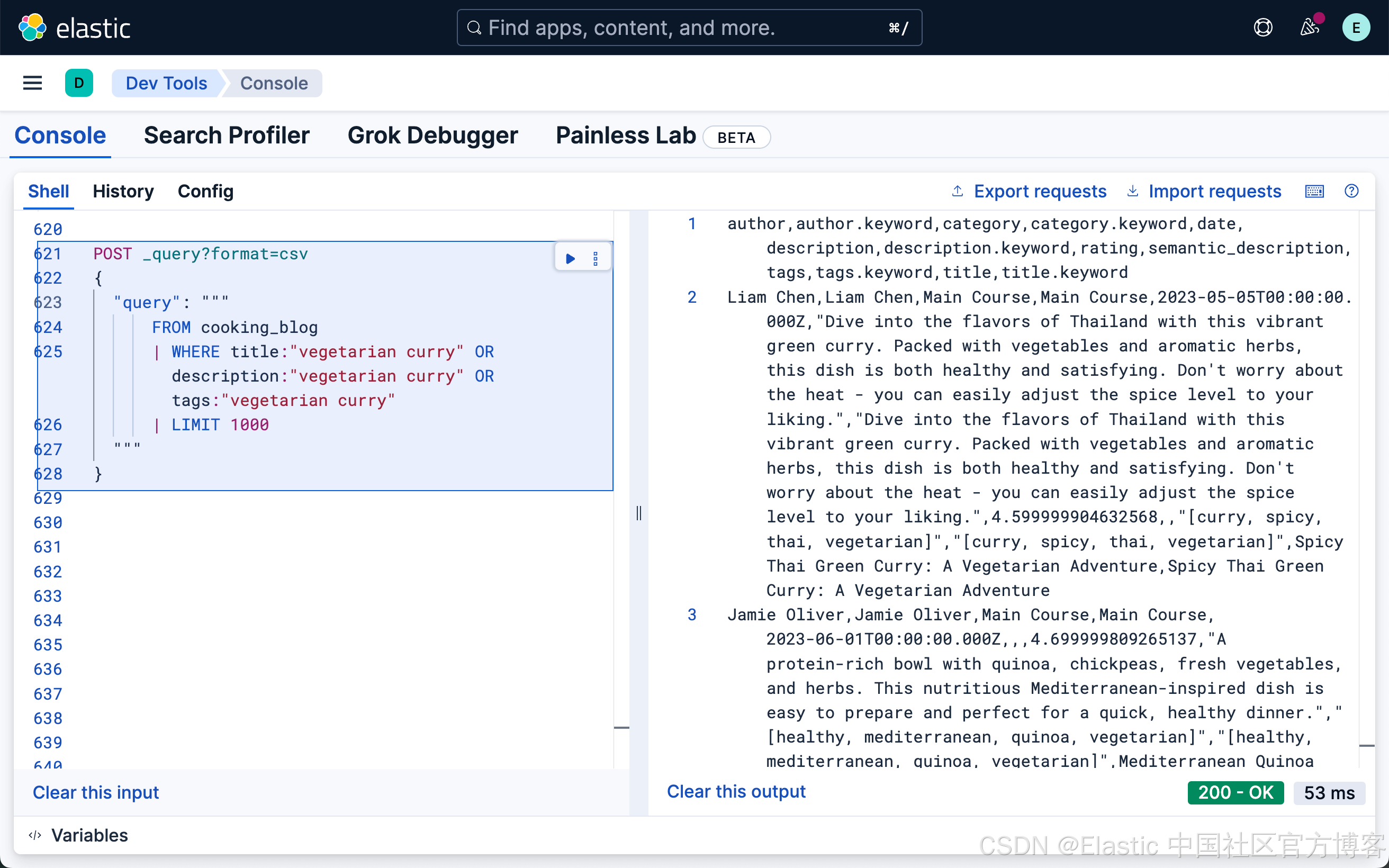
这个查询在 title、description 和 tags 字段中搜索 "vegetarian curry"。每个字段的重要性相同。
然而,在许多情况下,某些字段(如标题)中的匹配可能比其他字段更相关。我们可以通过评分来调整每个字段的重要性:
`

1.  FROM cooking_blog METADATA _score /* 1 */
2.  | WHERE match(title, "vegetarian curry", {"boost": 2.0}) /* 2 */
3.      OR match(description, "vegetarian curry")
4.      OR match(tags, "vegetarian curry")
5.  | KEEP title, description, tags, _score /* 3 */
6.  | SORT _score DESC /* 4 */
7.  | LIMIT 1000

`AI写代码
- 请求 _score 元数据以获取基于相关性的结果
- 标题匹配的重要性是其他字段的两倍
- 在结果中包含相关性评分
- 必须明确按 _score 排序才能查看基于相关性的结果
提示:在 ES|QL 中使用相关性评分时,理解 _score 非常重要。如果你在查询中不包含 METADATA _score,你将无法在结果中看到相关性评分。这意味着你将无法根据相关性进行排序或基于相关性评分进行过滤。
当你包含 METADATA _score 时,WHERE 条件中的搜索功能会贡献相关性评分。过滤操作(如范围条件和精确匹配)不会影响评分。
如果你想要最相关的结果排在前面,必须通过显式使用 SORT _score DESC 或 SORT _score ASC 来按 _score 排序。
步骤 6:过滤和查找精确匹配
过滤允许你根据精确标准缩小搜索结果的范围。与全文搜索不同,过滤是二元的(是/否),并且不会影响相关性评分。过滤执行比查询更快,因为排除的结果不需要进行评分。
`

1.  FROM cooking_blog
2.  | WHERE category.keyword == "Breakfast"
3.  | KEEP title, author, rating, tags
4.  | SORT rating DESC
5.  | LIMIT 1000

`AI写代码
使用 keyword 字段进行精确匹配(区分大小写)。
注意:这里使用了 category.keyword。它指的是 category 字段的 keyword 多字段,确保进行精确的、区分大小写的匹配。
在日期范围内搜索帖子
通常,用户希望找到在特定时间范围内发布的内容:
`

1.  FROM cooking_blog
2.  | WHERE date >= "2023-05-01" AND date <= "2023-05-31"
3.  | KEEP title, author, date, rating
4.  | LIMIT 1000

`AI写代码
包含日期范围过滤器。
查找精确匹配
有时,用户希望搜索精确的术语,以消除搜索结果中的歧义:
`

1.  FROM cooking_blog
2.  | WHERE author.keyword == "Maria Rodriguez"
3.  | KEEP title, author, rating, tags
4.  | SORT rating DESC
5.  | LIMIT 1000

`AI写代码
在 author 字段上进行精确匹配。
与 Query DSL 中的 term 查询类似,这种查询没有灵活性,并且区分大小写。
步骤 7:组合多个搜索条件
复杂的搜索通常需要组合多个搜索条件:
`

1.  FROM cooking_blog METADATA _score
2.  | WHERE rating >= 4.5
3.      AND NOT category.keyword == "Dessert"
4.      AND (title:"curry spicy" OR description:"curry spicy")
5.  | SORT _score DESC
6.  | KEEP title, author, rating, tags, description
7.  | LIMIT 1000

`AI写代码
将相关性评分与自定义条件结合
对于更复杂的相关性评分和组合条件,你可以使用 EVAL 命令来计算自定义评分:
`

1.  FROM cooking_blog METADATA _score
2.  | WHERE NOT category.keyword == "Dessert"
3.  | EVAL tags_concat = MV_CONCAT(tags.keyword, ",") /* 1 */
4.  | WHERE tags_concat LIKE "*vegetarian*" AND rating >= 4.5 /* 2 */
5.  | WHERE match(title, "curry spicy", {"boost": 2.0}) OR match(description, "curry spicy") /* 3 */
6.  | EVAL category_boost = CASE(category.keyword == "Main Course", 1.0, 0.0) /* 4 */
7.  | EVAL date_boost = CASE(DATE_DIFF("month", date, NOW()) <= 1, 0.5, 0.0) /* 5 */
8.  | EVAL custom_score = _score + category_boost + date_boost /* 6 */
9.  | WHERE custom_score > 0 /* 7 */
10.  | SORT custom_score DESC
11.  | LIMIT 1000

`AI写代码
- 将多值字段转换为字符串
- 通配符模式匹配
- 使用全文本功能,将更新 _score 元数据字段
- 条件加权
- 加权最近内容
- 组合评分
- 基于自定义评分进行过滤

