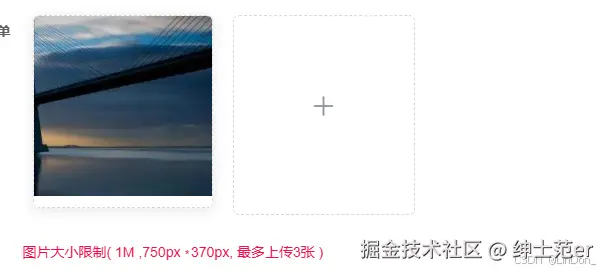
示例图
组件封装
<template>
<div>
<!-- 上传框和图片列表容器 -->
<div
class="upload-container"
:style="dynamicMarginStyle"
>
<!-- 已上传图片列表 -->
<div
v-if="fileList.length > 0"
class="perview-container"
>
<div
v-for="(item, index) in fileList"
:key="index"
class="perview-content"
>
<div class="image-container">
<el-card
:body-style="{ padding: '0px' }"
class="uploaded-image"
style="margin-bottom: 10px;"
>
<img
:src="item.url"
class="image"
style="width: 180px; height: 180px; object-fit: cover;"
@click="handlePictureCardPreview(item)"
>
</el-card>
<!-- 操作蒙层 -->
<div class="image-overlay">
<div class="image-actions">
<span @click.stop="handlePictureCardPreview(item)"><i class="el-icon-zoom-in"/></span>
<span @click.stop="handleRemove(item)"><i class="el-icon-delete"/></span>
</div>
</div>
</div>
</div>
<el-upload
v-if="fileList.length < limit && fileList.length !== 0"
class="avatar-uploader"
:action="upMoUrl"
:drag="true"
:headers="headers"
:auto-upload="false"
:limit="limit"
:show-file-list="false"
:on-error="uploadFalse"
:before-upload="beforeUpload"
:on-change="uploadChange"
:multiple="true"
:file-list="fileList"
>
<i
class="el-icon-plus avatar-uploader-icon"
style="width: 180px; height: 180px; line-height: 180px; font-size: 24px;"
/>
</el-upload>
</div>
<!-- 上传框 -->
<el-upload
v-if="fileList.length === 0"
class="avatar-uploader"
:action="upMoUrl"
:drag="true"
:headers="headers"
:auto-upload="false"
:limit="limit"
:show-file-list="false"
:before-upload="beforeUpload"
:on-change="uploadChange"
:multiple="true"
:file-list="fileList"
>
<i
class="el-icon-plus avatar-uploader-icon"
style="width: 180px; height: 180px; line-height: 180px; font-size: 24px;"
/>
</el-upload>
</div>
<div style="color: #f11041">
图片大小限制( {{ size >= 1 ? (size + 'M') : (size * 1024) + 'kb' }}
<span v-if="imgWidth && imgHeight">,{{ imgWidth }}px
<i
style="font-size: 10px;position: relative;"
>* </i>
{{ imgHeight }}px,
最多上传{{ limit }}张
</span>)
</div>
<!-- 剪裁图片弹框 -->
<el-dialog
title="图片剪裁器"
:visible.sync="dialogVisible"
:center="true"
:close-on-click-modal="false"
:append-to-body="true"
width="70%"
>
<!-- 剪裁器内容 -->
<div
class="cropper-content"
>
<vueCropper
ref="cropMultipleImages"
:img="option.img"
:output-size="option.size"
:output-type="option.outputType"
:info="true"
:full="option.full"
:can-move="option.canMove"
:can-move-box="option.canMoveBox"
:original="option.original"
:auto-crop="option.autoCrop"
:fixed="option.fixed"
:fixed-number="option.fixedNumber"
:center-box="option.centerBox"
:info-true="option.infoTrue"
:fixed-box="option.fixedBox"
:auto-crop-width="option.autoCropWidth"
:auto-crop-height="option.autoCropHeight"
@cropMoving="cropMoving"
/>
<!-- 预览效果图 -->
<div
v-show="IshowPreviews"
class="show-preview"
>
<div
:style="previews.div"
class="preview"
>
<img
:src="previews.url"
:style="previews.img"
>
</div>
</div>
</div>
<div class="button-group">
<!-- 工具组 -->
<el-button-group>
<el-button
type="primary"
icon="el-icon-zoom-in"
@click="changeScaleHandle(1)"
>
放大
</el-button>
<el-button
type="primary"
@click="changeScaleHandle(-1)"
>
缩小
<i class="el-icon-zoom-out el-icon--right"/>
</el-button>
<el-button
type="primary"
icon="el-icon-arrow-left"
@click="rotateLeftHandle"
>
左旋转
</el-button>
<el-button
type="primary"
@click="rotateRightHandle"
>
右旋转
<i class="el-icon-arrow-right el-icon--right"/>
</el-button>
<el-button
type="primary"
icon="el-icon-download"
@click="downloadHandle('blob')"
>
下载到本地
</el-button>
</el-button-group>
</div>
<div slot="footer">
<!-- 插槽底部 -->
<el-upload
:action="fileUploadApi"
:auto-upload="false"
:show-file-list="false"
:on-change="uploadChange"
class="upload-reset"
>
<el-button icon="el-icon-refresh">
换个图
</el-button>
</el-upload>
<el-button
type="primary"
:loading="loading"
icon="el-icon-circle-check"
style="width: 130px"
@click="finish"
>
保存提交
</el-button>
</div>
</el-dialog>
<!-- 图片预览弹框 -->
<el-dialog
:visible.sync="previewDialogVisible"
append-to-body
>
<img
width="100%"
:src="previewImageUrl"
alt=""
>
</el-dialog>
</div>
</template>
<script>
import {VueCropper} from 'vue-cropper';
import {mapGetters} from 'vuex';
import {uploadBlob} from '@/utils/upload';
import {getToken} from '@/utils/auth';
export default {
name: 'CropMultipleImages',
components: {VueCropper},
computed: {
...mapGetters(['baseApi', 'fileUploadApi']),
formattedFileList() {
return this.fileList;
},
dynamicMarginStyle() {
const safeFileList = Array.isArray(this.fileList) ? this.fileList : [];
return safeFileList.length > 6 ? {marginLeft: `${this.marginLeft}px`} : {marginLeft: '0px'};
}
},
props: {
// 绑定的数据
value: {
type: Array,
default: () => []
},
// 图片宽度
imgWidth: {
type: Number,
default: 750
},
// 图片的高度
imgHeight: {
type: Number,
default: 370
},
// 上传的大小
size: {
type: Number,
default: 1
},
// 限制张数
limit: {
type: Number,
default: 1
},
// 一定张数,样式调整
marginLeft: {
type: Number,
default: 100
},
// 是否允许重复上传同一张图
isRepeat: {
type: Boolean,
default: true
},
// 上传接口地址
uploadUrl: {
type: String,
default: null
}
},
data() {
return {
upMoUrl: '',
headers: {'Authorization': getToken()},
dialogVisible: false,
previewDialogVisible: false,
previewImageUrl: '',
loading: false,
option: {
img: '', // 裁剪图片的地址
info: true, // 裁剪框的大小信息
outputSize: 0.2, // 裁剪生成图片的质量
outputType: 'png', // 裁剪生成图片的格式
canScale: true, // 图片是否允许滚轮缩放
autoCrop: true, // 是否默认生成截图框
canMoveBox: false, // 截图框能否拖动
autoCropWidth: this.imgWidth, // 默认生成截图框宽度
autoCropHeight: this.imgHeight, // 默认生成截图框高度
fixedBox: true, // 固定截图框大小(不允许改变)
fixed: false, // 是否开启截图框宽高固定比例
fixedNumber: [3, 2], // 截图框的宽高比例
full: false, // 是否输出原图比例的截图
original: false, // 上传图片按照原始比例渲染
centerBox: true, // 截图框是否被限制在图片里面
infoTrue: true // true为展示真实输出图片宽高(false展示看到的截图框宽高)
},
previews: {},
IshowPreviews: false,
fileList: this.value.map((item, index) => ({
name: index,
url: item.url || item
}))
};
},
watch: {
value: {
handler(newVal) {
this.fileList = newVal.map((item, index) => ({
name: index,
url: item.url || item
}));
},
deep: true
}
},
mounted() {
this.upMoUrl = this.uploadUrl ? (this.baseApi + '/' + this.uploadUrl) : this.fileUploadApi;
},
methods: {
updateFileList() {
this.$emit('input', this.formattedFileList);
},
uploadChange(file, fileList) {
debugger;
const isJPG = file.raw.type === 'image/jpeg' || file.raw.type === 'image/png';
const isLt5M = file.size / 1024 / 1024 < this.size;
if (!this.isRepeat) {
let nameBleon = false;
let urlBleon = false;
if (fileList.length > 0) {
const nameArr = fileList.filter(f => !f.url);
const urlArr = fileList.filter(f => f.url);
if (nameArr.length > 0) {
nameBleon = nameArr.some(s => s.name === file.name);
}
if (urlArr.length > 0) {
const urlArrMap = urlArr.map(m => m.url.split('/').pop());
urlBleon = urlArrMap.some(m => m === file.name);
}
}
if (nameBleon || urlBleon) {
return this.$message.error('上传的图片已存在,重新换一张!');
}
}
if (!isJPG) {
this.$message.error('上传图片只能是 JPG/PNG 格式!');
return false;
}
if (!isLt5M) {
this.$message.error(`上传头像图片大小不能超过 ${this.size}MB!`);
return false;
}
// 文件合法正常通过(赋值给裁剪框显示图片)
this.$nextTick(async() => {
debugger;
this.option.img = URL.createObjectURL(file.raw);
this.loading = false;
this.dialogVisible = true;
});
},
downloadHandle(type) {
// eslint-disable-next-line no-undef
const aLink = document.createElement('a');
aLink.download = 'image';
if (type === 'blob') {
this.$refs.cropMultipleImages.getCropBlob((data) => {
aLink.href = URL.createObjectURL(data);
aLink.click();
});
} else {
this.$refs.cropMultipleImages.getCropData((data) => {
aLink.href = data;
aLink.click();
});
}
},
finish() {
this.$refs.cropMultipleImages.getCropBlob((blob) => {
this.loading = true;
this.http(blob)
.finally(() => {
this.loading = false;
});
});
},
http(blob) {
return uploadBlob(`${this.upMoUrl}`, blob, `${this.name}.jpg`)
.then((result) => {
if (result.data) {
const newFileList = [...this.fileList];
newFileList.push({
name: newFileList.length,
url: result.data
});
this.fileList = newFileList;
this.updateFileList();
this.dialogVisible = false;
} else {
this.dialogVisible = false;
}
})
.catch(() => {
this.$message('上传失败');
});
},
cropMoving(data) {
debugger;
const iw = Math.round(data.axis.x2 - data.axis.x1);
const ih = Math.round(data.axis.y2 - data.axis.y1);
if (iw !== this.imgWidth || ih !== this.imgHeight) {
console.log('this.fileList', this.fileList);
this.resetCropperState();
this.$message.warning(`图片宽度:${iw}px-图片高度:${ih}px-不符、请换一张图片`);
return false;
}
},
resetCropperState() {
this.option.img = ''; // 清空裁剪框的图片
this.dialogVisible = false; // 关闭弹框
this.loading = false; // 重置加载状态
this.fileList = this.fileList.filter(item => item.url); // 清空未上传的文件
},
changeScaleHandle(num) {
num = num || 1;
this.$refs.cropMultipleImages.changeScale(num);
},
rotateLeftHandle() {
this.$refs.cropMultipleImages.rotateLeft();
},
rotateRightHandle() {
this.$refs.cropMultipleImages.rotateRight();
},
handlePictureCardPreview(file) {
this.previewImageUrl = file.url;
this.previewDialogVisible = true;
},
handleRemove(response) {
this.fileList = this.fileList.filter(item => item.url !== response.url);
this.updateFileList();
}
}
};
</script>
<style scoped>
.upload-container {
display: flex;
flex-wrap: wrap;
gap: 10px;
margin-bottom: 10px;
}
.avatar-uploader .el-upload {
border-radius: 6px;
cursor: pointer;
position: relative;
overflow: hidden;
}
.avatar-uploader-icon {
font-size: 28px;
color: #8c939d;
width: 178px;
height: 178px;
line-height: 178px;
text-align: center;
}
.el-upload-list__item-thumbnail {
width: 100%;
height: 100%;
object-fit: cover;
}
.el-upload-list__item-actions {
display: flex;
justify-content: center;
align-items: center;
}
.upload-reset {
display: inline-block;
margin-right: 15px;
}
.cropper-content {
display: flex;
width: auto;
height: 450px;
}
.button-group {
text-align: center;
margin-top: 30px;
}
.show-preview {
flex: 1;
display: flex;
justify-content: center;
}
.preview {
overflow: hidden;
border: 1px solid #67c23a;
background: #cccccc;
}
.uploaded-image {
border: 1px dashed #d9d9d9;
border-radius: 6px;
overflow: hidden;
}
.image-container {
position: relative;
}
.image-overlay {
position: absolute;
top: 0;
left: 0;
width: 100%;
height: 100%;
background: rgba(0, 0, 0, 0.5);
display: flex;
justify-content: center;
align-items: center;
opacity: 0;
transition: opacity 0.3s;
}
.image-container:hover .image-overlay {
opacity: 1;
}
.image-actions {
display: flex;
gap: 10px;
}
.image-actions span {
color: white;
margin: 0 10px;
}
.avatar-uploader .el-upload-dragger {
border: none !important;
width: auto !important;
height: auto !important;
display: flex;
flex-direction: column;
justify-content: center;
align-items: center;
padding: 10px;
}
::v-deep .el-upload-dragger {
width: 180px;
}
.avatar-uploader .el-upload-dragger span {
margin-top: 10px;
font-size: 12px;
color: #ff4949;
}
.perview-content {
width: 180px;
margin: 0 10px;
}
.perview-container {
display: flex;
flex-wrap: wrap;
gap: 10px;
}
</style>
页面应用
<cropMultipleImages
v-model="form.imgList"
limit="3"
size="1"
/>