IDEA
mapper.xml模板
<?xml version="1.0" encoding="UTF-8" ?>
<!DOCTYPE mapper PUBLIC "-//mybatis.org//DTD Mapper 3.0//EN" "http://mybatis.org/dtd/mybatis-3-mapper.dtd">
<mapper namespace="">
</mapper>
MyBatisCodeHelperPro插件
MyBatis介绍
MyBatis是JAVA的持久层框架,也是一个半 ORM(对象关系映射)框架,与传统ORM框架(JAVA对象和数据库表映射),MyBatis通过XML或注解方式配置,将Java对象方法与数据库表的操作关联起来。 MyBaits它内部封装了 JDBC,开发时只需要关注 SQL 语句本身,不需要花费精力去处理加载驱动、创建连接、创建statement 等繁杂的过程。程序员直接编写原生态 sql,可以严格控制 sql 执行性能,灵活度高。
MyBatis 和 Hibernate 的区别
- MyBatis 是一个半自动映射的框架,配置Java对象与sql语句执行结果的对应关系,多表关联关系配置简单
- Hibernate 是一个全表映射的框架,配置Java对象与数据库表的对应关系,多表关联关系配置复杂
MyBatis的工作原理
- MyBatis 的工作原理如下图
-
读取 MyBatis 配置文件:mybatis-config.xml 为 MyBatis 的全局配置文件,配置了 MyBatis 的运行环境等信息,例如数据库连接信息。
-
加载映射文件。映射文件即 SQL 映射文件,该文件中配置了操作数据库的 SQL 语句,需要在 MyBatis 配置文件 mybatis-config.xml 中加载。mybatis-config.xml 文件可以加载多个映射文件,每个文件对应数据库中的一张表。
-
构造会话工厂:通过 MyBatis 的环境等配置信息构建会话工厂 SqlSessionFactory。
-
创建会话对象:由会话工厂创建 SqlSession 对象,该对象中包含了执行 SQL 语句的所有方法。
-
Executor 执行器:MyBatis 底层定义了一个 Executor 接口来操作数据库,它将根据 SqlSession 传递的参数动态地生成需要执行的 SQL 语句,同时负责查询缓存的维护。
-
MappedStatement 对象:在 Executor 接口的执行方法中有一个 MappedStatement 类型的参数,该参数是对映射信息的封装,用于存储要映射的 SQL 语句的 id、参数等信息。
-
输入参数映射:输入参数类型可以是 Map、List 等集合类型,也可以是基本数据类型和 POJO 类型。输入参数映射过程类似于 JDBC 对 preparedStatement 对象设置参数的过程。
-
输出结果映射:输出结果类型可以是 Map、 List 等集合类型,也可以是基本数据类型和 POJO 类型。输出结果映射过程类似于 JDBC 对结果集的解析过程。
SpringBoot接入MyBatis
创建表
特别注意 由于Java基本类型会有默认值,例如当某个类中存在private int age;字段时,创建这个类时,age会有默认值0。当使用age属性时,它总会有值。因此在某些情况下,便无法实现使age为null。并且在动态SQL部分,如果使用age != null进行判断,结果总会为true,因此会导致很多隐藏的问题。 所以,在实体类中不要使用基本类型。基本类型包括byte、int、short、long、float、double、char、boolean。
SET FOREIGN_KEY_CHECKS=0;

-- ----------------------------
-- Table structure for country
-- ----------------------------
DROP TABLE IF EXISTS `country`;
CREATE TABLE `country` (
  `id` int(11) NOT NULL AUTO_INCREMENT,
  `countryname` varchar(255) DEFAULT NULL,
  `countrycode` varchar(255) DEFAULT NULL,
  PRIMARY KEY (`id`)
) ENGINE=InnoDB AUTO_INCREMENT=6 DEFAULT CHARSET=utf8;

-- ----------------------------
-- Records of country
-- ----------------------------
INSERT INTO `country` VALUES ('1', '中国', 'CN');
INSERT INTO `country` VALUES ('2', '美国', 'US');
INSERT INTO `country` VALUES ('3', '俄罗斯', 'RU');
INSERT INTO `country` VALUES ('4', '英国', 'GB');
INSERT INTO `country` VALUES ('5', '法国', 'FR');

-- ----------------------------
-- Table structure for sys_dict
-- ----------------------------
DROP TABLE IF EXISTS `sys_dict`;
CREATE TABLE `sys_dict` (
  `id` bigint(32) NOT NULL AUTO_INCREMENT COMMENT '主键',
  `code` varchar(64) NOT NULL COMMENT '类别',
  `name` varchar(64) NOT NULL COMMENT '字典名',
  `value` varchar(64) NOT NULL COMMENT '字典值',
  PRIMARY KEY (`id`)
) ENGINE=InnoDB AUTO_INCREMENT=7 DEFAULT CHARSET=utf8;

-- ----------------------------
-- Records of sys_dict
-- ----------------------------
INSERT INTO `sys_dict` VALUES ('1', '性别', '男', '男');
INSERT INTO `sys_dict` VALUES ('2', '性别', '女', '女');
INSERT INTO `sys_dict` VALUES ('3', '季度', '第一季度', '1');
INSERT INTO `sys_dict` VALUES ('4', '季度', '第二季度', '2');
INSERT INTO `sys_dict` VALUES ('5', '季度', '第三季度', '3');
INSERT INTO `sys_dict` VALUES ('6', '季度', '第四季度', '4');

-- ----------------------------
-- Table structure for sys_privilege
-- ----------------------------
DROP TABLE IF EXISTS `sys_privilege`;
CREATE TABLE `sys_privilege` (
  `id` bigint(20) NOT NULL AUTO_INCREMENT COMMENT '权限ID',
  `privilege_name` varchar(50) DEFAULT NULL COMMENT '权限名称',
  `privilege_url` varchar(200) DEFAULT NULL COMMENT '权限URL',
  PRIMARY KEY (`id`)
) ENGINE=InnoDB AUTO_INCREMENT=6 DEFAULT CHARSET=utf8 COMMENT='权限表';

-- ----------------------------
-- Records of sys_privilege
-- ----------------------------
INSERT INTO `sys_privilege` VALUES ('1', '用户管理', '/users');
INSERT INTO `sys_privilege` VALUES ('2', '角色管理', '/roles');
INSERT INTO `sys_privilege` VALUES ('3', '系统日志', '/logs');
INSERT INTO `sys_privilege` VALUES ('4', '人员维护', '/persons');
INSERT INTO `sys_privilege` VALUES ('5', '单位维护', '/companies');

-- ----------------------------
-- Table structure for sys_role
-- ----------------------------
DROP TABLE IF EXISTS `sys_role`;
CREATE TABLE `sys_role` (
  `id` bigint(20) NOT NULL AUTO_INCREMENT COMMENT '角色ID',
  `role_name` varchar(50) DEFAULT NULL COMMENT '角色名',
  `enabled` int(11) DEFAULT NULL COMMENT '有效标志',
  `create_by` bigint(20) DEFAULT NULL COMMENT '创建人',
  `create_time` datetime DEFAULT NULL COMMENT '创建时间',
  PRIMARY KEY (`id`)
) ENGINE=InnoDB AUTO_INCREMENT=3 DEFAULT CHARSET=utf8 COMMENT='角色表';

-- ----------------------------
-- Records of sys_role
-- ----------------------------
INSERT INTO `sys_role` VALUES ('1', '管理员', '1', '1', '2016-04-01 17:02:14');
INSERT INTO `sys_role` VALUES ('2', '普通用户', '1', '1', '2016-04-01 17:02:34');

-- ----------------------------
-- Table structure for sys_role_privilege
-- ----------------------------
DROP TABLE IF EXISTS `sys_role_privilege`;
CREATE TABLE `sys_role_privilege` (
  `role_id` bigint(20) DEFAULT NULL COMMENT '角色ID',
  `privilege_id` bigint(20) DEFAULT NULL COMMENT '权限ID'
) ENGINE=InnoDB DEFAULT CHARSET=utf8 COMMENT='角色权限关联表';

-- ----------------------------
-- Records of sys_role_privilege
-- ----------------------------
INSERT INTO `sys_role_privilege` VALUES ('1', '1');
INSERT INTO `sys_role_privilege` VALUES ('1', '3');
INSERT INTO `sys_role_privilege` VALUES ('1', '2');
INSERT INTO `sys_role_privilege` VALUES ('2', '4');
INSERT INTO `sys_role_privilege` VALUES ('2', '5');

-- ----------------------------
-- Table structure for sys_user
-- ----------------------------
DROP TABLE IF EXISTS `sys_user`;
CREATE TABLE `sys_user` (
  `id` bigint(20) NOT NULL AUTO_INCREMENT COMMENT '用户ID',
  `user_name` varchar(50) DEFAULT NULL COMMENT '用户名',
  `user_password` varchar(50) DEFAULT NULL COMMENT '密码',
  `user_email` varchar(50) DEFAULT 'test@mybatis.tk' COMMENT '邮箱',
  `user_info` text COMMENT '简介',
  `head_img` blob COMMENT '头像',
  `create_time` datetime DEFAULT NULL COMMENT '创建时间',
  PRIMARY KEY (`id`)
) ENGINE=InnoDB AUTO_INCREMENT=1035 DEFAULT CHARSET=utf8 COMMENT='用户表';

-- ----------------------------
-- Records of sys_user
-- ----------------------------
INSERT INTO `sys_user` VALUES ('1', 'admin', '123456', 'admin@mybatis.tk', '管理员用户', 0x1231231230, '2016-06-07 01:11:12');
INSERT INTO `sys_user` VALUES ('1001', 'test', '123456', 'test@mybatis.tk', '测试用户', 0x1231231230, '2016-06-07 00:00:00');
-- ----------------------------
-- Table structure for sys_user_role
-- ----------------------------
DROP TABLE IF EXISTS `sys_user_role`;
CREATE TABLE `sys_user_role` (
  `user_id` bigint(20) DEFAULT NULL COMMENT '用户ID',
  `role_id` bigint(20) DEFAULT NULL COMMENT '角色ID'
) ENGINE=InnoDB DEFAULT CHARSET=utf8 COMMENT='用户角色关联表';

-- ----------------------------
-- Records of sys_user_role
-- ----------------------------
INSERT INTO `sys_user_role` VALUES ('1', '1');
INSERT INTO `sys_user_role` VALUES ('1', '2');
INSERT INTO `sys_user_role` VALUES ('1001', '2');

-- ----------------------------
-- Table structure for user info
-- ----------------------------
DROP TABLE IF EXISTS `user info`;
CREATE TABLE `user info` (
  `id` int(11) NOT NULL,
  PRIMARY KEY (`id`)
) ENGINE=InnoDB DEFAULT CHARSET=utf8;

-- ----------------------------
-- Records of user info
-- ----------------------------
引入依赖
<dependencies>
    <dependency>
        <groupId>org.mybatis.spring.boot</groupId>
        <artifactId>mybatis-spring-boot-starter</artifactId>
    </dependency>
    <dependency>
        <groupId>mysql</groupId>
        <artifactId>mysql-connector-java</artifactId>
    </dependency>
    <!--druid配置连接池-->
    <dependency>
        <groupId>com.alibaba</groupId>
        <artifactId>druid-spring-boot-starter</artifactId>
    </dependency>
</dependencies>
application.yml配置
server:
  port: 8080
spring:
  application:
    name: mybatis-crud
  datasource:
    driver-class-name: com.mysql.cj.jdbc.Driver
    url: jdbc:mysql://localhost:3306/mybatis?useUnicode=true&characterEncoding=utf-8&serverTimezone=Asia/Shanghai
    username: root
    password: a19960504
mybatis:
#  resources相当于类路径(src下),这里需要扫描mapper文件路径
  mapper-locations: classpath:mapper/*.xml
#  设置配置的日志输出信息(为了看到SQL语句)
  configuration:
    log-impl: org.apache.ibatis.logging.stdout.StdOutImpl
#  type-handlers-package: com.itheima.crud.type
创建表对应的实体类
在MyBatis中,关于数据库字段和Java类型的对应关系,不需要刻意去记,但需要注意一个特殊类型"byte[]"。这个类型一般对应数据库中的 BLOB、LONGARBINARY 以及一些和二进制流有关的字段类型。
由于Java基本类型会有默认值,例如当某个类中存在private int age;字段时,创建这个类时,age会有默认值0。当使用age属性时,它总会有值。因此在某些情况下,便无法实现使age为null。并且在动态SQL部分,如果使用age != null进行判断,结果总会为true,因此会导致很多隐藏问题。 所以,在实体类中不要使用基本类型。
XML方式
<select>
<resultMap id="userMap" type="tk.mybatis.simple.model.SysUser">
        <id property="id" column="id"/>
        <result property="userName" column="user_name"/>
        <result property="userPassword" column="user_password"/>
        <result property="userEmail" column="user_email"/>
        <result property="userInfo" column="user_info"/>
        <result property="headImg" column="head_img" jdbcType="BLOB"/>
        <result property="createTime" column="create_time" jdbcType="TIMESTAMP"/>
</resultMap>

<select id="selectById" resultMap="userMap">
        select * from sys_user where id = #{id}
</select>


<select id="selectAll" resultType="tk.mybatis.simple.model.SysUser">
    select id,
        user_name userName,
        user_password userPassword,
        user_email userEmail,
        user_info userInfo,
        head_img headImg,
        create_time createTime
    from sys_user
</select>


<select id="selectRolesByUserId" resultType="tk.mybatis.simple.model.SysRole">
    select
                r.id,
                r.role_name roleName,
                r.enabled,
                r.create_by createBy,
                r.create_time createTime,
                u.user_name as "user.userName",
                u.user_email as "user.userEmail"
        from sys_user u
        inner join sys_user_role ur on u.id = ur.user_id
        inner join sys_role r on ur.role_id = r.id
    where u.id = #{userId}
</select>


<select id="selectRolesByUserIdAndRoleEnabled" resultType="tk.mybatis.simple.model.SysRole">
    select
                r.id,
                r.role_name roleName,
                r.enabled,
                r.create_by createBy,
                r.create_time createTime
        from sys_user u
        inner join sys_user_role ur on u.id = ur.user_id
        inner join sys_role r on ur.role_id = r.id
    where u.id = #{userId} and r.enabled = #{enabled}
</select>
<inset>
<insert id="insert">
        insert into sys_user(
                id, user_name, user_password, user_email,
                user_info, head_img, create_time)
        values(
                #{id}, #{userName}, #{userPassword}, #{userEmail},
                #{userInfo}, #{headImg, jdbcType=BLOB}, #{createTime, jdbcType=TIMESTAMP})
</insert>


<insert id="insert2" useGeneratedKeys="true" keyProperty="id" >
        insert into sys_user(
                user_name, user_password, user_email,
                user_info, head_img, create_time)
        values(
                #{userName}, #{userPassword}, #{userEmail},
                #{userInfo}, #{headImg, jdbcType=BLOB}, #{createTime, jdbcType=TIMESTAMP})
</insert>
useGeneratedKeys 设置为true后,MyBatis会使用JDBC的getGeneratedKeys方法来去除数据库内部生成的主键。获取主键值后将其赋值给keyProperty配置的id属性。
<selectKey>
<selectKey>使用selectKey返回主键的值
适用于不提供主键自增功能的数据库(Oracle),也适用于提供主键自增功能的数据库(MySQL)。
<insert id="insert3">
        insert into sys_user(
                user_name, user_password, user_email,
                user_info, head_img, create_time)
        values(
                #{userName}, #{userPassword}, #{userEmail},
                #{userInfo}, #{headImg, jdbcType=BLOB}, #{createTime, jdbcType=TIMESTAMP})
        <selectKey keyColumn="id" resultType="long" keyProperty="id" order="AFTER">
            SELECT 0
        </selectKey>
</insert>

<!-- Oracle 的例子,查询多个列的时候需要 keyColumn -->
<insert id="insertOracle">
        <selectKey keyColumn="id" resultType="long" keyProperty="id" order="BEFORE">
                SELECT SEQ_USER.nextval from dual
        </selectKey>
        insert into sys_user(
                id, user_name, user_password, user_email,
                user_info, head_img, create_time)
        values(
                #{id}, #{userName}, #{userPassword}, #{userEmail},
                #{userInfo}, #{headImg, jdbcType=BLOB}, #{createTime, jdbcType=TIMESTAMP})
</insert>
<update>
<update id="updateById">
        update sys_user
        set user_name = #{userName},
                user_password = #{userPassword},
                user_email = #{userEmail},
                user_info = #{userInfo},
                head_img = #{headImg, jdbcType=BLOB},
                create_time = #{createTime, jdbcType=TIMESTAMP}
        where id = #{id}
</update>
<delete>
<delete id="deleteById">
        delete from sys_user where id = #{id}
</delete>
注解方式
@Select
@Select({"select id,role_name roleName, enabled, create_by createBy, create_time createTime",
                 "from sys_role",
                 "where id = #{id}"})
SysRole selectById(Long id);

@Results(id = "roleResultMap", value = {
        @Result(property = "id", column = "id", id = true),
        @Result(property = "roleName", column = "role_name"),
        @Result(property = "enabled", column = "enabled"),
        @Result(property = "createBy", column = "create_by"),
        @Result(property = "createTime", column = "create_time")
})
@Select("select id,role_name, enabled, create_by, create_time from sys_role where id = #{id}")
SysRole selectById2(Long id);


@ResultMap("roleResultMap")
@Select("select * from sys_role")
List<SysRole> selectAll();
@Insert
# 不需要返回主键
@Insert({"insert into sys_role(id, role_name, enabled, create_by, create_time)",
                 "values(#{id}, #{roleName}, #{enabled}, #{createBy}, #{createTime, jdbcType=TIMESTAMP})"})
int insert(SysRole sysRole);

# 需要返回主键
@Insert({"insert into sys_role(role_name, enabled, create_by, create_time)",
"values(#{roleName}, #{enabled}, #{createBy}, #{createTime, jdbcType=TIMESTAMP})"})
@Options(useGeneratedKeys = true, keyProperty = "id")
int insert2(SysRole sysRole);

# 返回非自增主键
@Insert({"insert into sys_role(role_name, enabled, create_by, create_time)",
 "values(#{roleName}, #{enabled}, #{createBy}, #{createTime, jdbcType=TIMESTAMP})"})
@SelectKey(statement = "SELECT 6454422", keyProperty = "id", resultType = Long.class, before = false)
int insert3(SysRole sysRole);
@Options
@SelectKey
@Update
@Update({"update sys_role",
             "set role_name = #{roleName},",
                         "enabled = #{enabled},",
                         "create_by = #{createBy},",
                         "create_time = #{createTime, jdbcType=TIMESTAMP}",
                 "where id = #{id}"
        })
int updateById(SysRole sysRole);
@Delete
@Delete("delete from sys_role where id = #{id}")
int deleteById(Long id);
动态SQL
<if>
在where中使用if
<select id="selectByUser" resultType="tk.mybatis.simple.model.SysUser">
        <bind name="print" value="@tk.mybatis.util.StringUtil@print(_parameter)"/>
    select id,
        user_name userName,
        user_password userPassword,
        user_email userEmail,
        user_info userInfo,
        head_img headImg,
        create_time createTime
    from sys_user
    <where>
            <if test="@tk.mybatis.util.StringUtil@isNotEmpty(userName)">
                    and user_name like concat('%', #{userName}, '%')
            </if>
            <if test="userEmail != '' and userEmail != null">
            and user_email = #{userEmail}
            </if>
    </where>
</select>
在update中使用if
<update id="updateByIdSelective">
<bind name="print" value="@tk.mybatis.util.StringUtil@print(_parameter)"/>
        update sys_user
        <set>
                <if test="userName != null and userName != ''">
                user_name = #{userName},
                </if>
                <if test="userPassword != null and userPassword != ''">
                user_password = #{userPassword},
                </if>
                <if test="userEmail != null and userEmail != ''">
                user_email = #{userEmail},
                </if>
                <if test="userInfo != null and userInfo != ''">
                user_info = #{userInfo},
                </if>
                <if test="headImg != null">
                head_img = #{headImg, jdbcType=BLOB},
                </if>
                <if test="createTime != null">
                create_time = #{createTime, jdbcType=TIMESTAMP},
                </if>
                id = #{id},
        </set>
        where id = #{id}
</update>
在insert中使用if
<insert id="insert2" useGeneratedKeys="true" keyProperty="id">
        insert into sys_user(
                user_name, user_password,
                <if test="userEmail != null">
                        <if test="userEmail != ''">
                        user_email,
                        </if>
                </if>
                user_info, head_img, create_time)
        values(
                #{userName}, #{userPassword},
                <if test="userEmail != null">
                        <if test="userEmail != ''">
                        #{userEmail},
                        </if>
                </if>
                #{userInfo}, #{headImg, jdbcType=BLOB}, #{createTime, jdbcType=TIMESTAMP})
</insert>
<chose> <when> <otherwise>
<select id="selectByIdOrUserName" resultType="tk.mybatis.simple.model.SysUser">
    select id,
        user_name userName,
        user_password userPassword,
        user_email userEmail,
        user_info userInfo,
        head_img headImg,
        create_time createTime
    from sys_user
    where 1 = 1
        <choose>
                <when test="id != null">
                and id = #{id}
                </when>
                <when test="userName != null and userName != ''">
                and user_name = #{userName}
                </when>
                <otherwise>
                limit 0
                </otherwise>
        </choose>
</select>
<where>
<select id="selectByUser" resultType="tk.mybatis.simple.model.SysUser">
        <bind name="print" value="@tk.mybatis.util.StringUtil@print(_parameter)"/>
    select id,
        user_name userName,
        user_password userPassword,
        user_email userEmail,
        user_info userInfo,
        head_img headImg,
        create_time createTime
    from sys_user
    <where>
            <if test="@tk.mybatis.util.StringUtil@isNotEmpty(userName)">
                    and user_name like concat('%', #{userName}, '%')
            </if>
            <if test="userEmail != '' and userEmail != null">
            and user_email = #{userEmail}
            </if>
    </where>
</select>
<set>
<update id="updateByIdSelective">
<bind name="print" value="@tk.mybatis.util.StringUtil@print(_parameter)"/>
        update sys_user
        <set>
                <if test="userName != null and userName != ''">
                user_name = #{userName},
                </if>
                <if test="userPassword != null and userPassword != ''">
                user_password = #{userPassword},
                </if>
                <if test="userEmail != null and userEmail != ''">
                user_email = #{userEmail},
                </if>
                <if test="userInfo != null and userInfo != ''">
                user_info = #{userInfo},
                </if>
                <if test="headImg != null">
                head_img = #{headImg, jdbcType=BLOB},
                </if>
                <if test="createTime != null">
                create_time = #{createTime, jdbcType=TIMESTAMP},
                </if>
                id = #{id},
        </set>
        where id = #{id}
</update>
<trim>
<foreach>
foreach 实现 in 集合
<select id="selectByIdList" resultType="tk.mybatis.simple.model.SysUser">
    select id,
        user_name userName,
        user_password userPassword,
        user_email userEmail,
        user_info userInfo,
        head_img headImg,
        create_time createTime
    from sys_user
where id in
<foreach collection="list" open="(" close=")" separator="," item="id" index="i">
        #{id}
</foreach>
</select>
foreach 实现批量插入
<insert id="insertList" useGeneratedKeys="true" keyProperty="id">
        insert into sys_user(
                user_name, user_password,user_email,
                user_info, head_img, create_time)
        values
        <foreach collection="list" item="user" separator=",">
                (
                #{user.userName}, #{user.userPassword},#{user.userEmail},
                #{user.userInfo}, #{user.headImg, jdbcType=BLOB}, #{user.createTime, jdbcType=TIMESTAMP})
        </foreach>
</insert>
foreach 实现动态 update
<update id="updateByMap">
        update sys_user
        set
        <foreach collection="_parameter" item="val" index="key" separator=",">
                ${key} = #{val}
        </foreach>
        where id = #{id}
</update>
<bind>
代码生成器
高级查询
高级结果映射
一对一映射
<resultMap id="userMap" type="tk.mybatis.simple.model.SysUser">
        <id property="id" column="id"/>
        <result property="userName" column="user_name"/>
        <result property="userPassword" column="user_password"/>
        <result property="userEmail" column="user_email"/>
        <result property="userInfo" column="user_info"/>
        <result property="headImg" column="head_img" jdbcType="BLOB"/>
        <result property="createTime" column="create_time" jdbcType="TIMESTAMP"/>
</resultMap>

<resultMap id="userRoleMap" extends="userMap" type="tk.mybatis.simple.model.SysUser">
        <association property="role" columnPrefix="role_" resultMap="tk.mybatis.simple.mapper.RoleMapper.roleMap"/>
</resultMap>


<select id="selectUserAndRoleById2" resultMap="userRoleMap">
    select
        u.id,
        u.user_name,
        u.user_password,
        u.user_email,
        u.user_info,
        u.head_img,
        u.create_time,
                r.id role_id,
                r.role_name role_role_name,
                r.enabled role_enabled,
                r.create_by role_create_by,
                r.create_time role_create_time
        from sys_user u
        inner join sys_user_role ur on u.id = ur.user_id
        inner join sys_role r on ur.role_id = r.id
    where u.id = #{id}
</select>
extends继承
<resultMap id="userMap" type="tk.mybatis.simple.model.SysUser">
        <id property="id" column="id"/>
        <result property="userName" column="user_name"/>
        <result property="userPassword" column="user_password"/>
        <result property="userEmail" column="user_email"/>
        <result property="userInfo" column="user_info"/>
        <result property="headImg" column="head_img" jdbcType="BLOB"/>
        <result property="createTime" column="create_time" jdbcType="TIMESTAMP"/>
</resultMap>
<resultMap id="userRoleMapSelect" extends="userMap" type="tk.mybatis.simple.model.SysUser">
        <association property="role"
                                 fetchType="lazy"
                                 select="tk.mybatis.simple.mapper.RoleMapper.selectRoleById"
                                 column="{id=role_id}"/>
</resultMap>
<select id="selectUserAndRoleByIdSelect" resultMap="userRoleMapSelect">
    select
        u.id,
        u.user_name,
        u.user_password,
        u.user_email,
        u.user_info,
        u.head_img,
        u.create_time,
                ur.role_id
        from sys_user u
        inner join sys_user_role ur on u.id = ur.user_id
    where u.id = #{id}
</select>
一对多映射
<resultMap id="userMap" type="tk.mybatis.simple.model.SysUser">
        <id property="id" column="id"/>
        <result property="userName" column="user_name"/>
        <result property="userPassword" column="user_password"/>
        <result property="userEmail" column="user_email"/>
        <result property="userInfo" column="user_info"/>
        <result property="headImg" column="head_img" jdbcType="BLOB"/>
        <result property="createTime" column="create_time" jdbcType="TIMESTAMP"/>
</resultMap>
<resultMap id="userRoleListMap" extends="userMap" type="tk.mybatis.simple.model.SysUser">
        <collection property="roleList" columnPrefix="role_"
                    resultMap="tk.mybatis.simple.mapper.RoleMapper.rolePrivilegeListMap"/>
</resultMap>

<select id="selectAllUserAndRoles" resultMap="userRoleListMap">
    select
        u.id,
        u.user_name,
        u.user_password,
        u.user_email,
        u.user_info,
        u.head_img,
        u.create_time,
        r.id role_id,
                r.role_name role_role_name,
                r.enabled role_enabled,
                r.create_by role_create_by,
                r.create_time role_create_time,
                p.id role_privilege_id,
                p.privilege_name role_privilege_privilege_name,
                p.privilege_url role_privilege_privilege_url
        from sys_user u
        inner join sys_user_role ur on u.id = ur.user_id
        inner join sys_role r on ur.role_id = r.id
        inner join sys_role_privilege rp on rp.role_id = r.id
        inner join sys_privilege p on p.id = rp.privilege_id
</select>
<resultMap id="userRoleListMapSelect" extends="userMap" type="tk.mybatis.simple.model.SysUser">
        <collection property="roleList" fetchType="lazy"
                    select="tk.mybatis.simple.mapper.RoleMapper.selectRoleByUserId"
                    column="{userId=id}"/>
</resultMap>
<select id="selectAllUserAndRolesSelect" resultMap="userRoleListMapSelect">
    select
        u.id,
        u.user_name,
        u.user_password,
        u.user_email,
        u.user_info,
        u.head_img,
        u.create_time
        from sys_user u
        where u.id = #{id}
</select>
<resultMap id="roleMap" type="tk.mybatis.simple.model.SysRole">
        <id property="id" column="id"/>
        <result property="roleName" column="role_name"/>
        <result property="enabled" column="enabled"/>
        <association property="createInfo" javaType="tk.mybatis.simple.model.CreateInfo">
                <result property="createBy" column="create_by"/>
                <result property="createTime" column="create_time" jdbcType="TIMESTAMP"/>
        </association>
</resultMap>

<resultMap id="rolePrivilegeListMap" extends="roleMap" type="tk.mybatis.simple.model.SysRole">
        <collection property="privilegeList" columnPrefix="privilege_"
                                resultMap="tk.mybatis.simple.mapper.PrivilegeMapper.privilegeMap"/>
</resultMap>
<select id="selectAllRoleAndPrivileges" resultMap="rolePrivilegeListMap">
    select
        r.id,
                r.role_name,
                r.enabled,
                r.create_by,
                r.create_time,
                p.id privilege_id,
                p.privilege_name privilege_privilege_name,
                p.privilege_url privilege_privilege_url
        from sys_role r
        inner join sys_role_privilege rp on rp.role_id = r.id
        inner join sys_privilege p on p.id = rp.privilege_id
</select>
<resultMap id="rolePrivilegeListMapSelect" extends="roleMap" type="tk.mybatis.simple.model.SysRole">
        <collection property="privilegeList"
                                fetchType="lazy"
                                select="tk.mybatis.simple.mapper.PrivilegeMapper.selectPrivilegeByRoleId"
                                column="{roleId=id}"/>
</resultMap>

<select id="selectRoleByUserId" resultMap="rolePrivilegeListMapSelect">
        select
        r.id,
                r.role_name,
                r.enabled,
                r.create_by,
                r.create_time
        from sys_role r
        inner join sys_user_role ur on ur.role_id = r.id
        where ur.user_id = #{userId}
</select>
鉴别器映射
discriminator
存储过程
使用枚举或其他对象
缓存
MyBatis缓存一般放置在服务器内存中。通常把命中率高的数据缓存起来。
缓存分为一级缓存和二级缓存。
一级缓存(SqlSession缓存)
MyBatis默认开启一级缓存,也就是对SqlSession缓存,这个缓存不需要POJO对象序列化(实现java.io.Serializable接口)。
例如多次对同一对象进行获取,但是只执行一条SQL。因为是使用同一个SqlSession对象获取数据,当一个SqlSession第一次通过SQL和参数获取对象后,它就会将其缓存起来,如果下次的SQL和参数都没有发生变化,并且缓存没有超时或者声明需要刷新时,那么它就会从缓存中获取数据。如果SQL和参数发生了变化,缓存会删除,使用新的SqlSession获取数据。
一级缓存原理
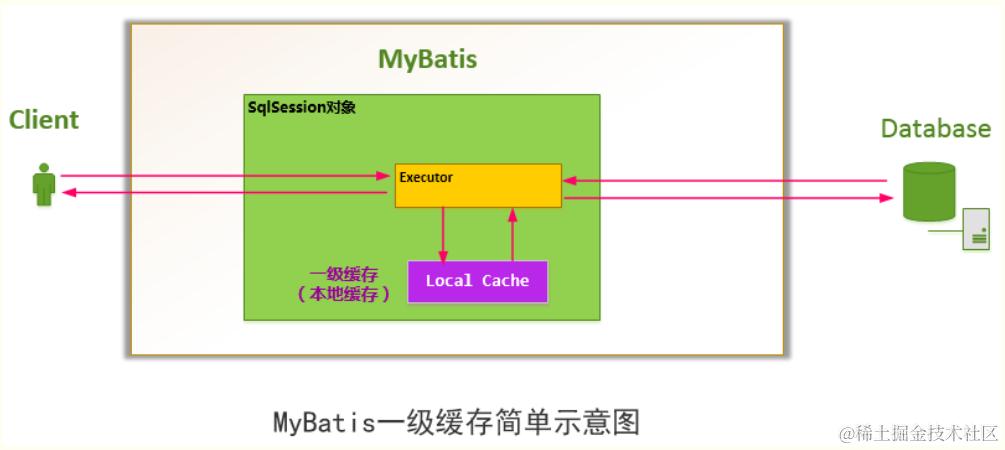
注意:
- MyBatis默认开启一级缓存
- MyBatis一级缓存的生命周期和SqlSession一致。
- MyBatis一级缓存内部设计简单,只是一个没有容量限定的HashMap,在缓存的功能性上有所欠缺。
- MyBatis的一级缓存最大范围是SqlSession内部,有多个SqlSession或者分布式的环境下,数据库写操作会引起脏数据,建议设定缓存级别为Statement。
二级缓存(SqlSessionFactory缓存
有了一级缓存为什么还要二级缓存呢?
因为一级缓存中,其最大的共享范围就是一个SqlSession内部,如果多个SqlSession之间需要共享缓存,则需要使用到二级缓存。二级环境就是一个全局变量二级缓存开启后,同一个namespace下的所有操作语句,都影响着同一个Cache,即二级缓存被多个SqlSession共享,是一个全局的变量。
开启缓存后,数据的查询执行的流程就是 二级缓存 -> 一级缓存 -> 数据库。
二级缓存原理
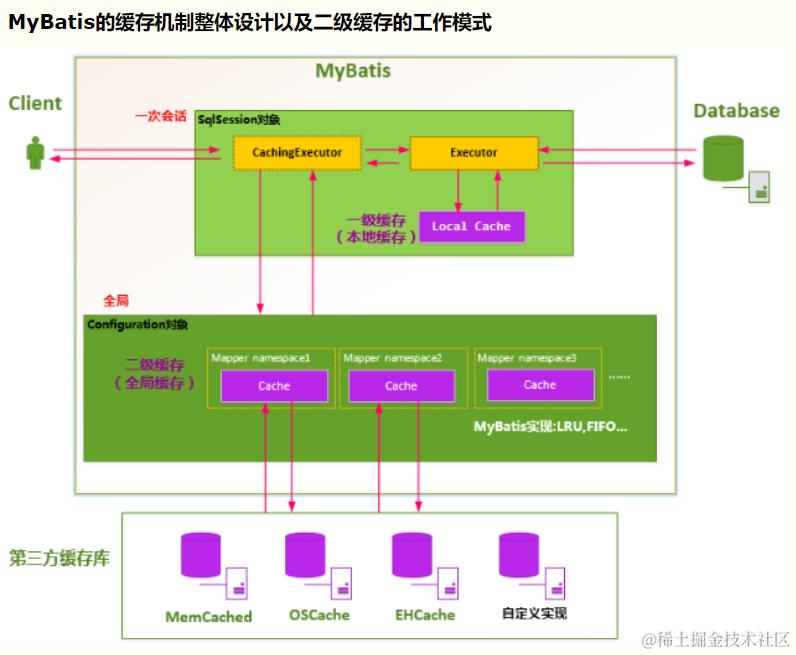
注意
- MyBatis开启二级缓存后,强制要求POJO是个可序列化的对象,否则抛出异常。
- MyBatis的二级缓存相对于一级缓存来说,实现了SqlSession之间缓存数据的共享,同时粒度更加的细,能够到namespace级别,通过Cache接口实现类不同的组合,对Cache的可控性也更强。
- MyBatis在多表查询时,极大可能会出现脏数据,有设计上的缺陷,安全使用二级缓存的条件比较苛刻。 在分布式环境下,由于默认的MyBatis Cache实现都是基于本地的,分布式环境下必然会出现读取到脏数据,需要使用集中式缓存将MyBatis的Cache接口实现,有一定的开发成本,直接使用Redis、Memcached等分布式缓存可能成本更低,安全性也更高。
其他
接入多源数据库