最近有一个新项目,因为没有历史负担,整哈上手了最新的springboot3.x体系,所以就顺带也升级了spring6.x。
在使用spring6.x时,发现spring官方提供了一套HTTP Interface的功能 挺好用,类似@FeignClient的那样,也可以通过@HttpExchange注解来调用第三方接口,从此可以摆脱RestTemplate臃肿的调用,实现轻量级的第三方接口服务了。
所以特此记录,与大家分享一下。
1. 版本
- springboot3.3.5
- spring-framework 6.1.14
- jdk 17 (spring6.x 最低jdk版本)
2. 原理
其实,从架构上来说,spring框架并没有对外接口调用的底层做太多的改变,HTTP Interface 是在原先的RestTemplate这类http客户端的上面,又搞了一个接口代理层,
代理层上面是我们HTTP Interface的接口定义部分,然后通过代理层的代理,将http 请求功能转发到底层的http客户端实现。而这底层的http客户端实现,就是我们之前使用过的RestTemplate,以及spring6.x 新提供的RestClient。
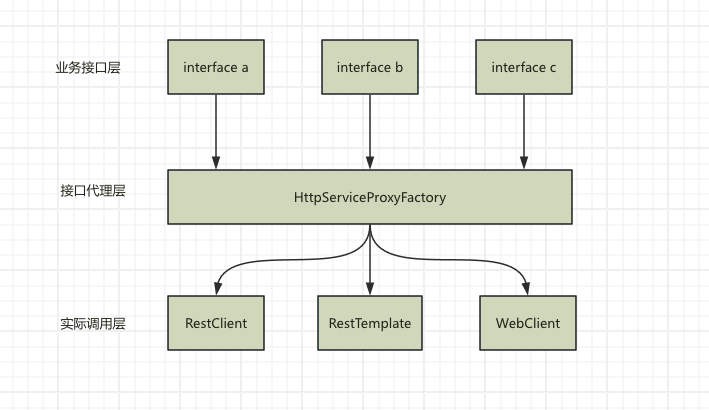
通过上面的架构图,我们可以看出,HTTP Interface并不是响应式web(webFlux)独有的,而是可以通过自由的组合底层的http客户端实现, 来支持不同的场景,也就是说servlet阻塞式web也支持。
再次印证了技术圈的那句老话:
没有问题不是通过加一层不能解决,如果不行,那就再加一层
2.1 RestClient
多说一句RestClient,大家可能对RestTemplate和WebClient很熟悉了,一个数阻塞式web请求常青树,一个是响应式web请求客户端。
但是RestTemplate 相对于 WebClient 来说太难用了,语法繁琐,解析不变。 所以spring6.1版本 引入了RestClient这一实现。
安装官方的解释:
The RestClient offers a more modern API for synchronous HTTP access. RestTemplate uses the same HTTP library abstraction as RestClient. 翻译:RestTemplate和RestClient使用相同的HTTP库, 但是RestClient提供了一种现代的HTTP访问API,方便大家使用。
RestClient的使用demo:
int id = 1;
Pet pet = restClient.get()
  .uri("https://petclinic.example.com/pets/{id}", id)
  .accept(APPLICATION_JSON)
  .retrieve()
  .body(Pet.class);
是不是很简洁,现代的很多http客户端都是这种流式调用语法糖,比如okhttp、java原生的HTTPClient等
2.2 HttpExchange
HTTP Interface的核心注解,可以放到一个java接口类上,也可以放到一个接口方法上。通feign一样,可以同步使用spring-web体系下的相关的注解,比如@PathVariable、@RequestParam等,
这些可以在controller里能够正常使用的注解,都可以无缝的在@HttpExchange注解标记的接口或方法上使用。
在方法上使用:
interface RepositoryService {

    @GetExchange("/repos/{owner}/{repo}")
    Repository getRepository(@PathVariable String owner, @PathVariable String repo);

    // more HTTP exchange methods...

}
在类上使用:
@HttpExchange(url = "/repos/{owner}/{repo}", accept = "application/vnd.github.v3+json")
interface RepositoryService {

    @GetExchange
    Repository getRepository(@PathVariable String owner, @PathVariable String repo);

    @PatchExchange(contentType = MediaType.APPLICATION_FORM_URLENCODED_VALUE)
    void updateRepository(@PathVariable String owner, @PathVariable String repo,
          @RequestParam String name, @RequestParam String description, @RequestParam String homepage);

}
看到这里,大家会有一个疑问, 第三方调研的域名地址在哪里配置呢?
在feign里,我们在@FeignClient注解里,可以通过url属性来指定域名地址,但是HTTP Interface不行,需要在接口对应的代理bean里配置对应的域名地址,这里不如feign好用。
我们上面配置的接口RepositoryService必须手动注册到HttpServiceProxyFactory里才生效,不然无法使用。
在这里,我们可以自己指定底层实际的http客户端。
- RestClient
@Bean
public RepositoryService repositoryService(){
    RestClient restClient = RestClient.builder().baseUrl("https://api.github.com/").build();
    RestClientAdapter adapter = RestClientAdapter.create(restClient);
    HttpServiceProxyFactory factory = HttpServiceProxyFactory.builderFor(adapter).build();

    RepositoryService service = factory.createClient(RepositoryService.class);
}
- WebClient
@Bean
public RepositoryService repositoryService(){
    WebClient webClient = WebClient.builder().baseUrl("https://api.github.com/").build();
    WebClientAdapter adapter = WebClientAdapter.create(webClient);
    HttpServiceProxyFactory factory = HttpServiceProxyFactory.builderFor(adapter).build();

    RepositoryService service = factory.createClient(RepositoryService.class);
}
- RestTemplate
public RepositoryService repositoryService(){
    RestTemplate restTemplate = new RestTemplate();
    restTemplate.setUriTemplateHandler(new DefaultUriBuilderFactory("https://api.github.com/"));
    RestTemplateAdapter adapter = RestTemplateAdapter.create(restTemplate);
    HttpServiceProxyFactory factory = HttpServiceProxyFactory.builderFor(adapter).build();

    RepositoryService service = factory.createClient(RepositoryService.class);
}
然后,我们的接口RepositoryService就注册成spring容器里的一个bean,可以在任何地方注入了。
2.3 HttpExchange的变种
spring官方对@HttpExchange注解,提供了一些扩展,方便使用:
- GetExchange
- PostExchange
- PutExchange
- PatchExchange
- DeleteExchange
3. 上代码
好了,我们来写一个简单的例子,看看HTTP Interface的使用。
3.1 业务接口
这是我们项目里的业务接口,定义了HTTP Interface的接口定义,通过@GetExchange注解来定义接口
public interface TestApi {

    @GetExchange(value = "/queryTest",accept = "application/json")
    TestRes test(@RequestParam(value = "pageNum",defaultValue = "1") int pageNum,
                     @RequestParam(value = "pageSize",defaultValue = "10") int pageSize,
                     @RequestParam(value = "jobName",required = false) String jobName

    );
}
返回结果会自动封装到TestRes对象中
@Data
public  class TestBaseRes {
    private String msg;
    private Integer code;
    private Boolean success;

}

@Data
public class TestRes extends TestBaseRes {

    private TestData data;


    @Data
    public static class TestData {
        private Integer total;
        private JSONArray rows;

    }
}
3.2 注册代理类
将TestApi配置到代理类中,并指定请求域名:
@Configuration
public class TestConfig {
    @Bean
    public TestApi testApi() {
        RestClient restClient = RestClient.builder().baseUrl("http://localhost:8080/").build();
        RestClientAdapter adapter = RestClientAdapter.create(restClient);
        HttpServiceProxyFactory factory = HttpServiceProxyFactory.builderFor(adapter).build();

        return factory.createClient(TestApi.class);
    }
}
3.3 使用接口
@Autowired
TestApi testApi;
完整代码可以查看我的github: spring6.x http interface demo