选择器选项太多时,需要分页加载选项,且需要支持模糊搜索,目前Vant UI
提供的选择器组件不支持,因此封装一个H5选择器组件。
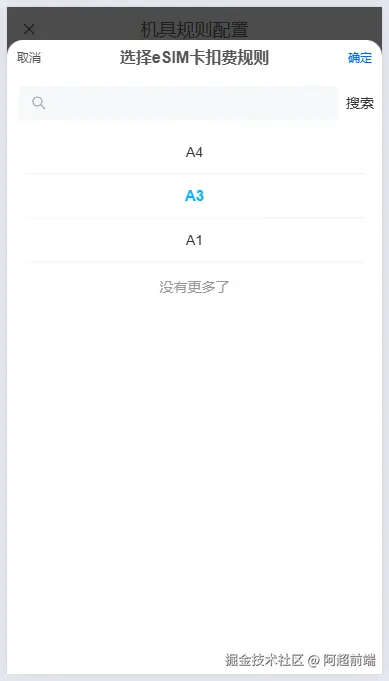
组件封装
<template>
  <div class="picker-by-paging">
    <van-popup
      v-model:show="props.show"
      round
      position="bottom"
      style="height: 95%"
      :close-on-click-overlay="false"
    >
      <div class="picker-hidder">
        <div @click="onCancel">取消</div>
        <div class="title">{{ pickerTitle }}</div>
        <div @click="onConfirm" style="color: #0267ff">确定</div>
      </div>
      <van-search
        v-model="searchValue"
        show-action
        @search="search"
        v-if="showSearch"
      >
        <template #action>
          <div @click="search">搜索</div>
        </template>
      </van-search>
      <div v-else style="height: 15px"></div>
      <div class="picker-content" :class="{ 'no-search': !showSearch }">
        <van-list
          v-model:loading="loading"
          :finished="finished"
          finished-text="没有更多了"
          @load="getData"
        >
          <van-cell
            v-for="(item, index) in list"
            :key="index"
            :title="item.text"
            class="picker-item"
            :class="{ active: item.value === selected?.value }"
            @click="handleSelect(item)"
          >
          </van-cell>
        </van-list>
      </div>
    </van-popup>
  </div>
</template>

<script setup lang="ts">
import { ref } from "vue";
import { ITextValue } from "@/type/base";
import { useRequest } from "@xus/vue-reuse";
import { Toast } from "vant";
interface props {
  show: boolean;
  selectedItem?: ITextValue | null;
  pickerTitle?: string;
  showSearch?: boolean;
  initParams?: any;
  pageSize?: number;
  searchKey?: string;
  getListApi: (any) => any;
}
const props = withDefaults(defineProps<props>(), {
  show: false,
  selectedItem: null,
  pickerTitle: "",
  showSearch: true,
  initParams: {},
  pageSize: 20,
  searchKey: "",
  getListApi: () => Promise.resolve([]),
});
const emit = defineEmits(["update:show", "on-confirm"]);
const searchValue = ref("");
const list = ref<ITextValue[]>([]);
const loading = ref(false);
const finished = ref(false);
const page = ref({
  pageNum: 1,
  pageSize: props.pageSize,
});
const { run: getList } = useRequest(props.getListApi, {
  manual: true,
  onSuccess: (res) => {
    if (page.value.pageNum >= res.pages) {
      finished.value = true;
    }
    list.value.push(...res.data);
    loading.value = false;
    page.value.pageNum++;
  },
  onError: (err) => {
    loading.value = false;
    finished.value = true;
    Toast(err.message);
  },
});
const getData = () => {
  const req = {
    ...props.initParams,
    ...page.value,
  };
  req[props.searchKey] = searchValue.value || undefined;
  getList(req);
};
const search = () => {
  list.value = [];
  page.value.pageNum = 1;
  getData();
};
const selected = ref(props.selectedItem);
const handleSelect = (item) => {
  selected.value = item;
};
const onCancel = () => {
  emit("update:show", false);
};
const onConfirm = () => {
  if (!selected.value?.value) {
    Toast("请选择");
    return;
  }
  emit("on-confirm", selected.value);
  emit("update:show", false);
};
</script>

<style lang="scss" scoped>
.picker-by-paging {
  color: #555;
}
.picker-hidder {
  padding: 10px;
  display: flex;
  justify-content: space-between;
  line-height: 16px;
  .title {
    font-size: 16px;
    font-weight: bold;
  }
}
.picker-content {
  min-height: 50%;
  max-height: calc(100% - 92px);
  overflow-y: scroll;
  .picker-item {
    text-align: center;
  }
  .active {
    color: #02aefdf9;
    font-weight: bold;
    font-size: 15px;
  }
}
.no-search {
  max-height: calc(100% - 38px);
}
</style>
使用组件
<PickerByPaging
  v-if="showPickerByPaging"
  v-model:show="showPickerByPaging"
  :selectedItem="selectedItem"
  :pickerTitle="pickerTitle"
  :showSearch="showSearch"
  :searchKey="searchKey"
  :initParams="initParams"
  :pageSize="30"
  :getListApi="getListByPage"
  @on-confirm="pickerConfirm"
/>
<script lang="ts" setup>
  import PickerByPaging from "@/components/Picker/PickerByPaging.vue";
</script>
export const getPolicyListByPage = async (req: any): Promise<any> => {
  const res: any = await request.get(
    `/xxx/xxx`,
    { params: req }
  );
  const data = res.records.map((item) => {
    return {
      value: item.code,
      text: item.name,
    };
  });
  return { data, pages: res.pages, total: res.total };
};
组件参数配置
| 参数 | 说明 | 类型 | 默认值 | 是否必传 |
|---|
| show | 是否弹出选择器 | boolean | false | 是 |
| selectedItem | 当前选中的选项 | ITextValue | null | 否 |
| pickerTitle | 弹窗标题 | String | '' | 否 |
| showSearch | 是否显示搜索框 | boolean | true | 否 |
| searchKey | 搜索的字段名称 | String | '' | 否 |
| initParams | 请求时的附加参数 | object | {} | 否 |
| pageSize | 每页请求的数据条数 | number | 20 | 否 |
| getListApi | 请求方法 | Function | () => Promise.resolve([]) | 是 |
组件事件
| 方法名 | 说明 | 回调参数 | 是否必传 |
|---|
| onConfirm | 选中选项,点击确定时出发 | 当前选中的选项 | 否 |