效果图如下:
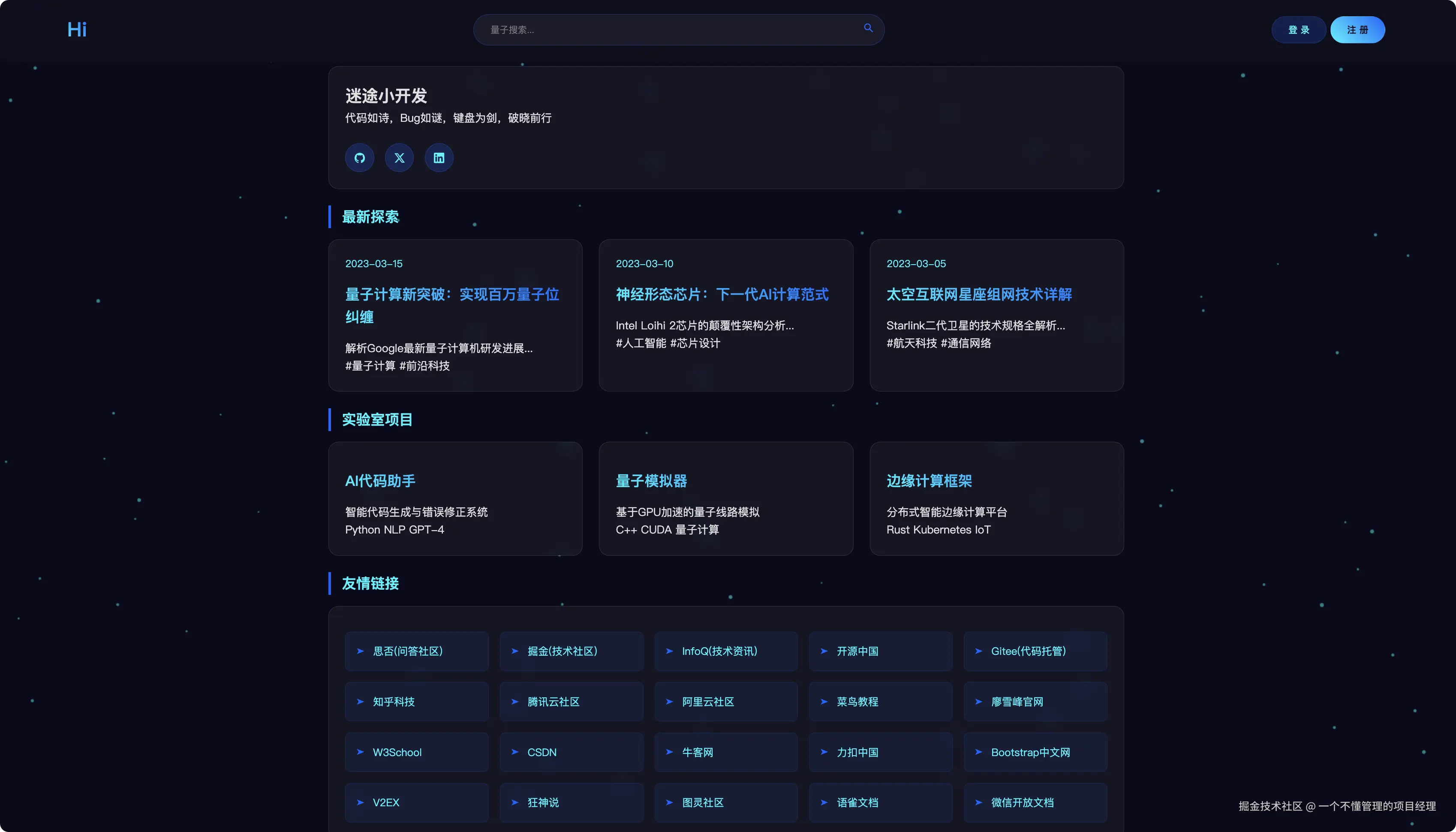
代码如下:
<!DOCTYPE html>
<html lang="zh-CN">
<head>
<meta charset="UTF-8">
<meta name="viewport" content="width=device-width, initial-scale=1.0">
<title>Hi 博客</title>
<style>
:root {
--bg-color: #0a0a1a;
--text-color: #e0e0e0;
--accent-1: #00f3ff;
--accent-2: #0066ff;
--nav-bg: rgba(16,16,32,0.9);
--card-bg: rgba(255,255,255,0.05);
}
[data-theme="light"] {
--bg-color: #f5f7fa;
--text-color: #2c3e50;
--nav-bg: rgba(255,255,255,0.9);
--card-bg: rgba(0,0,0,0.03);
--accent-1: #0066ff;
--accent-2: #00b8d4;
}
* {
margin: 0;
padding: 0;
box-sizing: border-box;
font-family: 'Segoe UI', 'Roboto', sans-serif;
}
body {
background: var(--bg-color);
color: var(--text-color);
line-height: 1.6;
overflow-x: hidden;
}
#particles-canvas {
position: fixed;
top: 0;
left: 0;
z-index: -1;
}
.navbar {
padding: 1.5rem 5%;
background: var(--nav-bg);
backdrop-filter: blur(10px);
position: fixed;
width: 100%;
top: 0;
z-index: 1000;
display: flex;
justify-content: space-between;
align-items: center;
gap: 2rem;
}
.nav-search {
flex: 1;
max-width: 600px;
position: relative;
}
.search-input {
width: 100%;
padding: 0.8rem 1.5rem;
border-radius: 50px;
background: rgba(255,255,255,0.05);
border: 1px solid rgba(0,102,255,0.3);
border-color: rgba(0,102,255,0.3);
color: #00f3ff;
transition: all 0.3s;
padding-right: 45px;
}
.search-input:focus {
outline: none;
box-shadow: 0 0 15px rgba(0,102,255,0.2);
}
.search-btn {
position: absolute;
right: 15px;
top: 50%;
transform: translateY(-50%);
background: none;
border: none;
cursor: pointer;
}
.search-btn svg {
fill: #0066ff;
transition: fill 0.3s;
}
.search-btn:hover svg {
fill: #00f3ff;
}
.nav-brand {
font-size: 1.8rem;
background: linear-gradient(45deg, #00f3ff, #0066ff);
-webkit-background-clip: text;
-webkit-text-fill-color: transparent;
font-weight: 700;
}
.nav-menu {
display: flex;
gap: 2rem;
list-style: none;
}
.social-btn svg {
width: 24px;
height: 24px;
fill: #00f3ff;
transition: all 0.3s;
}
.social-btn:hover svg {
fill: #0066ff;
transform: scale(1.2);
}
.social-links {
display: flex;
gap: 1rem;
margin-top: 1.5rem;
}
.social-btn:hover {
background: rgba(0, 102, 255, 0.4);
box-shadow: 0 0 15px rgba(0, 102, 255, 0.3);
}
.social-btn {
background: rgba(0, 102, 255, 0.2);
border: 1px solid rgba(0, 102, 255, 0.3);
padding: 0.8rem;
border-radius: 50%;
display: flex;
justify-content: center;
align-items: center;
width: 42px;
height: 42px;
}
.nav-link {
color: var(--accent-1);
text-decoration: none;
position: relative;
padding: 0.5rem 1rem;
transition: 0.3s;
}
.nav-link::after {
content: '';
position: absolute;
bottom: 0;
left: 0;
width: 0;
height: 2px;
background: #00f3ff;
transition: 0.3s;
}
.nav-link:hover::after {
width: 100%;
}
.container {
max-width: 1200px;
margin: 100px auto 50px;
padding: 0 20px;
}
.card-grid {
display: grid;
grid-template-columns: repeat(auto-fit, minmax(300px, 1fr));
gap: 1.5rem;
margin-top: 1rem;
}
.card {
background: var(--card-bg);
border-radius: 15px;
padding: 1.5rem;
backdrop-filter: blur(10px);
border: 1px solid rgba(255, 255, 255, 0.1);
transition: transform 0.3s, box-shadow 0.3s;
cursor: pointer;
}
.card:hover {
transform: translateY(-2px);
box-shadow: 0 10px 30px rgba(0, 102, 255, 0.2);
}
.card-date {
color: var(--accent-1);
font-size: 0.9rem;
}
.card-title {
margin: 1rem 0;
font-size: 1.3rem;
background: linear-gradient(45deg, var(--accent-1), var(--accent-2));
-webkit-background-clip: text;
-webkit-text-fill-color: transparent;
}
.link-grid {
display: grid;
grid-template-columns: repeat(auto-fill, minmax(200px, 1fr));
gap: 1rem;
margin-top: 0.8rem;
}
.link-card {
padding: 1rem;
border-radius: 8px;
background: rgba(0, 102, 255, 0.08);
border: 1px solid rgba(0, 102, 255, 0.15);
color: #00f3ff;
transition: all 0.3s;
text-decoration: none;
display: flex;
align-items: center;
font-size: 0.95em;
}
.link-card:before {
content: "➤";
margin-right: 0.8rem;
color: #0066ff;
font-size: 0.8em;
}
.link-card:hover {
background: rgba(0, 102, 255, 0.2);
transform: translateX(0px);
box-shadow: 2px 0 10px rgba(0,102,255,0.2);
}
.sidebar {
margin-top: 3rem;
padding: 2rem;
background: rgba(16, 16, 32, 0.8);
border-radius: 15px;
}
.widget-title {
color: var(--accent-1);
border-left: 4px solid #0066ff;
padding-left: 1rem;
margin: 1.5rem 0 1rem !important;
font-size: 1.3em;
}
.nav-btn {
padding: 0.6rem 1.5rem;
border-radius: 20px;
font-weight: 500;
transition: all 0.3s;
border: 1px solid transparent;
}
.login-btn {
background: rgba(0,102,255,0.2);
color: #00f3ff;
border-color: rgba(0,102,255,0.3);
}
.register-btn {
background: linear-gradient(45deg, #00f3ff, #0066ff);
color: #0a0a1a;
}
.nav-btn:hover {
transform: translateY(-1px);
box-shadow: 0 5px 15px rgba(0,102,255,0.3);
}
@media (max-width: 768px) {
.navbar {
flex-wrap: wrap;
gap: 1rem;
padding: 1rem 5%;
}
.nav-search {
order: 3;
width: 100%;
max-width: none;
}
.nav-btn {
padding: 0.5rem 1rem;
font-size: 0.9em;
}
.nav-menu {
display: none;
}
.widget-title {
margin: 1.5rem 0 0.8rem;
}
.card-grid {
gap: 1rem;
margin-top: 0.8rem;
grid-template-columns: 1fr;
}
.nav-actions {
display: flex;
gap: 1rem;
margin-left: auto;
}
.link-grid {
grid-template-columns: repeat(auto-fill, minmax(150px, 1fr));
}
.link-card {
padding: 0.8rem;
font-size: 0.85em;
}
}
</style>
</head>
<body>
<canvas id="particles-canvas"></canvas>
<nav class="navbar">
<div class="nav-brand">
Hi
</div>
<div class="nav-search">
<input type="text"
placeholder="量子搜索..."
class="search-input"
aria-label="站内搜索">
<button class="search-btn">
<svg viewBox="0 0 24 24" width="18" height="18">
<path d="M15.5 14h-.79l-.28-.27a6.5 6.5 0 0 0 1.48-5.34c-.47-2.78-2.79-5-5.59-5.34a6.505 6.505 0 0 0-7.27 7.27c.34 2.8 2.56 5.12 5.34 5.59a6.5 6.5 0 0 0 5.34-1.48l.27.28v.79l4.25 4.25c.41.41 1.08.41 1.49 0 .41-.41.41-1.08 0-1.49L15.5 14zm-6 0C7.01 14 5 11.99 5 9.5S7.01 5 9.5 5 14 7.01 14 9.5 11.99 14 9.5 14z"/>
</svg>
</button>
</div>
<div class="nav-actions">
<button class="nav-btn login-btn">登 录</button>
<button class="nav-btn register-btn">注 册</button>
</div>
</nav>
<div class="container">
<section class="card">
<h2>迷途小开发</h2>
<p>代码如诗,Bug如谜,键盘为剑,破晓前行</p>
<div class="social-links">
<button class="social-btn">
<svg role="img" viewBox="0 0 24 24" xmlns="http://www.w3.org/2000/svg">
<path d="M12 .297c-6.63 0-12 5.373-12 12 0 5.303 3.438 9.8 8.205 11.385.6.113.793-.258.793-.577 0-.285-.01-1.04-.015-2.04-3.338.724-4.042-1.61-4.042-1.61C4.422 18.07 3.633 17.7 3.633 17.7c-1.087-.744.084-.729.084-.729 1.205.084 1.838 1.236 1.838 1.236 1.07 1.835 2.809 1.305 3.495.998.108-.776.417-1.305.76-1.605-2.665-.3-5.466-1.332-5.466-5.93 0-1.31.465-2.38 1.235-3.22-.135-.303-.54-1.523.105-3.176 0 0 1.005-.322 3.3 1.23.96-.267 1.98-.399 3-.405 1.02.006 2.04.138 3 .405 2.28-1.552 3.285-1.23 3.285-1.23.645 1.653.24 2.873.12 3.176.765.84 1.23 1.91 1.23 3.22 0 4.61-2.805 5.625-5.475 5.92.42.36.81 1.096.81 2.22 0 1.606-.015 2.896-.015 3.286 0 .315.21.69.825.57C20.565 22.092 24 17.592 24 12.297c0-6.627-5.373-12-12-12"/>
</svg>
</button>
<button class="social-btn">
<svg role="img" viewBox="0 0 24 24" xmlns="http://www.w3.org/2000/svg">
<path d="M18.901 1.153h3.68l-8.04 9.19L24 22.846h-7.406l-5.8-7.584-6.638 7.584H.474l8.6-9.83L0 1.154h7.594l5.243 6.932ZM17.61 20.644h2.039L6.486 3.24H4.298Z"/>
</svg>
</button>
<button class="social-btn">
<svg role="img" viewBox="0 0 24 24" xmlns="http://www.w3.org/2000/svg">
<path d="M20.447 20.452h-3.554v-5.569c0-1.328-.027-3.037-1.852-3.037-1.853 0-2.136 1.445-2.136 2.939v5.667H9.351V9h3.414v1.561h.046c.477-.9 1.637-1.85 3.37-1.85 3.601 0 4.267 2.37 4.267 5.455v6.286zM5.337 7.433c-1.144 0-2.063-.926-2.063-2.065 0-1.138.92-2.063 2.063-2.063 1.14 0 2.064.925 2.064 2.063 0 1.139-.925 2.065-2.064 2.065zm1.782 13.019H3.555V9h3.564v11.452zM22.225 0H1.771C.792 0 0 .774 0 1.729v20.542C0 23.227.792 24 1.771 24h20.451C23.2 24 24 23.227 24 22.271V1.729C24 .774 23.2 0 22.222 0h.003z"/>
</svg>
</button>
</div>
</section>
<h2 class="widget-title">最新探索</h2>
<div class="card-grid" id="articles-grid">
</div>
<h2 class="widget-title">实验室项目</h2>
<div class="card-grid" id="projects-grid">
</div>
<h2 class="widget-title">友情链接</h2>
<section class="card">
<div class="link-grid">
<a href="https://segmentfault.com/" target="_blank" class="link-card">思否(问答社区)</a>
<a href="https://juejin.cn/" target="_blank" class="link-card">掘金(技术社区)</a>
<a href="https://www.infoq.cn/" target="_blank" class="link-card">InfoQ(技术资讯)</a>
<a href="https://www.oschina.net/" target="_blank" class="link-card">开源中国</a>
<a href="https://gitee.com/" target="_blank" class="link-card">Gitee(代码托管)</a>
<a href="https://www.zhihu.com/technology" target="_blank" class="link-card">知乎科技</a>
<a href="https://cloud.tencent.com/developer" target="_blank" class="link-card">腾讯云社区</a>
<a href="https://developer.aliyun.com/" target="_blank" class="link-card">阿里云社区</a>
<a href="https://www.runoob.com/" target="_blank" class="link-card">菜鸟教程</a>
<a href="https://www.liaoxuefeng.com/" target="_blank" class="link-card">廖雪峰官网</a>
<a href="https://www.w3school.com.cn/" target="_blank" class="link-card">W3School</a>
<a href="https://www.csdn.net/" target="_blank" class="link-card">CSDN</a>
<a href="https://www.nowcoder.com/" target="_blank" class="link-card">牛客网</a>
<a href="https://leetcode.cn/" target="_blank" class="link-card">力扣中国</a>
<a href="https://www.bootcss.com/" target="_blank" class="link-card">Bootstrap中文网</a>
<a href="https://v2ex.com/" target="_blank" class="link-card">V2EX</a>
<a href="https://www.kuangstudy.com/" target="_blank" class="link-card">狂神说</a>
<a href="https://www.ituring.com.cn/" target="_blank" class="link-card">图灵社区</a>
<a href="https://www.yuque.com/" target="_blank" class="link-card">语雀文档</a>
<a href="https://developers.weixin.qq.com/" target="_blank" class="link-card">微信开放文档</a>
</div>
</section>
</div>
<script>
document.querySelectorAll('.social-btn').forEach(btn => {
btn.addEventListener('click', (e) => {
const platforms = {
0: 'https://github.com/yourprofile',
1: 'https://twitter.com/yourhandle',
2: 'https://linkedin.com/in/yourid'
};
window.open(platforms[e.currentTarget.closest('.social-links').children.length - 1 - Array.from(e.currentTarget.parentNode.children).indexOf(e.currentTarget)], '_blank');
});
});
function initParticles() {
const canvas = document.getElementById('particles-canvas');
const ctx = canvas.getContext('2d');
canvas.width = window.innerWidth;
canvas.height = window.innerHeight;
const particles = [];
class Particle {
constructor() {
this.x = Math.random() * canvas.width;
this.y = Math.random() * canvas.height;
this.size = Math.random() * 2 + 1;
this.speedX = Math.random() * 3 - 1.5;
this.speedY = Math.random() * 3 - 1.5;
}
update() {
this.x += this.speedX;
this.y += this.speedY;
if (this.x > canvas.width) this.x = 0;
if (this.x < 0) this.x = canvas.width;
if (this.y > canvas.height) this.y = 0;
if (this.y < 0) this.y = canvas.height;
}
draw() {
ctx.fillStyle = 'rgba(0, 243, 255, 0.5)';
ctx.beginPath();
ctx.arc(this.x, this.y, this.size, 0, Math.PI * 2);
ctx.fill();
}
}
function animate() {
ctx.clearRect(0, 0, canvas.width, canvas.height);
particles.forEach(particle => {
particle.update();
particle.draw();
});
requestAnimationFrame(animate);
}
for (let i = 0; i < 100; i++) {
particles.push(new Particle());
}
window.addEventListener('resize', () => {
canvas.width = window.innerWidth;
canvas.height = window.innerHeight;
});
animate();
}
const articles = [
{
title: "量子计算新突破:实现百万量子位纠缠",
date: "2023-03-15",
summary: "解析Google最新量子计算机研发进展...",
tags: ["量子计算", "前沿科技"]
},
{
title: "神经形态芯片:下一代AI计算范式",
date: "2023-03-10",
summary: "Intel Loihi 2芯片的颠覆性架构分析...",
tags: ["人工智能", "芯片设计"]
},
{
title: "太空互联网星座组网技术详解",
date: "2023-03-05",
summary: "Starlink二代卫星的技术规格全解析...",
tags: ["航天科技", "通信网络"]
}
];
const projects = [
{
name: "AI代码助手",
tech: ["Python", "NLP", "GPT-4"],
desc: "智能代码生成与错误修正系统"
},
{
name: "量子模拟器",
tech: ["C++", "CUDA", "量子计算"],
desc: "基于GPU加速的量子线路模拟"
},
{
name: "边缘计算框架",
tech: ["Rust", "Kubernetes", "IoT"],
desc: "分布式智能边缘计算平台"
}
];
function renderContent() {
const articlesGrid = document.getElementById('articles-grid');
const projectsGrid = document.getElementById('projects-grid');
articles.forEach(article => {
const articleHTML = `
<article class="card">
<div class="card-date">${article.date}</div>
<h3 class="card-title">${article.title}</h3>
<p>${article.summary}</p>
<div class="card-tags">
${article.tags.map(tag => `<span>#${tag}</span>`).join(' ')}
</div>
</article>
`;
articlesGrid.insertAdjacentHTML('beforeend', articleHTML);
});
projects.forEach(project => {
const projectHTML = `
<div class="card">
<h3 class="card-title">${project.name}</h3>
<p>${project.desc}</p>
<div class="tech-stack">
${project.tech.map(t => `<code>${t}</code>`).join(' ')}
</div>
</div>
`;
projectsGrid.insertAdjacentHTML('beforeend', projectHTML);
});
}
window.onload = () => {
initParticles();
renderContent();
document.querySelectorAll('.card-tags span, .tech-stack code').forEach(tag => {
tag.addEventListener('mouseover', () => {
tag.style.background = 'rgba(0, 243, 255, 0.2)';
});
tag.addEventListener('mouseout', () => {
tag.style.background = 'transparent';
});
});
};
</script>
</body>
</html>