在本教程中,我将演示如何使用LangChain代理利用 OpenAI 的 GPT3.5 模型创建自定义数学应用程序。对于应用程序前端,我将使用Chainlit,这是一个易于使用的开源 Python 框架。这个生成数学应用程序,我们称之为“Math Wiz”,旨在帮助用户解决数学或推理/逻辑问题。
环境设置
我们可以先创建一个新conda环境python=3.11.
conda create -n math_assistant python=3.11
激活环境:
conda activate math_assistant
接下来,让我们安装所有必要的库:
pip install -r requirements.txt
在OpenAI注册并获取您自己的密钥,以开始调用 gpt 模型。获得密钥后,.env在您的存储库中创建一个文件并存储 OpenAI 密钥:
OPENAI_API_KEY="your_openai_api_key"
申请流程
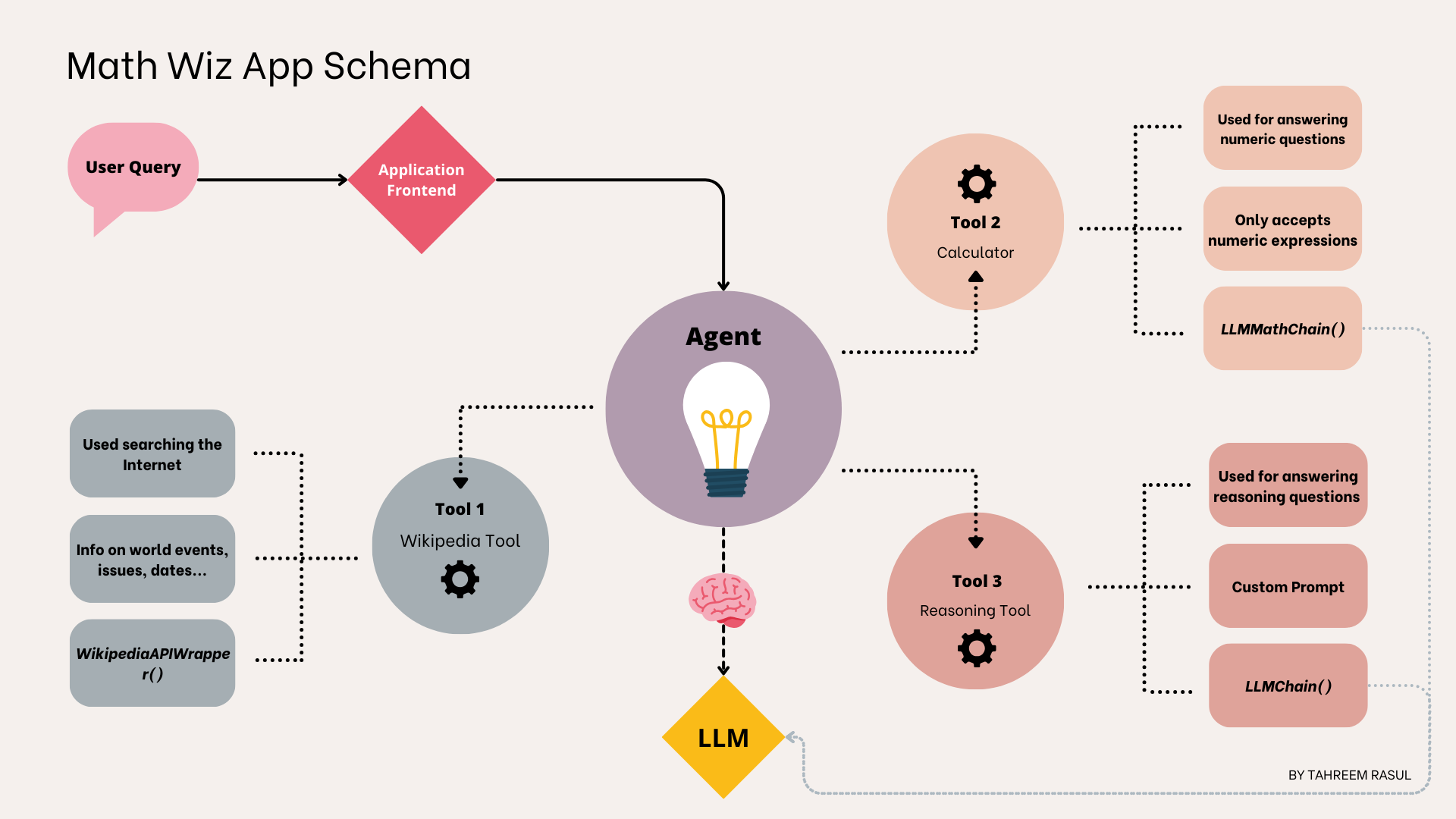
下面的流程图概述了 Math Wiz 的应用程序流程。我们管道中的代理将拥有一组可用于回答用户查询的工具。大型语言模型 (LLM) 充当代理的“大脑”,指导其决策。当用户提交问题时,代理使用 LLM 选择最合适的工具或工具组合来提供答案。如果代理确定需要多个工具,它还将指定使用这些工具的顺序。

LangChain 代理解构。作者插图
我们的 Math Wiz 应用程序的代理将使用以下工具:
- 维基百科工具: 此工具将负责使用维基百科 API 从维基百科获取最新信息。虽然有付费工具和 API 可以集成到 LangChain 中,但我会使用维基百科作为应用程序的在线信息来源。
- 计算器工具: 此工具负责解决用户的数学查询。这包括任何涉及数值计算的问题。例如,如果用户询问 4 的平方根是多少,此工具就很合适。
- 推理工具: 我们应用程序设置中的最后一个工具是推理工具,负责处理基于逻辑/推理的用户查询。任何数学应用题也应该用这个工具来处理。
现在我们有了粗略的应用程序设计,我们可以开始考虑构建这个应用程序了。
了解 LangChain 代理
LangChain 代理旨在通过为更复杂、更具交互性的任务提供接口来增强与语言模型的交互。我们可以将代理视为用户和大型语言模型之间的中介。代理试图将看似复杂的用户查询(我们的 LLM 可能无法单独解决)分解为更简单、可操作的步骤。
在我们的应用程序流程中,我们定义了一些不同的工具,这些工具是我们希望用于数学应用程序的。根据用户输入,代理应决定使用其中的哪一个工具。如果不需要某个工具,则不应使用它。LangChain 代理可以为我们简化此过程。这些代理使用语言模型来选择要采取的一系列操作。本质上,LLM 充当代理的“大脑”,指导代理使用哪种工具进行特定查询以及按照何种顺序使用。这与 LangChain 链不同,LangChain 链的操作顺序是硬编码在代码中的。LangChain 提供了一套可以与代理集成的工具。这些工具包括但不限于在线搜索工具、基于 API 的工具、基于链的工具等。有关 LangChain 代理及其类型的更多信息,请参阅此处。
实现
步骤 1
创建chatbot.py脚本并导入必要的依赖项:
from langchain_openai import OpenAI
from langchain.chains import LLMMathChain, LLMChain
from langchain.prompts import PromptTemplate
from langchain_community.utilities import WikipediaAPIWrapper
from langchain.agents.agent_types import AgentType
from langchain.agents import Tool, initialize_agent
from dotenv import load_dotenv

load_dotenv()
第 2 步
接下来,我们将定义基于 OpenAI 的语言模型。LangChain 提供了langchain-openai可用于定义 OpenAI 模型实例的包。我们将使用gpt-3.5-turbo-instruct来自 OpenAI 的模型。该dotenv包已经处理了 API 密钥,因此您无需在此处明确定义它:
llm = OpenAI(model='gpt-3.5-turbo-instruct',
             temperature=0)
我们将在数学和推理链中使用这个ChatGPT,并将其作为我们代理的决策者。
步骤3
在构建自己的代理时,您需要为其提供可以使用的工具列表。除了调用的实际函数外,还Tool包含其他一些参数:
name(str) 是必需的,并且在提供给代理的一组工具中必须是唯一的description(str),是可选的,但建议使用,因为代理使用它来确定工具的使用情况
我们现在将创建三个工具。第一个将是使用 Wikipedia API 包装器的在线工具:
wikipedia = WikipediaAPIWrapper()
wikipedia_tool = Tool(name="Wikipedia",
                      func=wikipedia.run,
                  description="A useful tool for searching the Internet
to    find information on world events, issues, dates, years, etc. Worth
using for general topics. Use precise questions.")
在上面的代码中,我们定义了 Wikipedia API 包装器的一个实例。之后,我们将其包装在 LangChain 中Tool,并添加名称、功能和描述。
接下来,让我们定义用于计算任何数值表达式的工具。LangChain 提供LLMMathChain使用numexprPython 库来计算数学表达式的工具。明确定义此工具的用途也很重要。描述可以帮助代理决定从一组工具中为特定用户查询使用哪个工具。对于基于链的工具,我们将使用方法Tool.from_function()。
problem_chain = LLMMathChain.from_llm(llm=llm)
math_tool = Tool.from_function(name="Calculator",
                func=problem_chain.run,
                 description="Useful for when you need to answer questions
about math. This tool is only for math questions and nothing else. Only input
math expressions.")
最后,我们将定义基于逻辑/推理的查询工具。我们将首先创建一个提示来指示模型执行特定任务。然后我们将LLMChain为该工具创建一个简单的提示,将 LLM 和提示传递给它。
word_problem_template = """You are a reasoning agent tasked with solving
the user's logic-based questions. Logically arrive at the solution, and be
factual. In your answers, clearly detail the steps involved and give the
final answer. Provide the response in bullet points.
Question  {question} Answer"""

math_assistant_prompt = PromptTemplate(input_variables=["question"],
                                       template=word_problem_template
                                       )
word_problem_chain = LLMChain(llm=llm,
                              prompt=math_assistant_prompt)
word_problem_tool = Tool.from_function(name="Reasoning Tool",
                                       func=word_problem_chain.run,
                                       description="Useful for when you need
to answer logic-based/reasoning questions.",
                                    )
步骤4
现在,我们将使用上面创建的工具初始化我们的代理。我们还将指定 LLM 来帮助它选择使用哪些工具以及使用顺序:
agent = initialize_agent(
    tools=[wikipedia_tool, math_tool, word_problem_tool],
    llm=llm,
    agent=AgentType.ZERO_SHOT_REACT_DESCRIPTION,
    verbose=False,
    handle_parsing_errors=True
)

print(agent.invoke(
    {"input": "I have 3 apples and 4 oranges. I give half of my oranges
               away and buy two dozen new ones, alongwith three packs of
               strawberries. Each pack of strawberry has 30 strawberries.
               How  many total pieces of fruit do I have at the end?"}))

应用程序对逻辑问题的回答
创建 Chainlit 应用程序
我们将使用开源 Python 框架Chainlit来构建我们的应用程序。借助Chainlit,您只需几行简单的代码即可构建对话式 AI 应用程序。为了更深入地了解 Chainlit 的功能以及应用程序的设置方式,您可以查看我的文章:
我们将在应用程序中使用两个装饰器函数。它们分别是@cl.on_chat_start和@cl.on_message装饰器函数。@cl.on_chat_start将负责包装在启动用户会话时应执行的所有代码。@cl.on_message将包含我们希望在用户发送查询时执行的代码位。
让我们用这两个装饰函数重构我们的chatbot.py脚本。首先将chainlit包导入到我们的chatbot.py脚本中:
import chainlit as cl
接下来,让我们围绕装饰器函数编写包装器函数@cl.on_chat_start。我们将向此函数添加我们的 LLM、工具和代理初始化代码。我们将存储agent在用户会话内的变量中,以便在用户发送消息时检索。
@cl.on_chat_start
def math_chatbot():
    llm = OpenAI(model='gpt-3.5-turbo-instruct',
                 temperature=0)

  # prompt for reasoning based tool
    word_problem_template = """You are a reasoning agent tasked with solving t he user's logic-based questions. Logically arrive at the solution, and be factual. In your answers, clearly detail the steps involved and give the final answer. Provide the response in bullet points. Question  {question} Answer"""

    math_assistant_prompt = PromptTemplate(
        input_variables=["question"],
        template=word_problem_template
    )

  # chain for reasoning based tool
    word_problem_chain = LLMChain(llm=llm,
                                  prompt=math_assistant_prompt)
    # reasoning based tool
    word_problem_tool = Tool.from_function(name="Reasoning Tool",
                                           func=word_problem_chain.run,
                                           description="Useful for when you need to answer logic-based/reasoning questions."
                                           )
  # calculator tool for arithmetics
    problem_chain = LLMMathChain.from_llm(llm=llm)
    math_tool = Tool.from_function(name="Calculator",
                                   func=problem_chain.run,
                                   description="Useful for when you need to answer numeric questions. This tool is only for math questions and nothing else. Only input math expressions, without text",
                                   )

  # Wikipedia Tool
    wikipedia = WikipediaAPIWrapper()
    wikipedia_tool = Tool(
        name="Wikipedia",
        func=wikipedia.run,
        description="A useful tool for searching the Internet to find information on world events, issues, dates, "
                    "years, etc. Worth using for general topics. Use precise questions.",
    )

  # agent
    agent = initialize_agent(
        tools=[wikipedia_tool, math_tool, word_problem_tool],
        llm=llm,
        agent=AgentType.ZERO_SHOT_REACT_DESCRIPTION,
        verbose=False,
        handle_parsing_errors=True
    )

    cl.user_session.set("agent", agent)
接下来,让我们为@cl.on_message装饰器定义包装函数。这将包含用户向我们的应用发送查询时的代码。我们将首先检索我们在会话开始时设置的代理,然后使用我们的用户查询异步调用它。
@cl.on_message
async def process_user_query(message: cl.Message):
    agent = cl.user_session.get("agent")

    response = await agent.acall(message.content,
                                 callbacks=[cl.AsyncLangchainCallbackHandler()])

    await cl.Message(response["output"]).send()
我们可以使用以下方法运行我们的应用程序:
chainlit run chatbot.py
该应用程序应在https://localhost:8000上可用。
我们还来编辑一下chainlit.mdrepo 中的文件。运行上述命令时会自动创建该文件。
# Welcome to Math Wiz! 🤖

Hi there! 👋  I am a reasoning tool to help you with your math or logic-based reasoning questions. How can I
help today?
刷新浏览器选项卡以使更改生效。

Math Wiz 前端。图片由作者提供
演示
您可以在此处查看该应用程序的演示:
测试和验证
现在让我们验证一下我们的机器人的性能。我们没有将任何内存集成到我们的机器人中,因此每个查询都必须是其自己的函数调用。让我们向我们的应用程序询问几个数学问题。为了进行比较,我附上了 Chat GPT 3.5 和我们的 Math Wiz 应用程序对同一查询的每个响应的屏幕截图。
算术问题
问题 1
What is the cube root of 625?

# correct answer = 8.5498

Math Wiz 对“ 625 的立方根是多少?”的回答 图片来自作者。

ChatGPT 对“ 625 的立方根是多少?”的回应 图片来自作者。
我们的 Math Wiz 应用能够正确回答。但是,ChatGPT 的回答是错误的。
问题 2
what is cube root of 81? Multiply with 13.27, and subtract 5.

# correct answer = 52.4195

Math Wiz 对以下问题的回答:“ 81 的立方根是多少?乘以 13.27,然后减去 5。” 图片来自作者。

聊天 GPT 对“81 的立方根是多少?乘以 13.27,然后减去 5”的回应。图片来自作者。
我们的 Math Wiz 应用也能正确回答这个问题。但是,ChatGPT 的回答再次不正确。偶尔,ChatGPT 可以正确回答数学问题,但这取决于及时设计和多次输入。
推理问题
问题 1
让我们向我们的应用程序询问几个推理/逻辑问题。其中一些问题包含算术部分。我希望代理能够决定在每种情况下使用哪种工具。
I have 3 apples and 4 oranges. I give half of my oranges away and buy two
dozen new ones, alongwith three packs of strawberries. Each pack of
strawberry has 30 strawberries. How  many total pieces of fruit do I have at
the end?

# correct answer = 3 + 2 + 24 + 90 = 119

Math Wiz 对水果总量计算的回应。图片由作者提供。

ChatGPT 对总果实计算的响应。图片由作者提供。
我们的 Math Wiz 应用程序能够正确回答这个问题。然而,ChatGPT 的回答是错误的。它不仅不必要地复杂化了推理步骤,而且无法得出正确答案。然而,在另一个场合,ChatGPT 能够正确回答这个问题。这当然是不可靠的。
问题 2
Steve's sister is 10 years older than him. Steve was born when the cold war
ended. When was Steve's sister born?

# correct answer = 1991 - 10 = 1981

Math Wiz 根据历史事件对年龄计算的回应。图片由作者提供。

ChatGPT 根据历史事件对年龄计算的响应。图片由作者提供。
我们的 Math Wiz 应用程序能够正确回答这个问题。ChatGPT 的回答再次出错。尽管它能够正确计算出冷战结束的年份,但它搞砸了数学部分的计算。由于姐姐比史蒂夫大 10 岁,计算她的年龄时应该减去史蒂夫出生的年份。ChatGPT 进行了加法运算,这表明它缺乏推理能力。
问题 3
give me the year when Tom Cruise's Top Gun released raised to the power 2

# correct answer = 1987**2 = 3944196

Math Wiz 对电影上映日期相关算术问题的回答。图片由作者提供。

ChatGPT 对基于电影上映日期的算术问题的回答。图片由作者提供。
我们的 Math Wiz 应用程序能够正确回答这个问题。ChatGPT 的回答再次出错。尽管它能够正确计算出电影的上映日期,但最终的计算是错误的。
结论和后续步骤
在本教程中,我们使用Langchain 代理和工具创建了一个数学解算器,它也可以解决用户的推理/逻辑问题。我们发现我们的 Math Wiz 应用正确回答了所有问题,但是,ChatGPT 给出的大多数答案都是错误的。这是构建该工具的很好的第一步。LLMMathChain但是,如果我们提供的输入包含基于字符串的文本,则可能会失败。可以通过几种不同的方式解决这个问题,例如为代码创建错误处理实用程序、为添加后处理逻辑以及使用自定义提示。您还可以通过包含搜索工具来提高该工具的有效性,以获得更复杂和准确的结果,因为维基百科有时可能没有更新的信息。