业务链路实时大盘
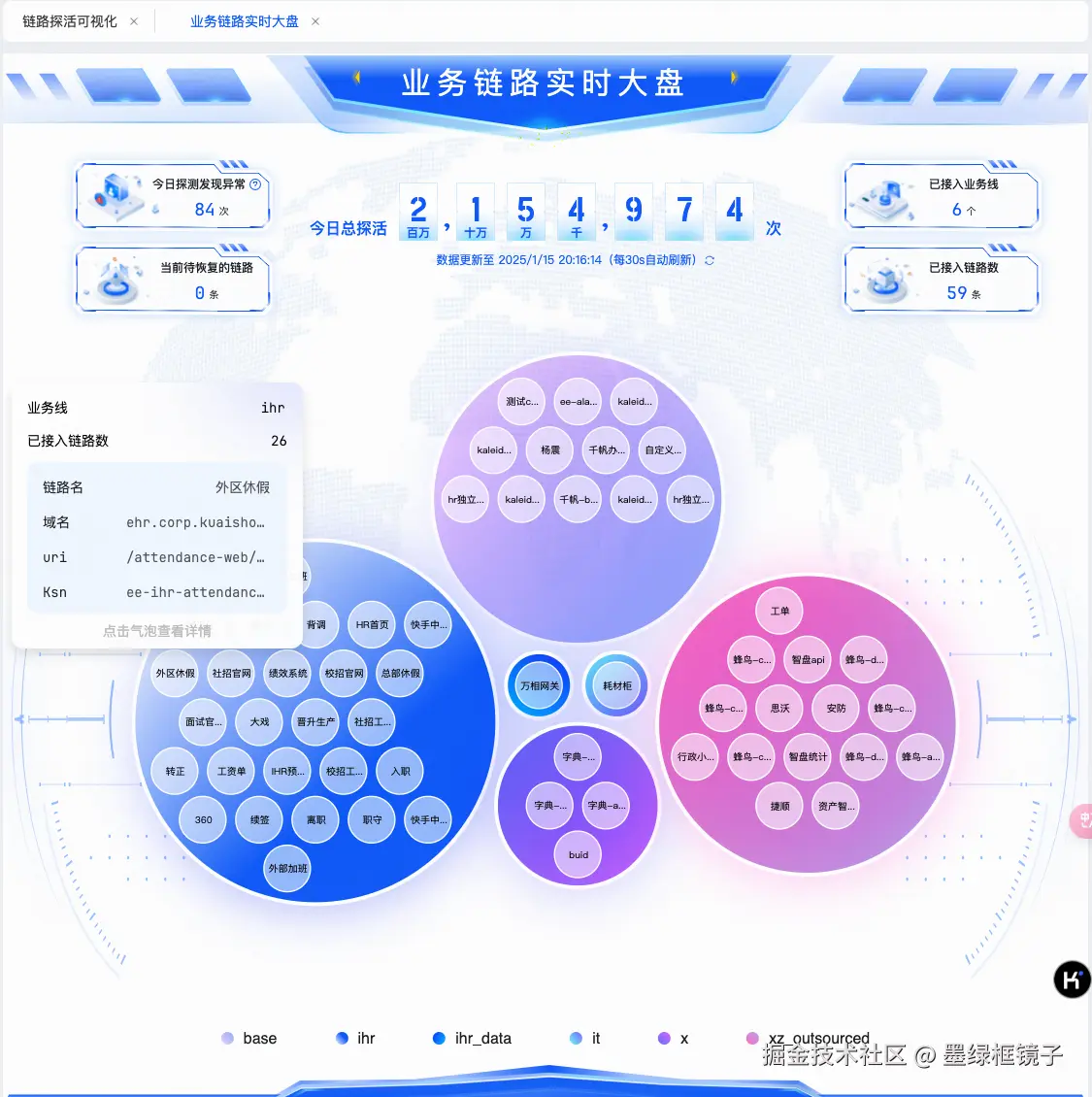
- 以气泡图的形式展示各条业务线下的所有链路
- 大的气泡代表业务线,小气泡代表链路,鼠标 hover 上去出现弹窗,展示相关信息
- 链路在探测过程中,如果出现异常,对应的小气泡则会变红
- 每个小气泡无论是状态正常与否,点击之后都会跳转到 链路探活可视化 页面,因状态(正常/异常)差异导致跳转后的差别,详见后续陈述
- 点击小气泡进入 链路探活可视化 页面,后续统称为 【从大盘进入】
代码组织
基于 d3-hierarchy 实现的 antv g6 自定义布局
import { BaseLayout } from '@antv/g6';
import { hierarchy, pack } from 'd3-hierarchy';
export const judgeIsMac = () => {
var innerHeight = window.innerHeight;
return innerHeight < 1010 ? true : false;
};
export class BubbleLayout extends BaseLayout {
id = 'bubble-layout';
async execute(model: { nodes: any[] }, options: any) {
const { nodes = [] } = model;
const { width = 0, height = 0 } = { ...this.options, ...options };
const root = hierarchy({ id: 'root' }, (datum: any) => {
const { id } = datum;
if (id === 'root') return nodes.filter((node) => node.depth === 1);
else if (datum.depth === 2) return [];
else {
return nodes.filter((node) => node.actualParentId === id);
}
});
root.sum((d: any) => {
return (+d.index_value || 0.01) ** 0.5 * 100;
});
root.sort((a: any, b: any) => {
return a.value - b.value;
});
const finalRadius = judgeIsMac() ? 16 : 24;
pack()
.size([width, height])
.radius(() => finalRadius)
.padding((node: { depth: number }) => {
return node.depth === 0 ? 12 : 10;
})(root);
const result: any = { nodes: [] };
root.descendants().forEach((node: any) => {
let {
data: { id },
x,
y,
r,
} = node;
if (node.depth >= 1)
result.nodes.push({ id, style: { x, y, size: r * 2 } });
});
return result;
}
}
基于 antv g6 的 tooltip 插件,自定义其中的内容
import type { TBubbleData } from '@/stores/monitorService/dashboard/type';
import normalModalBgSvg from '@public/svg/monitorService/normal-modal-bg.svg';
import exceptionModalBgSvg from '@public/svg/monitorService/exception-modal-bg.svg';
export const tooltipPlugin = {
type: 'tooltip',
position: 'top',
getContent: (_: Event, items: TBubbleData[]) => {
const {
depth,
business,
linkCount,
uri,
linkName,
domain,
ksn,
isException,
id,
failedReason,
} = items[0];
const parentTooltip = `<div key="${id}" style="width: 300px; height: 86px; color: black; border-radius: 12px; opacity: 1; padding: 16px; background: url(${normalModalBgSvg}) no-repeat; background-position: right top;"><div style="display: flex; justify-content: space-between; line-height: 20px; font-size: 14px;">
<span>业务线</span><span style="width: 176px; text-overflow:ellipsis; overflow:hidden;white-space:nowrap; text-align:right; padding-right:2px;">${id}</span>
</div>
<div style="display: flex; justify-content: space-between;line-height: 20px; font-size: 14px; margin: 14px 0 12px;">
<span>已接入链路数</span><span>${linkCount}</span>
</div><div>`;
if (depth == 1) {
return parentTooltip;
}
const normalStr = `<div key="${id}" style="width: 300px; height: 274px; color: black; border-radius: 12px; opacity: 1; padding: 16px; background: url(${normalModalBgSvg}) no-repeat; background-position: right top;">`;
const exceptionStr = `<div key="${id}" style="width: 300px; height: 332px; color: black; border-radius: 12px; opacity: 1;background: #fff; padding: 16px; border: 1px solid #FC3232; background: url(${exceptionModalBgSvg}) no-repeat; background-position: right top; ">`;
const tooltipContent =
(isException ? exceptionStr : normalStr) +
`<div style="display: flex; justify-content: space-between; line-height: 20px; font-size: 14px;">
<span>业务线</span><span style="width: 176px; text-overflow:ellipsis; overflow:hidden;white-space:nowrap; text-align:right; padding-right:2px;">${business}</span>
</div>
<div style="display: flex; justify-content: space-between;line-height: 20px; font-size: 14px; margin: 14px 0 12px;">
<span>已接入链路数</span><span>${linkCount}</span>
</div>
<div style="background:` +
`${isException ? '#FFF5F5' : '#F2F8FF'};` +
`border-radius: 12px; padding: 16px; height: ${
isException ? '212px' : '156px'
};">
<div style="display: flex; justify-content: space-between; align-item: center; color: #1F2329; line-height: 20px; font-size: 14px; margin-bottom: 16px;">
<span>链路名</span>
<span style="width: 130px; text-overflow:ellipsis; overflow:hidden;white-space: nowrap; text-align:right; padding-right:2px; color:#5C6066">${linkName}</span>
</div>
<div style="display: flex; justify-content: space-between; align-item: center; color: #1F2329; line-height: 20px; font-size: 14px; margin-bottom: 16px;">
<span>域名</span>
<span style="width: 150px; text-overflow:ellipsis; overflow:hidden;white-space:nowrap; text-align:right; padding-right:2px; color: #5C6066">${domain}</span>
</div>
<div style="display: flex; justify-content: space-between; align-item: center; color: #1F2329; line-height: 20px; font-size: 14px; margin-bottom: 16px;">
<span>uri</span>
<span style="width: 150px; text-overflow:ellipsis; overflow:hidden;white-space: nowrap; text-align:right; padding-right:2px; color: #5C6066">${uri}</span>
</div>
<div style="display: flex; justify-content: space-between; align-item: center; color: #1F2329; line-height: 20px; font-size: 14px; margin-bottom: 16px;">
<span>Ksn</span>
<span style="width: 150px; text-overflow:ellipsis; overflow:hidden;white-space: nowrap; text-align:right; padding-right:2px; color: #5C6066">${ksn}</span>
</div>` +
(isException
? `<div style="display: flex; justify-content: space-between; align-item: center; color: #1F2329; line-height: 20px; font-size: 14px; margin-bottom: 16px;">
<span>探活失败原因</span>
<div style="width: 86px; text-overflow:ellipsis; overflow:hidden;
display: -webkit-box; -webkit-box-orient: vertical; -webkit-line-clamp: 2;
padding-right:2px;">${failedReason}</div>
</div>`
: '') +
`</div>
<div style="font-size: 14px; color: #c5c5c5; text-align: center;margin-top: 8px;">点击气泡查看详情</div>
</div>`;
return tooltipContent;
},
};
链路探活可视化
进入该页面的方式一共有三种:
- 从大盘进入
- 从告警进入 —— 当探测到某条链路有异常情况,后端会将相关异常信息发送到 kim 告警群中,并生成一条告警链接,告警链接上携带有相关参数信息。此时在 kim 群里直接点击该链接即可直接进入该页面。链接🌰:http:xxxxxxxxxxxxxx/monitorService/linkGraph?enterType=alarm&ksn=ee-kaleido-runtime&name=kaleido%E8%BF%90%E8%A1%8C%E4%BE%A7-ee-kaleido-runtime&date=2025-01-25&startTime=1737774631&endTime=1737774960
- 路由变化 —— 浏览器地址栏中没有携带 enterType 参数时,一律视作此种情况。包括但不限于:点击侧边导航栏、在浏览器中直接输入当前页 url 、从浏览器收藏夹进入等等。
查询必要条件
- 查询时间段
- 三个选项:最近五分钟、最近一小时、自定义时段
- 时间跨度限制:最长一个小时,需转换为具体的秒级时间戳后查询
- 前端处理时间取的是设备时间,所以如果出现查询数据不准确,可优先检查比对设备时间与服务器时间是否一致
- 自定义时间段:查询日期最早可选为 2024/01/01、时间跨度最长为一小时、不能选中未来的 时、分、日期 (例如:当前时分为:2025/01/06 12:04,但开始时间选择的是 11:50,此时,最多只能选到12:04, 即时间跨度为 14 min)
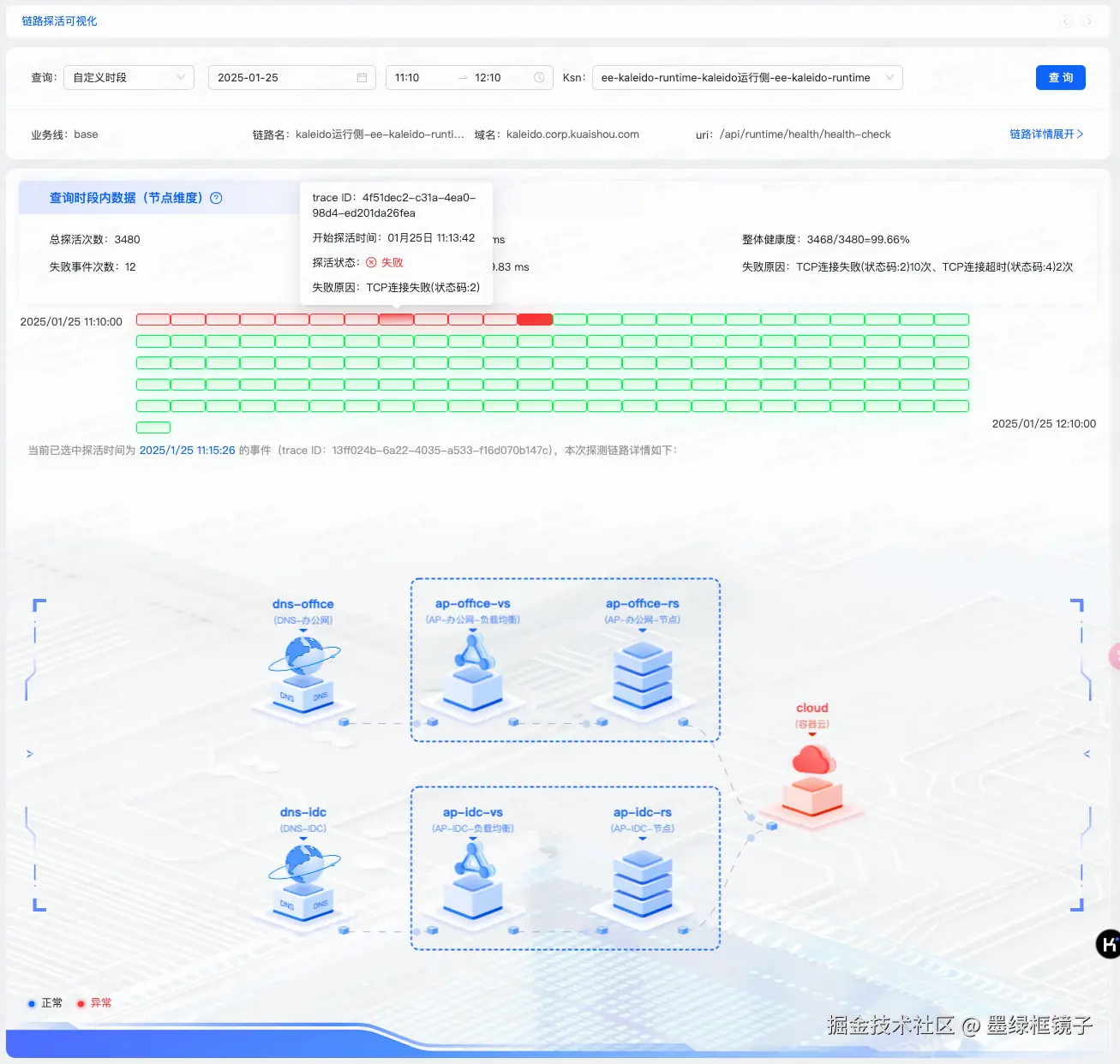
查询结果-链路探活数据
- 本次探测信息
- 时间分片
- 每个分片的时间跨度为 30s,所以这儿最多有 120个 时间分片
- 绿色为正常,红色为异常,橙色为进行中(通常是最后一个)
- 进入页面 或者 查询数据后,如果查询结果中有异常的时间分片就自动选中最后一个异常的时间分片,否则直接选中最后一个时间分片(正常/进行中)
- 链路图
- 点击每个时间分片后,都会请求对应 30s 内探测过的组件
- 直观展现将对应组件的信息、状态、所属组合
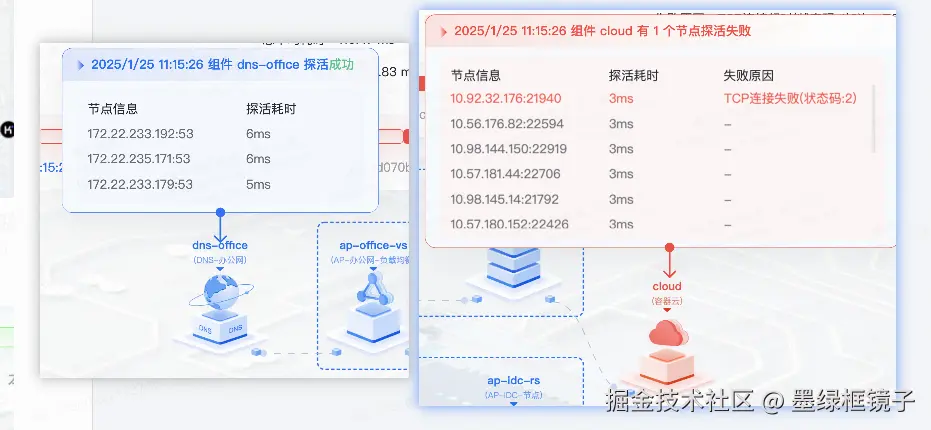
- 鼠标 hover 到对应组件节点后,弹窗展示组件探测信息
代码组织
目录结构
.
├── graph
│ ├── customEdges
│ │ ├── antLine.tsx
│ │ └── index.tsx
│ ├── customNode
│ │ ├── errorTooltip
│ │ │ ├── index.less
│ │ │ └── index.tsx
│ │ ├── normalTooltip
│ │ │ ├── index.less
│ │ │ └── index.tsx
│ │ └── singleNode
│ │ ├── index.less
│ │ ├── index.tsx
│ │ └── reflectId2Svg.tsx
│ ├── formatGraphData.ts
│ ├── index.tsx
├── index.less
├── index.tsx
├── searchForm
│ ├── constance.ts
│ ├── datePickerFn.ts
│ ├── index.less
│ └── index.tsx
└── timeFrame
├── constance.ts
├── frameList
│ ├── index.less
│ └── index.tsx
├── index.less
└── index.tsx
处理 graph 数据,添加 状态字段、是否有出入边字段
import type { TLinkGraphData } from '@/stores/monitorService/linkGraph/type';
export const formatGraphData = (data: TLinkGraphData) => {
const { nodes = [], edges = [] } = data;
const hasFromEdgeNodeSet = new Set([]);
const hasToEdgeNodeSet = new Set([]);
edges.forEach(({ source, target }) => {
hasFromEdgeNodeSet.add(target);
hasToEdgeNodeSet.add(source);
});
const res = nodes.map((node) => {
const { id } = node;
const { list } = node.data;
let _isHasException = false;
if (Array.isArray(list) && list.length) {
_isHasException = list?.some((x) => {
return x.isException;
});
}
let _isHasFromEdge = false;
let _isHasToEdge = false;
hasFromEdgeNodeSet.has(id) && (_isHasFromEdge = true);
hasToEdgeNodeSet.has(id) && (_isHasToEdge = true);
return {
...node,
data: {
...node.data,
_isHasException,
_isHasFromEdge,
_isHasToEdge,
},
};
});
return { ...data, nodes: res };
};
自定义组件节点
import { Typography, Tooltip } from 'antd';
import type { TGraphNodesData } from '@/stores/monitorService/linkGraph/type';
import arrowSvg from '../../svg/arrow.svg';
import exceptionArrowSvg from '../../svg/exception-arrow.svg';
import anChorSvg from '../../svg/anchor.svg';
import ErrorTooltip from '../errorTooltip';
import NormalTooltip from '../normalTooltip';
import { nodeType, reflectId2Svg, type TNodeType } from './reflectId2Svg';
import styles from './index.less';
const { Text } = Typography;
const SingleNode = ({ nodeInfo }: { nodeInfo: any }) => {
const { data } = nodeInfo;
const { name, list, desc, _isHasException, _isHasFromEdge, _isHasToEdge } =
data as TGraphNodesData;
const traceStartTime = sessionStorage.getItem('curFrameTime') ?? '';
let targetNodeType: TNodeType = 'dns';
if (!name.startsWith('dns')) {
targetNodeType = name.split('-').pop() as TNodeType;
}
if (!nodeType.includes(targetNodeType)) {
console.log(
'%c INFO === 节点类型不存在 name--targetNodeType',
'color: red',
name,
targetNodeType
);
}
const nodeSet = reflectId2Svg[targetNodeType];
const targetSvg = nodeSet[_isHasException ? 'exception' : 'normal'];
return (
<Tooltip
autoAdjustOverflow={false}
overlayInnerStyle={{
backgroundColor: 'transparent',
borderRadius: 12,
width: 0,
height: 0,
minHeight: 0,
padding: 0,
minWidth: 0,
}}
overlayStyle={{
backgroundColor: 'orange',
borderRadius: 12,
}}
style={{ background: 'yellow' }}
title={
_isHasException ? (
<ErrorTooltip list={list} name={name} time={traceStartTime} />
) : (
<NormalTooltip list={list} name={name} time={traceStartTime} />
)
}
placement="top"
arrow={false}
// destroyTooltipOnHide={true}
>
<div className={styles['single-node-wrap']}>
<div className={styles['text-area']}>
<Text
className={styles['main-title']}
style={{ color: _isHasException ? '#FC3232' : '#0c63fa' }}
>
{name ?? ''}
</Text>
<Text
className={styles['sub-title']}
style={{
color: _isHasException
? 'rgba(231, 30, 1, 0.7)'
: 'rgba(12, 99, 250, 0.7)',
}}
>
({desc ?? ''})
</Text>
</div>
<img src={_isHasException ? exceptionArrowSvg : arrowSvg} />
{/* 节点图片 */}
<img src={targetSvg} style={{ width: 147, height: 126 }}></img>
{/* 左锚点 */}
{_isHasFromEdge && (
<img
style={{ position: 'absolute', bottom: 4, left: 0 }}
src={anChorSvg}
/>
)}
{/* 右锚点 */}
{_isHasToEdge && (
<img
style={{ position: 'absolute', bottom: 4, right: 0 }}
src={anChorSvg}
/>
)}
</div>
</Tooltip>
);
};
export default SingleNode;
自定义 errorTooltip
import { Tooltip } from 'antd';
import errorTooltipArrowSvg from '../../svg/error-tooltip-arrow.svg';
import errorTooltipHeaderBgSvg from '../../svg/error-tooltip-header-bg.svg';
import errorRightSvg from '../../svg/error-right.svg';
import './index.less';
import type { TGraphNodesData } from '@/stores/monitorService/linkGraph/type';

type TErrorTooltip = {
  list: TGraphNodesData['list'];
  name: string;
  time: string;
};
const ErrorTooltip = (props: TErrorTooltip) => {
  const { name, time, list } = props;

  let failCounts = 0;
  const sortedList = list?.reduce((acc, item) => {
    if (item.isException) {
      failCounts++;
      acc.unshift(item);
    } else {
      acc.push(item);
    }
    return acc;
  }, [] as TGraphNodesData['list']);
  return (
    <div className="error-node-tooltip">
      <div
        className="error-header"
        style={{ background: `url(${errorTooltipHeaderBgSvg}) no-repeat` }}
      >
        <img src={errorRightSvg} />
        <span className="error-header-text">
          {time || '11月8日 00:03:35'} 组件 {name} 有 {failCounts}{' '}
          个节点探活失败
        </span>
      </div>
      <section className="error-content">
        <div className="error-info-list-area">
          <div className="error-list-header">
            <span className="error-item-label">节点信息</span>
            <span className="error-item-value">探活耗时</span>
            <span className="error-item-label"> 失败原因</span>
          </div>
          <div className="error-info-list">
            {sortedList?.map((item) => {
              const { title, isException, duration, reason } = item;
              return (
                <div
                  className="error-list-item"
                  style={{ color: isException ? '#FC3232' : '#5c6066' }}
                >
                  <span className="error-item-label">{title}</span>
                  <span className="error-item-value">{duration}ms</span>
                  {reason.length > 10 ? (
                    <Tooltip title={reason} arrow={false}>
                      <span className="error-item-value" style={{ width: 160 }}>
                        {reason || '-'}
                      </span>
                    </Tooltip>
                  ) : (
                    <span className="error-item-value" style={{ width: 160 }}>
                      {reason || '-'}
                    </span>
                  )}
                </div>
              );
            })}
          </div>
        </div>
      </section>
      <img className="error-arrow-icon" src={errorTooltipArrowSvg} />
    </div>
  );
};

export default ErrorTooltip;
自定义边
import { Circle } from '@antv/g';
import { CubicHorizontal, subStyleProps } from '@antv/g6';
export class FlyMarkerCubic extends CubicHorizontal {
  getMarkerStyle(attributes: any) {
    return {
      r: 5,
      fill: '#c3d5f9',
      offsetPath: this.shapeMap.key,
      ...subStyleProps(attributes, 'marker'),
    };
  }

  onCreate() {
    const marker = this.upsert(
      'marker',
      Circle,
      this.getMarkerStyle(this.attributes),
      this
    );
    marker.animate([{ offsetDistance: 0 }, { offsetDistance: 1 }], {
      duration: 3000,
      iterations: Infinity,
    });
  }
}