

使用layoutWeight
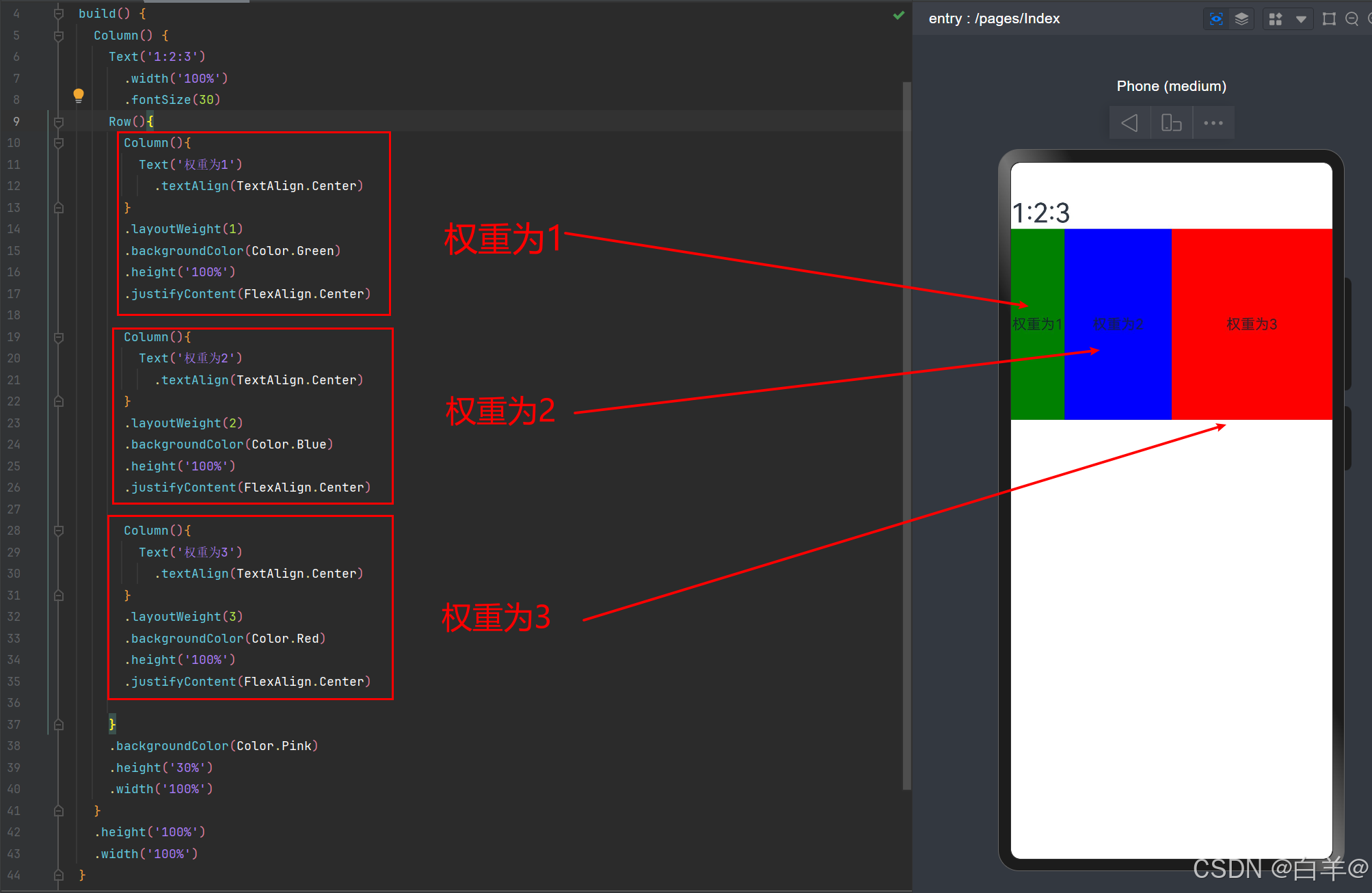
将比重分为1:2:3,即将原本宽度等分为6份,依次占1份,2份,3份。 设置了这个属性,它们会依据权重在不同尺寸设备下智能地占满剩余空间,忽视元素原本的尺寸控制。
@Entry
@Component
struct Index {
  build() {
    Column() {
      Text('1:2:3')
        .width('100%')
        .fontSize(30)
      Row(){
        Column(){
          Text('权重为1')
            .textAlign(TextAlign.Center)
        }
        .layoutWeight(1)
        .backgroundColor(Color.Green)
        .height('100%')
        .justifyContent(FlexAlign.Center)

        Column(){
          Text('权重为2')
            .textAlign(TextAlign.Center)
        }
        .layoutWeight(2)
        .backgroundColor(Color.Blue)
        .height('100%')
        .justifyContent(FlexAlign.Center)

        Column(){
          Text('权重为3')
            .textAlign(TextAlign.Center)
        }
        .layoutWeight(3)
        .backgroundColor(Color.Red)
        .height('100%')
        .justifyContent(FlexAlign.Center)

      }
      .backgroundColor(Color.Pink)
      .height('30%')
      .width('100%')
    }
    .height('100%')
    .width('100%')
  }
}
根据尺寸设置百分比
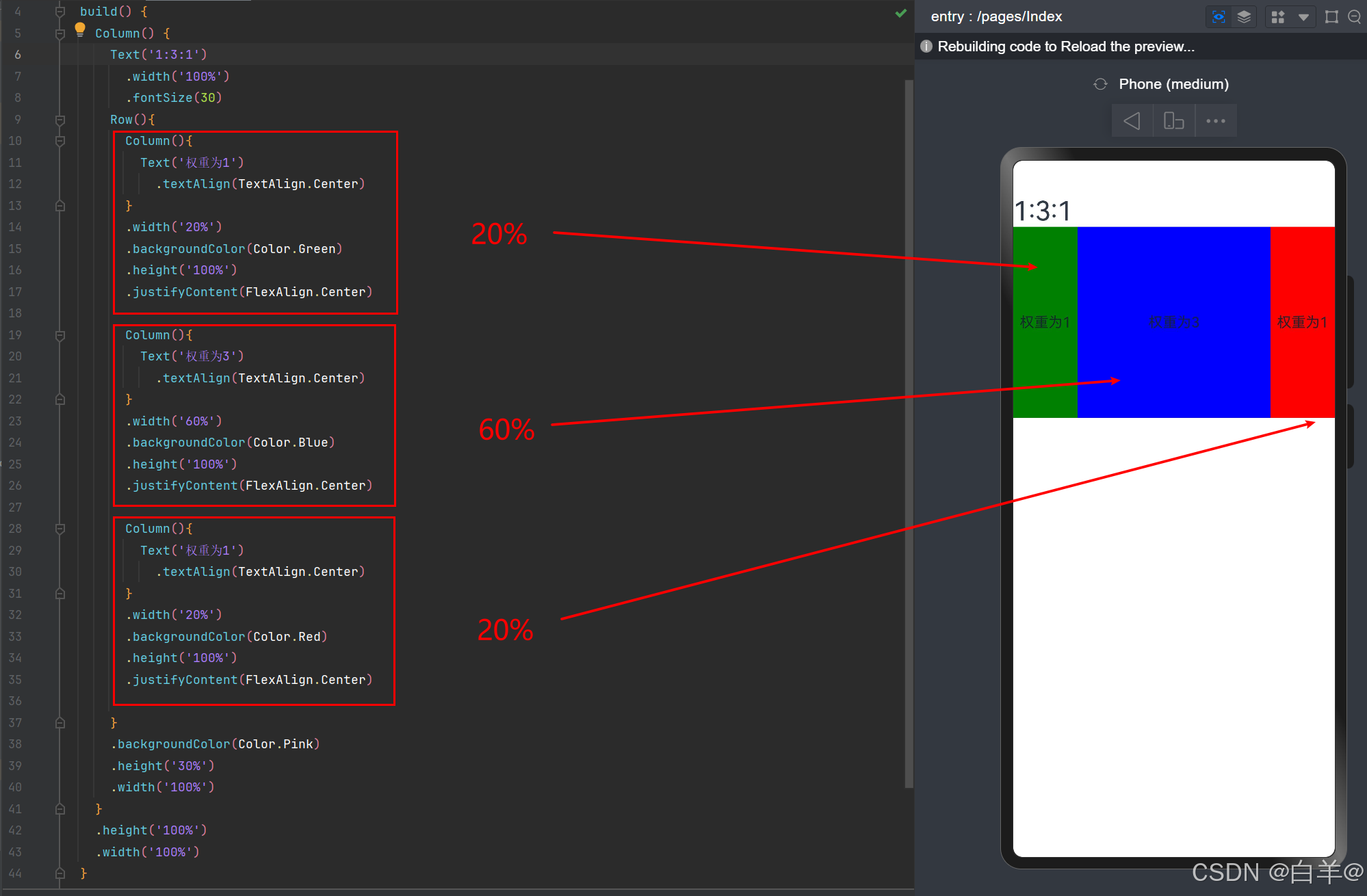
如:想要权重为1:3:1的效果,就可以用尺寸百分比20%:60%:20%的比重。
@Entry
@Component
struct Index {
  build() {
    Column() {
      Text('1:3:1')
        .width('100%')
        .fontSize(30)
      Row(){
        Column(){
          Text('权重为1')
            .textAlign(TextAlign.Center)
        }
        .width('20%')
        .backgroundColor(Color.Green)
        .height('100%')
        .justifyContent(FlexAlign.Center)

        Column(){
          Text('权重为3')
            .textAlign(TextAlign.Center)
        }
        .width('60%')
        .backgroundColor(Color.Blue)
        .height('100%')
        .justifyContent(FlexAlign.Center)

        Column(){
          Text('权重为1')
            .textAlign(TextAlign.Center)
        }
        .width('20%')
        .backgroundColor(Color.Red)
        .height('100%')
        .justifyContent(FlexAlign.Center)

      }
      .backgroundColor(Color.Pink)
      .height('30%')
      .width('100%')
    }
    .height('100%')
    .width('100%')
  }
}
`# 使用layoutWeight
将比重分为1:2:3,即将原本宽度等分为6分,依次占1份,2份,3份。 设置了这个属性,它们会依据权重在不同尺寸设备下智能地占满剩余空间,忽视元素原本的尺寸控制。
@Entry
@Component
struct Index {
  build() {
    Column() {
      Text('1:2:3')
        .width('100%')
        .fontSize(30)
      Row(){
        Column(){
          Text('权重为1')
            .textAlign(TextAlign.Center)
        }
        .layoutWeight(1)
        .backgroundColor(Color.Green)
        .height('100%')
        .justifyContent(FlexAlign.Center)

        Column(){
          Text('权重为2')
            .textAlign(TextAlign.Center)
        }
        .layoutWeight(2)
        .backgroundColor(Color.Blue)
        .height('100%')
        .justifyContent(FlexAlign.Center)

        Column(){
          Text('权重为3')
            .textAlign(TextAlign.Center)
        }
        .layoutWeight(3)
        .backgroundColor(Color.Red)
        .height('100%')
        .justifyContent(FlexAlign.Center)

      }
      .backgroundColor(Color.Pink)
      .height('30%')
      .width('100%')
    }
    .height('100%')
    .width('100%')
  }
}
根据尺寸设置百分比
如:想要权重为1:3:1的效果,就可以用尺寸百分比20%:60%:20%的比重。
@Entry
@Component
struct Index {
  build() {
    Column() {
      Text('1:3:1')
        .width('100%')
        .fontSize(30)
      Row(){
        Column(){
          Text('权重为1')
            .textAlign(TextAlign.Center)
        }
        .width('20%')
        .backgroundColor(Color.Green)
        .height('100%')
        .justifyContent(FlexAlign.Center)

        Column(){
          Text('权重为3')
            .textAlign(TextAlign.Center)
        }
        .width('60%')
        .backgroundColor(Color.Blue)
        .height('100%')
        .justifyContent(FlexAlign.Center)

        Column(){
          Text('权重为1')
            .textAlign(TextAlign.Center)
        }
        .width('20%')
        .backgroundColor(Color.Red)
        .height('100%')
        .justifyContent(FlexAlign.Center)

      }
      .backgroundColor(Color.Pink)
      .height('30%')
      .width('100%')
    }
    .height('100%')
    .width('100%')
  }
}

