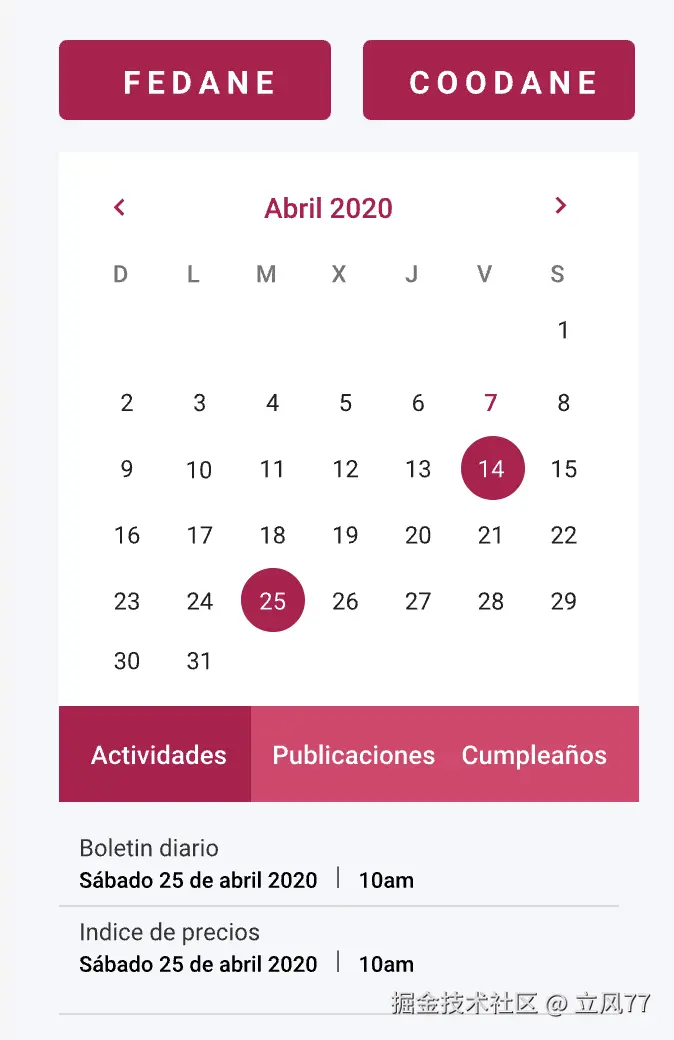
效果图:
目录结构:
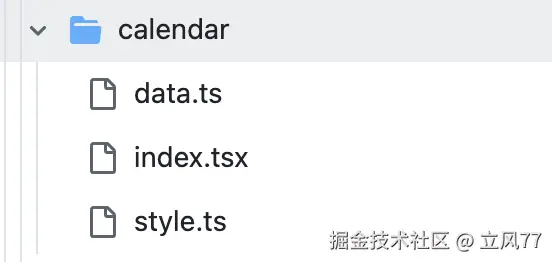
代码
index.tsx
import React, { useState } from "react";
import {
format,
addMonths,
subMonths,
startOfMonth,
endOfMonth,
startOfWeek,
endOfWeek,
addDays,
isSameMonth,
isSameDay,
} from "date-fns";
import {
CalendarWrapper,
Header,
DaysRow,
Row,
Cell,
ChangeButton,
ScrollBox,
} from "./style";
import { HorizontalContent, VerticalContent } from "../utils";
import Button from "../button";
import TextBox from "../textBox";
import { InfoBox } from "../utils/style";
import { Events } from "./data";
const Calendar: React.FC = () => {
const [currentDate, setCurrentDate] = useState(new Date());
const [selectedDate, setSelectedDate] = useState<Date | null>(currentDate);
const [activeEventType, setActiveEventType] = useState<
"Actividades" | "Publicaciones" | "Cumpleaños"
>("Actividades");
const nextMonth = () => setCurrentDate(addMonths(currentDate, 1));
const prevMonth = () => setCurrentDate(subMonths(currentDate, 1));
const renderHeader = () => (
<Header>
<ChangeButton onClick={prevMonth}>{"<"}</ChangeButton>
<span>{format(currentDate, "MMMM yyyy")}</span>
<ChangeButton onClick={nextMonth}>{">"}</ChangeButton>
</Header>
);
const renderDays = () => {
const days = [];
const dateFormat = "EEEEE";
const startDate = startOfWeek(currentDate, { weekStartsOn: 1 });
for (let i = 0; i < 7; i++) {
days.push(
<div className="day-name" key={i}>
{format(addDays(startDate, i), dateFormat)}
</div>
);
}
return <DaysRow>{days}</DaysRow>;
};
const renderCells = () => {
const monthStart = startOfMonth(currentDate);
const monthEnd = endOfMonth(monthStart);
const startDate = startOfWeek(monthStart, { weekStartsOn: 1 });
const endDate = endOfWeek(monthEnd, { weekStartsOn: 1 });
const rows = [];
let days = [];
let day = startDate;
let dayCounter = 0;
while (day <= endDate || dayCounter < 6) {
for (let i = 0; i < 7; i++) {
const cloneDay = day;
const isToday = isSameDay(day, new Date());
const isSelected = selectedDate && isSameDay(day, selectedDate);
days.push(
<Cell
className={`${!isSameMonth(day, monthStart) ? "disabled" : ""} ${
isToday ? "today" : ""
} ${isSelected ? "selected" : ""}`}
key={day.toString()}
onClick={() => setSelectedDate(cloneDay)}
>
<span>{format(day, "d")}</span>
</Cell>
);
day = addDays(day, 1);
}
rows.push(<Row key={day.toString()}>{days}</Row>);
days = [];
dayCounter++;
}
return <div style={{ margin: "0 10px" }}>{rows}</div>;
};
const renderEvents = () => {
if (!selectedDate) return null;
const dateStr = format(selectedDate, "yyyy-MM-dd");
const filteredEvents = Events.filter(
(event) => event.date === dateStr && event.type === activeEventType
);
if (filteredEvents.length === 0) {
return (
<VerticalContent width="whole" height="xxSmall" justifyContent="center">
<InfoBox style={{ fontSize: "12px", color: "#999" }}>
No hay eventos para esta fecha.
</InfoBox>
</VerticalContent>
);
}
return filteredEvents.map((event, index) => (
<VerticalContent
key={index}
width="whole"
height="xxSmall"
borderBottom="1px solid #BDBDBD"
justifyContent="center"
>
<InfoBox style={{ fontSize: "12px", color: "#333333" }}>
{event.title}
</InfoBox>
<InfoBox
style={{
fontSize: "12px",
color: "#000000",
fontWeight: "700",
whiteSpace: "nowrap",
overflow: "hidden",
textOverflow: "ellipsis",
}}
>
{event.description}
</InfoBox>
</VerticalContent>
));
};
return (
<CalendarWrapper>
{renderHeader()}
{renderDays()}
{renderCells()}
<HorizontalContent height="xxSmall" backgroundColor="white">
{["Actividades", "Publicaciones", "Cumpleaños"].map((type) => (
<Button
key={type}
width="realThird"
height="large"
border="none"
borderRadius="none"
color="white"
fontSize="xSmall"
backgroundColor={activeEventType === type ? "red" : "pink"}
hoverBackgroundColor="#B6004C"
onClick={() =>
setActiveEventType(
type as "Actividades" | "Publicaciones" | "Cumpleaños"
)
}
>
<TextBox>{type}</TextBox>
</Button>
))}
</HorizontalContent>
<ScrollBox>{renderEvents()}</ScrollBox>
</CalendarWrapper>
);
};
export default Calendar;
style.ts
import styled from "styled-components";

export const CalendarWrapper = styled.div`
  width: 100%;
  margin: auto;
  background: #fff;
  border-radius: 8px;
  /* overflow: hidden; */
  min-height: calc(
    6 * 37.425px + 5 * 2px + 10px
  ); // 计算出最小高度(假设每个单元格40px高,5行间隔)
`;

export const Header = styled.div`
  margin: 0 10px;
  display: flex;
  justify-content: space-between;
  align-items: center;
  padding: 10px;
  background: #ffffff;
  color: #b6004c;
  font-weight: bold;
`;

export const ChangeButton = styled.button`
  background: none;
  border: none;
  color: #b10f40;
  cursor: pointer;
  font-size: 16px;
  &:active {
    color: #df396b;
  }
`;

export const DaysRow = styled.div`
  display: flex;
  justify-content: space-between;
  padding: 10px;
  margin: 0 10px;
`;

export const Row = styled.div`
  display: flex;
  justify-content: space-between;
`;

export const Cell = styled.div`
  width: 40px;
  /* height: 34.575px; */
  aspect-ratio: 1;
  display: flex;
  justify-content: center;
  align-items: center;
  margin: 2px;
  cursor: pointer;
  border-radius: 50%;
  color: #000;

  &.disabled {
    color: #ccc;
  }

  &.today {
    background-color: #b6004c; // 今日日期的颜色
    color: white;
  }

  &.selected {
    background-color: #df396b;
    color: white;
  }
`;

export const ScrollBox = styled.div`
  height: 80px;
  overflow: scroll;
  background-color: #f6f7fb;

  &::-webkit-scrollbar {
    display: none;
  }

  /* 隐藏滚动条,在 Firefox 中 */
  scrollbar-width: none;

  /* 适用于更现代的 Firefox */
  -ms-overflow-style: none; IE 10+
`;
data.ts
export interface Event {
date: string;
type: "Actividades" | "Publicaciones" | "Cumpleaños";
title: string;
description: string;
}
export const Events: Event[] = [
{
date: "2024-12-12",
type: "Actividades",
title: "Reunión de Proyecto",
description: "Reunión para discutir el progreso del proyecto.",
},
{
date: "2024-12-12",
type: "Publicaciones",
title: "Nuevo Artículo Publicado",
description: "Un nuevo artículo sobre desarrollo web ha sido publicado.",
},
{
date: "2024-12-12",
type: "Publicaciones",
title: "2 Nuevo Artículo Publicado",
description: "Un nuevo artículo sobre desarrollo web ha sido publicado.",
},
{
date: "2024-12-14",
type: "Cumpleaños",
title: "Cumpleaños de Juan",
description: "Celebra el cumpleaños de Juan con una fiesta virtual.",
},
];
说明:
- 防止日历页面抖动
要解决日历组件在每个月之间切换时高度变化的问题,我们可以通过以下方法来确保每个月的日历高度保持一致:
- 固定日历的行数:即使某个月份的天数较少,也可以通过填充空行来确保行数保持不变。
- 设置最小行数:通常一个月最多需要六行来显示(如从周日开始的月份且有31天时)。
- 保持cell格子的正方形
aspect-ratio: 1: 这个 CSS 属性确保元素的宽高比为 1:1,即正方形。这样,当宽度发生变化时,高度会自动调整以匹配宽度。
- div内多出的文字自动省略显示
.truncated-text {
width: 200px;
white-space: nowrap;
overflow: hidden;
text-overflow: ellipsis;
border: 1px solid #ccc;
}