深入CSS(下)————CSS盒模型
行级
(和其它行级盒子一起放在一行或拆成多行,盒子模型中的width,height不适用,由内容撑开)
默认情况下,行级元素生成行级盒子,内容分布在多个行盒中,例如:span,em,strong,cite,code等等
可以通过dispaly:inline转化为行级盒子
行级排版上下文
只包含行级盒子的容器会创建一个IFC
IFC内的排版规则
- 盒子在一行内水平摆放
- 一行放不下,换行显示
- text-align决定一行内盒子的水平对齐
- vertical—align决定一个盒子在行内的垂直对齐
- 避开浮动元素
例如:
     <div>
     dadadadadadaddadadad
     <span>taattatatta</span>
     <em>xxxxxx</em>
div为块级元素,里面由文字,<span>标签,<em>标签,都是行级,所以创建了排版上下文,所以遵循排版规则。
补充:单词太长之类超过范围,可以用css代码overflow-wrap:break-word,单词超出容器范围就会换行
块级(不和其他盒子并列摆放)
默认情况下,块级元素生成块级盒子,例如:body,div,h1~6,p,ul等等
可以通过dispaly:block转化为块级盒子
块级排版上下文
某些容器会创建BFC
BFC排版规则:
- 盒子从上到下摆放
- 垂直margin合并
- BFC内盒子的margin不会与外面的合并
- BFC不会和浮动元素重叠
补充:Flex Box(一种新的排版上下文)
- 它可以控制盒子的:
- 摆放流向
- 摆放顺序
- 盒子的宽度和高度
- 水平和垂直方向的对齐
- 是否允许折行
例如:
   <div class="container">
       <div class="a">A</div>
       <div class="b">B</div>
       <div class="c">C</div>
  </div>
   <style>
   .container{
       display:flex;
      border:2px solid #966;
       }
       .a,.b,.c{
           text-align:center;
          padding:1em;
     }
元素的流向用主轴和侧轴去表示
- 主轴上 用
justify-content表示,如:flex-start,flex-end,center,space-between,space-around,space-evenly
- 侧轴 用
align-item表示,如:flex-start,flex-end,center,stretch,baseline
Flexibility 可以设置子项的弹性:当容器有剩余的空间时,会伸展,当空间不够的时候会收缩
flex-grow有剩余空间时的伸展能力;flex-shrink空间不足时的收缩能力flex-basis没有伸缩时的基础长度
直接用flex:可以表示上面属性,如:
Grid布局
display:grid (使元素生成一个块级的Grid容器)
    grid-template-columns:100px 100px 200px
    grid-template-rows:100px 100px
第一行代码表示生成三列, 第二行代码表示生成两行。
    grid-template-columns:100px 1fr 1fr
    grid-template-rows:100px 1fr
1fr表示一份,第一行代码就是第一列100px,剩下的空间由后面各一份占领。
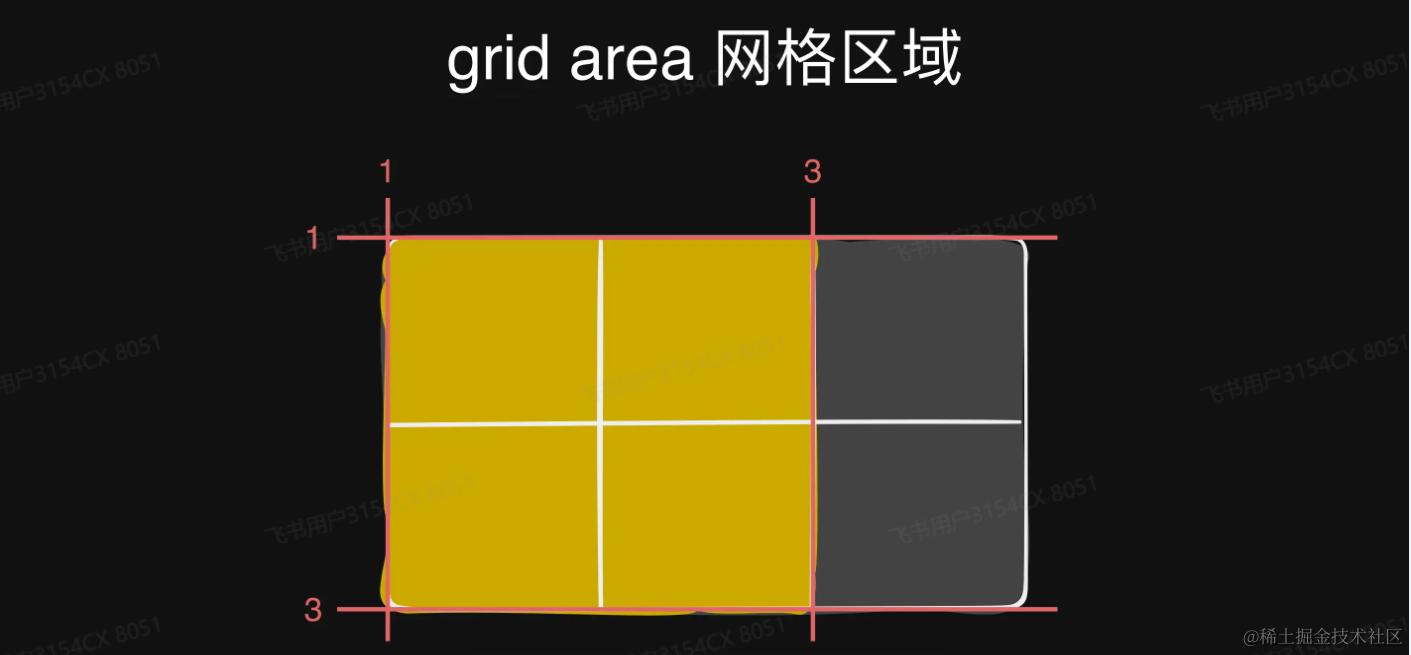
    grid-row-start:1
    grid-columns-start:1
    grid-row-end:3
    grid-columns-start:3
上述代码划分了一个区域,如也就是下图的黄色区域
 也可以用上
也可以用上grid-area:1/1/3/3表示上面的黄色区域。
绝对定位
position属性
- static 默认值,非定位元素
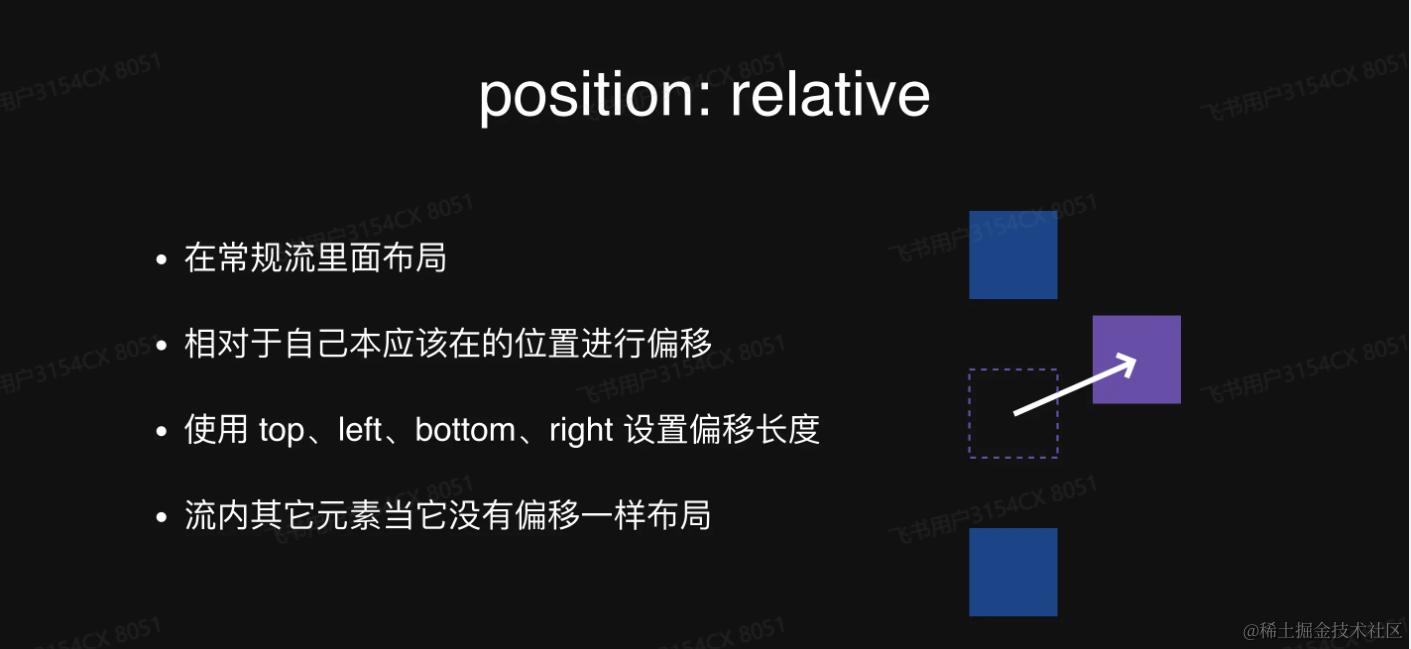
- relative 相对自身原本位置偏移,不脱离文档流
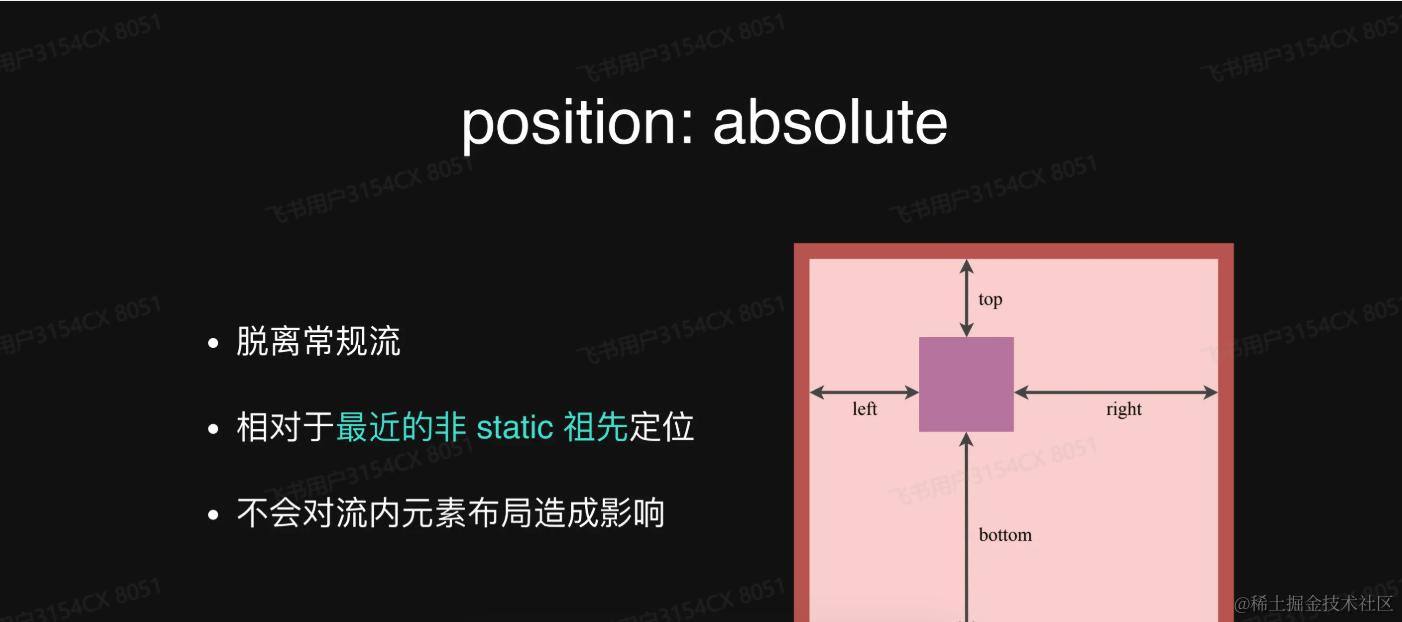
- absolute 绝对定位,相对非static祖先元素定位
- fixed 相对于视口绝对定位
    <h1>页面标题</h1>
    <div class="container">
    <div class="box"></div>
    <p>段落内容段落内容 1</p>
    <p>段落内容段落内容 2</p>
    <p>段落内容段落内容 3</p>
    <p>段落内容段落内容 4</p>
    </div>

<style>
  .container {
    background: lightblue;
  }

  .box {
    position: absolute;
    top: 0;
    left: 0;
    width: 100px;
    height: 100px;
    background: red;
  }
</style>
上述代码box使用了绝对定位,所以它要去寻找最近的父级定位,看它是否是非static,但是很显然,上述代码box的父级,也就是container是默认的static,然后在往上找,就到了body,body标签也是默认的,最后就找到了html,所以根据html去定位。
而fixed总是相对于窗口去定位
  <a href="#">首页</a>
  <a href="#">导航1</a>
  <a href="#">导航2</a>
</nav>
<main>
  <section>1</section>
  <section>2</section>
  <section>3</section>
  <section>4</section>
  <section>5</section>
</main>
<a href="#" class="go-top">返回顶部</a>

<style>
  nav {
    position: fixed;
    line-height: 3;
    background: rgba(0, 0, 0, 0.3);
    width: 100%;
  }

  .go-top {
    position: fixed;
    right: 1em;
    bottom: 1em;
    color: #fff;
  }

  nav a {
    padding: 0 1em;
    color: rgba(255, 255, 255, 0.7);
  }

  nav a:hover {
    color: #fff;
  }

  body {
    margin: 0;
    font-size: 14px;
  }

  a {
    color: #fff;
    text-decoration: none;
  }

  section {
    height: 100vh;
    color: #fff;
    text-align: center;
    font-size: 5em;
    line-height: 100vh;
  }

  section:nth-child(1) {
    background: #F44336;
  }

  section:nth-child(2) {
    background: #3F51B5;
  }

  section:nth-child(3) {
    background: #FFC107;
  }

  section:nth-child(4) {
    background: #607D8B;
  }

  section:nth-child(5) {
    background: #4CAF50;
  }
</style>