简介:本文是以十字元件为背景光源,经过一个透镜元件成像在探测器上,并显示其热成像图。  成像示意图 首先我们建立十字元件命名为Target 成像示意图 首先我们建立十字元件命名为Target 创建方法: 面1 :面型:plane材料:Air孔径:X=1.5, Y=6,Z=0.075,形状选择Box 创建方法: 面1 :面型:plane材料:Air孔径:X=1.5, Y=6,Z=0.075,形状选择Box 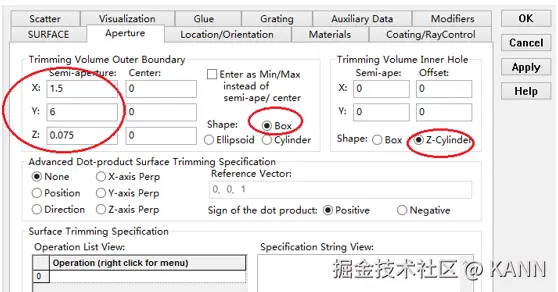 辅助数据:首先在第一行输入temperature :300K,emissivity:0.1; 辅助数据:首先在第一行输入temperature :300K,emissivity:0.1;  面2 :面型:plane材料:Air孔径:X=1.5, Y=6,Z=0.075,形状选择Box 面2 :面型:plane材料:Air孔径:X=1.5, Y=6,Z=0.075,形状选择Box  位置坐标:绕Z轴旋转90度, 位置坐标:绕Z轴旋转90度,  辅助数据: 首先在第一行输入temperature :300K,emissivity: 0.1; 辅助数据: 首先在第一行输入temperature :300K,emissivity: 0.1;  Target 元件距离坐标原点-161mm; Target 元件距离坐标原点-161mm; 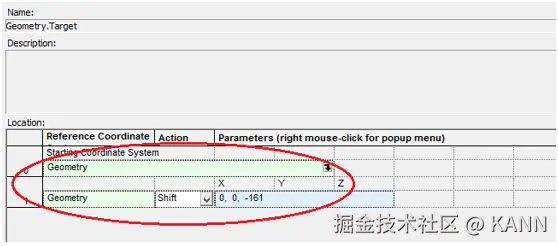 单透镜参数设定:F=100, bend=0, 位置位于坐标原点 单透镜参数设定:F=100, bend=0, 位置位于坐标原点  探测器参数设定: 在菜单栏中选择Create/Element Primitive /plane 探测器参数设定: 在菜单栏中选择Create/Element Primitive /plane   元件半径为20mm*20,mm,距离坐标原点200mm。 光源创建: 光源类型选择为任意平面,光源半角设定为15度。 元件半径为20mm*20,mm,距离坐标原点200mm。 光源创建: 光源类型选择为任意平面,光源半角设定为15度。  我们将光源设定在探测器位置上,具体的原理解释请见本章第二部分。 我们在位置选项又设定一行的目的是通过脚本自动控制光源在探测器平面不同划分区域内不同位置处追迹光线。 我们将光源设定在探测器位置上,具体的原理解释请见本章第二部分。 我们在位置选项又设定一行的目的是通过脚本自动控制光源在探测器平面不同划分区域内不同位置处追迹光线。  功率数值设定为:P=sin2(theta) theta为光源半角15度。我们为什么要这么设定,在第二部分会给出详细的公式推导。 创建分析面: 功率数值设定为:P=sin2(theta) theta为光源半角15度。我们为什么要这么设定,在第二部分会给出详细的公式推导。 创建分析面: 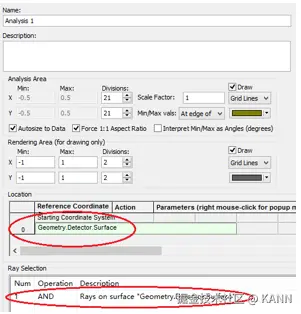 到这里元件参数设定完成,现在我们设定元件的光学属性,在前面我们分别对第一和第二面设定的温度和发射系数,散射属性我们设定为黑朗伯,4%的散射。并分别赋予到面一和面二。 到这里元件参数设定完成,现在我们设定元件的光学属性,在前面我们分别对第一和第二面设定的温度和发射系数,散射属性我们设定为黑朗伯,4%的散射。并分别赋予到面一和面二。  到此,所有的光学结构和属性设定完成,通过光线追迹我们可以查看光线是否可以穿过元件。 到此,所有的光学结构和属性设定完成,通过光线追迹我们可以查看光线是否可以穿过元件。  FRED在探测器上穿过多个像素点迭代来创建热图 FRED具有一个内置的可编译的Basic脚本语言。从Visual Basic脚本语言里,几乎所有用户图形界面(GUI)命令是可用这里的。FRED同样具有自动的客户端和服务器能力,它可以被调用和并调用其他可启动程序,如Excel。因此可以在探测器像素点上定义多个离轴光源,及在FRED Basic脚本语言里的For Next loops语句沿着探测器像素点向上和向下扫描来反向追迹光线,这样可以使用三维图表查看器(Tools/Open plot files in 3D chart)调用和查看数据。将如下的代码放置在树形文件夹 Embedded Scripts, FRED在探测器上穿过多个像素点迭代来创建热图 FRED具有一个内置的可编译的Basic脚本语言。从Visual Basic脚本语言里,几乎所有用户图形界面(GUI)命令是可用这里的。FRED同样具有自动的客户端和服务器能力,它可以被调用和并调用其他可启动程序,如Excel。因此可以在探测器像素点上定义多个离轴光源,及在FRED Basic脚本语言里的For Next loops语句沿着探测器像素点向上和向下扫描来反向追迹光线,这样可以使用三维图表查看器(Tools/Open plot files in 3D chart)调用和查看数据。将如下的代码放置在树形文件夹 Embedded Scripts,  打开后清空里面的内容,此脚本为通用脚本适用于一切可热成像的应用。 绿色字体为说明文字, '#Language "WWB-COM"'script for calculating thermal image map'edited rnp 4 november 2005 'declarationsDim op As T_OPERATIONDim trm As T_TRIMVOLUMEDim irrad(32,32) As Double 'make consistent with samplingDim temp As DoubleDim emiss As DoubleDim fname As String, fullfilepath As String 'Option Explicit Sub Main 'USER INPUTS nx = 31 ny = 31 numRays = 1000 minWave = 7 'microns maxWave = 11 'microns sigma = 5.67e-14 'watts/mm^2/deg k^4 fname = "teapotimage.dat" Print "" Print "THERMAL IMAGE CALCULATION" detnode = FindFullName( "Geometry.Detector.Surface" ) '找到探测器平面节点 Print "found detector array at node " & detnode srcnode = FindFullName( "Optical Sources.Source 1" ) '找到光源节点 Print "found differential detector area at node " & srcnode GetTrimVolume detnode, trm detx = trm.xSemiApe dety = trm.ySemiApe area = 4 * detx * dety Print "detector array semiaperture dimensions are " & detx & " by " & dety Print "sampling is " & nx & " by " & ny 'reset differential detector area dimensions to be consistent with sampling pixelx = 2 * detx / nx pixely = 2 * dety / ny SetSourcePosGridRandom srcnode, pixelx / 2, pixely / 2, numRays, False Print "resetting source dimensions to " & pixelx / 2 & " by " & pixely / 2 'reset the source power SetSourcePower( srcnode, Sin(DegToRad(15))^2 ) Print "resetting the source power to " & GetSourcePower( srcnode ) & " units" 'zero out irradiance array For i = 0 To ny - 1 For j = 0 To nx - 1 irrad(i,j) = 0.0 Next j Next i 'main loop EnableTextPrinting( False ) ypos = dety + pixely / 2 For i = 0 To ny - 1 xpos = -detx - pixelx / 2 ypos = ypos - pixely EnableTextPrinting( True ) Print i EnableTextPrinting( False ) For j = 0 To nx - 1 xpos = xpos + pixelx 'shift source LockOperationUpdates srcnode, True GetOperation srcnode, 1, op op.val1 = xpos op.val2 = ypos SetOperation srcnode, 1, op LockOperationUpdates srcnode, False 打开后清空里面的内容,此脚本为通用脚本适用于一切可热成像的应用。 绿色字体为说明文字, '#Language "WWB-COM"'script for calculating thermal image map'edited rnp 4 november 2005 'declarationsDim op As T_OPERATIONDim trm As T_TRIMVOLUMEDim irrad(32,32) As Double 'make consistent with samplingDim temp As DoubleDim emiss As DoubleDim fname As String, fullfilepath As String 'Option Explicit Sub Main 'USER INPUTS nx = 31 ny = 31 numRays = 1000 minWave = 7 'microns maxWave = 11 'microns sigma = 5.67e-14 'watts/mm^2/deg k^4 fname = "teapotimage.dat" Print "" Print "THERMAL IMAGE CALCULATION" detnode = FindFullName( "Geometry.Detector.Surface" ) '找到探测器平面节点 Print "found detector array at node " & detnode srcnode = FindFullName( "Optical Sources.Source 1" ) '找到光源节点 Print "found differential detector area at node " & srcnode GetTrimVolume detnode, trm detx = trm.xSemiApe dety = trm.ySemiApe area = 4 * detx * dety Print "detector array semiaperture dimensions are " & detx & " by " & dety Print "sampling is " & nx & " by " & ny 'reset differential detector area dimensions to be consistent with sampling pixelx = 2 * detx / nx pixely = 2 * dety / ny SetSourcePosGridRandom srcnode, pixelx / 2, pixely / 2, numRays, False Print "resetting source dimensions to " & pixelx / 2 & " by " & pixely / 2 'reset the source power SetSourcePower( srcnode, Sin(DegToRad(15))^2 ) Print "resetting the source power to " & GetSourcePower( srcnode ) & " units" 'zero out irradiance array For i = 0 To ny - 1 For j = 0 To nx - 1 irrad(i,j) = 0.0 Next j Next i 'main loop EnableTextPrinting( False ) ypos = dety + pixely / 2 For i = 0 To ny - 1 xpos = -detx - pixelx / 2 ypos = ypos - pixely EnableTextPrinting( True ) Print i EnableTextPrinting( False ) For j = 0 To nx - 1 xpos = xpos + pixelx 'shift source LockOperationUpdates srcnode, True GetOperation srcnode, 1, op op.val1 = xpos op.val2 = ypos SetOperation srcnode, 1, op LockOperationUpdates srcnode, False |



