前言
通过 AlphabetIndexer 组件可以与容器组件结合,实现导航联动,以及快速定位的效果
基本用法:
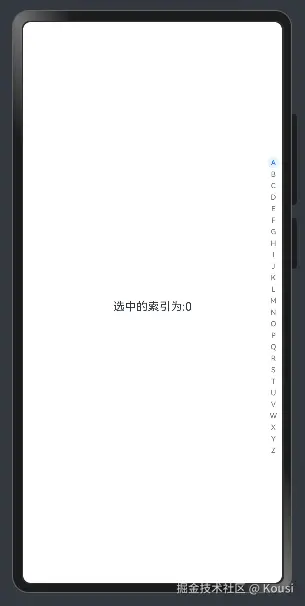
AlphabetIndexer不是容器组件,属于功能类的组件,使用时,需要设置如下 2 个参数
| 参数名 | 参数类型 | 必填 | 参数描述 |
|---|
| arrayValue | Array | 是 | 字母索引字符串数组,不可设置为空。 |
| selected | number | 是 | 初始选中项索引值,若超出索引值范围,则取默认值0。从API version 10开始,该参数支持$$双向绑定变量。 |
@Entry
@Component
struct Page08_AlphabetIndexer {
alphabets: string[] = ['A', 'B', 'C', 'D', 'E', 'F', 'G', 'H', 'I', 'J', 'K',
'L', 'M', 'N', 'O', 'P', 'Q', 'R', 'S', 'T', 'U', 'V', 'W', 'X', 'Y', 'Z']
@State selectedIndex: number = 0
build() {
Stack({ alignContent: Alignment.End }) {
Text('选中的索引为:' + this.selectedIndex)
.width('100%')
.textAlign(TextAlign.Center)
.onClick(() => {
this.selectedIndex = 10
})
AlphabetIndexer({ arrayValue: this.alphabets, selected: $$this.selectedIndex })
}
.width('100%')
.height('100%')
}
}
文字设置:
| 名称 | 参数类型 | 描述 |
|---|
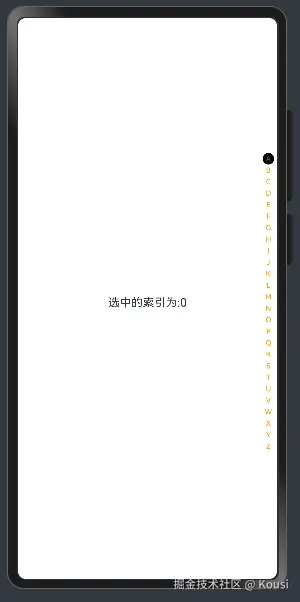
| color | ResourceColor | 设置文字颜色。 默认值:0x99000000。 |
| itemSize | number | 设置每个字母的区域大小 |
| font | Font | 设置每个字母的字体样式 |
| selectedFont | Font | 设置选中字母的字体样式 |
| selectedColor | ResourceColor | 设置选中项文字颜色。 默认值:0xFF254FF7。 |
| selectedBackgroundColor | ResourceColor | 设置选中项背景颜色。 默认值:0x1F0A59F7。 |
@Entry
@Component
struct Page08_AlphabetIndexer {
alphabets: string[] = ['A', 'B', 'C', 'D', 'E', 'F', 'G', 'H', 'I', 'J', 'K',
'L', 'M', 'N', 'O', 'P', 'Q', 'R', 'S', 'T', 'U', 'V', 'W', 'X', 'Y', 'Z']
@State selecteIndex: number = 0
build() {
Stack({ alignContent: Alignment.End }) {
Text('选中的索引为:' + this.selecteIndex)
.width('100%')
.textAlign(TextAlign.Center)
.onClick(() => {
this.selecteIndex = 10
})
AlphabetIndexer({ arrayValue: this.alphabets, selected: $$this.selecteIndex })
.color(Color.Orange)
.selectedColor(Color.Green)
.selectedBackgroundColor(Color.Black)
}
.width('100%')
.height('100%')
}
}
弹窗提示:
| 名称 | 参数类型 | 描述 |
|---|
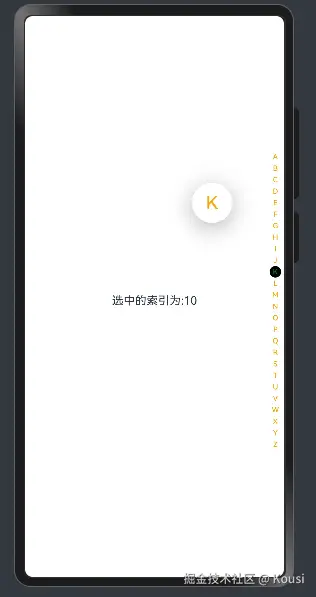
| usingPopup | boolean | 设置是否使用提示弹窗。默认值:false。 |
| popupBackground | ResourceColor | 设置提示弹窗背景色。默认值:0xFFFFFFFF。 |
| popupColor | ResourceColor | 设置提示弹窗文字颜色。默认值:0xFF254FF7。 |
@Entry
@Component
struct Page08_AlphabetIndexer {
alphabets: string[] = ['A', 'B', 'C', 'D', 'E', 'F', 'G', 'H', 'I', 'J', 'K',
'L', 'M', 'N', 'O', 'P', 'Q', 'R', 'S', 'T', 'U', 'V', 'W', 'X', 'Y', 'Z']
@State selecteIndex: number = 0
build() {
Stack({ alignContent: Alignment.End }) {
Text('选中的索引为:' + this.selecteIndex)
.width('100%')
.textAlign(TextAlign.Center)
.onClick(() => {
this.selecteIndex = 10
})
AlphabetIndexer({ arrayValue: this.alphabets, selected: $$this.selecteIndex })
.color(Color.Orange)
.selectedColor(Color.Green)
.selectedBackgroundColor(Color.Black)
.usingPopup(true)
.popupColor(Color.Orange)
.popupBackground(Color.Pink)
}
.width('100%')
.height('100%')
}
}