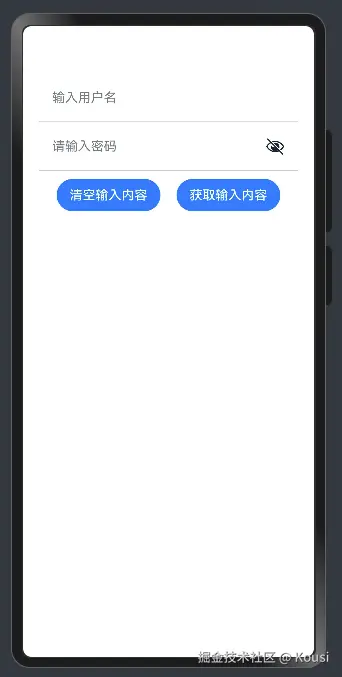
前言:
日常开发中如果需要接收用户输入,就可以使用输入组件来完成
TextInput:单行输入框
常用参数:
常用属性:
| 名称 | 参数类型 | 描述 |
|---|
| type | InputType | 设置输入框类型。默认值:InputType.Normal |
| showUnderline | boolean | 设置是否开启下划线。下划线默认颜色为'#33182431',默认粗细为1px,文本框尺寸48vp(下划线只支持InputType.Normal类型)。默认值:false |
| passwordIcon | PasswordIcon | onIconSrc:输入状态时图标offIconSrc:隐藏状态时图标 |
| placeholderColor | ResourceColor | 设置placeholder文本颜色。默认值跟随主题。 |
常用枚举:
| 名称 | 描述 |
|---|
| Normal | 基本输入模式。 可输入数字、字母、下划线、空格、特殊字符。 |
| Password | 密码输入模式。支持输入数字、字母、下划线、空格、特殊字符。密码显示小眼睛图标并且默认会将文字变成圆点。密码输入模式不支持下划线样式。在已启用密码保险箱的情况下,支持用户名、密码的自动保存和自动填充。 |
| Email | 邮箱地址输入模式。支持数字,字母,下划线,.字符,以及@字符(只能存在一个@字符)。 |
| Number | 纯数字输入模式。 |
@Entry
@Component
struct Page01_TextInput {
  @State username:string =''
  @State password:string =''
  build() {
    Column(){
      TextInput({placeholder:'输入用户名',text:$$this.username})
        .type(InputType.Normal)
        .backgroundColor(Color.Transparent)
        .borderRadius(0)
        .height(60)
        .border({
          width:{bottom:1}
        ,color:'#ccc'
        })

      TextInput({placeholder:'请输入密码',text:$$this.password})
        .type(InputType.Password)
        .height(60)
        .backgroundColor(Color.Transparent)
        .borderRadius(0)
        .border({
          width:{bottom:1}
        ,color:'#ccc'
        })

      Row({space:20}){
        Button('清空输入内容')
          .onClick(()=>{
            this.username=''
            this.password=''
          })
        Button('获取输入内容')
          .onClick(()=>{
            AlertDialog.show({
              message:`用户名:${this.username},密码:${this.password}`
            })
          })
      }
      .margin({top:10})
    }
    .padding(20)
  }
}