本文旨在编写解决html空div、空行以及注释问题的自定义plugin
在index.html 加入2个空div和1个注释
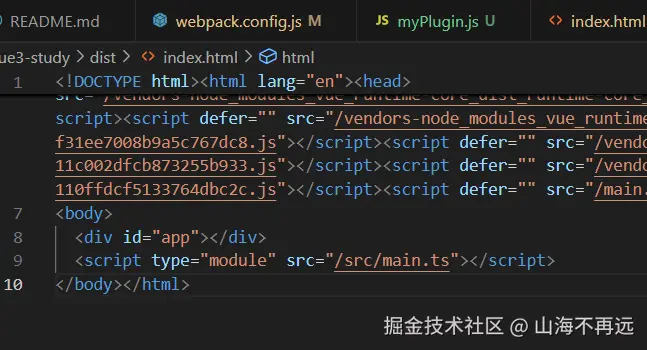
通过自定义plugin成功去掉空div和注释以及空行问题
const cheerio = require('cheerio');
// 18.17 可能需要node 18.17 版本
class MyPlugin {
apply(compiler) {
compiler.hooks.emit.tap('MyPlugin', (compilation) => {
// 遍历所有输出的文件资源
Object.keys(compilation.assets).forEach((file) => {
if (file.endsWith('.html')) {
const asset = compilation.assets[file];
// content 是当前html 页面里的所有内容
const content = asset.source();
// // 使用cheerio加载HTML内容,类似在浏览器中操作DOM
const $ = cheerio.load(content);
// 找到所有空的div元素并删除它们
$('div:empty').each((index, element) => {
if ($(element).attr('id') !== 'app') {
$(element).remove();
}
});
// 将注释去掉
$('*').contents().each((i, element) => {
if (element.type === 'comment') {
$(element).remove();
}
});
const newContent = $.html().replace(/\n\s*\n/g, '\n');
compilation.assets[file] = {
// source: () => $.html(),
// size: () => Buffer.from($.html()).length
source: () => newContent,
size: () => Buffer.from(newContent).length
};
}
});
});
}
}
module.exports = MyPlugin;
自定义plugin相较于官方plugin或者loader的好处:
- 可以根据项目的特定需求来定制构建过程
- 能够精确地控制构建流程的各个阶段
- 自定义插件可以实现对资源更精细的优化
- 自定义的plugin比官方的loader更轻量,有时候解决一个小问题,不需要使用到所有的loader