今天主要来学习vue第二个核心模块运行时。下面代码示例部分只做参考,具体完整代码可以在vue3源码解读: 手写vue3核心源码,内含详细解读 (gitee.com)内查看。
vue3 中区分了编译时(模板编译)和运行时(不关心模板编译) vue3 中区分了根据环境区分操作
- runtime-dom (浏览器操作的一些api,dom的增删改查)
- runtime-core (并不关心调用了哪些api)
- compile-dom (针对dom的编译)
- compile-core (进行非平台相关的编译)
1. dom 节点操作 绑定事件
function createInvoker(val) {
    let invoker = (e) => invoker.val(e)
    invoker.val = val
    return invoker
}

function patchEvent(el, eventName, nextValue) {
    const invokers = el._vei || (el._vei = {})
    const exist = invokers[eventName]
    // click: customEvent -> f
    // 通过一个自定义变量,绑定这个变量,后需更改变量对应的值
    if (exist && nextValue) {
        // 已存在旧事件,并且有新事件
        exist.val = nextValue // 换绑事件
    } else {
        // 没有旧事件,或者没有新事件
        const name = eventName.slice(2).toLowerCase()
        // 有新事件
        if (nextValue) {
            // 绑定事件
            const invoker = (invokers[eventName] = createInvoker(nextValue))
            el.addEventListener(name, invoker)
        } else if (exist) {
            // 没有新事件,有旧事件(清空事件)
            el.removeEventListener(name, exist)
            invokers[eventName] = null
        }
    }
}
比较核心的一点是 dom 的事件绑定,由于绑定解绑事件是非常耗费性能的。我们可以转换一个思路,永远绑定一个函数,将要触发的函数放入这个函数内,等要换绑事件时,更换放入的这个函数就行了,这样极大的节省了性能。
2. 节点比较
需要知道的是,如果标签和key值不一样不会再往下比较。 对比也只对比同层。
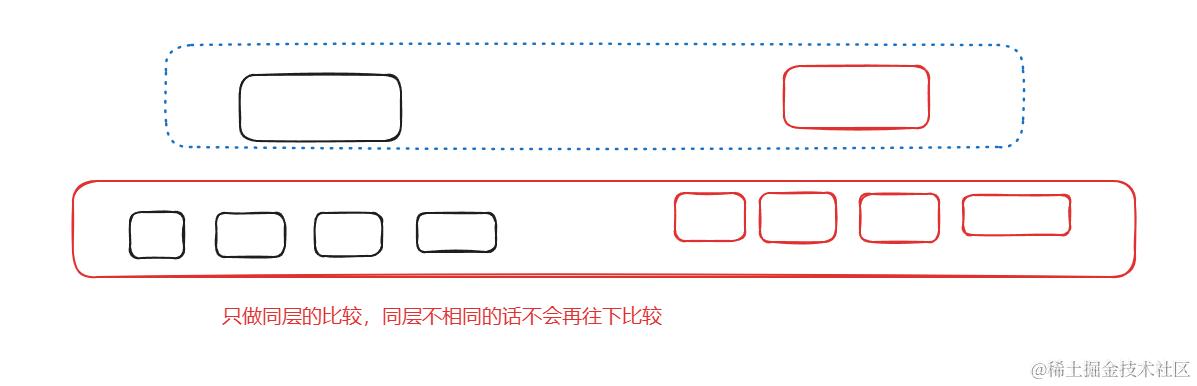
子节点比较
src/7.runtime-dom.html
import {render, h} from "../js/runtime-dom/index.js";


// 从前往后比较(老少新多)
// const VDom = h("div", [h('div', {key: 'a'}, 'a'), h('div', {key: 'b'}, 'b'), h('div', {key: 'c'}, 'c')])
// const VDom2 = h("div", [h('div', {key: 'a'}, 'a'), h('div', {key: 'b'}, 'b'), h('div', {key: 'c'}, 'c'), h('div', {key: 'd'}, 'd')])


// 从后往前比较(老少新多)
// const VDom = h("div", [h('div', {key: 'a'}, 'a'), h('div', {key: 'b'}, 'b'), h('div', {key: 'c'}, 'c')])
// const VDom2 = h("div", [h('div', {key: 'd'}, 'd'), h('div', {key: 'a'}, 'a'), h('div', {key: 'b'}, 'b'), h('div', {key: 'c'}, 'c')])

// 从前往后比较(老多新少)
// const VDom = h("div", [h('div', {key: 'a'}, 'a'), h('div', {key: 'b'}, 'b'), h('div', {key: 'c'}, 'c'), h('div', {key: 'd'}, 'd'),])
// const VDom2 = h("div", [h('div', {key: 'a'}, 'a'), h('div', {key: 'b'}, 'b'), h('div', {key: 'c'}, 'c')])

// 从前往后比较(老多新少)
const VDom = h("div", [h('div', {key: 'd'}, 'd'), h('div', {key: 'a'}, 'a'), h('div', {key: 'b'}, 'b'), h('div', {key: 'c'}, 'c'),])
const VDom2 = h("div", [h('div', {key: 'a'}, 'a'), h('div', {key: 'b'}, 'b'), h('div', {key: 'c'}, 'c')])
render(VDom, app)
setTimeout(() => {
    render(VDom2, app)
}, 1000)
js/runtime-core/render.js
// 比对子节点
const patchChildren = (n1, n2, el) => {
    // 比较前后2个节点的差异
    let c1 = n1.children // 老子节点
    let c2 = n2.children // 新子节点

    let prevShapeFlag = n1.shapeFlag
    let shapeFlag = n2.shapeFlag

    // 文本,数组,空组合, 9种情况

    // 第一种情况
    // 1. 文本-》数组   文本删掉,换成数组

    // 第二种情况  2,3两者逻辑相同
    // 2. 文本-》空    老文本换成空,
    // 3. 文本-》文本   老文本换成新文本

    // 第三种情况 4,5两者逻辑相同
    // 4. 数组-》文本   移除数组,换成文本
    // 5. 数组-》空     移除数组,换成空

    // 第四种情况
    // 6. 数组-》数组  (核心diff算法)

    // 第五种情况 7,8两者逻辑相同
    // 7. 空-》文本    更新文本
    // 8. 空-》数组    挂载数组

    // 第六种情况
    // 9. 空-》空      无需处理

    if (shapeFlag & ShapeFlags.TEXT_CHILDREN) {
        if (prevShapeFlag & ShapeFlags.ARRAY_CHILDREN) {
            // 新的是文本,老的是数组。移除老的,换新的
            unmountChildren(c1)
        }

        // 新的是文本,老的是文本或者空,则直接采用新的
        if (c1 !== c2) {
            // 文本有变化
            hostSetElementText(el, c2)
        }
    } else {
        // 老的是数组
        if (prevShapeFlag & ShapeFlags.ARRAY_CHILDREN) {
            if (shapeFlag & ShapeFlags.ARRAY_CHILDREN) {
                // 新的是数组
                // diff算法
                console.log('diff')
                patchKeyedChildren(c1, c2, el)
            } else {
                // 老的是数组,新的是空
                unmountChildren(c1)
            }
        } else {
            // 老的是文本
            if (prevShapeFlag & ShapeFlags.TEXT_CHILDREN) {
                hostSetElementText(el, '')
            }
            // 新的是数组,则直接挂载即可
            if (shapeFlag & ShapeFlags.ARRAY_CHILDREN) {
                mountChildren(c2, el)
            }
        }
    }


    // console.log(c1, c2)
}
这里对比子节点总共有9种情况,大多对比也是直接替换。只有一种情况需要重点关注,就是子节点都是数组,这里也是diff算法的核心。
3. 核心diff算法
const patchKeyedChildren = (c1, c2, el) => {
    // 优化的点 dom常见的操作方式 1)前后增加  前后删除
    // 如果不优化,那就比较c1, c2的差异循环即可
    // from start
    // a, b, c
    // a, b, c, d
    let i = 0 // 头部索引
    let e1 = c1.length - 1
    let e2 = c2.length - 1
    while (i <= e1 && i <= e2) {
        const n1 = c1[i]
        const n2 = c2[i]
        if (isSameVnode(n1, n2)) {
            patch(n1, n2, el)
        } else {
            break
        }
        i++
    }
    console.log('from start', i, e1, e2) // 3 2 3

    // from end
    // a, b, c
    // d, a, b, c
    while (i <= e1 && i <= e2) {
        const n1 = c1[e1]
        const n2 = c2[e2]
        if (isSameVnode(n1, n2)) {
            patch(n1, n2, el)
        } else {
            break
        }
        e1--
        e2--
    }
    console.log('from end', i, e1, e2) // 0 -1 0

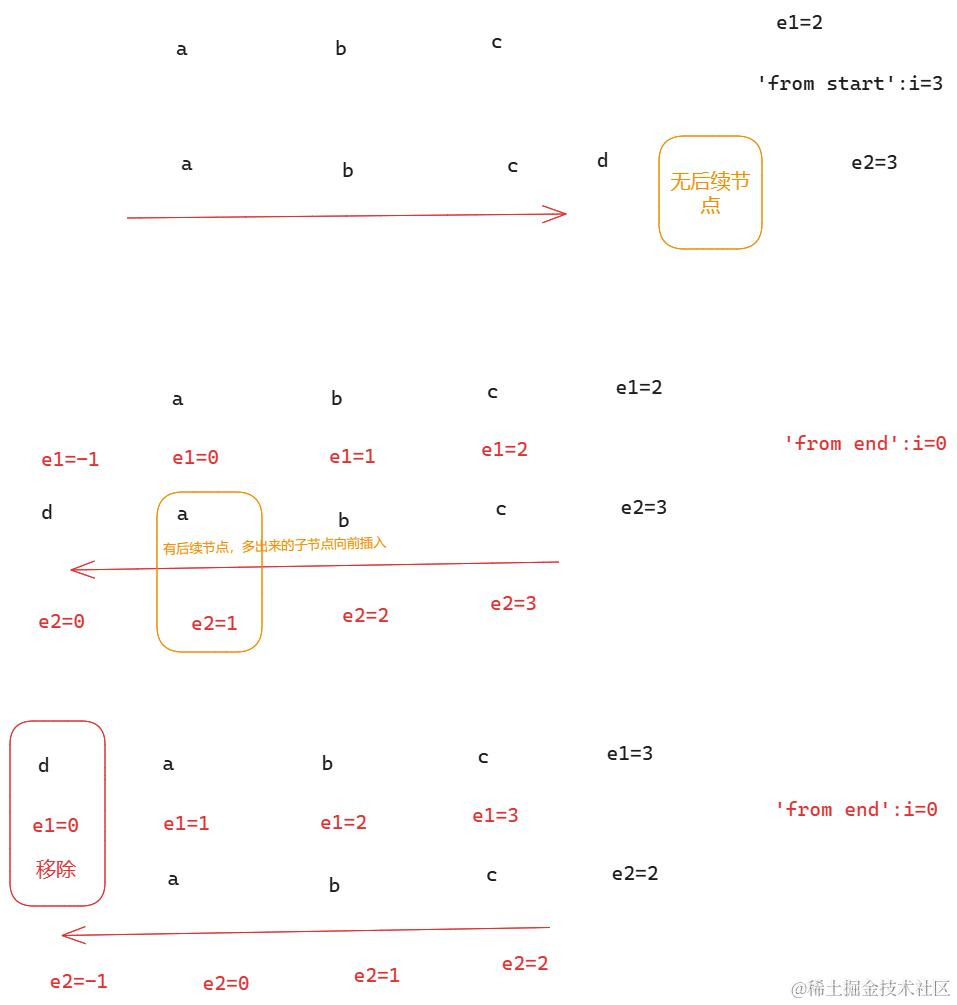
    // a, b, c      i   e1  e2
    // a, b, c, d   3   2   3
    //    a, b, c   i   e1  e2
    // d, a, b, c   0   -1  0

    // 怎么知道新的比老的多的?如何知道有新增元素?
    // 当 i 比 e1 大,说明有新增 0 > -1, 3 > 2

    // i > e1 说明新的比老的长,有新增的逻辑
    if (i > e1) {
        if (i <= e2) {
            // i - e2 之间为新增的部分
            while (i <= e2) {
                // 如果 e2 后面没有值,说明往后插入
                // 如果 e2 后面有值,说明是往前比较的,肯定是向前插入
                const nextPos = e2 + 1
                const anchor = c2[nextPos]?.el
                patch(null, c2[i], el, anchor) // 如何选择锚点值
                i++
            }
        }
    } else if (i > e2) {
        // 老多新少
        while (i <= e1) {
            unmount(c1[i])
            i++
        }
    }

}
我们先从前边向后比较,接着从后向前比较。多的就插入,少的就移除老节点。
不写key的情况
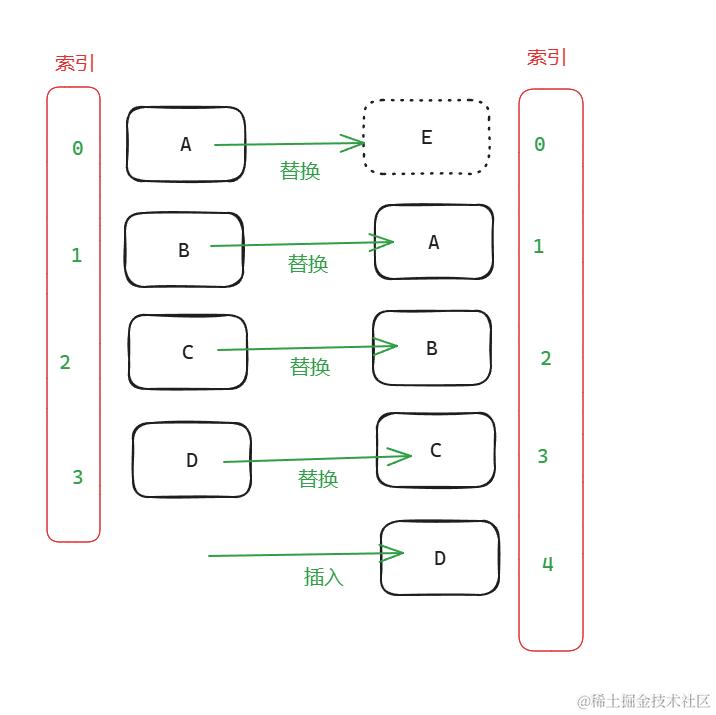
可以看到元素没有被复用。
因为是同样的标签, 没有key,只对比标签,所以内容属性对比做了替换。最后多出来的插入。
而且,用 index 当 key 值是一样的,因为两次 index 是一样的,还是被替换。
最长递增子序列
最长递增子序列概念
假设
原有C,D,E 三个元素
现有E,C,D,H 四个元素
如果不使用则会依次插入H,D,C,E, 需要插入4次
以上图为例:
我们可以看到C,D,Q,N是可以连续的,只需要把E挪到最前边,M挪到最后边,并不需要依次去插入,浪费性能。
我们需要计算出最长的递增序列(不需要连续)
假设我们有两个列表:
- 旧列表:
[2, 5, 8, 9, 7, 4, 6, 11] - 新列表:
[5, 8, 9, 7, 2, 11, 6, 4]
在这个例子中,5、8和9是稳定元素(它们的相对位置没有改变)。当Vue渲染新列表时,它可以:
- 跳过
5、8和9的重新渲染。 - 将
7、2、11、6和4移动到正确的位置
计算方式
2 5 8 9 7 4 6 11 最长的子序列是多少个 长度?
我们找序列中最有潜力的那一个
如:
// 我们找序列中最有潜力的那一个,比最后一个大的,直接放到队列中,如果比最后一个小
// 则将它替换到队伍中比他第一个大的那一项(二分查找)
// 贪心算法+二分查找+追溯

// 2 3  (更有潜力,后边可以放4,5)
// 2 5

// 2 (2的前一个是null)
// 2 5 (5的前一个是2)
// 2 5 8 (8的前一个是5)
// 2 5 8 9 (9的前一个是8)
// 2 5 8 9 7  (❌7无法放到9后边)
// 2 5 7 9 (7去找比自己大的那一项替换,虽然错误,但我们找的是后面更有潜力的。序列长度是不会错的,7的前一个是5)
// 2 5 7 9 11 (11的前一个是9)


11,9,8,5,2
// 追溯
// 2 5 8 9 11  = 5
图示:
算法如下:
function getSeq(arr) {
    debugger
    let result = [0]
    const len = arr.length // 总长度
    let resultLastIndex
    let start
    let end
    let middle = 0
    let p = arr.slice(0).fill(0)
    for (let i = 0; i < len; i++) {
        const arrI = arr[i]
        if (arrI != 0) {
            // 获取队列中的最后一项
            resultLastIndex = result[result.length - 1]
            if (arr[resultLastIndex] < arrI) {
                result.push(i)
                p[i] = resultLastIndex
                continue
            }
            // ..替换
            start = 0
            end = result.length - 1
            while (start < end) { // 折半 查找
                middle = Math.floor((start + end) / 2)
                // 中间那一项的值
                // 1,2,3,4,6    5
                if (arr[result[middle]] < arrI) {
                    start = middle + 1
                } else {
                    end = middle
                }
            }
            if (arrI < arr[result[end]]) {
                p[i] = result[end - 1]
                result[end] = i // 发现最后找到的索引比这一项大,那就用这个索引换掉,因为更有潜力
            }
        }
    }
    let i = result.length
    let last = result[i - 1]
    while (i-- > 0) {
        result[i] = last
        last = p[last]
    }
    return result
}


// console.log(getSeq([1, 2, 3, 4, 5, 0]))
console.log(getSeq([2, 3, 1, 5, 9, 4]))
利用最长递增子序列,优化Diff算法
const cressingIndexMap = getSeq(newIndexToOldIndexMap)
let lastIndex = cressingIndexMap.length - 1
// 哪些元素不需要移动
// 根据标记找到哪些索引不需要动, 倒序循环时匹配到索引跳过即可
// [5,3,4,0] => 索引[1,2]不需要动
// [5,3,8,0,4,6,7] => 索引 [1,4,5,6] 不需要动。0是新增
// 递增子序列,不用非要连续
// 我如何知道哪些元素是新增的哪些是要移动的
// 倒序插入 (insertBefore向前插入,所以要倒序插入)

for (let i = toBePatch - 1; i >= 0; i--) {
    const anchorIndex = s2 + i
    const child = c2[anchorIndex]
    const insertAnchor = c2[anchorIndex + 1]?.el
    if (newIndexToOldIndexMap[i] === 0) {
        patch(null, child, el, insertAnchor)
    } else {
        // 说明这个虚拟节点创建过
        // 暴力倒序插入
        if (cressingIndexMap[lastIndex] === i) {
            // 计算了递增子序列不用移动的部分,减少性能消耗
            lastIndex--
        } else {
            hostInsert(child.el, el, insertAnchor)
        }
    }
}
4. 异步更新响应式数据
const app = document.getElementById("app"); //创建app元素对象,作为游戏应用的主体内容
const VueComponent = {
    data() {
        return {age: 0, a: 0};
    },
    props: {
        a: Object,
        b: Number,
    },
    render(proxy) {
        // 允许编写模板的 -> effect
        console.log(proxy);
        setTimeout(() => {
            proxy.age++
            proxy.age++
        }, 1000)

        return h(Fragment, [h(Text, proxy.age), h(Text, proxy.a)]);
    },
    // 属性分为两种 第一种:props 第二种attrs
};
render(h(VueComponent, {a: {a: 1}, b: 2, c: 1}), app);
如上图,如果 proxy.age 同样的属性执行了两次,会造成双重执行,因为每次 age 属性变化了就立刻执行了 两遍effect 函数,相当于重新执行 render 函数。而从实际情况来看,我们只需要最后一次 age 变化的结果。这里就需要用到异步,主要核心就是 Promise.resolve()。在同步任务,也就是两次 age 执行完成后再执行 render 函数。
以下为核心代码: js/runtime-core/scheduler.js
const queue = []
let isFlushing = false
const resolvePromise = Promise.resolve()

// 调度函数,实现异步渲染
export function queueJob(job) {
    if (!queue.includes(job)) {
        // 将任务放到队列中
        queue.push(job)
    }
    if (!isFlushing) {
        isFlushing = true
        resolvePromise.then(() => {
            isFlushing = false

            let arr = queue.slice(0)
            queue.length = 0 // 再执行时可以继续向queue中添加任务
            for (let i = 0; i < arr.length; i++) {
                const job = arr[i]
                job()
            }
            arr.length = 0
        })
    }
}
js/runtime-core/renderer.js
function mountComponent(n2, container) {
    // 拿到用户的数据和渲染函数
    let {data = () => ({}), render} = n2.type
    const state = reactive(data())

    const instance = { // 组件的实例,用它来记录组件中的属性
        state,
        isMounted: false, // 是否挂载成功
        vnode: n2, // 组件的虚拟节点
        subTree: null, // 组件渲染的虚拟节点
        update: null // 用于组件更新的方法
    }
    // 每个组件都要有一个effect函数
    const componentUpdateFn = () => {
        if (!instance.isMounted) {
            const subTree = render.call(state, state)
            instance.subTree = subTree
            patch(null, subTree, container)
            instance.isMounted = true
        } else {
            // 组件更新,自身状态变了要更新子树
            const subTree = render.call(state, state)
            patch(instance.subTree, subTree, container)
            instance.subTree = subTree
        }
    }
    const effect = new ReactiveEffect(componentUpdateFn, () => {
        queueJob(instance.update)
    })
    const update = (instance.update = effect.run.bind(effect))
    update()
}