React的生命周期
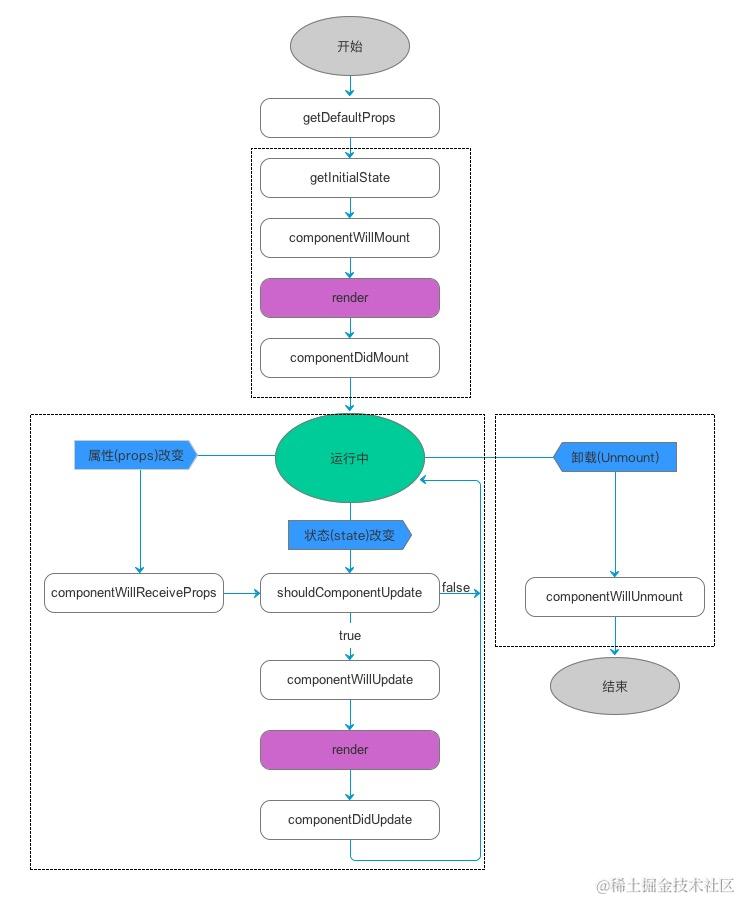
React的生命周期分成三大阶段:
- 挂载:Mounting,该阶段已插入真实 DOM
- 更新:Updating,该阶段正在被重新渲染
- 卸载:Unmounting,该阶段已移出真实 DOM
React的生命周期函数
React 为在前两个状态都提供了两种处理函数,will开头的函数在进入状态之前调用,did开头的函数在进入状态之后调用,三种状态共计五种处理函数。
componentWillMount() // 在渲染前调用
componentDidMount() // 在渲染后调用
// 在组件接收到新的props或者state但还没有render时被调用;在组件初始化时不会被调用
componentWillUpdate(object:nextProps, object:nextState)
// 在组件完成更新后立即调用;在初始化时不会被调用
componentDidUpdate(object:prevProps, object:prevState)
// 在组件从 DOM 中移除的时候立刻被调用
componentWillUnmount()
此外,React 还提供两种特殊状态的处理函数
// 已加载组件收到新的参数时调用,这个方法在初始化render时不会被调用
componentWillReceiveProps(object:nextProps)
// 组件判断是否重新渲染时调用,返回一个布尔值。
// 在组件接收到新的props或者state时被调用;在初始化时或者使用forceUpdate时不被调用
shouldComponentUpdate(object nextProps, object nextState)
类组件的生命周期函数
圈红的是常用的生命周期函数。
- 挂载阶段
constructor(props):构造函数,初始化状态。static getDerivedStateFromProps(props, state):在组件实例被创建和插入DOM之前调用,返回一个对象来更新状态。写了这个函数就必须有返回值,可以是null,也可以是一个对象。render():渲染组件。componentDidMount():组件被渲染到DOM后调用,适合发起网络请求等操作。
- 更新阶段
static getDerivedStateFromProps(props, state):在组件接收到新的props时调用,返回一个对象来更新状态。shouldComponentUpdate(nextProps, nextState):决定组件是否需要重新渲染,返回true就会再次运行render函数,返回false不再运行render函数。一个优化生命周期函数,可以优化无用渲染。render():重新渲染组件。getSnapshotBeforeUpdate(prevProps, prevState):在最近一次渲染输出(提交到DOM节点)之前调用,可以捕获一些信息(如滚动位置)。componentDidUpdate(prevProps, prevState, snapshot):组件更新后调用,适合执行DOM操作或网络请求。
- 卸载阶段
componentWillUnmount():组件被卸载前调用,适合清理操作(如取消网络请求、清除定时器)。
shouldComponentUpdate(nextProps, nextState)返回true时,组件初始化之后又再次执行了render生命周期函数。
// App.js
import { Component } from 'react'
import appStyle from './App.module.css'
class App extends Component {
  constructor(props) {
    super(props)
    this.state = {
      msg: "hello App"
    }
    console.log("constructor 运行")
  }
  static getDerivedStateFromProps(props, state) {
    console.log(props, state);
    console.log("getDerivedStateFromProps 运行");
    return null;
  }
  shouldComponentUpdate() {
    // 优化生命周期
    console.log("shouldComponentUpdate 运行");
    return true;

  }
  changeHandle = () => {
    this.setState({
      msg: "呼神护卫"
    })
  }
  render() {
    console.log("render 运行")
    return (
      <div>
        <h1>App组件</h1>
        <button className={appStyle["complex-button"]} onClick={this.changeHandle}>修改state</button>
      </div>
    )
  }
  componentDidMount() {
    console.log("componentDidMount 运行")
  }
  componentDidUpdate(prevProps, prevState) {
    // prevProps, prevState是修改前的props属性和state状态
    console.log(prevProps, prevState)
    console.log('componentDidUpdate 运行');
  }
  componentWillUnmount() {
    console.log('componentWillUnmount 运行');
  }
}

export default App;
shouldComponentUpdate(nextProps, nextState)返回flase时,组件初始化之后没有再执行render生命周期函数。
// App.js
import { Component } from 'react'
import appStyle from './App.module.css'
class App extends Component {
  constructor(props) {
    super(props)
    this.state = {
      msg: "hello App"
    }
    console.log("constructor 运行")
  }
  static getDerivedStateFromProps(props, state) {
    console.log(props, state);
    console.log("getDerivedStateFromProps 运行");
    return null;
  }
  shouldComponentUpdate() {
    // 优化生命周期
    console.log("shouldComponentUpdate 运行");
    return false;

  }
  changeHandle = () => {
    this.setState({
      msg: "呼神护卫"
    })
  }
  render() {
    console.log("render 运行")
    return (
      <div>
        <h1>App组件</h1>
        <button className={appStyle["complex-button"]} onClick={this.changeHandle}>修改state</button>
      </div>
    )
  }
  componentDidMount() {
    console.log("componentDidMount 运行")
  }
  componentDidUpdate(prevProps, prevState) {
    // prevProps, prevState是修改前的props属性和state状态
    console.log(prevProps, prevState)
    console.log('componentDidUpdate 运行');
  }
  componentWillUnmount() {
    console.log('componentWillUnmount 运行');
  }
}

export default App;
shouldComponentUpdate(nextProps, nextState)模拟PureComponent组件
// App.js
import { Component } from 'react'
import appStyle from './App.module.css'
class App extends Component {
  constructor(props) {
    super(props)
    this.state = {
      msg: "hello App"
    }
    console.log("constructor 运行")
  }
  static getDerivedStateFromProps(props, state) {
    console.log(props, state);
    console.log("getDerivedStateFromProps 运行");
    return null;
  }
  shouldComponentUpdate(nextProps, nextState) {
    // 优化生命周期,模拟PureComponent组件
    // nextProps, nextState是修改之后的props属性和state状态;this.state,this.state是修改前的props属性和state状态
    console.log(nextState, "修改后的state");
    console.log(this.state, "修改前的state")
    // 循环对象,比较两个对象是否发生了更改
    for (const key in this.state) {
      if (Object.prototype.hasOwnProperty.call(this.state, key)) {
        // 修改之后的值
        const element1 = this.state[key];
        // 修改之前的值
        const element2 = nextState[key];
        if(element1 == element2){
          return false;
        }else {
          return true;
        }
      }
    }
    console.log("shouldComponentUpdate 运行");

  }
  changeHandle = () => {
    this.setState({
      msg: "呼神护卫"
    })
  }
  render() {
    console.log("render 运行")
    return (
      <div>
        <h1>App组件</h1>
        <button className={appStyle["complex-button"]} onClick={this.changeHandle}>修改state</button>
      </div>
    )
  }
  componentDidMount() {
    console.log("componentDidMount 运行")
  }
  componentDidUpdate(prevProps, prevState) {
    // prevProps, prevState是修改前的props属性和state状态
    console.log(prevProps, prevState)
    console.log('componentDidUpdate 运行');
  }
  componentWillUnmount() {
    console.log('componentWillUnmount 运行');
  }
}

export default App;
shouldComponentUpdate注意事项
当React想要渲染一个组件的时候,它将会调用这个组件的shouldComponentUpdate钩子函数, 这个函数会告诉React是不是真的要渲染这个组件。返回false就不会重新渲染也就不会执行render函数,返回true就会重新渲染并执行render函数,默认返回true。所以shouldComponentUpdate函数中可以自己实现逻辑决定是否让页面重新渲染,它可以优化无用渲染。
单数类组件中shouldComponentUpdate有个注意事项,对于PureComponent的类组件中不能使用shouldComponentUpdate生命周期函数。因为PureComponent组件的功能就是用shouldComponentUpdate生命周期函数来实现的,PureComponent组件会在shouldComponentUpdate生命周期函数中判断props属性和state状态是否有更新。
// App.js
import { PureComponent } from 'react'
import appStyle from './App.module.css'
class App extends PureComponent {
  constructor(props) {
    super(props)
    this.state = {
      msg: "hello App"
    }
    console.log("constructor 运行")
  }
  static getDerivedStateFromProps(props, state) {
    console.log(props, state);
    console.log("getDerivedStateFromProps 运行");
    return null;
  }
  shouldComponentUpdate() {
    // 优化生命周期
    console.log("shouldComponentUpdate 运行")
  }
  changeHandle = () => {
    this.setState({
      msg: "呼神护卫"
    })
  }
  render() {
    console.log("render 运行")
    return (
      <div>
        <h1>App组件</h1>
        <button className={appStyle["complex-button"]} onClick={this.changeHandle}>修改state</button>
      </div>
    )
  }
  componentDidMount() {
    console.log("componentDidMount 运行")
  }
  componentDidUpdate(prevProps, prevState) {
    console.log(prevProps, prevState)
    console.log('componentDidUpdate 运行');
  }
  componentWillUnmount() {
    console.log('componentWillUnmount 运行');
  }
}

export default App;
类组件生命周期函数作用
对于类组件(Class Component),render 是一个必须实现的方法。它负责返回描述用户界面的React元素(虚拟DOM)。这个方法会在组件初始化时以及每次组件状态或属性发生变化时被调用。
class MyComponent extends React.Component {
    render() {
        return (
            <div>
                <h1>Hello, {this.props.name}</h1>
            </div>
        );
    }
}
render方法特点:
- 不应包含任何副作用操作(如网络请求、直接DOM操作等)。这些应该放在生命周期方法。
- 返回值可以是JSX、React元素、数组、字符串、数字、null 或 false。
函数组件的生命周期函数(使用Hooks)
函数组件通过Hooks来模拟类组件的生命周期方法
- 挂载阶段
useState(initialState):初始化状态。useEffect(() => { ... }, []):类似于componentDidMount,在组件挂载后执行。useLayoutEffect(() => { ... }, []):类似于componentDidMount,但在浏览器绘制之前同步执行。
- 更新阶段
useState(initialState):更新状态。useEffect(() => { ... }, [dependencies]):类似于componentDidUpdate,在组件更新后执行。依赖数组为空时,只在挂载时执行一次;依赖数组中有值时,会在依赖值变化时执行。useLayoutEffect(() => { ... }, [dependencies]):类似于componentDidUpdate,但在浏览器绘制之前同步执行。
- 卸载阶段
useEffect(() => { return () => { ... } }, [dependencies]):类似于componentWillUnmount,在组件卸载前执行清理操作。
import React, { useState, useEffect } from 'react';
function MyComponent() {
    const [count, setCount] = useState(0);
    useEffect(() => {
        console.log('Component did mount');
        return () => { console.log('Component will unmount');
        };
     }, []);
     useEffect(() => {
     console.log('Component did update'); }, [count]);
     return <div>{count}</div>;
}
函数体本身的return返回值就是类组件的render方法。函数体就是负责返回描述用户界面的React元素(虚拟DOM)。函数体会在组件初始化时以及每次组件状态或属性发生变化时被调用。
函数体本身也不应包含任何副作用操作(如网络请求、直接DOM操作等)。需要使用useEffect和useLayoutEffect副作用Hook来模拟类组件的生命周期函数,
函数组件与类组件生命周期函数的对比
| 生命周期方法 | 类组件 | 函数组件 |
|---|---|---|
| 初始化状态 | constructor(props) | useState(initialState) |
| 获取初始状态 | static getDerivedStateFromProps(props, state) | - |
| 渲染 | render() | 函数体 |
| 挂载后 | componentDidMount() | useEffect(() => { ... }, []) |
| 接收新Props | static getDerivedStateFromProps(props, state) | useEffect(() => { ... }, [props]) |
| 是否更新 | shouldComponentUpdate(nextProps, nextState) | - |
| 更新前 | - | useLayoutEffect(() => { ... }, [dependencies]) |
| 更新后 | componentDidUpdate(prevProps, prevState, snapshot) | useEffect(() => { ... }, [dependencies]) |
| 卸载前 | componentWillUnmount() | useEffect(() => { return () => { ... } }, [dependencies]) |
生命周期函数使用场景
render:通过render函数的执行来决定组件渲染什么内容,所以无论更新还是初次挂载都必须执行render。该生命周期函数一定不能做setState操作。componentDidMount:组件挂载完成,一般用来做一些页面初始化操作。比如初始化数据网络请求、绘制echart等。也就是vue中mounted或onMount里做的事儿shouldComponentUpdate:更新阶段调用,返回false则不会执行render函数从而达到阻止页面刷新的效果,用于做无用渲染的优化。componentDidUpdate:页面更新完成时调用,等同于vue的updatedcomponentWillUnmount:组件即将卸载,通常做一些全局事件监听的卸载和定时器的卸载来优化应用的性能