1、文本属性
| 属性 | 描述 |
|---|---|
| fontSize | 字体大小 |
| fontColor | 字体颜色 |
| fontStyle | 字体样式 |
| fontWeight | 字体粗细 |
| lineHeight | 文本行高 |
| decoration | 文本修饰线及颜色 |
| textAlign | 水平方向Text对齐方式 |
| align | 垂直方向对齐方式 |
| textIndent | 文本首行缩进 |
| textOverflow | 设置文本超长时的显示方式 |
| maxLines | 设置文本的最大行数 |
2、Text的基本使用:
//1、使用string数据设置文本内容
Text('登录页面')
//2、使用Resource数据设置文本内容
Text($r('app.string.login_page'))
  .margin(20)
3、Text设置字体大小
//1、设置文本内容大小
Text('登录页面')
  .fontSize(24)


//2、设置文本内容大小
Text('登录页面')
  .fontSize($r('app.float.ui_60'))
字体大小文件:
{
  "float": [
    {
      "name": "ui_20",
      "value": "20"
    },

    {
      "name": "ui_60",
      "value": "60"
    }
  ]
}
4、Text设置颜色
  //1、使用系统颜色
  Text('登录页面')
    .fontColor(Color.Red)


  //2、使用string颜色
  Text('登录页面')
    .fontColor('#00FFFF')

  //3、使用number颜色
  Text('登录页面')
    .fontColor(0x182431)

  //4、使用Resourse颜色
  Text('登录页面')
    .fontColor($r('app.color.text_color'))
}
5、Text设置文本粗细
//1、使用number设置粗细
Text('登录页面')
  .fontWeight(300)

//2、使用FontWeight设置粗细
Text('登录页面')
  .fontWeight(FontWeight.Bold)
| 名称 | 说明 |
|---|---|
| Lighter | 字体较细 |
| Normal | 字体粗细正常 |
| Regular | 字体粗细正常 |
| Mediun | 字体粗细适中 |
| Bold | 字体较粗 |
| Bolder | 字体非常粗 |
6、Text设置文本边框
BorderStyle样式, Dotted:点; Dashed:虚线;Solid:实体边框;
//1、设置边框
Text('登录页面')
  .fontWeight(300)
  .padding(6)
  .border({
    width:1, //宽度
    color:Color.Green,
    style:BorderStyle.Solid,// Dotted:点; Dashed:虚线;Solid:实体边框
  })

//2、设置单边框
Text('登录页面')
  .padding(6)
  .margin(10)
  .fontWeight(FontWeight.Bold)
  .border({
    width:{left:1,right:2}, //宽度
    color:{left:Color.Red,right:Color.Orange},
    style:{left:BorderStyle.Solid,right:BorderStyle.Solid},// Dotted:点; Dashed:虚线;Solid:实体边框
  })
7、Text设置文本圆角
//1、设置圆角为20
Text('登录页面')
  .fontWeight(300)
  .padding(6)
  .backgroundColor(Color.Pink)
  .borderRadius(20)//设置四个圆角统一大小

//2、设置单个圆角
Text('登录页面')
  .padding(6)
  .margin(10)
  .fontWeight(FontWeight.Bold)
  .backgroundColor(Color.Orange)
  .borderRadius({ //单个设置圆角,不同值
    topLeft:10,
    topRight:20,
    bottomLeft:30,
    bottomRight:40
  })
8、Text设置背景图片
  //1、设置ImageRepeat.X 轴方向填充
  Text('我是文本内容')
    .width(300)
    .height(100)
    .backgroundColor(Color.Pink)
    .backgroundImage($r('app.media.pay'),ImageRepeat.X)

  //2、设置ImageRepeat.XY 轴方向填充
  Text('我是文本内容')
    .width(300)
    .height(100)
    .margin(10)
    .backgroundColor(Color.Pink)
    .backgroundImage($r('app.media.pay'),ImageRepeat.XY)
}
9、Text设置背景图片的位置
//1、设置图片的具体位置
Text('我是文本内容')
  .width(300)
  .height(200)
  .backgroundColor(Color.Pink)
  .backgroundImage($r('app.media.pay'))
  .backgroundImagePosition({
    x:150,
    y:100
  })


//2、设置图片的相对位置,Alignment:  TopStrat、Top、TopEnd、BottomStart、Bottom、BottomEnd
Text('我是文本内容')
  .width(300)
  .height(200)
  .margin(10)
  .backgroundColor(Color.Pink)
  .backgroundImage($r('app.media.pay'))
  .backgroundImagePosition(Alignment.TopEnd)
10、Text设置图片位置vp转px
//1、设置图片位置vp转px
Text('我是文本内容')
  .width('300vp')
  .height('200vp')
  .backgroundColor(Color.Pink)
  .backgroundImage($r('app.media.pay'))
  .backgroundImagePosition({
    x:vp2px(50),
    y:vp2px(30)
  })
11、Text设置图片的缩放
//1、设置图片的缩放
//Contain: 等比例缩放,展示整张图片,可能会留白
//Cover:等比例缩放,让图片铺满整个容器,不会留白,但是有可能会有部分内容显示不全
//Auto:等比例缩放,展示整张图片,可能会留白
//FILL: 拉伸充满,会让图片变形
Text('我是文本内容')
  .width(300)
  .height(200)
  .backgroundColor(Color.Pink)
  .backgroundImage($r('app.media.bg'))
  .backgroundImagePosition(Alignment.Center)
  .backgroundImageSize(ImageSize.Contain)
12、Text设置文字溢出省略号、行高
属性:textOverflow 参数:{overflow: TextOverflow},TextOverflow 为枚举类型
- None:文本超长时裁剪显示
- Clip:文本超长时进行裁剪显示
- Ellipsis:文本超长时显示不下的文本用省略号代替
- MARQUEE:文本超长时以跑马灯的方式展示(滚动显示)
属性:maxLines
参数:数字
  //1、设置文本过长显示效果
    //TextOverflow中 Ellipsis:后面省略号; Clip:直接结束,没有省略号; MARQUEE:循环跑马灯效果
    Text('据央视新闻10月25日消息,当地时间10月24日,俄罗斯总统普京在喀山金砖峰会记者会上表示,俄罗斯将考虑任何有关解决乌克兰危机的和平协议方案,但该方案必须基于现实情况。')
      .width(300)
      .height(100)
      .backgroundColor(Color.Pink)
      .lineHeight(30)//设置行高
      .textOverflow({
        overflow:TextOverflow.Ellipsis
      })
      .maxLines(2)
13、Text设置文字内边距
//1、设置文本内边距
Text('据央视新闻10月25日消息,当地时间10月24日,俄罗斯总统普京在喀山金砖峰会记者会上表示,俄罗斯将考虑任何有关解决乌克兰危机的和平协议方案,但该方案必须基于现实情况。')
  .width(300)
  .height(120)
  .backgroundColor(Color.Pink)
  .padding(10)

//2、设置文本内边距
Text('据央视新闻10月25日消息,当地时间10月24日,俄罗斯总统普京在喀山金砖峰会记者会上表示,俄罗斯将考虑任何有关解决乌克兰危机的和平协议方案,但该方案必须基于现实情况。')
  .width(300)
  .height(120)
  .backgroundColor(Color.Pink)
  .padding({
    left:5,
    top:10,
    right:20,
    bottom:30
  })
  .margin(10)
14、Text设置文字外边距
//1、设置文本内边距
Text('刘备')
  .backgroundColor(Color.Pink)

Text('关羽')
  .backgroundColor(Color.Pink)
 // .margin(10) //设置方式一
  .margin({  //设置方式二
    left:10,
    right:30,
    top:40,
    bottom:50
  })
Text('张飞')
  .backgroundColor(Color.Pink)
15、Text设置文字样式
作用:设置字体是否倾斜
属性:fontStyle()
参数:枚举FontStyle
● Normal:正常字体(不倾斜)
● Italic:斜体
//1、设置文本样式
Text('我是文本内容')
  .backgroundColor(Color.Pink)
  .fontStyle(FontStyle.Italic)
16、Text设置文本修饰
属性:decoration()
参数:{}
● type:修饰线类型,TextDecorationType(枚举)
○ None:无
○ Underline:下划线
○ LineThrough:删除线
○ Overline:顶划线
● color:修饰线颜色,可选,默认为黑色
//1、设置文本修饰
Text('我是文本内容-删除线')
  .backgroundColor(Color.Gray)
  .decoration({
    type:TextDecorationType.LineThrough,
    color:Color.Red,
  })

//2、设置文本修饰
Text('我是文本内容-下划线')
  .backgroundColor(Color.Gray)
  .decoration({
    type:TextDecorationType.Underline,
    color:Color.Red
  })
  .margin(10)

//3、设置文本修饰
Text('我是文本内容-顶划线')
  .backgroundColor(Color.Gray)
  .decoration({
    type:TextDecorationType.Overline,
    color:Color.Red
  })
17、文本水平对齐方式1
作用:设置文本在水平方向的对齐方式
属性:textAlign
参数:枚举 TextAlign
● Start:左对齐,默认值
● Center:居中
● End:右对齐
Text('中间对齐')
  .width(200)
  .height(50)
  .backgroundColor('#d3f2e3')
  .textAlign(TextAlign.Center)

Text('左对齐')
  .width(200)
  .height(50)
  .backgroundColor(Color.Orange)
  .textAlign(TextAlign.Start)

Text('右对齐')
  .width(200)
  .height(50)
  .backgroundColor('#d3f2e3')
  .textAlign(TextAlign.End)
18、文本水平对齐方式2(textAlign和align配合使用)
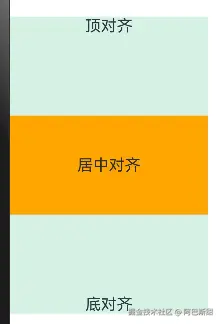
Text 组件内容默认垂直居中,效果如下:
可使用align属性调整Text组件垂直对齐方式。
属性: align()
参数: 枚举Alignment
| 参数 | 描述 |
|---|---|
| Top | 顶对齐 |
| Center | 垂直居中,默认值 |
| Bottom | 底对齐 |
Text('顶对齐')
.width(200)
.height(100)
.backgroundColor('#d3f2e3')
.textAlign(TextAlign.Center)
// 垂直对齐方式
.align(Alignment.Top)
Text('居中对齐')
.width(200)
.height(100)
.backgroundColor(Color.Orange)
.textAlign(TextAlign.Center)
// 垂直对齐方式
.align(Alignment.Center)
Text('底对齐')
.width(200)
.height(100)
.backgroundColor('#d3f2e3')
.textAlign(TextAlign.Center)
// 垂直对齐方式
.align(Alignment.Bottom)
19、文本首行缩进
属性:textIndent
参数:数值
Text('据央视新闻10月25日消息,当地时间10月24日,俄罗斯总统普京在喀山金砖峰会记者会上表示,俄罗斯将考虑任何有关解决乌克兰危机的和平协议方案,但该方案必须基于现实情况。')
  .width(300)
  .height(100)
  .backgroundColor('#d3f2e3')
  .textIndent(20)
20、Text的点击事件和触摸事件
- onClick:点击事件
- onTouch:触摸事件
//点击事件
Text('点我啊-点击事件')
  .backgroundColor('#d3f2e3')
  .padding(12)

  //1、Text点击事件1
  // .onClick(()=>{
  //   console.log("lyy","点击了文本")
  // })
  //2、Text点击事件2
  .onClick((event: ClickEvent)=>{
    console.log("lyy","点击了文本:"+event.x)
  })

//触摸事件
Text('点我啊-触摸事件')
  .backgroundColor('#d3f2e3')
  .padding(12)
    //1、Text触摸事件1
    // .onTouch(()=>{
    //
    // })
    //2、Text触摸事件2
  .onTouch((event: TouchEvent)=>{
    if (TouchType.Down == event.type) {
      console.log("lyy","===Down====")
    }

    if (TouchType.Up == event.type) {
      console.log("lyy","===Up====")
    }

    if (TouchType.Move == event.type) {
      console.log("lyy","===Move====")
    }
  })
  .margin(10)