1. 项目前置准备
2. 卡片双向通信
- 现在我们通过一个加减器来实现卡片的双向通信
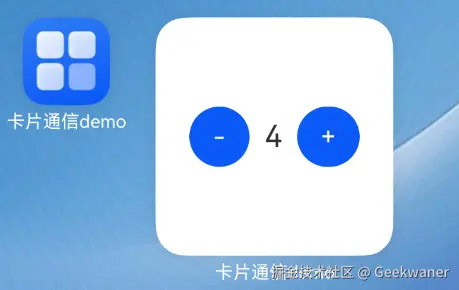
- 卡片页面和应用页面的ui我们保持一致
@Entry
@Component
struct Index {
  @State
  num: number = 0
  build() {
    Column() {
      Row({ space: 10 }) {
        Button("-")
          .onClick(() => {
            if (this.num) {
              this.num--
            }
          })
        Text(this.num.toString())
        Button("+")
          .onClick(() => {
            this.num++
          })
      }
      .justifyContent(FlexAlign.Center)
      .width("100%")
    }
    .width("100%")
    .height("100%")
    .justifyContent(FlexAlign.Center)
    .alignItems(HorizontalAlign.Center)
  }
}
2.1. 创建卡片时应用数据同步到卡片
- 创建卡片时会触发卡片生命周期
onAddForm函数
- 卡片框架会通过want传给我们一个创建好的formId字符串
- 此时我们在生命周期接收到formId返回给卡片页面
import { formBindingData, FormExtensionAbility, formInfo } from '@kit.FormKit';
import { Want } from '@kit.AbilityKit';
export default class EntryFormAbility extends FormExtensionAbility {
onAddForm(want: Want) {
return formBindingData.createFormBindingData({
formId: want.parameters!["ohos.extra.param.key.form_identity"] as string
});
}
}
- 接着我们到卡片页面去接收formId
- 此时formId监听到变化,触发updateFormId事件
- 在updateFormId事件中调用
postCardAction方法 备注:postCardAction方法能够快速拉起卡片提供方应用的指定UIAbility,从而将数据从卡片==>应用

@Entry
@Component
struct Count {
@LocalStorageProp("formId")
@Watch("updateFormId")
formId: string = ""
@LocalStorageProp("num")
num: number = 0
updateFormId() {
postCardAction(this, {
action: 'call',
abilityName: 'EntryAbility',
params: {
method: 'updateFormId',
formId: this.formId
}
})
}
.....
}
- 请注意,如果使用call方式传递调用,需要开启一个后台权限-保持应用在后台
"requestPermissions": [{
    "name": "ohos.permission.KEEP_BACKGROUND_RUNNING"
  }],
- 此时在应用卡片中设置call 函数,可以拿到formId数据
class Params implements rpc.Parcelable {
marshalling(messageSequence: rpc.MessageSequence): boolean {
return true;
}
unmarshalling(messageSequence: rpc.MessageSequence): boolean {
return true;
}
}
class CardParams {
num: number = 0
formId: string = ""
}
this.callee.on("updateFormId", (data) => {
const res = JSON.parse(data.readString()) as CardParams
....
return new Params()
})
- 此时接收到formId我们需要存入首选项中,因为需要存储多个formId来推送给不同的卡片, 所以我们可以封装一个类去管理首选项
import { preferences } from '@kit.ArkData'
import { Context } from '@kit.AbilityKit'
export default class FormIdManager {
static context: Context
static getStore() {
return preferences.getPreferencesSync(FormIdManager.context || getContext(), {
name: "num_formId"
})
}
static async addFormId(formId: string) {
const store = FormIdManager.getStore()
const list = FormIdManager.getFormIdList()
if (!list.some(id => id === formId)) {
list.push(formId)
}
store.putSync("num_formId_key", JSON.stringify(list))
await store.flush()
}
static getFormIdList() {
const store = FormIdManager.getStore()
return JSON.parse(store.getSync("num_formId_key", '[]') as string) as string[]
}
static async delFormId(formId: string) {
const store = FormIdManager.getStore()
const list = FormIdManager.getFormIdList()
const index = list.findIndex(id => id === formId)
list.splice(index, 1)
store.putSync("num_formId_key", JSON.stringify(list))
await store.flush()
}
}
onCreate(want: Want, launchParam: AbilityConstant.LaunchParam): void {
this.callee.on("updateFormId", (data) => {
const res = JSON.parse(data.readString()) as CardParams
FormIdManager.addFormId(res.formId)
formProvider.updateForm(res.formId, formBindingData.createFormBindingData({
num: AppStorage.get("num")
}))
return new Params()
})
}
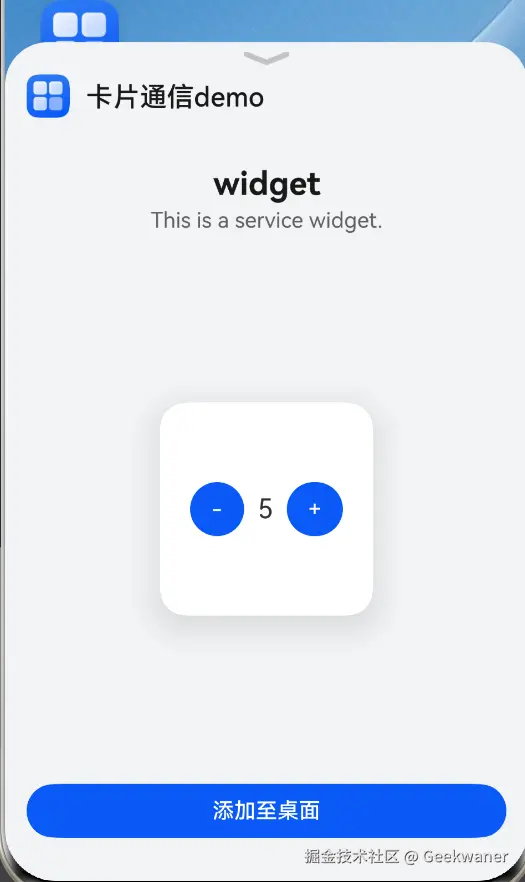
- 此时点击添加卡片,卡片中的数据和应用的num保持一致
2.2. 卡片改变数据触发应用刷新
- 在卡片的onClick 事件中点击加减触发 postCardAction
Button("-")
.onClick(() => {
if (this.num) {
this.num--
}
postCardAction(this, {
action: 'call',
abilityName: 'EntryAbility',
params: {
method: 'updateNum',
num: this.num
}
})
})
- 在onCreate方法接收数据并存储到全局数据, 接着在应用页面中接收
- 将@state 改成 @StorageLink("num")
onCreate(want: Want, launchParam: AbilityConstant.LaunchParam): void {
this.callee.on("updateNum", (data) => {
const res = JSON.parse(data.readString()) as CardParams
AppStorage.setOrCreate("num", res.num)
return new Params()
})
this.callee.on("updateFormId", (data) => {
....
})
}
@Entry
@Component
struct Index {
@StorageLink("num")
@Watch("pushCard")
num: number = 0
....
}
2.3. 应用改变数据触发卡片刷新
- 在应用页面中监听num数据的变换,当数据变化时触发更新卡片函数
@Entry
@Component
struct Index {
@StorageLink("num")
@Watch("pushCard")
num: number = 0
pushCard() {
const store = preferences.getPreferencesSync(getContext(), {
name: 'formIdList'
})
const list = FormIdManager.getFormIdList()
list.forEach(formId => {
formProvider.updateForm(formId, formBindingData.createFormBindingData({
num: this.num
}))
})
}
....
}
- 卡片接收,num设置成
@LocalStorageProp("num")
@Entry
@Component
struct Count {
@LocalStorageProp("num")
num: number = 0
....
}
3. 源代码
import { preferences } from '@kit.ArkData'
import { formBindingData, formProvider } from '@kit.FormKit'
import FormIdManager from '../utils/FormIdManager'
@Entry
@Component
struct Index {
@StorageLink("num")
@Watch("pushCard")
num: number = 0
pushCard() {
const store = preferences.getPreferencesSync(getContext(), {
name: 'formIdList'
})
const list = FormIdManager.getFormIdList()
list.forEach(formId => {
formProvider.updateForm(formId, formBindingData.createFormBindingData({
num: this.num
}))
})
}
build() {
Column() {
Row({ space: 10 }) {
Button("-")
.onClick(() => {
if (this.num) {
this.num--
}
})
Text(this.num.toString())
Button("+")
.onClick(() => {
this.num++
})
}
.justifyContent(FlexAlign.Center)
.width("100%")
}
.width("100%")
.height("100%")
.justifyContent(FlexAlign.Center)
.alignItems(HorizontalAlign.Center)
}
}
@Entry
@Component
struct Count {
@LocalStorageProp("num")
num: number = 0
@LocalStorageProp("formId")
@Watch("updateFormId")
formId: string = ""
updateFormId() {
console.log('formId')
postCardAction(this, {
action: 'call',
abilityName: 'EntryAbility',
params: {
method: 'updateFormId',
formId: this.formId
}
})
}
build() {
Row({ space: 10 }) {
Button("-")
.onClick(() => {
if (this.num) {
this.num--
}
postCardAction(this, {
action: 'call',
abilityName: 'EntryAbility',
params: {
method: 'updateNum',
num: this.num
}
})
})
Text(this.num.toString())
.fontSize(20)
Button("+")
.onClick(() => {
this.num++
postCardAction(this, {
action: 'call',
abilityName: 'EntryAbility',
params: {
method: 'updateNum',
num: this.num
}
})
})
}
.width("100%")
.height("100%")
.justifyContent(FlexAlign.Center)
.alignItems(VerticalAlign.Center)
.onClick(() => {
postCardAction(this, {
action: 'router',
abilityName: 'EntryAbility'
})
})
}
}
import { AbilityConstant, UIAbility, Want } from '@kit.AbilityKit';
import { hilog } from '@kit.PerformanceAnalysisKit';
import { window } from '@kit.ArkUI';
import rpc from '@ohos.rpc';
import { preferences } from '@kit.ArkData';
import { formBindingData, formProvider } from '@kit.FormKit';
import { Logger } from '../utils/Logger';
import FormIdManager from '../utils/FormIdManager';
class Params implements rpc.Parcelable {
marshalling(messageSequence: rpc.MessageSequence): boolean {
return true;
}
unmarshalling(messageSequence: rpc.MessageSequence): boolean {
return true;
}
}
class CardParams {
num: number = 0
formId: string = ""
}
export default class EntryAbility extends UIAbility {
onCreate(want: Want, launchParam: AbilityConstant.LaunchParam): void {
this.callee.on("updateNum", (data) => {
const res = JSON.parse(data.readString()) as CardParams
AppStorage.setOrCreate("num", res.num)
return new Params()
})
this.callee.on("updateFormId", (data) => {
const res = JSON.parse(data.readString()) as CardParams
FormIdManager.addFormId(res.formId)
formProvider.updateForm(res.formId, formBindingData.createFormBindingData({
num: AppStorage.get("num")
}))
return new Params()
})
}
onDestroy(): void {
this.callee.off("updateNum")
hilog.info(0x0000, 'testTag', '%{public}s', 'Ability onDestroy');
}
onWindowStageCreate(windowStage: window.WindowStage): void {
hilog.info(0x0000, 'testTag', '%{public}s', 'Ability onWindowStageCreate');
windowStage.loadContent('pages/Index', (err) => {
if (err.code) {
hilog.error(0x0000, 'testTag', 'Failed to load the content. Cause: %{public}s', JSON.stringify(err) ?? '');
return;
}
hilog.info(0x0000, 'testTag', 'Succeeded in loading the content.');
});
}
}