简介
Ingress 为外部提供集群的访问入口(也叫 gateway 或 reverse proxy),因此,它自身也是以 Service 形式部署,可以是 NodePort 也可以是 LoadBalancer。
(1) Ingress on NodePort
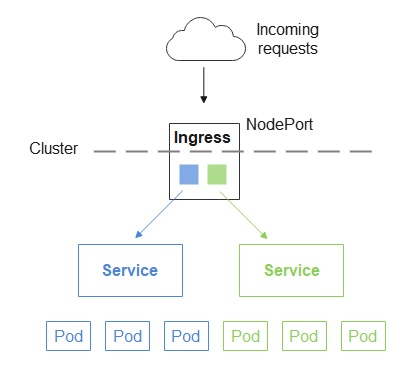
使用 NodePort 方式有个缺陷,那就是 kube-proxy 默认只会在 30000-32767 的范围内分配端口,没法使用 80 端口。
不过,可以通过参数 --service-node-port-range 来指定范围。
vim /etc/kubernetes/manifests/kube-apiserver.yaml
apiVersion: v1
kind: Pod
metadata:
  creationTimestamp: null
  labels:
    component: kube-apiserver
    tier: control-plane
  name: kube-apiserver
  namespace: kube-system
spec:
  containers:
  - command:
    - kube-apiserver
    - --advertise-address=172.17.216.80
    - --allow-privileged=true
    - --authorization-mode=Node,RBAC
    - --service-cluster-ip-range=10.96.0.0/12
    - --service-node-port-range=20000-22767
    - --tls-cert-file=/etc/kubernetes/pki/apiserver.crt
	...
重启 api-server
# 获得 apiserver 的 pod 名字
export apiserver_pods=$(kubectl get pods --selector=component=kube-apiserver -n kube-system --output=jsonpath={.items..metadata.name})
# 删除 apiserver 的 pod
kubectl delete pod $apiserver_pods -n kube-system
注意
- 对于已经创建的NodePort类型的Service,您需要删除重新创建
- 如果您的集群有多个 Master 节点,您需要逐个修改每个节点上的
/etc/kubernetes/manifests/kube-apiserver.yaml文件,并重启 apiserver
还可以 --nodeport-addresses 来指定 kube-proxy 绑定的端口。
最后,可以在 Serivce 定义文件中,通过 nodePort 字段来指定该 Service 所侦听的 NodePort 端口,如下:
apiVersion: v1
kind: Service
metadata:
  name: my-service
spec:
  type: NodePort
  selector:
    app: MyApp
  ports:
      # By default and for convenience, the `targetPort` is set to the same value as the `port` field.
    - port: 80
      targetPort: 80
      # Optional field
      # By default and for convenience, the Kubernetes control plane will allocate a port from a range (default: 30000-32767)
      nodePort: 30007
(2) Ingress on LoadBalancer
如何选择版本部署那个 yaml?
raw.githubusercontent.com/kubernetes/…
deploy.yaml 主要会创建如下资源:
-
Namespace: ingress-nginx
-
ServiceAccount: ingress-nginx
-
ConfigMap: ingress-nginx-controller
-
ClusterRole: ingress-nginx
-
ClusterRoleBinding: ingress-nginx
-
Role: ingress-nginx
-
RoleBinding: ingress-nginx
-
Service 1 (ClusterIP, for webhook ) : ingress-nginx-controller-admission
-
Service 2 (LoadBalancer) : ingress-nginx-controller
-
Deployment: ingress-nginx-controller
-
IngressClass (controller: k8s.io/ingress-nginx): ingress-nginx,
-
ValidatingWebhookConfiguration: ingress-nginx-admission
-
ServiceAccount: ingress-nginx-admission
-
ClusterRole: ingress-nginx-admission
-
ClusterRoleBinding: ingress-nginx-admission
-
Role: ingress-nginx-admission
-
RoleBinding: ingress-nginx-admission
-
Job: ingress-nginx-admission-create
-
Job: ingress-nginx-admission-patch
注意,上述 yaml 没有定义 Secret 资源。
BareMetal 与 Cloud 的主要区别:
-
- Service 2: BareMetal 是 NodePort,而 Cloud 则是 LoadBalancer,且 externalTrafficPolicy: Local
By setting externalTrafficPolicy=local, nodes only route traffic to pods that are on the same node, which then preserves client IP. It’s important to recognize that ExternalTrafficPolicy is not a way to preserve source IP; it’s a change in networking policy that happens to preserve source IP.
-
- Deployment: Cloud 的 args 中多了这个参数:
--publish-service=$(POD_NAMESPACE)/ingress-nginx-controller
Do 与 Cloud 的区别是:
-
- ConfigMap: Do 多了这个参数
use-proxy-protocol: 'true'
- ConfigMap: Do 多了这个参数
- Service 2
Do 多了这个 annotation
service.beta.kubernetes.io/do-loadbalancer-enable-proxy-protocol: 'true'
解释:
启用 use-proxy-protocol 的主要目的是保留 Original client IP,否则收到请求的 pod 会不知道 Original Client IP 是多少。启用 proxy protocol 之后,ingress controller 就会把 Original IP 添加到 HTTP Header 中去。还有另一种方式保留 Client IP,那就是像 Cloud 中一样,把 ExternalTrafficPolicy 设为 local,这样只有本地才能发请求,也就知道 Client IP 是多少了,因为就是本机 IP。
You will recieve an external IP address via the openstack load balancer Octavia. This uses the service type load balancer in Kubernetes. The service will include additional annotations for the proxy protocol. Which will ensure that the original client IP address is inserted into the HTTP header. So that the backend service is able to get the real source IP of the request. Please check the version of the nginx ingress contoller that you are deploying. The version in this example maybe outdated.
AWS 与 Cloud 区别:
Service 2
AWS 只在 Service 2 中多了 annotations 和 labels,其它完全一样
Preserving Source IP with Kubernetes ingress
How else can you preserve source IP with Kubernetes? If your external load balancer is a Layer 7 load balancer, the X-Forwarded-For header will also propagate client IP. If you are using a Layer 4 load balancer, you can use the PROXY protocol.
To experiment with this in your own Kubernetes environment, you can quickly bootstrap a Kubernetes ingress controller by answering a few questions about your Kubernetes environment with the K8s Initializer.
全文完!
如果你喜欢我的文章,欢迎关注我的微信公众号 deliverit。