redis 主从,sentine和cluster
redis 主从,sentine和cluster
1.RDB和AOF的优缺点
RDB优点:
- RDB快照保存了某个时间点的数据,可以通过脚本执行redis指令bgsave(非阻塞,后台执行)或者save(会阻塞写操作,不推荐)命令自定义时间点备份,
- 可以保留多个备份,当出现问题可以恢复到不同时间点的版本,很适合备份。
- 并且此文件格式也支持不少第三方工具可以进行后续的数据分析。
4.RDB可以最大化redis的性能,父进程在保存RDB文件时唯一要做的就是fork出一个子进程,然后这个子进程就会处理接下来的所有保存工作,父进程无需执行热河磁盘IO操作。5.RDB在大量数据比如几个G数据,恢复速度比AOF快。
RDB缺点:
不能实时保存数据,可能丢失自上一次RDB备份到当前的内存数据。当数据量非常大的时候,从父进程fork子进程进行保存至RDB文件时需要一点时间,可能是毫秒或是秒,取决于磁盘IO性能在数据集比较庞大时,fork()可能会非常耗时,造成服务器在一定时间内停止处理客户端
AOF优点:
- 数据安全性相对较高,根据所使用的fsync策略(fsync是同步于redis所有已经修改的文件到存储设备),默认是appendfsync everysec ,即每秒执行一次fsync,在这种配置下,redis仍然可以保持良好性能,并且就算发生故障停机,也最多只会丢失一秒钟 数据(fsync 会在后台线程执行,所以主线程可以继续努力处理命令请求)
- 由于该机制对日志文件的写入操作采用的是append模式,因此在写入过程中不需要seek,即使出现宕机现象,也不会破坏日志中已经存在的内容。
- Redis可以在AOF文件体积变得过大时自动的在后台对AOF进行重写:重写后的新AOF文件包含了恢复当前数据所需要的最小命令集合
- AOF包含了一个格式清晰、易于理解的日志文件用于记录所有的修改操作
AOF缺点:
1.即使有些操作是重复的也会全部记录,AOF的文件大小要大于RDB格式的文件; 2.AOF在恢复大数据的速度比RDB的恢复速度慢; 3.根据fsync策略不同,AOF速度可能会慢于RDB 4.Bug 出现的可能性更多 RDB 和AOF的选择
如果主要充当缓存功能,或者可以承受数分钟的数据丢失,通常生产环境一般只需启用RDB即可,此也是默认值 如果数据需要持久保存,一点也不能丢失,可以选择同时开启RDB和AOF,一般不建议只开启AOF
2. redis的Master和slave同步过程
即redis主从复制
**环境准备:**
master:10.0.0.18
slave1 :10.0.0.28
slave2: 10.0.0.38
#在mater上设置key1
[root@centos8 ~]#vim /etc/redis.conf
appendonly yes #开启持久化
bind 0.0.0.0 #开启主从同步
requirepass 123456
#systemctl start redis
[root@centos8 ~]#redis-cli #或redis-cli -a 123456
127.0.0.1:6379> AUTH 123456
OK
127.0.0.1:6379> INFO replication
# Replication
role:master
connected_slaves:0
master_replid:eccadbe6c2e8b7f1ee9dd3a06bb3b59e698434b5
master_replid2:0000000000000000000000000000000000000000
master_repl_offset:0
second_repl_offset:-1
repl_backlog_active:0
repl_backlog_size:1048576
repl_backlog_first_byte_offset:0
repl_backlog_histlen:0
127.0.0.1:6379> SET key1 v1-master
OK
127.0.0.1:6379> KEYS * #生产慎用
1) "key1"
127.0.0.1:6379> GET key1
"v1-master"
127.0.0.1:6379>
#以下都在slave1上执行,登录
[root@centos8 ~]#redis-cli
127.0.0.1:6379> info
NOAUTH Authentication required.
127.0.0.1:6379> AUTH 123456
OK
127.0.0.1:6379> INFO replication #查看当前角色默认为master
# Replication
role:master #默认master
connected_slaves:0
master_replid:cdfdaa8fa64e76bfeacbb2ad8b12644330663212
master_replid2:0000000000000000000000000000000000000000
master_repl_offset:0
second_repl_offset:-1
repl_backlog_active:0
repl_backlog_size:1048576
repl_backlog_first_byte_offset:0
repl_backlog_histlen:0
127.0.0.1:6379> set key1 v1-slave-28
OK
127.0.0.1:6379> KEYS *
1) "key1"
127.0.0.1:6379> get key1
"v1-slave-28"
127.0.0.1:6379>
#在第二个slave2,也设置相同的key1,但值不同
127.0.0.1:6379> KEYS *
1) "key1"
127.0.0.1:6379> get key1
"v1-slave-38"
127.0.0.1:6379>
127.0.0.1:6379> INFO replication
# Replication
role:master #默认master
connected_slaves:0
master_replid:9d8630e8344e938f6e81b281d7b9c3f44d74ebe4
master_replid2:0000000000000000000000000000000000000000
master_repl_offset:0
second_repl_offset:-1
repl_backlog_active:0
repl_backlog_size:1048576
repl_backlog_first_byte_offset:0
repl_backlog_histlen:0
#在slave上设置master的IP和端口,4.0版之前的指令为slaveof
127.0.0.1:6379> REPLICAOF 10.0.0.18 6379 #仍可使用SLAVEOF MasterIP Port
OK
#在slave上设置master的密码,才可以同步
127.0.0.1:6379> CONFIG SET masterauth 123456
OK
127.0.0.1:6379> INFO replication
# Replication #角色变为slave
role:slave
master_host:10.0.0.18 #指向masterIP
master_port:6379
master_link_status:up
master_last_io_seconds_ago:4
master_sync_in_progress:0
slave_repl_offset:70
slave_priority:100
slave_read_only:1
connected_slaves:0
master_replid:34ead6a506afd682dc7e7564c6fd429e8fc7042f
master_replid2:0000000000000000000000000000000000000000
master_repl_offset:70
second_repl_offset:-1
repl_backlog_active:1
repl_backlog_size:1048576
repl_backlog_first_byte_offset:1
repl_backlog_histlen:70
#查看已经同步成功
127.0.0.1:6379> GET key1
"v1-master"
#在master上可以看到所有slave信息
127.0.0.1:6379> INFO replication
# Replication
role:master
connected_slaves:2 #连接从节点数量有2台
slave0:ip=10.0.0.38,port=6379,state=online,offset=420,lag=1 #slave信息
slave1:ip=10.0.0.28,port=6379,state=online,offset=420,lag=1
master_replid:34ead6a506afd682dc7e7564c6fd429e8fc7042f
master_replid2:0000000000000000000000000000000000000000
master_repl_offset:420
second_repl_offset:-1
repl_backlog_active:1
repl_backlog_size:1048576
repl_backlog_first_byte_offset:1
repl_backlog_histlen:420
删除主从同步
REPLIATOF NO ONE 指令可以取消主从复制
#取消复制,在slave上执行,会断开和master的连接不再主从复制, 但不会清除slave上已有的数据
127.0.0.1:6379> REPLICAOF no one
在master观察日志
[root@centos8 ~]#tail -f /var/log/redis/redis.log 36766:M 22 Oct 2020 16:15:16.432 * Background saving terminated with success
36766:M 22 Oct 2020 16:15:16.433 * Synchronization with replica 10.0.0.38:6379 succeeded
36766:M 22 Oct 2020 16:19:46.148 * Replica 10.0.0.28:6379 asks for synchronization
36766:M 22 Oct 2020 16:19:46.148 * Full resync requested by replica 10.0.0.28:6379
36766:M 22 Oct 2020 16:19:46.148 * Starting BGSAVE for SYNC with target: disk
36766:M 22 Oct 2020 16:19:46.150 * Background saving started by pid 36929
36929:C 22 Oct 2020 16:19:46.156 * DB saved on disk
36929:C 22 Oct 2020 16:19:46.157 * RDB: 2 MB of memory used by copy-on-write
36766:M 22 Oct 2020 16:19:46.157 * Background saving terminated with success
36766:M 22 Oct 2020 16:19:46.158 * Synchronization with replica 10.0.0.28:6379 succeeded
在slave观察日志
[root@centos28 ~]#tail -f /var/log/redis/redis.log
2682:S 22 Oct 2020 16:19:45.378 * Full resync from master: 34ead6a506afd682dc7e7564c6fd429e8fc7042f:378
2682:S 22 Oct 2020 16:19:45.383 * MASTER <-> REPLICA sync: receiving 226 bytes from master
2682:S 22 Oct 2020 16:19:45.383 * MASTER <-> REPLICA sync: Flushing old data
2682:S 22 Oct 2020 16:19:45.383 * MASTER <-> REPLICA sync: Loading DB in memory
2682:S 22 Oct 2020 16:19:45.384 * MASTER <-> REPLICA sync: Finished with success
2682:S 22 Oct 2020 16:22:54.021 * 1 changes in 900 seconds. Saving...
2682:S 22 Oct 2020 16:22:54.142 * Background saving started by pid 2692
2692:C 22 Oct 2020 16:22:54.157 * DB saved on disk
2692:C 22 Oct 2020 16:22:54.158 * RDB: 4 MB of memory used by copy-on-write
2682:S 22 Oct 2020 16:22:54.244 * Background saving terminated with success
修改slave节点配置文件
[root@centos8 ~]#vim /etc/redis.conf
.........略....
replicaof 10.0.0.0.18 6379 #指定master的IP和端口号
masterauth 123456 #如果密码需要设置
。。。。。。略......
[root@centos8 ~]#systemctl restart redis
master和slave查看状态
#在master上查看状态
127.0.0.1:6379> info replication
# Replication
role:master
connected_slaves:2
slave0:ip=10.0.0.38,port=6379,state=online,offset=2520,lag=0
slave1:ip=10.0.0.28,port=6379,state=online,offset=2520,lag=0
master_replid:34ead6a506afd682dc7e7564c6fd429e8fc7042f
master_replid2:0000000000000000000000000000000000000000
master_repl_offset:2520
second_repl_offset:-1
repl_backlog_active:1
repl_backlog_size:1048576
repl_backlog_first_byte_offset:1
repl_backlog_histlen:2520
#在slave上查看状态
127.0.0.1:6379> get key1
"v1-master" #同步成功后,slave上的key信息丢失,从master复制过来新的值
127.0.0.1:6379> info replication
# Replication
role:slave
master_host:10.0.0.18
master_port:6379
master_link_status:up
master_last_io_seconds_ago:2
master_sync_in_progress:0
slave_repl_offset:2660
slave_priority:100
slave_read_only:1
connected_slaves:0
master_replid:34ead6a506afd682dc7e7564c6fd429e8fc7042f
master_replid2:0000000000000000000000000000000000000000
master_repl_offset:2660
second_repl_offset:-1
repl_backlog_active:1
repl_backlog_size:1048576
repl_backlog_first_byte_offset:1
repl_backlog_histlen:2660
#停止master的redis服务:systemctl stop redis ,在slave上可以看到以下现象
127.0.0.1:6379> info replication
# Replication
role:slave
master_host:10.0.0.18
master_port:6379
master_link_status:down #显示无法连接master,down
master_last_io_seconds_ago:-1
master_sync_in_progress:0
slave_repl_offset:2940
master_link_down_since_seconds:20
slave_priority:100
slave_read_only:1
connected_slaves:0
master_replid:34ead6a506afd682dc7e7564c6fd429e8fc7042f
master_replid2:0000000000000000000000000000000000000000
master_repl_offset:2940
second_repl_offset:-1
repl_backlog_active:1
repl_backlog_size:1048576
repl_backlog_first_byte_offset:1
repl_backlog_histlen:2940
slave 状态只读无法写入数据
127.0.0.1:6379> set key1 v1-slave
(error) READONLY You can't write against a read only replica.
主从故障恢复
当前主节点10.0.0.18故障,提升10.0.0.28为新的master
#查看当前10.0.0.28节点状态为slave,master指向10.0.0.0.18
127.0.0.1:6379> info replication
# Replication
role:slave
master_host:10.0.0.18
master_port:6379
master_link_status:down
master_last_io_seconds_ago:-1
master_sync_in_progress:0
slave_repl_offset:2940
master_link_down_since_seconds:380
slave_priority:100
slave_read_only:1
connected_slaves:0
master_replid:34ead6a506afd682dc7e7564c6fd429e8fc7042f
master_replid2:0000000000000000000000000000000000000000
master_repl_offset:2940
second_repl_offset:-1
repl_backlog_active:1
repl_backlog_size:1048576
repl_backlog_first_byte_offset:2493
repl_backlog_histlen:448
停止slave同步并提升为新的master
#提升为master角色
127.0.0.1:6379> REPLICAOF no one #旧版使用slaveof no one
OK
127.0.0.1:6379> info replication
# Replication
role:master
connected_slaves:0
master_replid:19f022e5662d3a7d6fa5902cbd3bab54ffa9b5d4
master_replid2:34ead6a506afd682dc7e7564c6fd429e8fc7042f
master_repl_offset:2940
second_repl_offset:2941
repl_backlog_active:1
repl_backlog_size:1048576
repl_backlog_first_byte_offset:2493
repl_backlog_histlen:448
[root@centos8 ~]#vim /etc/redis.conf
appendonly yes
bind 0.0.0.0
requirepass 123456
replicaof 10.0.0.0.18 6379 #注释掉
[root@centos8 ~]#systemctl restart redis
### **测试能否写入数据**
127.0.0.1:6379> set key test1
OK
### **修改所有slave指向新的master节点**
修改10.0.0.38节点指向新的master节点10.0.0.28
127.0.0.1:6379> SLAVEOF 10.0.0.28 6379
OK
127.0.0.1:6379> set key v10
(error) READONLY You can't write against a read only replica
#查看日志
[root@centos8 ~]#tail -f /var/log/redis/redis.log
2909:M 22 Oct 2020 17:17:30.555 * DB loaded from append only file: 0.000 seconds
2909:M 22 Oct 2020 17:17:30.555 * Ready to accept connections
2909:M 22 Oct 2020 17:17:30.779 * Replica 10.0.0.38:6379 asks for synchronization
2909:M 22 Oct 2020 17:17:30.779 * Partial resynchronization not accepted: Replication ID mismatch (Replica asked for '34ead6a506afd682dc7e7564c6fd429e8fc7042f', my replication IDs are 'ffb82ddba16ff7b99f6db27622d16c2f54ddd221' and '0000000000000000000000000000000000000000')
2909:M 22 Oct 2020 17:17:30.779 * Starting BGSAVE for SYNC with target: disk
2909:M 22 Oct 2020 17:17:30.783 * Background saving started by pid 2914
2914:C 22 Oct 2020 17:17:30.787 * DB saved on disk
2914:C 22 Oct 2020 17:17:30.788 * RDB: 4 MB of memory used by copy-on-write
2909:M 22 Oct 2020 17:17:30.858 * Background saving terminated with success
2909:M 22 Oct 2020 17:17:30.859 * Synchronization with replica 10.0.0.38:6379 succeeded
在新master上可看到slave
#在新master节点slave上查看状态
127.0.0.1:6379> info replication
# Replication
role:master
connected_slaves:1 #连接主机slave一台
slave0:ip=10.0.0.38,port=6379,state=online,offset=182,lag=0
master_replid:d3c0429e43689f57e7581a003a4a088884644ed4
master_replid2:0000000000000000000000000000000000000000
master_repl_offset:182
second_repl_offset:-1
repl_backlog_active:1
repl_backlog_size:1048576
repl_backlog_first_byte_offset:1
repl_backlog_histlen:182
2. 哨兵的使用和实现机制
redis哨兵(sentinel)
sentinel中的三个定时任务
每10秒每个sentinel对master和slave执行info 发现slave节点 确认主从关系 每2秒每个sentinel通过master节点的channel交换信息(pub/sub) 通过sentinel_:hello频道交互 交互对节点的“看法”和自身信息 每1秒每个sentinel对其他的sentinel和redis执行ping
实现哨兵sentinel
1.哨兵的准备实现主从复制架构
哨兵的前提是已经实现了一个redis的主从复制的运行环境,从而实现基于哨兵的高可用redis架构
注:master的配置文件中master和slave都必须相同
所有主从节点的redis.conf中关键配置
[root@centos8 ~]#dnf -y install redis
[root@centos8 ~]#vim /etc/redis.conf
bind 0.0.0.0
masterauth 123456
requirepass 123456
#或者非交互执行
[root@centos8 ~]#sed -i -e 's/bind 127.0.0.1/bind 0.0.0.0/' -e 's/^# masterauth./masterauth 123456/' -e 's/^# requirepass ./requirepass 123456/' /etc/redis.conf
#在所有从节点执行
[root@centos8 ~]#echo "replicaof 10.0.0.8 6379" >> /etc/redis.conf
[root@centos8 ~]#sed -i -e 's/bind 127.0.0.1/bind 0.0.0.0/' -e 's/^# masterauth./masterauth 123456/' -e 's/^# requirepass ./requirepass 123456/' /etc/redis.conf
#在所有主从节点执行
[root@centos8 ~]#systemctl enable --now redis
2. master 服务器状态 10.0.0.8
[root@centos8 ~]#redis-cli -a 123456
127.0.0.1:6379> info replication
# Replication
role:master
connected_slaves:0
master_replid:b460e6fc3bde3231c60496dededa775373920e62
master_replid2:0000000000000000000000000000000000000000
master_repl_offset:0
second_repl_offset:-1
repl_backlog_active:0
repl_backlog_size:1048576
repl_backlog_first_byte_offset:0
repl_backlog_histlen:0
### **3.配置slave1 10.0.0.18**
[root@centos8 ~]#redis-cli
127.0.0.1:6379> replicaof 10.0.0.8 6379
OK Already connected to specified master
127.0.0.1:6379> config set masterauth 123456
OK
127.0.0.1:6379> info replication
# Replication
role:slave
master_host:10.0.0.8
master_port:6379
master_link_status:up
master_last_io_seconds_ago:8
master_sync_in_progress:0
slave_repl_offset:0
slave_priority:100
slave_read_only:1
connected_slaves:0
master_replid:a43dfe3e4932bd2005da1c8f17a005731b744acc
master_replid2:0000000000000000000000000000000000000000
master_repl_offset:0
second_repl_offset:-1
repl_backlog_active:1
repl_backlog_size:1048576
repl_backlog_first_byte_offset:1
repl_backlog_histlen:0
[root@centos8 ~]#systemctl restart redis
4.配置slave2 10.0.0.28
[root@centos8 ~]#redis-cli
127.0.0.1:6379> replicaof 10.0.0.8 6379
OK Already connected to specified master
127.0.0.1:6379> config set masterauth 123456
OK
127.0.0.1:6379> info replication
# Replication
role:slave
master_host:10.0.0.8
master_port:6379
master_link_status:up
master_last_io_seconds_ago:3
master_sync_in_progress:0
slave_repl_offset:280
slave_priority:100
slave_read_only:1
connected_slaves:0
master_replid:a43dfe3e4932bd2005da1c8f17a005731b744acc
master_replid2:0000000000000000000000000000000000000000
master_repl_offset:280
second_repl_offset:-1
repl_backlog_active:1
repl_backlog_size:1048576
repl_backlog_first_byte_offset:267
repl_backlog_histlen:14
5.编辑哨兵的配置文件
sentinel配置
sentinel实际上是一个特殊的redis服务器有些redis指令支持,但很多指令并不=支持,默认监听在26379/tcp端口
哨兵可以不和redis服务器部署在一起,但一般部署在一起,所有redis节点使用相同的以下示例文件
#如果是编译安装,在源码目录有sentinel.conf,复制到安装目录即可,如:/apps/redis/etc/sentinel.conf
[root@centos8 ~]#vim /etc/redis-sentinel.conf
bind 0.0.0.0
port 26379
daemonize yes
pidfile "redis-sentinel.pid"
logfile "sentinel_26379.log"
dir "/tmp" #工作目录
sentinel myid 50547f34ed71fd48c197924969937e738a39975b
sentinel monitor mymaster 10.0.0.8 6379 2 #指定当前mymaster集群中master服务器的地址和端口
#2为法定人数限制(quorum),即有几个sentinel认为master down了就进行故障转移,一般此值是所有sentinel节点(一般总数是>=3的 奇数,如:3,5,7等)的一半以上的整数值,比如,总数是3,即3/2=1.5,取整为2,是master的ODOWN客观下线的依据
sentinel auth-pass mymaster 123456 #mymaster集群中master的密码,注意此行要在上面行的下面
sentinel down-after-milliseconds mymaster 30000 #(SDOWN)判断mymaster集群中所有节点的主观下线的时间,单位:毫秒,建议3000
sentinel parallel-syncs mymaster 1 #发生故障转移后,同时向新master同步数据的slave数量,数字越小总同步时间越长,但可以减轻新master的负载压力
sentinel failover-timeout mymaster 180000 #所有slaves指向新的master所需的超时时间,单位:毫秒
sentinel deny-scripts-reconfig yes #禁止修改脚本
logfile /var/log/redis/sentinel.log
6. 三个哨兵服务器的配置都如下
[root@centos8 ~]#grep -vE '^#|^$' /etc/redis-sentinel.conf
port 26379
daemonize no
pidfile /var/run/redis-sentinel.pid
logfile "/var/log/redis/sentinel.log"
dir /tmp
sentinel monitor mymaster 10.0.0.8 6379 2 #修改此行
sentinel auth-pass mymaster 123456 #增加此行
sentinel down-after-milliseconds mymaster 3000 #修改此行
sentinel parallel-syncs mymaster 1
sentinel failover-timeout mymaster 180000
sentinel deny-scripts-reconfig yes
logfile /var/log/redis/sentinel.log
#以下内容自动生成,不需要修改
sentinel myid 50547f34ed71fd48c197924969937e738a39975b #此行每个哨兵主机自动生成,且必须唯一
.....
# Generated by CONFIG REWRITE
protected-mode no
supervised systemd
sentinel leader-epoch mymaster 0
sentinel known-replica mymaster 10.0.0.28 6379
sentinel known-replica mymaster 10.0.0.18 6379
sentinel current-epoch 0
[root@centos8 ~]#scp /etc/redis-sentinel.conf 10.0.0.18:/etc/
[root@centos8 ~]#scp /etc/redis-sentinel.conf 10.0.0.8:/etc/
7.启动哨兵
三台哨兵服务都要启动
#确保每个哨兵主机myid不同
[root@centos18 ~]#vim /etc/redis-sentinel.conf
sentinel myid b460e6fc3bde3231c60496dededa775373920e63
[root@centos28 ~]#vim /etc/redis-sentinel.conf
sentinel myid b460e6fc3bde3231c60496dededa775373920e64
[root@centos8 ~]#systemctl enable --now redis-sentinel.service
[root@centos18 ~]#systemctl enable --now redis-sentinel.service
[root@centos28 ~]#systemctl enable --now redis-sentinel.service
如果是编译安装,在所有哨兵服务器执行下面操作启动哨兵
#vim /apps/redis/etc/sentinel.conf
bind 0.0.0.0
port 26379
daemonize yes
pidfile "redis-sentinel.pid"
Logfile "sentinel_26379.log"
dir "/apps/redis/data"
sentinel monitor mymaster 10.0.0.8 6379 2
sentinel auth-pass mymaster 123456
sentinel down-after-milliseconds mymaster 15000
sentinel parallel-syncs mymaster 1
sentinel failover-timeout mymaster 180000
sentinel deny-scripts-reconfig yes
#/apps/redis/bin/redis-sentinel /apps/redis/etc/sentinel.conf
8.验证哨兵端口
[root@centos8  ~]#ss -ntl
State  Recv-Q  Send-Q    Local Address:Port                Peer Address:Port
LISTEN 0       128             0.0.0.0:111                      0.0.0.0:*
LISTEN 0       32        192.168.122.1:53                       0.0.0.0:*
LISTEN 0       128             0.0.0.0:22                       0.0.0.0:*
LISTEN 0       5             127.0.0.1:631                      0.0.0.0:*
LISTEN 0       128             0.0.0.0:42661                    0.0.0.0:*
LISTEN 0       128             0.0.0.0:26379                    0.0.0.0:*
LISTEN 0       128             0.0.0.0:6379                     0.0.0.0:*
LISTEN 0       128                [::]:111                         [::]:*
LISTEN 0       128                [::]:60501                       [::]:*
LISTEN 0       128                [::]:22                          [::]:*
LISTEN 0       5                 [::1]:631                         [::]:*
LISTEN 0       128                [::]:26379                       [::]:*
9.查看哨兵日志
master的哨兵日志
[root@centos8 ~]#tail -f /var/log/redis/sentinel.log
2740:X 23 Oct 2020 20:53:32.364 # oO0OoO0OoO0Oo Redis is starting oO0OoO0OoO0Oo
2740:X 23 Oct 2020 20:53:32.364 # Redis version=5.0.3, bits=64, commit=00000000, modified=0, pid=2740, just started
2740:X 23 Oct 2020 20:53:32.364 # Configuration loaded
2740:X 23 Oct 2020 20:53:32.364 * supervised by systemd, will signal readiness
2740:X 23 Oct 2020 20:53:32.366 * Running mode=sentinel, port=26379.
2740:X 23 Oct 2020 20:53:32.366 # WARNING: The TCP backlog setting of 511 cannot be enforced because /proc/sys/net/core/somaxconn is set to the lower value of 128.
2740:X 23 Oct 2020 20:53:32.368 # Sentinel ID is d3ed95f03e9cb551499cdb7f421c43ca1338cd35
2740:X 23 Oct 2020 20:53:32.368 # +monitor master mymaster 10.0.0.8 6379 quorum 2
2740:X 23 Oct 2020 20:54:06.112 * +sentinel sentinel b460e6fc3bde3231c60496dededa775373920e63 10.0.0.18 26379 @ mymaster 10.0.0.8 6379
2740:X 23 Oct 2020 20:54:07.917 * +sentinel sentinel b460e6fc3bde3231c60496dededa775373920e64 10.0.0.28 26379 @ mymaster 10.0.0.8 6379
slave 的哨兵日志
[root@centos8 ~]#tail -f /var/log/redis/sentinel.log36538:X 23 Oct 2020 20:54:06.522 # oO0OoO0OoO0Oo Redis is starting oO0OoO0OoO0Oo
36538:X 23 Oct 2020 20:54:06.522 # Redis version=5.0.3, bits=64, commit=00000000, modified=0, pid=36538, just started
36538:X 23 Oct 2020 20:54:06.522 # Configuration loaded
36538:X 23 Oct 2020 20:54:06.522 * supervised by systemd, will signal readiness
36538:X 23 Oct 2020 20:54:06.550 * Running mode=sentinel, port=26379.
36538:X 23 Oct 2020 20:54:06.550 # WARNING: The TCP backlog setting of 511 cannot be enforced because /proc/sys/net/core/somaxconn is set to the lower value of 128.
36538:X 23 Oct 2020 20:54:06.550 # Sentinel ID is b460e6fc3bde3231c60496dededa775373920e63
36538:X 23 Oct 2020 20:54:06.550 # +monitor master mymaster 10.0.0.8 6379 quorum 2
10.当前sentinel状态
在sentinel状态中尤其是最后一行,涉及到masterIP是多少,有几个slave,有几个sentinel,必须是符合全部服务器数量
127.0.0.1:26379> info sentinel
# Sentinel
sentinel_masters:1
sentinel_tilt:0
sentinel_running_scripts:0
sentinel_scripts_queue_length:0
sentinel_simulate_failure_flags:0
master0:name=mymaster,status=ok,address=10.0.0.8:6379,slaves=2,sentinels=3 #2个slave,3个sentinel服务器,如果sentinels值不符合检查myid冲突问题
11.停止redis master测试故障转移
[root@centos8 ~]#killall redis-server
查看各节点上哨兵信息
[root@centos8 ~]#redis-cli -p 26379
127.0.0.1:26379> info sentinel
# Sentinel
sentinel_masters:1
sentinel_tilt:0
sentinel_running_scripts:0
sentinel_scripts_queue_length:0
sentinel_simulate_failure_flags:0
master0:name=mymaster,status=odown,address=10.0.0.8:6379,slaves=2,sentinels=3
故障转移时sentinel的信息
[root@centos8 ~]#tail -f /var/log/redis/sentinel.log
5154:X 23 Oct 2020 22:50:36.336 # +sdown slave 10.0.0.8:6379 10.0.0.8 6379 @ mymaster 10.0.0.18 6379
5154:X 23 Oct 2020 22:51:00.575 # +new-epoch 2
5154:X 23 Oct 2020 22:51:01.323 # +config-update-from sentinel 97afb4b25c0138df82e31f9396071a559c69803f 10.0.0.18 26379 @ mymaster 10.0.0.18 6379
5154:X 23 Oct 2020 22:51:01.323 # +switch-master mymaster 10.0.0.18 6379 10.0.0.28 6379
5154:X 23 Oct 2020 22:51:01.324 * +slave slave 10.0.0.8:6379 10.0.0.8 6379 @ mymaster 10.0.0.28 6379
5154:X 23 Oct 2020 22:51:01.324 * +slave slave 10.0.0.18:6379 10.0.0.18 6379 @ mymaster 10.0.0.28 6379
5154:X 23 Oct 2020 22:51:04.375 # +sdown slave 10.0.0.8:6379 10.0.0.8 6379 @ mymaster 10.0.0.28 6379
5154:X 23 Oct 2020 22:51:11.440 * +convert-to-slave slave 10.0.0.18:6379 10.0.0.18 6379 @ mymaster 10.0.0.28 6379
12.故障转移后redis配置文件会被自动修改
故障转移后redis.conf中replicaof行的master IP会被修改
[root@centos8 ~]#grep '^replicaof' /etc/redis.conf
replicaof 10.0.0.28 6379
哨兵配置文件的sentinel monitor IP 同样会被修改
[root@centos18 ~]#grep '^[a-z]' /etc/redis-sentinel.conf
port 26379
daemonize no
pidfile "/var/run/redis-sentinel.pid"
logfile "/var/log/redis/sentinel.log"
dir "/tmp"
sentinel myid 97afb4b25c0138df82e31f9396071a559c69803f
sentinel deny-scripts-reconfig yes
sentinel monitor mymaster 10.0.0.28 6379 2 #自动修改此行
sentinel down-after-milliseconds mymaster 3000
sentinel auth-pass mymaster 123456
sentinel config-epoch mymaster 2
protected-mode no
supervised systemd
sentinel leader-epoch mymaster 2
sentinel known-replica mymaster 10.0.0.18 6379
sentinel known-replica mymaster 10.0.0.8 6379
sentinel known-sentinel mymaster 10.0.0.28 26379 9ff3139e05a7639265ed41ac097190349d917f0a
sentinel known-sentinel mymaster 10.0.0.8 26379 c58682825a17f3e8f85d419cf47d5cb7c373faec
sentinel current-epoch 2
[root@centos28 ~]#grep '^[a-z]' /etc/redis-sentinel.conf
port 26379
daemonize no
pidfile "/var/run/redis-sentinel.pid"
logfile "/var/log/redis/sentinel.log"
dir "/tmp"
sentinel myid 9ff3139e05a7639265ed41ac097190349d917f0a
sentinel deny-scripts-reconfig yes
sentinel monitor mymaster 10.0.0.28 6379 2
sentinel down-after-milliseconds mymaster 3000
sentinel auth-pass mymaster 123456
sentinel config-epoch mymaster 2
protected-mode no
supervised systemd
sentinel leader-epoch mymaster 2
sentinel known-replica mymaster 10.0.0.18 6379
sentinel known-replica mymaster 10.0.0.8 6379
sentinel known-sentinel mymaster 10.0.0.8 26379 c58682825a17f3e8f85d419cf47d5cb7c373faec
sentinel known-sentinel mymaster 10.0.0.18 26379 97afb4b25c0138df82e31f9396071a559c69803f
sentinel current-epoch 2
13.当前redis状态
新的master状态
[root@centos28 ~]#redis-cli -a 123456
Warning: Using a password with '-a' or '-u' option on the command line interface may not be safe.
127.0.0.1:6379> info replication
# Replication
role:master
connected_slaves:1
slave0:ip=10.0.0.18,port=6379,state=online,offset=337121,lag=1
master_replid:81e4aae2b4643238b217767db618daebbc8f4c2f
master_replid2:ab2c58ecd006c17d7aedf055b91daf68a84f53f7
master_repl_offset:337386
second_repl_offset:174767
repl_backlog_active:1
repl_backlog_size:1048576
repl_backlog_first_byte_offset:99
repl_backlog_histlen:337288
另一个slave指向新的master
[root@centos8 ~]# redis-cli -a 123456
Warning: Using a password with '-a' or '-u' option on the command line interface may not be safe.
127.0.0.1:6379> info replication
# Replication
role:slave
master_host:10.0.0.28
master_port:6379
master_link_status:up
master_last_io_seconds_ago:0
master_sync_in_progress:0
slave_repl_offset:354626
slave_priority:100
slave_read_only:1
connected_slaves:0
master_replid:81e4aae2b4643238b217767db618daebbc8f4c2f
master_replid2:0000000000000000000000000000000000000000
master_repl_offset:354626
second_repl_offset:-1
repl_backlog_active:1
repl_backlog_size:1048576
repl_backlog_first_byte_offset:177044
repl_backlog_histlen:177583
14.恢复故障的原master重新加入redis集群
#sentinel会自动修改下面行指定新的master
[root@centos8 ~]#grep '^replicaof' /etc/redis.conf
replicaof 10.0.0.28 6379
在原master上观察状态
[root@centos8 ~]#redis-cli -a 123456
Warning: Using a password with '-a' or '-u' option on the command line interface may not be safe.
127.0.0.1:6379> info replication
# Replication
role:slave
master_host:10.0.0.28
master_port:6379
master_link_status:up
master_last_io_seconds_ago:2
master_sync_in_progress:0
slave_repl_offset:431611
slave_priority:100
slave_read_only:1
connected_slaves:0
master_replid:81e4aae2b4643238b217767db618daebbc8f4c2f
master_replid2:0000000000000000000000000000000000000000
master_repl_offset:431611
second_repl_offset:-1
repl_backlog_active:1
repl_backlog_size:1048576
repl_backlog_first_byte_offset:423573
repl_backlog_histlen:8039
[root@centos8 ~]#redis-cli -p 26379
127.0.0.1:26379> info sentinel
# Sentinel
sentinel_masters:1
sentinel_tilt:0
sentinel_running_scripts:0
sentinel_scripts_queue_length:0
sentinel_simulate_failure_flags:0
master0:name=mymaster,status=ok,address=10.0.0.28:6379,slaves=2,sentinels=3
观察新master上状态和日志
[root@centos18 ~]# redis-cli -a 123456
Warning: Using a password with '-a' or '-u' option on the command line interface may not be safe.
127.0.0.1:6379> info replication
# Replication
role:slave
master_host:10.0.0.28
master_port:6379
master_link_status:up
master_last_io_seconds_ago:1
master_sync_in_progress:0
slave_repl_offset:454451
slave_priority:100
slave_read_only:1
connected_slaves:0
master_replid:81e4aae2b4643238b217767db618daebbc8f4c2f
master_replid2:0000000000000000000000000000000000000000
master_repl_offset:454451
second_repl_offset:-1
repl_backlog_active:1
repl_backlog_size:1048576
repl_backlog_first_byte_offset:177044
repl_backlog_histlen:277408
[root@centos8 ~]#tail -f /var/log/redis/sentinel.log
38773:X 23 Oct 2020 22:51:02.043 # +new-epoch 2
38773:X 23 Oct 2020 22:51:02.043 # +vote-for-leader 9ff3139e05a7639265ed41ac097190349d917f0a 2
38773:X 23 Oct 2020 22:51:02.065 # +odown master mymaster 10.0.0.8 6379 #quorum 2/2
38773:X 23 Oct 2020 22:51:02.065 # Next failover delay: I will not start a failover before Fri Oct 23 22:57:02 2020
38773:X 23 Oct 2020 22:51:03.115 # +config-update-from sentinel 9ff3139e05a7639265ed41ac097190349d917f0a 10.0.0.28 26379 @ mymaster 10.0.0.8 6379
38773:X 23 Oct 2020 22:51:03.115 # +switch-master mymaster 10.0.0.8 6379 10.0.0.28 6379
38773:X 23 Oct 2020 22:51:03.115 * +slave slave 10.0.0.8:6379 10.0.0.8 6379 @ mymaster 10.0.0.28 6379
38773:X 23 Oct 2020 22:51:06.173 # +sdown slave 10.0.0.8:6379 10.0.0.8 6379 @ mymaster 10.0.0.28 6379
38773:X 23 Oct 2020 22:51:14.136 * +slave slave 10.0.0.18:6379 10.0.0.18 6379 @ mymaster 10.0.0.28 6379
38773:X 23 Oct 2020 23:11:57.644 # -sdown slave 10.0.0.8:6379 10.0.0.8 6379 @ mymaster 10.0.0.28 6379
15.sentinel 运维
手动让主节点下线
sentinel failover
示例:手动故障转移
[root@centos8 ~]#vim /etc/redis.conf
replica-priority 10 #指定优先级,值越小sentinel会优先将之选为新的master,默为值为100
[root@centos8 ~]#redis-cli   -p 26379
127.0.0.1:26379> sentinel failover mymaster
OK
4. R edis cluster集群创建和使用
基于redis 5 的redis cluster部署
官方文档:
redis cluster相关命令:
查看 --cluster选项帮助
[root@centos8 ~]#redis-cli --cluster help
Cluster Manager Commands:
create host1:port1 ... hostN:portN
--cluster-replicas <arg>
check host:port
--cluster-search-multiple-owners
info host:port
fix host:port
--cluster-search-multiple-owners
reshard host:port
--cluster-from <arg>
--cluster-to <arg>
--cluster-slots <arg>
--cluster-yes
--cluster-timeout <arg>
--cluster-pipeline <arg>
--cluster-replace
rebalance host:port
--cluster-weight <node1=w1...nodeN=wN>
--cluster-use-empty-masters
--cluster-timeout <arg>
--cluster-simulate
--cluster-pipeline <arg>
--cluster-threshold <arg>
--cluster-replace
add-node new_host:new_port existing_host:existing_port
--cluster-slave
--cluster-master-id <arg>
del-node host:port node_id
call host:port command arg arg .. arg
set-timeout host:port milliseconds
import host:port
--cluster-from <arg>
--cluster-copy
--cluster-replace
help
For check, fix, reshard, del-node, set-timeout you can specify the host and port of any working node in the cluster.
查看cluster 指令的帮助
[root@centos8 ~]# redis-cli -a 123456 cluster help
Warning: Using a password with '-a' or '-u' option on the command line interface may not be safe.
1) CLUSTER <subcommand> arg arg ... arg. Subcommands are:
2) ADDSLOTS <slot> [slot ...] -- Assign slots to current node.
3) BUMPEPOCH -- Advance the cluster config epoch.
4) COUNT-failure-reports <node-id> -- Return number of failure reports for <node-id>.
5) COUNTKEYSINSLOT <slot> - Return the number of keys in <slot>.
6) DELSLOTS <slot> [slot ...] -- Delete slots information from current node.
7) FAILOVER [force|takeover] -- Promote current replica node to being a master.
8) FORGET <node-id> -- Remove a node from the cluster.
9) GETKEYSINSLOT <slot> <count> -- Return key names stored by current node in a slot.
10) FLUSHSLOTS -- Delete current node own slots information.
11) INFO - Return onformation about the cluster.
12) KEYSLOT <key> -- Return the hash slot for <key>.
13) MEET <ip> <port> [bus-port] -- Connect nodes into a working cluster.
14) MYID -- Return the node id.
15) NODES -- Return cluster configuration seen by node. Output format:
16) <id> <ip:port> <flags> <master> <pings> <pongs> <epoch> <link> <slot> ... <slot>
17) REPLICATE <node-id> -- Configure current node as replica to <node-id>.
18) RESET [hard|soft] -- Reset current node (default: soft).
19) SET-config-epoch <epoch> - Set config epoch of current node.
20) SETSLOT <slot> (importing|migrating|stable|node <node-id>) -- Set slot state.
21) REPLICAS <node-id> -- Return <node-id> replicas.
22) SLOTS -- Return information about slots range mappings. Each range is made of:
23) start, end, master and replicas IP addresses, ports and ids
1.创建redis cluster集群的环境准备
1.每个redis节点采用相同的硬件配置、相同的密码、相同的redis版本
2.所有redis 服务器必须没有任何数据
3.先启动为单机redis且没有任何key value
4,主备6台主机,地址如下
10.0.0.18 ,10.0.0.28,10.0.0.38,10.0.0.48,10.0.0.58,10.0.0.68
2.启用redis cluster 配置
所有6台主机都执行以下配置
[root@centos8 ~]#yum -y install redis
每个节点修改redis配置,必须开启cluster 功能的参数
#手动修改配置文件
[root@redis-node1 ~]vim /etc/redis.conf
bind 0.0.0.0
masterauth 123456 #建议配置,否则后期的master和slave主从复制无法成功,还需再配置
requirepass 123456
cluster-enabled yes #取消此行注释,必须开启集群,开启后redis 进程会有cluster显示
cluster-config-file nodes-6379.conf #取消此行注释,此为集群状态文件,记录主从关系及slot范围信息,由redis cluster 集群自动创建和维护
cluster-require-full-coverage no #默认值为yes,设为no可以防止一个节点不可用导致整个cluster不可能
#或者执行下面命令,批量修改
[root@centos8 ~]#sed -i.bak -e 's/bind 127.0.0.1/bind 0.0.0.0/' -e '/masterauth/a masterauth 123456' -e '/# requirepass/a requirepass 123456' -e '/# cluster-enabled yes/a cluster-enabled yes' -e '/# cluster-config-file nodes-6379.conf/a cluster-config-file nodes-6379.conf' -e '/cluster-require-full-coverage yes/c cluster-require-full-coverage no' /etc/redis.conf
[root@centos8 ~]#systemctl enable --now redis
验证当前redis服务状态
#开启了16379的cluster的端口,实际的端口=redis port + 10000
[root@centos8 ~]#ss -ntl*
State Recv-Q Send-Q Local Address:Port Peer Address:Port
LISTEN0 128 0.0.0.0:22 0.0.0.0:*
LISTEN0 128 0.0.0.0:16379 0.0.0.0:*
LISTEN0 128 0.0.0.0:6379 0.0.0.0:*
LISTEN0 128 [::]:22 [::]:*
*#注意进程有[cluster]状态
[root@centos8 ~]#ps -ef |grep redis*
redis 1754 1 0 01:22 ? 00:00:00 /usr/bin/redi-server 0.0.0.0:6379 [cluster]
root 1765 1345 0 01:23 pts/0 00:00:00 grep --color=auto redis
*
3.创建集群
# redis-cli --cluster-replicas 1 表示每个master对应一个slave节点
[root@centos8 ~]#redis-cli -a 123456 --cluster create 10.0.0.18:6379 10.0.0.28:6379 10.0.0.38:6379 10.0.0.48:6379 10.0.0.58:6379 10.0.0.68:6379 --cluster-replicas 1
Warning: Using a password with '-a' or '-u' option on the command line interface may not be safe.
>>> Performing hash slots allocation on 6 nodes...
Master[0] -> Slots 0 - 5460
Master[1] -> Slots 5461 - 10922
Master[2] -> Slots 10923 - 16383
Adding replica 10.0.0.48:6379 to 10.0.0.18:6379
Adding replica 10.0.0.58:6379 to 10.0.0.28:6379
Adding replica 10.0.0.68:6379 to 10.0.0.38:6379
M: 08da9eb03abff895db97391593ef3a30df0c71dc 10.0.0.18:6379 #带M的为master
slots:[0-5460] (5461 slots) master #当前master槽位起始位和结束位
M: b6a81babbde1118f490d40ddf7d15f910d0d8e55 10.0.0.28:6379
slots:[5461-10922] (5462 slots) master
M: ce0d7ac851e8ff829246bc185c9f2c9eef0907d1 10.0.0.38:6379
slots:[10923-16383] (5461 slots) master
S: b10a16e9aa5ff45d5aecfc101f275ad80779a252 10.0.0.48:6379 #带S的slave
replicates 08da9eb03abff895db97391593ef3a30df0c71dc
S: 1d60d150030f349ddfec267b5e33fe7b930e3501 10.0.0.58:6379
replicates b6a81babbde1118f490d40ddf7d15f910d0d8e55
S: f2cedb37c6a337f4f7edda5919e24c3ddab262ff 10.0.0.68:6379
replicates ce0d7ac851e8ff829246bc185c9f2c9eef0907d1
Can I set the above configuration? (type 'yes' to accept): yes #输入yes自动创建集群
>>> Nodes configuration updated
>>> Assign a different config epoch to each node
>>> Sending CLUSTER MEET messages to join the cluster
Waiting for the cluster to join
..
>>> Performing Cluster Check (using node 10.0.0.18:6379)
M: 08da9eb03abff895db97391593ef3a30df0c71dc 10.0.0.18:6379
slots:[0-5460] (5461 slots) master #已经分配的槽位
1 additional replica(s) #分配了一个slave
S: b10a16e9aa5ff45d5aecfc101f275ad80779a252 10.0.0.48:6379
slots: (0 slots) slave #slave没有分配槽位
replicates 08da9eb03abff895db97391593ef3a30df0c71dc #对应的master的10.0.0.18的ID
M: b6a81babbde1118f490d40ddf7d15f910d0d8e55 10.0.0.28:6379
slots:[5461-10922] (5462 slots) master
1 additional replica(s)
M: ce0d7ac851e8ff829246bc185c9f2c9eef0907d1 10.0.0.38:6379
slots:[10923-16383] (5461 slots) master
1 additional replica(s)
S: f2cedb37c6a337f4f7edda5919e24c3ddab262ff 10.0.0.68:6379
slots: (0 slots) slave
replicates ce0d7ac851e8ff829246bc185c9f2c9eef0907d1 #对应的master的10.0.0.38的ID
S: 1d60d150030f349ddfec267b5e33fe7b930e3501 10.0.0.58:6379
slots: (0 slots) slave
replicates b6a81babbde1118f490d40ddf7d15f910d0d8e55
#对应的master的10.0.0.28的ID
[OK] All nodes agree about slots configuration.
>>> Check for open slots... #检查打开的槽位
>>> Check slots coverage... #检查插槽覆盖范围
[OK] All 16384 slots covered. #所有槽位(16384个)分配完成
4.查看主从状态
[root@centos18 ~]#redis-cli -a 123456 -c info replication
Warning: Using a password with '-a' or '-u' option on the command line interface may not be safe.
# Replication
role:master
connected_slaves:1
slave0:ip=10.0.0.48,port=6379,state=online,offset=910,lag=2
master_replid:cd0680ecee6226bf381946e7ab582706cb7a8406
master_replid2:0000000000000000000000000000000000000000
master_repl_offset:910
second_repl_offset:-1
repl_backlog_active:1
repl_backlog_size:1048576
repl_backlog_first_byte_offset:1
repl_backlog_histlen:910
[root@centos28 ~]#redis-cli -a 123456 -c info replication
Warning: Using a password with '-a' or '-u' option on the command line interface may not be safe.
# Replication
role:master
connected_slaves:1
slave0:ip=10.0.0.58,port=6379,state=online,offset=868,lag=0
master_replid:ab2f4c2aa0adcd9a9296fe4131613427ded6f8f8
master_replid2:0000000000000000000000000000000000000000
master_repl_offset:868
second_repl_offset:-1
repl_backlog_active:1
repl_backlog_size:1048576
repl_backlog_first_byte_offset:1
repl_backlog_histlen:868
[root@centos38 ~]#redis-cli -a 123456 -c info replication
Warning: Using a password with '-a' or '-u' option on the command line interface may not be safe.
# Replication
role:master
connected_slaves:1
slave0:ip=10.0.0.68,port=6379,state=online,offset=952,lag=1
master_replid:80de45b116763228c802923be08639e599c17410
master_replid2:0000000000000000000000000000000000000000
master_repl_offset:966
second_repl_offset:-1
repl_backlog_active:1
repl_backlog_size:1048576
repl_backlog_first_byte_offset:1
repl_backlog_histlen:966
[root@centos48 ~]# redis-cli -a 123456 -c info replication
# Replication
role:slave
master_host:10.0.0.18
master_port:6379
master_link_status:up
master_last_io_seconds_ago:6
master_sync_in_progress:0
slave_repl_offset:1008
slave_priority:100
slave_read_only:1
connected_slaves:0
master_replid:cd0680ecee6226bf381946e7ab582706cb7a8406
master_replid2:0000000000000000000000000000000000000000
master_repl_offset:1008
second_repl_offset:-1
repl_backlog_active:1
repl_backlog_size:1048576
repl_backlog_first_byte_offset:1
repl_backlog_histlen:1008
[root@centos58 ~]# redis-cli -a 123456 -c info replication
# Replication
role:slave
master_host:10.0.0.28
master_port:6379
master_link_status:up
master_last_io_seconds_ago:6
master_sync_in_progress:0
slave_repl_offset:1078
slave_priority:100
slave_read_only:1
connected_slaves:0
master_replid:ab2f4c2aa0adcd9a9296fe4131613427ded6f8f8
master_replid2:0000000000000000000000000000000000000000
master_repl_offset:1078
second_repl_offset:-1
repl_backlog_active:1
repl_backlog_size:1048576
repl_backlog_first_byte_offset:1
repl_backlog_histlen:1078
[root@centos68 ~]#redis-cli -a 123456 -c info replication
# Replication
role:slave
master_host:10.0.0.38
master_port:6379
master_link_status:up
master_last_io_seconds_ago:9
master_sync_in_progress:0
slave_repl_offset:1078
slave_priority:100
slave_read_only:1
connected_slaves:0
master_replid:80de45b116763228c802923be08639e599c17410
master_replid2:0000000000000000000000000000000000000000
master_repl_offset:1078
second_repl_offset:-1
repl_backlog_active:1
repl_backlog_size:1048576
repl_backlog_first_byte_offset:1
repl_backlog_histlen:1078
查看指定master节点的slave节点信息
[root@centos28 ~]#redis-cli -a 123456 cluster nodes
ce0d7ac851e8ff829246bc185c9f2c9eef0907d1 10.0.0.38:6379@16379 master - 0 1603561347104 3 connected 10923-16383
b10a16e9aa5ff45d5aecfc101f275ad80779a252 10.0.0.48:6379@16379 slave 08da9eb03abff895db97391593ef3a30df0c71dc 0 1603561350164 1 connected
f2cedb37c6a337f4f7edda5919e24c3ddab262ff 10.0.0.68:6379@16379 myself,slave ce0d7ac851e8ff829246bc185c9f2c9eef0907d1 0 1603561348000 6 connected
b6a81babbde1118f490d40ddf7d15f910d0d8e55 10.0.0.28:6379@16379 master - 0 1603561352194 2 connected 5461-10922
1d60d150030f349ddfec267b5e33fe7b930e3501 10.0.0.58:6379@16379 slave b6a81babbde1118f490d40ddf7d15f910d0d8e55 0 1603561349142 2 connected
08da9eb03abff895db97391593ef3a30df0c71dc 10.0.0.18:6379@16379 master - 0 1603561351180 1 connected 0-5460
#以下命令查看指定master节点的slave节点信息,其中
#08da9eb03abff895db97391593ef3a30df0c71dc 为master节点的ID
[root@centos28 ~]# redis-cli -a 123456 cluster slaves 08da9eb03abff895db97391593ef3a30df0c71dc
1) "b10a16e9aa5ff45d5aecfc101f275ad80779a252 10.0.0.48:6379@16379 slave 08da9eb03abff895db97391593ef3a30df0c71dc 0 1603532723083 4 connected"
5.验证集群状态
[root@centos18 ~]#redis-cli -a 123456 cluster info
cluster_state:ok
cluster_slots_assigned:16384
cluster_slots_ok:16384
cluster_slots_pfail:0
cluster_slots_fail:0
cluster_known_nodes:6 #节点数6个
cluster_size:3 #集群数3个
cluster_current_epoch:6
cluster_my_epoch:2
cluster_stats_messages_ping_sent:1175
cluster_stats_messages_pong_sent:1154
cluster_stats_messages_meet_sent:4
cluster_stats_messages_sent:2333
cluster_stats_messages_ping_received:1153
cluster_stats_messages_pong_received:1179
cluster_stats_messages_meet_received:1
cluster_stats_messages_received:2333
#查看任意节点的集群状态
[root@centos18 ~]# redis-cli -a 123456 --cluster info 10.0.0.38:6379
Warning: Using a password with '-a' or '-u' option on the command line interface may not be safe.
10.0.0.38:6379 (ce0d7ac8...) -> 0 keys | 5461 slots | 1 slaves.
10.0.0.28:6379 (b6a81bab...) -> 0 keys | 5462 slots | 1 slaves.
10.0.0.18:6379 (08da9eb0...) -> 0 keys | 5461 slots | 1 slaves.
[OK] 0 keys in 3 masters.
0.00 keys per slot on average.
6.查看集群node对应关系
[root@centos8 ~]#redis-cli -a 123456 cluster nodes
f2cedb37c6a337f4f7edda5919e24c3ddab262ff 10.0.0.68:6379@16379 slave ce0d7ac851e8ff829246bc185c9f2c9eef0907d1 0 1603532995000 3 connected
08da9eb03abff895db97391593ef3a30df0c71dc 10.0.0.18:6379@16379 master - 0 1603532995000 1 connected 0-5460
ce0d7ac851e8ff829246bc185c9f2c9eef0907d1 10.0.0.38:6379@16379 master - 0 1603532997000 3 connected 10923-16383
b10a16e9aa5ff45d5aecfc101f275ad80779a252 10.0.0.48:6379@16379 slave 08da9eb03abff895db97391593ef3a30df0c71dc 0 1603532997419 4 connected
b6a81babbde1118f490d40ddf7d15f910d0d8e55 10.0.0.28:6379@16379 myself,master - 0 1603532993000 2 connected 5461-10922
1d60d150030f349ddfec267b5e33fe7b930e3501 10.0.0.58:6379@16379 slave b6a81babbde1118f490d40ddf7d15f910d0d8e55 0 1603532998435 5 connected
[root@centos28 ~]# redis-cli -a 123456 --cluster check 10.0.0.48:6379
Warning: Using a password with '-a' or '-u' option on the command line interface may not be safe.
10.0.0.28:6379 (b6a81bab...) -> 0 keys | 5462 slots | 1 slaves.
10.0.0.38:6379 (ce0d7ac8...) -> 0 keys | 5461 slots | 1 slaves.
10.0.0.18:6379 (08da9eb0...) -> 0 keys | 5461 slots | 1 slaves.
[OK] 0 keys in 3 masters.
0.00 keys per slot on average.
>>> Performing Cluster Check (using node 10.0.0.48:6379)
S: b10a16e9aa5ff45d5aecfc101f275ad80779a252 10.0.0.48:6379
slots: (0 slots) slave
replicates 08da9eb03abff895db97391593ef3a30df0c71dc
M: b6a81babbde1118f490d40ddf7d15f910d0d8e55 10.0.0.28:6379
slots:[5461-10922] (5462 slots) master
1 additional replica(s)
S: 1d60d150030f349ddfec267b5e33fe7b930e3501 10.0.0.58:6379
slots: (0 slots) slave
replicates b6a81babbde1118f490d40ddf7d15f910d0d8e55
M: ce0d7ac851e8ff829246bc185c9f2c9eef0907d1 10.0.0.38:6379
slots:[10923-16383] (5461 slots) master
1 additional replica(s)
M: 08da9eb03abff895db97391593ef3a30df0c71dc 10.0.0.18:6379
slots:[0-5460] (5461 slots) master
1 additional replica(s)
S: f2cedb37c6a337f4f7edda5919e24c3ddab262ff 10.0.0.68:6379
slots: (0 slots) slave
replicates ce0d7ac851e8ff829246bc185c9f2c9eef0907d1
[OK] All nodes agree about slots configuration.
>>> Check for open slots...
>>> Check slots coverage...
[OK] All 16384 slots covered.
7.验证集群写入key
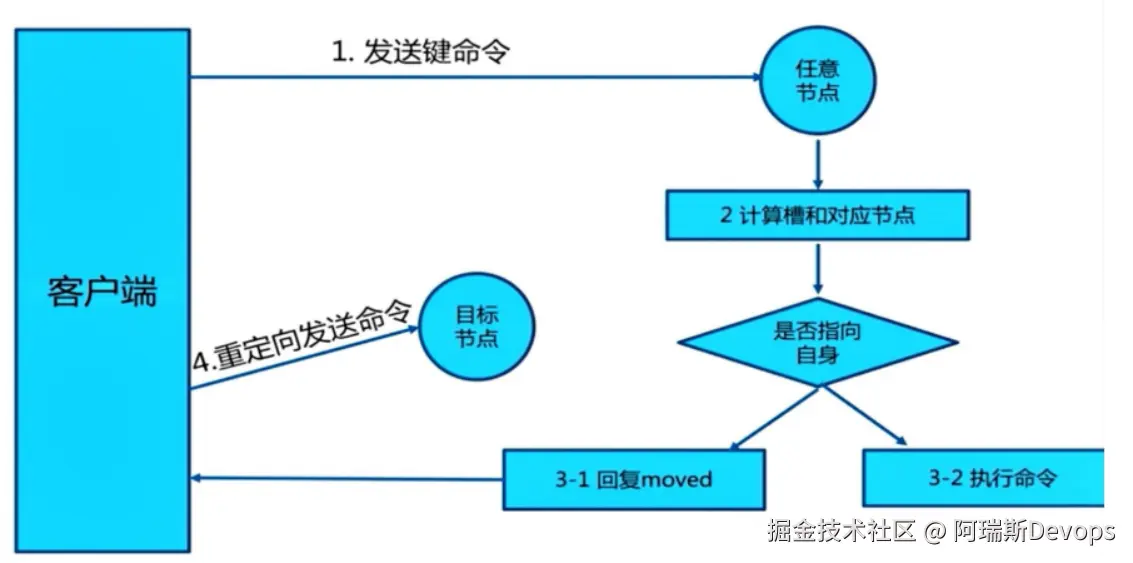
7.1 redis cluster写入key
#经过算法计算,当前key的槽位需要写入指定的node
[root@centos28 ~]#redis-cli -a 123456 -h 10.0.0.18 set key1 values1
(error) MOVED 9189 10.0.0.28:6379 #槽位不在当前node所以无法写入
[root@centos28 ~]#redis-cli -a 123456 -h 10.0.0.28 set key1 values1
OK
#指定node可写入
[root@centos28 ~]#redis-cli -a 123456 -h 10.0.0.28 get key1
"values1"
#对应slave 节点可以KEYS * ,但get key1 失败,可以到master上执行get可以
[root@centos28 ~]#redis-cli -a 123456 -h 10.0.0.58 keys "*"
1) "key1"
[root@centos28 ~]#redis-cli -a 123456 -h 10.0.0.58 get key1
(error) MOVED 9189 10.0.0.28:6379
7.2 redis cluster 计算key所有slot
[root@centos28 ~]#redis-cli -h 10.0.0.28 -a 123456 --no-auth-warning cluster nodes
f2cedb37c6a337f4f7edda5919e24c3ddab262ff 10.0.0.68:6379@16379 slave ce0d7ac851e8ff829246bc185c9f2c9eef0907d1 0 1603536175008 3 connected
08da9eb03abff895db97391593ef3a30df0c71dc 10.0.0.18:6379@16379 master - 0 1603536173991 1 connected 0-5460
ce0d7ac851e8ff829246bc185c9f2c9eef0907d1 10.0.0.38:6379@16379 master - 0 1603536173000 3 connected 10923-16383
b10a16e9aa5ff45d5aecfc101f275ad80779a252 10.0.0.48:6379@16379 slave 08da9eb03abff895db97391593ef3a30df0c71dc 0 1603536176022 4 connected
b6a81babbde1118f490d40ddf7d15f910d0d8e55 10.0.0.28:6379@16379 myself,master - 0 1603536170000 2 connected 5461-10922
1d60d150030f349ddfec267b5e33fe7b930e3501 10.0.0.58:6379@16379 slave b6a81babbde1118f490d40ddf7d15f910d0d8e55 0 1603536177039 5 connected
#计算得到hello对应的slot
[root@centos18 ~]#redis-cli -h 10.0.0.18 -a 123456 --no-auth-warning cluster keyslot hello
(integer) 866
[root@centos18 ~]#redis-cli -h 10.0.0.18 -a 123456 --no-auth-warning set hello magku
OK
[root@centos18 ~]#redis-cli -h 10.0.0.18 -a 123456 --no-auth-warning cluster keyslot name
(integer) 5798
[root@centos18 ~]#redis-cli -h 10.0.0.18 -a 123456 --no-auth-warning set name wei
(error) MOVED 5798 10.0.0.28:6379
[root@centos18 ~]#redis-cli -h 10.0.0.28 -a 123456 --no-auth-warning set name wei
OK
[root@centos18 ~]#redis-cli -h 10.0.0.28 -a 123456 --no-auth-warning get name
"wei"
8.python 脚本实现redis cluster集群写入
[root@centos28 ~]#dnf -y install python3
[root@centos28 ~]#pip3 install redis-py-cluster
[root@centos28 ~]#cat redis_cluster_test.py
#!/usr/bin/env python3
from rediscluster import RedisCluster
startup_nodes = [
{"host":"10.0.0.18","port":6379},
{"host":"10.0.0.28","port":6379},
{"host":"10.0.0.38","port":6379},
{"host":"10.0.0.48","port":6379},
{"host":"10.0.0.58","port":6379},
{"host":"10.0.0.68","port":6379},
{"host":"10.0.0.78","port":6379},
]
redis_conn= RedisCluster(startup_nodes=startup_nodes,password='123456',decode_responses=True)
for i in range(0,10000):
redis_conn.set('key'+str(i),'value'+str(i))
print('key'+str(i)+':',redis_conn.get('key'+str(i)))
[root@centos28 ~]#chmod +x redis_cluster_test.py
[root@centos28 ~]#./redis_cluster_test.py
[root@centos28 ~]#redis-cli -a 123456 -h 10.0.0.28
10.0.0.28:6379> dbsize
(integer) 3341
10.0.0.28:6379> get key1
"value1"
10.0.0.28:6379> get key2
(error) MOVED 4998 10.0.0.18:6379
10.0.0.28:6379> keys *
3329) "key7832"
3330) "key2325"
3331) "key2880"
10.0.0.8:6379>
[root@centos28 ~]#redis-cli -a 123456 -h 10.0.0.28 dbsize
(integer) 3340
[root@centos28 ~]#redis-cli -a 123456 -h 10.0.0.28 --no-auth-warning get key1
"value1"
[root@centos28 ~]#redis-cli -a 123456 -h 10.0.0.18 --no-auth-warning dbsize
(integer) 3329
[root@centos28 ~]#redis-cli -a 123456 -h 10.0.0.18 --no-auth-warning get key5
(error) MOVED 9057 10.0.0.28:6379
[root@centos28 ~]#redis-cli -a 123456 -h 10.0.0.28 --no-auth-warning get key5
"value5"
9.模拟master故障,对应节点的slave节点自动提升为新master
#模拟节点2,10.0.0.28出故障,需要相应的数秒故障转移时间
[root@centos28 ~]#tail -f /var/log/redis/redis.log
[root@centos28 ~]#redis-cli -a 123456
127.0.0.1:6379> shutdown
not connected> exit
[root@centos28 ~]#ss -ntl
State Recv-Q Send-Q Local Address:Port Peer Address:Port
LISTEN 0 128 0.0.0.0:22 0.0.0.0:*
LISTEN 0 128 [::]:22 [::]:*
[root@centos18 ~]#redis-cli -a 123456 --cluster info 10.0.0.18:6379
Could not connect to Redis at 10.0.0.28:6379: Connection refused
10.0.0.18:6379 (08da9eb0...) -> 3332 keys | 5461 slots | 1 slaves.
10.0.0.38:6379 (ce0d7ac8...) -> 3329 keys | 5461 slots | 1 slaves.
10.0.0.58:6379 (1d60d150...) -> 3341 keys | 5462 slots | 0 slaves. #10.0.0.58为新master
[OK] 10002 keys in 3 masters.
0.61 keys per slot on average.
[root@centos18 ~]#redis-cli -a 123456 --cluster check 10.0.0.18:6379
Warning: Using a password with '-a' or '-u' option on the command line interface may not be safe.
Could not connect to Redis at 10.0.0.28:6379: Connection refused
10.0.0.18:6379 (08da9eb0...) -> 3332 keys | 5461 slots | 1 slaves.
10.0.0.38:6379 (ce0d7ac8...) -> 3329 keys | 5461 slots | 1 slaves.
10.0.0.58:6379 (1d60d150...) -> 3341 keys | 5462 slots | 0 slaves.
[OK] 10002 keys in 3 masters.
0.61 keys per slot on average.
>>> Performing Cluster Check (using node 10.0.0.18:6379)
M: 08da9eb03abff895db97391593ef3a30df0c71dc 10.0.0.18:6379
slots:[0-5460] (5461 slots) master
1 additional replica(s)
S: b10a16e9aa5ff45d5aecfc101f275ad80779a252 10.0.0.48:6379
slots: (0 slots) slave
replicates 08da9eb03abff895db97391593ef3a30df0c71dc
M: ce0d7ac851e8ff829246bc185c9f2c9eef0907d1 10.0.0.38:6379
slots:[10923-16383] (5461 slots) master
1 additional replica(s)
S: f2cedb37c6a337f4f7edda5919e24c3ddab262ff 10.0.0.68:6379
slots: (0 slots) slave
replicates ce0d7ac851e8ff829246bc185c9f2c9eef0907d1
M: 1d60d150030f349ddfec267b5e33fe7b930e3501 10.0.0.58:6379
slots:[5461-10922] (5462 slots) master
[OK] All nodes agree about slots configuration.
>>> Check for open slots...
>>> Check slots coverage...
[OK] All 16384 slots covered.
[root@centos18 ~]#redis-cli -a 123456 -h 10.0.0.58
10.0.0.58:6379> info replication
# Replication
role:master
connected_slaves:0
master_replid:b07a9d330cb31da18b5c47d44ec2125b9493e3b6
master_replid2:ab2f4c2aa0adcd9a9296fe4131613427ded6f8f8
master_repl_offset:146681
second_repl_offset:146682
repl_backlog_active:1
repl_backlog_size:1048576
repl_backlog_first_byte_offset:1
repl_backlog_histlen:146681
#恢复10.0.0.28故障节点2
[root@centos28 ~]#systemctl start redis
#查看自动生成的配置文件,可以查看node2自动生成slave节点
[root@centos28 ~]#cat /var/log/redis/redis.log
2488:M 24 Oct 2020 19:40:56.538 * DB loaded from disk: 0.005 seconds
2488:M 24 Oct 2020 19:40:56.538 * Ready to accept connections
2488:M 24 Oct 2020 19:40:56.541 # Configuration change detected. Reconfiguring myself as a replica of 1d60d150030f349ddfec267b5e33fe7b930e3501
2488:S 24 Oct 2020 19:40:56.541 * Before turning into a replica, using my master parameters to synthesize a cached master: I may be able to synchronize with the new master with just a partial transfer.
2488:S 24 Oct 2020 19:40:56.541 # Cluster state changed: ok
2488:S 24 Oct 2020 19:40:57.556 * Connecting to MASTER 10.0.0.58:6379
2488:S 24 Oct 2020 19:40:57.557 * MASTER <-> REPLICA sync started
2488:S 24 Oct 2020 19:40:57.558 * Non blocking connect for SYNC fired the event.
2488:S 24 Oct 2020 19:40:57.559 * Master replied to PING, replication can continue...
2488:S 24 Oct 2020 19:40:57.564 * Trying a partial resynchronization (request 3bfc827ac3a3d9070e26081fece2a52978505b4b:1).
2488:S 24 Oct 2020 19:40:57.567 * Full resync from master: b07a9d330cb31da18b5c47d44ec2125b9493e3b6:146681
2488:S 24 Oct 2020 19:40:57.567 * Discarding previously cached master state.
2488:S 24 Oct 2020 19:40:57.627 * MASTER <-> REPLICA sync: receiving 62908 bytes from master
2488:S 24 Oct 2020 19:40:57.628 * MASTER <-> REPLICA sync: Flushing old data
2488:S 24 Oct 2020 19:40:57.632 * MASTER <-> REPLICA sync: Loading DB in memory
2488:S 24 Oct 2020 19:40:57.649 * MASTER <-> REPLICA sync: Finished with success
[root@centos8 ~]# redis-cli -a 123456 -h 10.0.0.58
10.0.0.58:6379> info replication
# Replication
role:master
connected_slaves:1
slave0:ip=10.0.0.28,port=6379,state=online,offset=147199,lag=1
master_replid:b07a9d330cb31da18b5c47d44ec2125b9493e3b6
master_replid2:ab2f4c2aa0adcd9a9296fe4131613427ded6f8f8
master_repl_offset:147199
second_repl_offset:146682
repl_backlog_active:1
repl_backlog_size:1048576
repl_backlog_first_byte_offset:1
repl_backlog_histlen:147199