前言
在解决BGP路由黑洞的方法有很多: 1.物理上设备全连 2. BGP邻居全连 3. RR反射器 4. MPLS ... 本文介绍现实中黑洞路由解决的最优解MPLS方法
BGP黑洞产生的背景
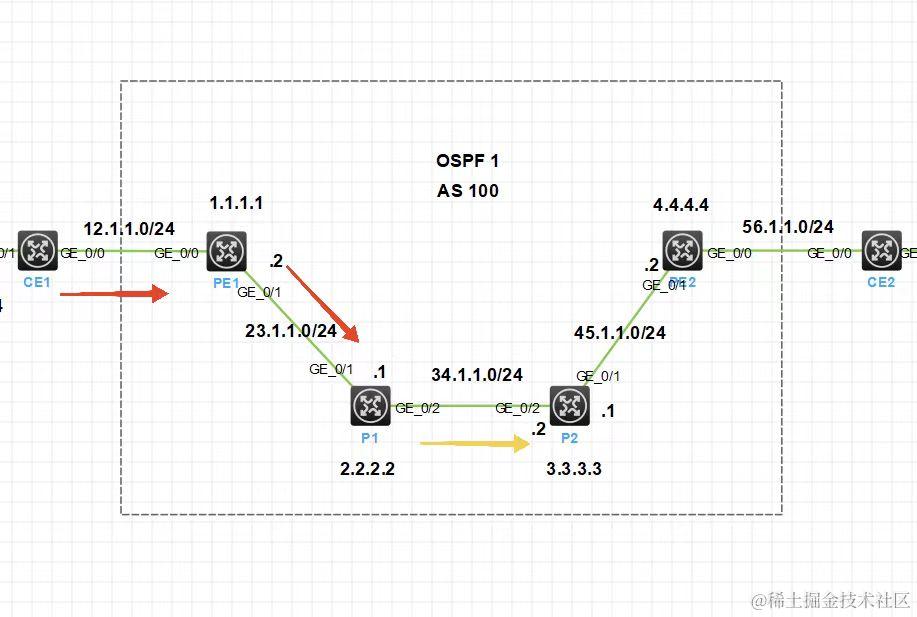
如图所示 CE1与CE2是私网边界路由 PE1与PE2是公网边界路由 CE1通过公网隧道MPLS访问CE2私网 PE1与PE2建立了IBGP邻居 因P1与P2没有运行BGP 在PE1流量发给P1 但是P1没有CE2的私网路由 导致路由黑洞
MPLS解决方法
- P设备 全局使能 MPLS/MPLS LDP 接口下使能MPLS / MPLS LDP 配置mpls lsr-id
- PE设备 配置静态路由迭代LSP隧道 ip route-static recursive-lookup tunnel
- PE设备传递私网路由 需要写静态 ip route-static vpn-instance VPN1 10.1.1.0 24 12.1.1.2
设备配置命令
CE1 配置缺省出口路由
#
interface GigabitEthernet0/0
 port link-mode route
 combo enable copper
 ip address 12.1.1.2 255.255.255.0
#
interface GigabitEthernet0/1
 port link-mode route
 combo enable copper
 ip address 10.1.1.1 255.255.255.0
#
 ip route-static 0.0.0.0 0 12.1.1.1
PE1 配置公网隧道/BGP/OSPF
#
ip vpn-instance VPN1
 route-distinguisher 100:1
 vpn-target 1:1 import-extcommunity
 vpn-target 1:1 export-extcommunity
#
 router id 1.1.1.1
#
ospf 1
 area 0.0.0.0
  network 1.1.1.1 0.0.0.0
  network 23.1.1.0 0.0.0.255
#
 mpls lsr-id 1.1.1.1
#
mpls ldp
#
interface LoopBack0
 ip address 1.1.1.1 255.255.255.255
#
interface GigabitEthernet0/0
 port link-mode route
 combo enable copper
 ip binding vpn-instance VPN1
 ip address 12.1.1.1 255.255.255.0
#
interface GigabitEthernet0/1
 port link-mode route
 combo enable copper
 ip address 23.1.1.2 255.255.255.0
 mpls enable
 mpls ldp enable
#
bgp 100
 peer 4.4.4.4 as-number 100
 peer 4.4.4.4 connect-interface LoopBack0
 #
 address-family ipv4 unicast
  network 10.1.1.0 255.255.255.0
  peer 4.4.4.4 enable
 #
 address-family vpnv4
  peer 4.4.4.4 enable    // 使能MP-BGP邻居
 #
 ip vpn-instance VPN1
  #
  address-family ipv4 unicast
   import-route direct
   network 10.1.1.0 255.255.255.0  // VPN1实例引入私网路由
#
 ip route-static recursive-lookup tunnel    // 路由迭代隧道
#
 ip route-static vpn-instance VPN1 10.1.1.0 24 12.1.1.2
P1 使能mpls/ldp 配置mpls lsr-id/ospf
#
 router id 2.2.2.2
#
ospf 1
 area 0.0.0.0
  network 2.2.2.2 0.0.0.0
  network 23.1.1.0 0.0.0.255
  network 34.1.1.0 0.0.0.255
#
 mpls lsr-id 2.2.2.2
#
mpls ldp
#
interface LoopBack0
 ip address 2.2.2.2 255.255.255.255
#
interface GigabitEthernet0/1
 port link-mode route
 combo enable copper
 ip address 23.1.1.1 255.255.255.0
 mpls enable
 mpls ldp enable
#
interface GigabitEthernet0/2
 port link-mode route
 combo enable copper
 ip address 34.1.1.1 255.255.255.0
 mpls enable
 mpls ldp enable
P2设备
#
 router id 3.3.3.3
#
ospf 1
 area 0.0.0.0
  network 3.3.3.3 0.0.0.0
  network 34.1.1.0 0.0.0.255
  network 45.1.1.0 0.0.0.255
#
 mpls lsr-id 3.3.3.3
#
mpls ldp
#
interface LoopBack0
 ip address 3.3.3.3 255.255.255.255
#
interface GigabitEthernet0/1
 port link-mode route
 combo enable copper
 ip address 45.1.1.1 255.255.255.0
 mpls enable
 mpls ldp enable
#
interface GigabitEthernet0/2
 port link-mode route
 combo enable copper
 ip address 34.1.1.2 255.255.255.0
 mpls enable
 mpls ldp enable
PE2设备
#
ip vpn-instance VPN1
 route-distinguisher 100:1
 vpn-target 1:1 import-extcommunity
 vpn-target 1:1 export-extcommunity
#
 router id 4.4.4.4
#
ospf 1
 area 0.0.0.0
  network 4.4.4.4 0.0.0.0
  network 45.1.1.0 0.0.0.255
#
 mpls lsr-id 4.4.4.4
#
mpls ldp
#
interface LoopBack0
 ip address 4.4.4.4 255.255.255.255
#
interface GigabitEthernet0/0
 port link-mode route
 combo enable copper
 ip binding vpn-instance VPN1
 ip address 56.1.1.1 255.255.255.0
#
interface GigabitEthernet0/1
 port link-mode route
 combo enable copper
 ip address 45.1.1.2 255.255.255.0
 mpls enable
 mpls ldp enable
#
bgp 100
 peer 1.1.1.1 as-number 100
 peer 1.1.1.1 connect-interface LoopBack0
 #
 address-family ipv4 unicast
  peer 1.1.1.1 enable
 #
 address-family vpnv4
  peer 1.1.1.1 enable
 #
 ip vpn-instance VPN1
  #
  address-family ipv4 unicast
   import-route direct
   network 60.1.1.0 255.255.255.0
#
 ip route-static recursive-lookup tunnel
#
 ip route-static vpn-instance VPN1 60.1.1.0 24 56.1.1.2
CE2设备
#
interface GigabitEthernet0/0
 port link-mode route
 combo enable copper
 ip address 56.1.1.2 255.255.255.0
#
interface GigabitEthernet0/1
 port link-mode route
 combo enable copper
 ip address 60.1.1.1 255.255.255.0
#
 ip route-static 0.0.0.0 0 56.1.1.1
故障排查
排查BGP邻居是否建立
[PE1]display bgp peer ipv4

 BGP local router ID: 1.1.1.1
 Local AS number: 100
 Total number of peers: 1                 Peers in established state: 1

  * - Dynamically created peer
  Peer                    AS  MsgRcvd  MsgSent OutQ PrefRcv Up/Down  State

  4.4.4.4                100       15       15    0       0 00:08:24 Established
[PE1]
排查MP-BGP邻居是否建立
[PE1]display bgp peer vpnv4

 BGP local router ID: 1.1.1.1
 Local AS number: 100
 Total number of peers: 1                 Peers in established state: 1

  * - Dynamically created peer
  Peer                    AS  MsgRcvd  MsgSent OutQ PrefRcv Up/Down  State

  4.4.4.4                100       16       15    0       2 00:09:06 Established
[PE1]
排查隧道邻居是否建立
[P1]display mpls ldp peer
Total number of peers: 2
Peer LDP ID             State         Role     GR   MD5  KA Sent/Rcvd
1.1.1.1:0               Operational   Active   Off  Off  53/53
3.3.3.3:0               Operational   Passive  Off  Off  49/49
[P1]
排查VPN实例路由表
[PE1]display ip routing-table vpn-instance VPN1

Destinations : 13       Routes : 13

Destination/Mask   Proto   Pre Cost        NextHop         Interface
0.0.0.0/32         Direct  0   0           127.0.0.1       InLoop0
10.1.1.0/24        Static  60  0           12.1.1.2        GE0/0
12.1.1.0/24        Direct  0   0           12.1.1.1        GE0/0
12.1.1.1/32        Direct  0   0           127.0.0.1       InLoop0
12.1.1.255/32      Direct  0   0           12.1.1.1        GE0/0
56.1.1.0/24        BGP     255 0           4.4.4.4         GE0/1
60.1.1.0/24        BGP     255 0           4.4.4.4         GE0/1
127.0.0.0/8        Direct  0   0           127.0.0.1       InLoop0
127.0.0.1/32       Direct  0   0           127.0.0.1       InLoop0
127.255.255.255/32 Direct  0   0           127.0.0.1       InLoop0
224.0.0.0/4        Direct  0   0           0.0.0.0         NULL0
224.0.0.0/24       Direct  0   0           0.0.0.0         NULL0
255.255.255.255/32 Direct  0   0           127.0.0.1       InLoop0
[PE1]
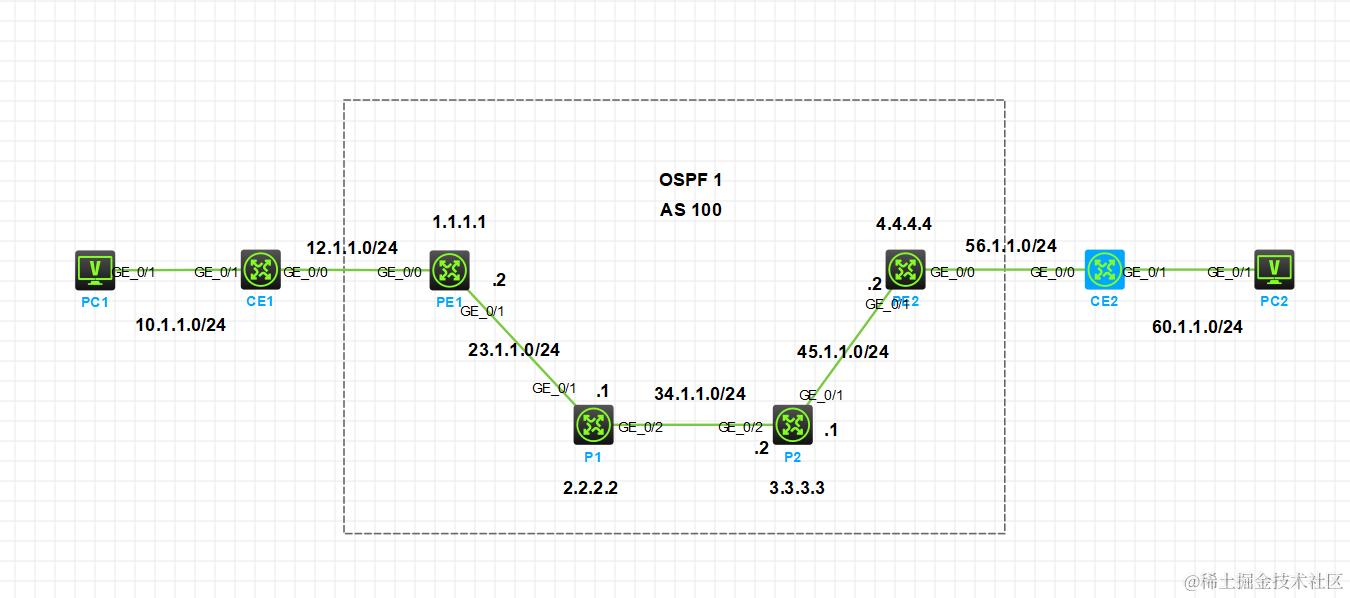
PC1-PC2 连通性测试
<H3C>ping 60.1.1.2
Ping 60.1.1.2 (60.1.1.2): 56 data bytes, press CTRL_C to break
56 bytes from 60.1.1.2: icmp_seq=0 ttl=251 time=1.955 ms
56 bytes from 60.1.1.2: icmp_seq=1 ttl=251 time=1.507 ms
56 bytes from 60.1.1.2: icmp_seq=2 ttl=251 time=2.126 ms
56 bytes from 60.1.1.2: icmp_seq=3 ttl=251 time=2.154 ms
56 bytes from 60.1.1.2: icmp_seq=4 ttl=251 time=2.166 ms

--- Ping statistics for 60.1.1.2 ---
5 packet(s) transmitted, 5 packet(s) received, 0.0% packet loss
round-trip min/avg/max/std-dev = 1.507/1.982/2.166/0.249 ms
<H3C>%Apr  9 11:24:29:038 2024 H3C PING/6/PING_STATISTICS: Ping statistics for 60.1.1.2: 5 packet(s) transmitted, 5 packet(s) received, 0.0% packet loss, round-trip min/avg/max/std-dev = 1.507/1.982/2.166/0.249 ms.