前言
本次来复习一下华三的堆叠技术 涉及到IRF的一些基本概念和基本的网络拓扑实验以及IRF的作用和IRF的显示与维护; 小白向? 难易程度: ★☆☆☆☆ 一颗星?
知识补充 IRF堆叠导致的双主IP冲突问题 真机加模拟器BUG等内容分析以及配置验证
IRF堆叠
IRF优点
- 简化管理 IRF形成后,用户登录任意一台设备都可以进入IRF系统,对IRF系统成员设备 进行统一管理
- 1:N备份 IRF由多台设备组成 主设备负责IRF的运行、维护与管理 从设备作为备份也可以管理业务;主设备发生故障 IRF自动选举新的主设备 保证业务不中断
- 跨成员设备的链路聚合
- 强大的网络扩展能力
IRF基本概念
- 角色 主备两个角色,由选举产生; 主备具有不同的功能,主角色负责管理整个IRF 从属角色作为备用 一个IRF有且只有一个主角色
- IRF端口 一种专用于IRF成员之间的逻辑接口;每台设备可配置两个IRF接口 (IRF-port1 / IRF-port2); 必须和物理接口绑定后方可生效
- IRF物理端口 与IRF端口绑定的物理接口 用于IRF成员设备之间的连接
- IRF区域 一个IRF对应一个IRF区域 IRF与IRF之间用 域编号(Domain ID)区别
IRF配置
- 配置member-id 堆叠形成开始时,每个设备的memberID默认为1,因此各成员设备需要修改memberID 否则堆叠无法生成。 命令如下 配置完成后重启才会生效
display irf configuration   // 查看id
irf member [member-id] renumber [new-member-id]    // 将原id修改为指定的id
2. 配置成员优先级 [可选] 可以设置优先级 来指定某个设备为主设备Master
irf-port [member-id] piriorty [piriorty] // 设置成员优先级
3. IRF逻辑端口绑定物理端口 IRF连接要求 IRF端口要交叉相连 即IRF-port1连接对端IRF-port2
irf-port [member-id]/[port-number]   // [设备ID]/[逻辑接口{1|2}]      // 进入逻辑接口
port group interface [interface-type] [interface-number]  // 绑定物理接口
4. 手动激活IRF
irf-port-configuration active // 激活IRF
5. IRF显示与维护
[SWAB]dis irf    // 查看IRF
MemberID    Role    Priority  CPU-Mac         Description
 *+1        Master  1         78e6-90c2-0104  ---
   2        Standby 1         78e6-9573-0204  ---
--------------------------------------------------
 * indicates the device is the master.        // 指示设备为主设备
 + indicates the device through which the user logs in.    // 指示设备为当前登录设备

 The bridge MAC of the IRF is: 78e6-90c2-0100
 Auto upgrade                : yes
 Mac persistent              : 6 min
 Domain ID                   : 0
[SWAB]
IRF堆叠配置举例
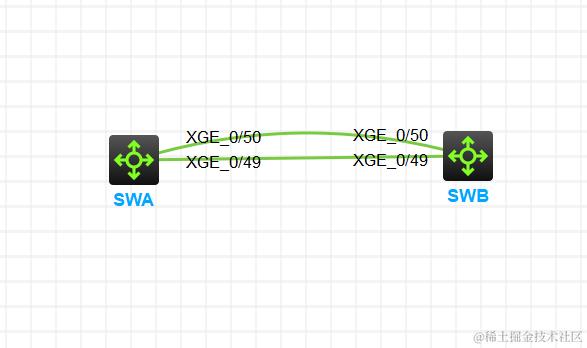
IRF的连接拓扑有链形和环形两种 此处为链形网络
网络拓扑如下
SWA配置
[SWA]interface range Ten-GigabitEthernet 1/0/49 TO Ten-GigabitEthernet 1/0/50
[SWA-if-range]shutdown  // 关闭物理堆叠端口
[SWA-if-range]qu
[SWA]irf-port 1/1       // 进入IRF端口
[SWA-irf-port1/1]port group interface Ten-GigabitEthernet 1/0/49    // 绑定物理端口
You must perform the following tasks for a successful IRF setup:
Save the configuration after completing IRF configuration.
Execute the "irf-port-configuration active" command to activate the IRF ports.
[SWA-irf-port1/1]port group interface Ten-GigabitEthernet 1/0/50    // 绑定物理端口
[SWA-irf-port1/1]qu
[SWA]interface range Ten-GigabitEthernet 1/0/49 TO Ten-GigabitEthernet 1/0/50
[SWA-if-range]undo shutdown  // 开启物理堆叠端口

[SWA]save  // 保存
The current configuration will be written to the device. Are you sure? [Y/N]:y
Please input the file name(*.cfg)[flash:/startup.cfg]
(To leave the existing filename unchanged, press the enter key):
Validating file. Please wait...
Saved the current configuration to mainboard device successfully.
[SWA]
[SWA]irf-port-configuration active  // 激活IRF
SWB配置
[SWB]irf member 1 renumber 2   // 修改member-id为2
Renumbering the member ID may result in configuration change or loss. Continue?[Y/N]:y
[SWB]qu
<SWB>reboot    // 重启
[SWB]interface range Ten-GigabitEthernet 2/0/49 to Ten-GigabitEthernet 2/0/50
[SWB-if-range]shutdown
[SWB-if-range]qu
[SWB]irf-port 2/2
[SWB-irf-port2/2]port group interface Ten-GigabitEthernet 2/0/49
You must perform the following tasks for a successful IRF setup:
Save the configuration after completing IRF configuration.
Execute the "irf-port-configuration active" command to activate the IRF ports.
[SWB-irf-port2/2]port group interface Ten-GigabitEthernet 2/0/50
[SWB-irf-port2/2]qu
[SWB]interface range Ten-GigabitEthernet 2/0/49 to Ten-GigabitEthernet 2/0/50
[SWB-if-range]undo shutdown
[SWB]irf-port-configuration active
小插曲!!!
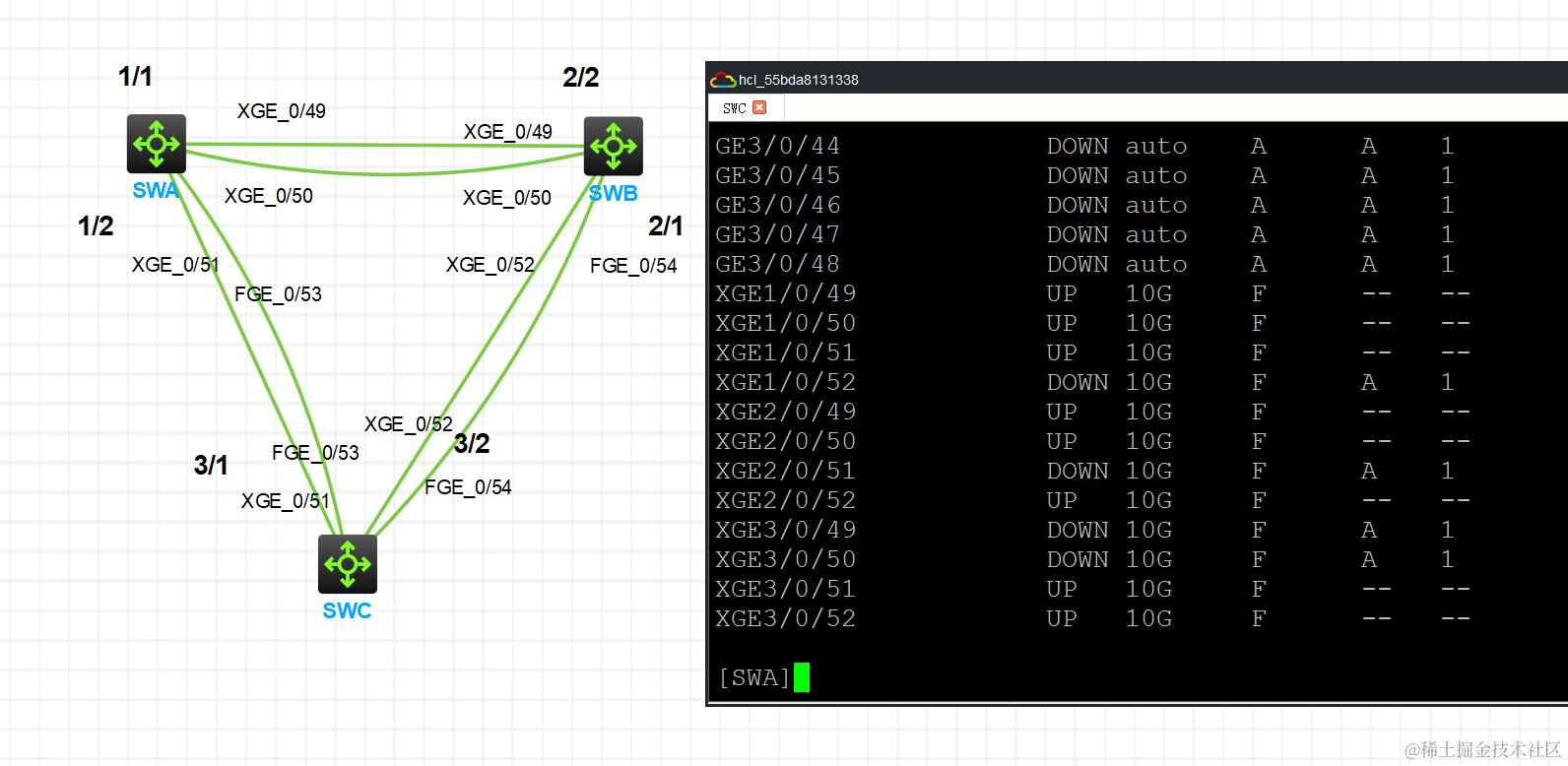
刚才配置环形链路时发现第三台SWC未进入IRF 发现是端口ADM手动shutdown掉了 然后又手动开启 然后还是ADM 然后直接无语 我的解决办法是 将交换机配置文件导出 然后把cfg脚本shutdown删了然后导入 完美解决
[switch]dis interface brief // 查看端口状态
堆叠双主检测 MAD-BFD方式
# MAD心跳线关闭STP
[S12]interface GigabitEthernet 1/0/24
[S12-GigabitEthernet1/0/24]undo stp enable
[S12-GigabitEthernet1/0/24]quit
[S12]interface GigabitEthernet 2/0/24
[S12-GigabitEthernet2/0/24]undo stp enable
[S12-GigabitEthernet2/0/24]quit

# 创建MAD-VLAN
[S12]vlan 1000
[S12-vlan1000]port GigabitEthernet 1/0/24 2/0/24
[S12-vlan1000]qu
[S12]interface Vlan-interface 1000
[S12-Vlan-interface1000]mad bfd enable
[S12-Vlan-interface1000]mad ip address 1.1.1.1 24 member 1 // 将虚拟地址绑定设备1
[S12-Vlan-interface1000]mad ip address 1.1.1.2 24 member 2 // 在主设备同时配置备设备地址

**************************************************************************

# 检查堆叠连接状态
[S12]display irf link
Member 1
 IRF Port  Interface                             Status
 1         Ten-GigabitEthernet1/0/50             UP
           Ten-GigabitEthernet1/0/51             UP
 2         disable                               --
Member 2
 IRF Port  Interface                             Status
 1         disable                               --
 2         Ten-GigabitEthernet2/0/50             UP
           Ten-GigabitEthernet2/0/51             UP
[S12]

# 查看BFD邻居状态
[S12]display bfd session peer-ip 1.1.1.2
 Total sessions: 1     Up sessions: 0     Init mode: Active

 IPv4 session working in control packet mode:

 LD/RD            SourceAddr      DestAddr        State  Holdtime    Interface
 32833/0          1.1.1.1         1.1.1.2         Down      /        Vlan1000
[S12]

# 查看MAD详细信息
[S12]display mad verbose
Multi-active recovery state: No
Excluded ports (user-configured):
Excluded ports (system-configured):
  IRF physical interfaces:
    Ten-GigabitEthernet1/0/50
    Ten-GigabitEthernet1/0/51
    Ten-GigabitEthernet2/0/50
    Ten-GigabitEthernet2/0/51
  BFD MAD interfaces:
    Vlan-interface1000
MAD ARP disabled.
MAD ND disabled.
MAD LACP disabled.
MAD BFD enabled interface: Vlan-interface1000        // 代表应用的是MAD-BFD
  MAD status                 : Faulty(错误状态)
  Member ID   MAD IP address       Neighbor   MAD status
  1           1.1.1.1/24           2          Faulty
  2           1.1.1.2/24           1          Faulty
[S12]
*************************************************************************

[S12]display ip interface brief   // S2查看三层接口 发现vlan10是断开状态
*down: administratively down
(s): spoofing  (l): loopback
Interface          Physical Protocol IP address/Mask    VPN instance Description
MGE0/0/0           down     down     --                 --           --
Vlan10             down     down     192.168.1.1/24     --           --
Vlan1000           up       up       1.1.1.2/24         --           --
[S12]
[S3]display arp
  Type: S-Static   D-Dynamic   O-Openflow   R-Rule   M-Multiport  I-Invalid
IP address      MAC address    VLAN/VSI name Interface                Aging Type
192.168.1.1     1424-e738-0102 10            BAGG1                    1028  D
[S3]
华三模拟器因为设备BUG原因 使用VLAN-IF接口MAD导致CPU到达99% 导致设备异常卡顿 解决办法如下
使用三层聚合接口解决模拟器双主检测问题
# 创建三层聚合接口
[S12]interface Route-Aggregation 1
[S12-Route-Aggregation1]mad bfd enable
[S12-Route-Aggregation1]mad ip address 192.168.99.1 255.255.255.252 member 1
[S12-Route-Aggregation1]mad ip address 192.168.99.2 255.255.255.252 member 2
[S12-Route-Aggregation1]quit

# 更改接口模式以及加入三层聚合口
[S12]interface range GigabitEthernet 1/0/24 GigabitEthernet 2/0/24
[S12-if-range]port link-mode route
[S12-if-range]port link-aggregation group 1
[S12-if-range]quit

*****************************************************************************

# 查看MAD详细信息
[S12]dis mad verbose
Multi-active recovery state: No
Excluded ports (user-configured):
Excluded ports (system-configured):
  IRF physical interfaces:
    Ten-GigabitEthernet1/0/50
    Ten-GigabitEthernet1/0/51
    Ten-GigabitEthernet2/0/50
    Ten-GigabitEthernet2/0/51
  BFD MAD interfaces:
    GigabitEthernet1/0/2
    GigabitEthernet1/0/24
    GigabitEthernet2/0/24
    Route-Aggregation1
MAD ARP disabled.
MAD ND disabled.
MAD LACP disabled.
MAD BFD enabled interface: Route-Aggregation1
  MAD status                 : Normal(正常状态)
  Member ID   MAD IP address       Neighbor   MAD status
  1           192.168.99.1/30      2          Normal
  2           192.168.99.2/30      1          Normal
[S12]

# 查看BFD邻居信息
[S12]display bfd session peer-ip 192.168.99.2
 Total sessions: 1     Up sessions: 0     Init mode: Active

 IPv4 session working in control packet mode:

 LD/RD            SourceAddr      DestAddr        State  Holdtime    Interface
 32833/0          192.168.99.1    192.168.99.2    Down      /        RAGG1
[S12]

*******************************************************************************

# 将堆叠线删除后 S1查看接口状态
[S12]display ip interface brief
*down: administratively down
(s): spoofing  (l): loopback
Interface          Physical Protocol IP address/Mask    VPN instance Description
GE1/0/2            down     down     --                 --           --
GE1/0/24           up       up       --                 --           --
MGE0/0/0           down     down     --                 --           --
RAGG1              up       up       192.168.99.1/30    --           --
Vlan10             up       up       192.168.1.1/24     --           --
[S12]

# 将堆叠线删除后 S2查看接口状态 发现接口已经down
[S12]display ip interface brief
*down: administratively down
(s): spoofing  (l): loopback
Interface          Physical Protocol IP address/Mask    VPN instance Description
GE2/0/24           up       up       --                 --           --
MGE0/0/0           down     down     --                 --           --
RAGG1              up       up       192.168.99.2/30    --           --
Vlan10             down     down     192.168.1.1/24     --           --
[S12]

# S3 ping 网关也不存在问题
[S3]ping 192.168.1.1
Ping 192.168.1.1 (192.168.1.1): 56 data bytes, press CTRL+C to break
56 bytes from 192.168.1.1: icmp_seq=0 ttl=255 time=0.506 ms
56 bytes from 192.168.1.1: icmp_seq=1 ttl=255 time=0.932 ms
56 bytes from 192.168.1.1: icmp_seq=2 ttl=255 time=0.571 ms
56 bytes from 192.168.1.1: icmp_seq=3 ttl=255 time=0.566 ms
56 bytes from 192.168.1.1: icmp_seq=4 ttl=255 time=0.322 ms

--- Ping statistics for 192.168.1.1 ---
5 packet(s) transmitted, 5 packet(s) received, 0.0% packet loss
round-trip min/avg/max/std-dev = 0.322/0.579/0.932/0.198 ms
[S3]%Oct 23 10:51:33:721 2024 S3 PING/6/PING_STATISTICS: Ping statistics for 192.168.1.1: 5 packet(s) transmitted, 5 packet(s) received, 0.0% packet loss, round-trip min/avg/max/std-dev = 0.322/0.579/0.932/0.198 ms.

[S3]