

#any feature of Qt which has been marked as deprecated (the exact warnings #depend on your compiler). Please consult the documentation of the #deprecated API in order to know how to port your code away from it. DEFINES += QT_DEPRECATED_WARNINGS
#You can also make your code fail to compile if you use deprecated APIs. #In order to do so, uncomment the following line. #You can also select to disable deprecated APIs only up to a certain version of Qt. #DEFINES += QT_DISABLE_DEPRECATED_BEFORE=0x060000 #disables all the APIs deprecated before Qt 6.0.0
CONFIG += c++11
SOURCES +=
main.cpp
demo.cpp
HEADERS +=
demo.h
FORMS +=
demo.ui
demo.h文件
#ifndef DEMO_H #define DEMO_H #include using namespace QtCharts; #include #include <QtCore/QTimer> #include <qt_windows.h>
namespace Ui { class Demo; }
class Demo : public QMainWindow { Q_OBJECT
public: explicit Demo(QWidget *parent = nullptr); ~Demo();
private slots: void Data();
private: Ui::Demo *ui; QList mydata1; QLineSeries *series; double data[2000]; QValueAxis *axisX; QValueAxis *axisY; QTimer m_timer; //定时器指针
};
#endif // DEMO_H
demo.cpp文件
#include "demo.h" #include "ui_demo.h" #include //随机数
Demo::Demo(QWidget *parent) : QMainWindow(parent), ui(new Ui::Demo) { ui->setupUi(this); series = new QLineSeries(); //创建QLineSeries实例 Data();
QChart \*chart = new QChart();  //创建QChart实例,为图表框架,相当图画笔
chart -> legend() -> hide();  //隐藏图例
chart -> addSeries(series);  //加载数据
//chart -> createDefaultAxes(); //添加坐标轴

axisX = new QValueAxis;
axisX->setRange(0,2000);  //设置X坐标范围
axisX->setTitleText("t/ms"); //设置X坐标名字

axisY = new QValueAxis;
axisY->setRange(-5,5);  //设置Y坐标范围
axisY->setTitleText("au/mV");  //设置Y坐标名字

//别忘记把坐标轴添加到chart
chart->addAxis(axisX, Qt::AlignBottom);  //并且XY轴的位置是上和右
chart->addAxis(axisY, Qt::AlignLeft);

QChartView \*chartview = new QChartView(chart);  //用于显示曲线,相当于画布

this->setCentralWidget(chartview);  //将图表显示在整个窗口

QObject::connect(&m_timer, SIGNAL(timeout()), this, SLOT(Data()));  //连接定时器与数据更新槽函数
m_timer.setInterval(10);  //设置时间
m_timer.start();  //启动定时器
}
Demo::~Demo() { delete ui; }
void Demo::Data() { QFile file("D:\DATA\20180319\20180319-10-59-31.dat"); file.open(QIODevice::ReadOnly); qint16 t; series->clear(); qsrand(time(NULL)); double a = qrand() % 5; //产生5以内的随机数 for(int i=0;i<2000;i++) { mydata1.append(QPointF(i,a*sin(i))); } series->replace(mydata1); //replace添加数据比append快很多,2000个点append需要200ms,replace需要2ms mydata1.clear(); }
main.cpp
#include "demo.h" #include
int main(int argc, char *argv[]) { QApplication a(argc, argv); Demo w; w.show();
return a.exec();
}
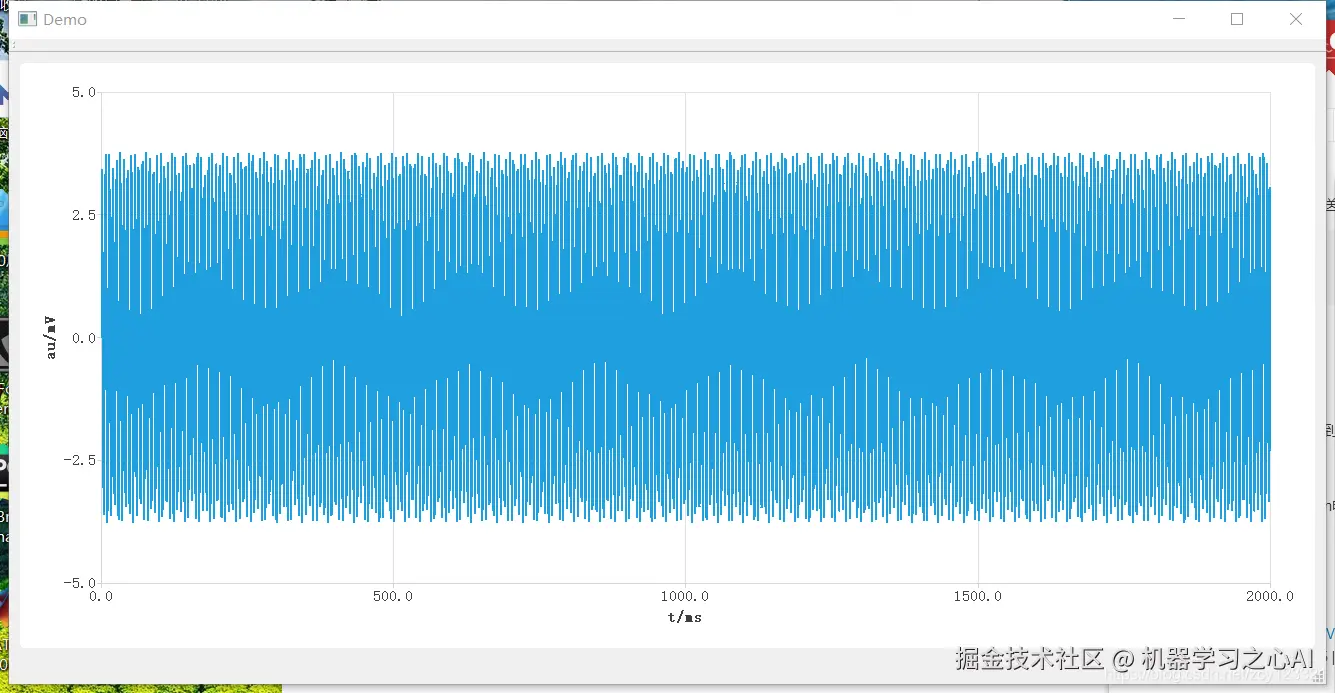
6. 运行结果
**收集整理了一份《2024年最新物联网嵌入式全套学习资料》,初衷也很简单,就是希望能够帮助到想自学提升的朋友。**

**[如果你需要这些资料,可以戳这里获取](https://gitee.com/vip204888)**
**一个人可以走的很快,但一群人才能走的更远!不论你是正从事IT行业的老鸟或是对IT行业感兴趣的新人**
**都欢迎加入我们的的圈子(技术交流、学习资源、职场吐槽、大厂内推、面试辅导),让我们一起学习成长!**

