

startActivity(installIntent);
### 5、完整demo,实现下载与安装:[https://download.csdn.net/download/meixi\_android/12376770]( )


### 6、在线交流解决下载安装bug:QQ1085220040


方法二
//在线更新
implementation ('com.teprinciple:updateapputilsx:2.3.0'){
exclude group: 'org.jetbrains:annotations:13.0'
}
public void postApp(AppDownloadBean bean) {
// if (!UserHelper.get().getSettingBean().isWifiUpdate()) {
        UpdateConfig updateConfig = new UpdateConfig();

        updateConfig.setNeedCheckMd5(false);

        updateConfig.setNotifyImgRes(R.mipmap.ic\_launcher);

        updateConfig.setForce(bean.getEnforce() == 1);
// updateConfig.setForce(true);
        updateConfig.setDebug(false);

        updateConfig.setAlwaysShowDownLoadDialog(true);


        UiConfig uiConfig = new UiConfig();

        uiConfig.setUiType(UiType.PLENTIFUL);

        uiConfig.setCustomLayoutId(R.layout.view\_update\_dialog\_plentiful);


        UpdateAppUtils

                .getInstance()

                .apkUrl(bean.getDownloadurl())

                .updateTitle(bean.getTitle())

                .updateContent(bean.getContent())

                .uiConfig(uiConfig)

                .updateConfig(updateConfig)

                .setOnInitUiListener(new OnInitUiListener() {

                    @Override

                    public void onInitUpdateUi(@Nullable View view, UpdateConfig updateConfig,  UiConfig uiConfig) {

                        TextView mTitle = view.findViewById(R.id.tv\_update\_title);

                        TextView mContent = view.findViewById(R.id.tv\_update\_content);

                        mTitle.setText(bean.getTitle());

                        mContent.setText(Html.fromHtml(bean.getContent()));

                    }

                })

                .setUpdateDownloadListener(new UpdateDownloadListener() {

                    @Override

                    public void onStart() {


                    }


                    @Override

                    public void onDownload(int progress) {


                    }


                    @Override

                    public void onFinish() {


                    }


                    @Override

                    public void onError(Throwable e) {


                    }

                })

                .update();
// }
}


/\*\*

 \* 获取版本号

 \*

 \* @return 当前应用的版本号

 \*/

public int getVersion(Activity activity) {

    try {

        PackageManager manager = activity.getPackageManager();

        PackageInfo info = manager.getPackageInfo(activity.getPackageName(), 0);

        return info.versionCode;

    } catch (Exception e) {

        e.printStackTrace();

        return 0;

    }

}
<androidx.constraintlayout.widget.ConstraintLayout
xmlns:android="http://schemas.android.com/apk/res/android"

xmlns:app="http://schemas.android.com/apk/res-auto"

xmlns:tools="http://schemas.android.com/tools"

android:layout\_width="280dp"

android:layout\_height="wrap\_content"

android:background="@drawable/bg\_update\_dialog"

android:paddingBottom="10dp">


<ImageView

    android:id="@+id/iv\_update\_logo"

    android:layout\_width="80dp"

    android:layout\_height="80dp"

    android:layout\_marginTop="15dp"

    app:layout\_constraintEnd\_toEndOf="parent"

    app:layout\_constraintStart\_toStartOf="parent"

    app:layout\_constraintTop\_toTopOf="parent"

    app:srcCompat="@drawable/ic\_kzf"/>


<TextView

    android:id="@+id/tv\_update\_title"

    android:layout\_width="wrap\_content"

    android:layout\_height="wrap\_content"

    android:layout\_marginTop="10dp"

    android:textColor="@color/text\_title"

    android:textSize="16sp"

    app:layout\_constraintEnd\_toEndOf="parent"

    app:layout\_constraintStart\_toStartOf="parent"

    app:layout\_constraintTop\_toBottomOf="@+id/iv\_update\_logo"

    tools:text="版本更新啦!"/>


<ScrollView

    android:id="@+id/scrollView2"

    android:layout\_width="match\_parent"

    android:layout\_height="90dp"

    android:layout\_marginTop="10dp"

    android:overScrollMode="never"

    app:layout\_constraintEnd\_toEndOf="parent"

    app:layout\_constraintStart\_toStartOf="parent"

    app:layout\_constraintTop\_toBottomOf="@+id/tv\_update\_title">


    <TextView

        android:id="@+id/tv\_update\_content"

        android:layout\_width="match\_parent"

        android:layout\_height="wrap\_content"

        android:layout\_gravity="top"

        android:gravity="start"

        android:lineSpacingExtra="5dp"

        android:paddingLeft="20dp"

        android:paddingRight="20dp"

        android:textColor="@color/text\_content"

        android:textSize="14sp"

        tools:text="1、快来升级最新版本\\n2、这次更漂亮了\\n3、快点来吧"/>

</ScrollView>


<TextView

    android:id="@+id/btn\_update\_sure"

    android:layout\_width="0dp"

    android:layout\_height="35dp"

    android:layout\_marginStart="20dp"

    android:layout\_marginTop="10dp"

    android:layout\_marginEnd="20dp"

    android:background="@drawable/bg\_btn\_lv\_selector"

    android:gravity="center"

    android:text="@string/update\_now"

    android:textColor="@color/white"

    android:textSize="14sp"

    app:layout\_constraintBottom\_toTopOf="@+id/btn\_update\_cancel"

    app:layout\_constraintEnd\_toEndOf="parent"

    app:layout\_constraintStart\_toStartOf="parent"

    app:layout\_constraintTop\_toBottomOf="@+id/scrollView2"

    app:layout\_goneMarginBottom="10dp"/>


<TextView

    android:id="@+id/btn\_update\_cancel"

    android:layout\_width="0dp"

    android:layout\_height="35dp"

    android:layout\_marginStart="20dp"

    android:layout\_marginTop="5dp"

    android:layout\_marginEnd="20dp"

    android:gravity="center"

    android:text="@string/update\_cancel"

    android:textColor="@color/text\_content"

    android:textSize="14sp"

    app:layout\_constraintBottom\_toBottomOf="parent"

    app:layout\_constraintEnd\_toEndOf="parent"

    app:layout\_constraintStart\_toStartOf="parent"

    app:layout\_constraintTop\_toBottomOf="@+id/btn\_update\_sure"

    app:layout\_goneMarginTop="10dp"/>
</androidx.constraintlayout.widget.ConstraintLayout>
{
**"code"**:**1**,
**"msg"**:**"app下载"**,
**"time"**:**"1615343899"**,
**"data"**:{
**"id"**:**9**,
**"title"**:**"Android回收员端"**,
**"downloadurl"**:**"[http://szhdljhsxshg.app.xiaozhuschool.com/uploads/20200831/b995d216dc9297ca9350ac48ee7193a0.apk]( )"**,
**"newversion"**:**"139"**,
**"packagesize"**:**"1"**,
>作者2013年从java开发,转做Android开发,在小厂待过,也去过华为,OPPO等大厂待过,18年四月份进了阿里一直到现在。
参与过不少面试,也当面试官 面试过很多人。深知大多数初中级Android工程师,想要提升技能,往往是自己摸索成长,不成体系的学习效果低效漫长,而且极易碰到天花板技术停滞不前!
我整理了一份阿里P7级别的最系统的Android开发主流技术,特别适合有3-5年以上经验的小伙伴深入学习提升。
主要包括阿里,以及字节跳动,腾讯,华为,小米,等一线互联网公司主流架构技术。**如果你想深入系统学习Android开发,成为一名合格的高级工程师,可以收藏一下这些Android进阶技术选型**
> 我搜集整理过这几年阿里,以及腾讯,字节跳动,华为,小米等公司的面试题,把面试的要求和技术点梳理成一份大而全的“ Android架构师”面试 Xmind(实际上比预期多花了不少精力),包含知识脉络 + 分支细节。
> 
**Java语言与原理;**
大厂,小厂。Android面试先看你熟不熟悉Java语言
> 
**高级UI与自定义view;**
自定义view,Android开发的基本功。
> 
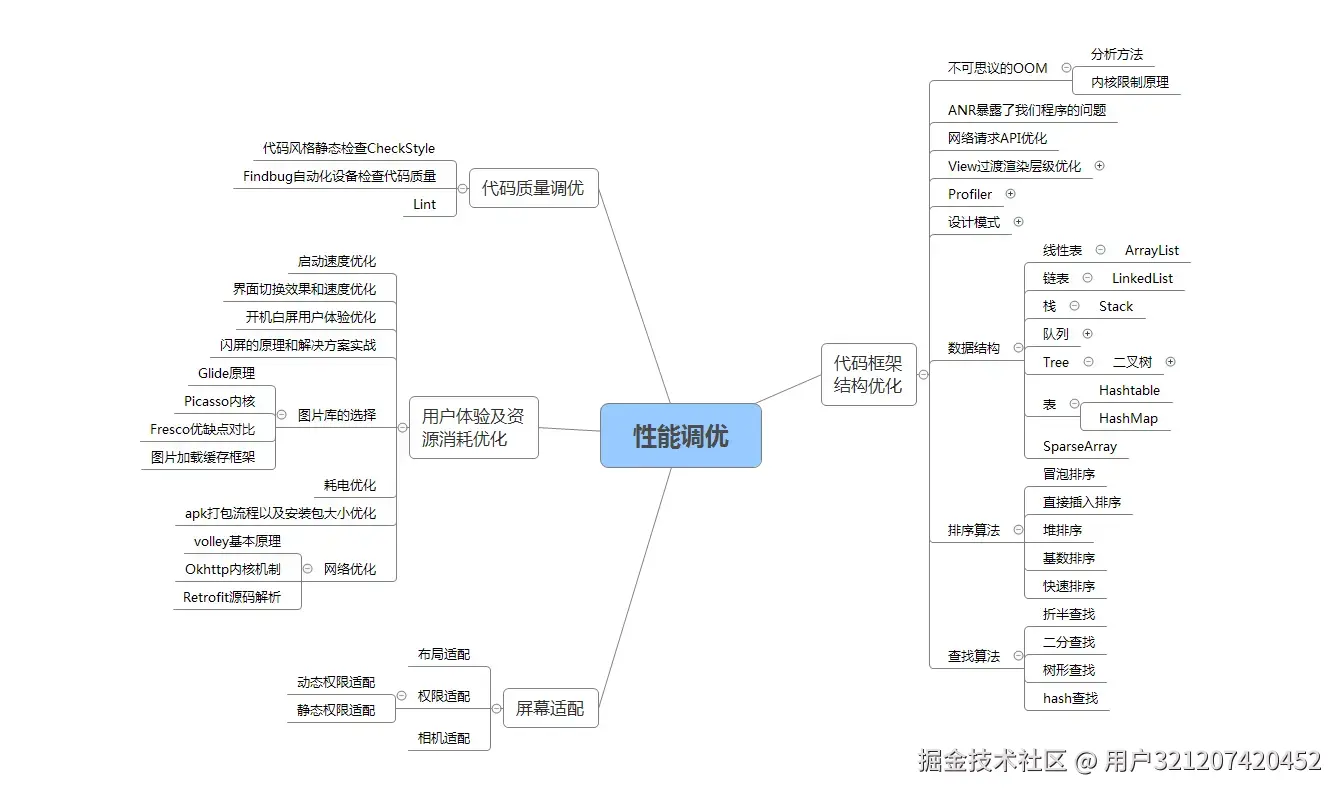
**性能调优;**
数据结构算法,设计模式。都是这里面的关键基础和重点需要熟练的。
> 
**NDK开发;**
未来的方向,高薪必会。
> 
**前沿技术;**
组件化,热升级,热修复,框架设计
> 
> 网上学习 Android的资料一大堆,但如果学到的知识不成体系,遇到问题时只是浅尝辄止,不再深入研究,那么很难做到真正的技术提升。希望这份系统化的技术体系对大家有一个方向参考。
我在搭建这些技术框架的时候,还整理了系统的高级进阶教程,会比自己碎片化学习效果强太多,GitHub可见;**[《Android架构视频+学习笔记》](https://github.com/a120464/Android-P7/blob/master/Android%E5%BC%80%E5%8F%91%E4%B8%8D%E4%BC%9A%E8%BF%99%E4%BA%9B%EF%BC%9F%E5%A6%82%E4%BD%95%E9%9D%A2%E8%AF%95%E6%8B%BF%E9%AB%98%E8%96%AA%EF%BC%81.md)**
当然,想要深入学习并掌握这些能力,并不简单。关于如何学习,做程序员这一行什么工作强度大家都懂,但是不管工作多忙,每周也要雷打不动的抽出 2 小时用来学习。
**不出半年,你就能看出变化!**

