

android:layout_height="wrap_content"

android:onClick="notificationAPI_11p"

android:text="默认通知(API 11+)" />
#### 实现
/**
- 系统下拉栏默认的通知(API 11+)
*/
public void notificationAPI_11p(View view) {
// 获取NotificationManager管理者对象

NotificationManager manager = (NotificationManager) getSystemService(Context.NOTIFICATION_SERVICE);

// 创建一个PendingIntent,和Intent类似,不同的是由于不是马上调用,需要在下拉状态条出发的Activity,所以采用的是PendingIntent,即点击Notification跳转启动到哪个Activity

PendingIntent pendingIntent = PendingIntent.getActivity(this, 0, new Intent(this, MainActivity.class), 0);

// 通过Notification.Builder来创建通知,注意API Level 11之后才支持

Notification notificationAPI_11p = new Notification.Builder(this)

        // 设置状态栏中的小图片,尺寸一般建议在24×24,这个图片同样也是在下拉状态栏中所显示,如果在那里需要更换更大的图片,可以使用setLargeIcon(Bitmap icon)

        .setSmallIcon(R.mipmap.ic_launcher)

                // 设置在status bar上显示的提示文字

        .setTicker("TickerText:" + "您有新短消息,请注意查收!")

                // 设置在下拉status bar后显示的标题

        .setContentTitle("这里是标题(API 11+)")

                // 设置在下拉status bar后显示的内容

        .setContentText("这里是显示的内容")

                // 关联PendingIntent

        .setContentIntent(pendingIntent)

                // 设置在下拉status bar后显示的数字

        .setNumber(1)

                // 需要注意build()是在API level 16及之后增加的,在API 11中可以使用getNotificatin()来代替

        .getNotification();

// FLAG_AUTO_CANCEL表明当通知被用户点击时,通知将被清除

notificationAPI_11p.flags |= Notification.FLAG_AUTO_CANCEL;

// 通过通知管理器来发起通知。

manager.notify(NOTIFICATION_FLAG, notificationAPI_11p);
}
### 默认通知(API 16+)
#### 效果图

#### 按钮
<Button
android:layout_width="match_parent"

android:layout_height="wrap_content"

android:onClick="notificationAPI_16p"

android:text="默认通知(API 16+)" />
#### 实现
/**
- 系统下拉栏默认的通知(API 16+)
*/
public void notificationAPI_16p(View view) {
// 获取NotificationManager管理者对象

NotificationManager manager = (NotificationManager) getSystemService(Context.NOTIFICATION_SERVICE);

// 创建一个PendingIntent,和Intent类似,不同的是由于不是马上调用,需要在下拉状态条出发的Activity,所以采用的是PendingIntent,即点击Notification跳转启动到哪个Activity

PendingIntent pendingIntent = PendingIntent.getActivity(this, 0, new Intent(this, MainActivity.class), 0);

// 通过Notification.Builder来创建通知,注意API Level 16之后才支持

Notification notificationAPI_16p = new Notification.Builder(this)

        // 设置状态栏中的小图片,尺寸一般建议在24×24,这个图片同样也是在下拉状态栏中所显示,如果在那里需要更换更大的图片,可以使用setLargeIcon(Bitmap icon)

        .setSmallIcon(R.mipmap.ic_launcher)

                // 设置在status bar上显示的提示文字

        .setTicker("TickerText:" + "您有新短消息,请注意查收!")

                // 设置在下拉status bar后显示的标题

        .setContentTitle("这里是标题(API 16+)")

                // 设置在下拉status bar后显示的内容

        .setContentText("这里是显示的内容")

                // 关联PendingIntent

        .setContentIntent(pendingIntent)

                // 设置在下拉status bar后显示的数字

        .setNumber(1)

                // 需要注意build()是在API level 16及之后增加的,API11可以使用getNotificatin()来替代

        .build();

// FLAG_AUTO_CANCEL表明当通知被用户点击时,通知将被清除。

notificationAPI_16p.flags |= Notification.FLAG_AUTO_CANCEL;

// 通过通知管理器来发起通知

manager.notify(NOTIFICATION_FLAG, notificationAPI_16p);
}
自定义样式
-----
### 效果图
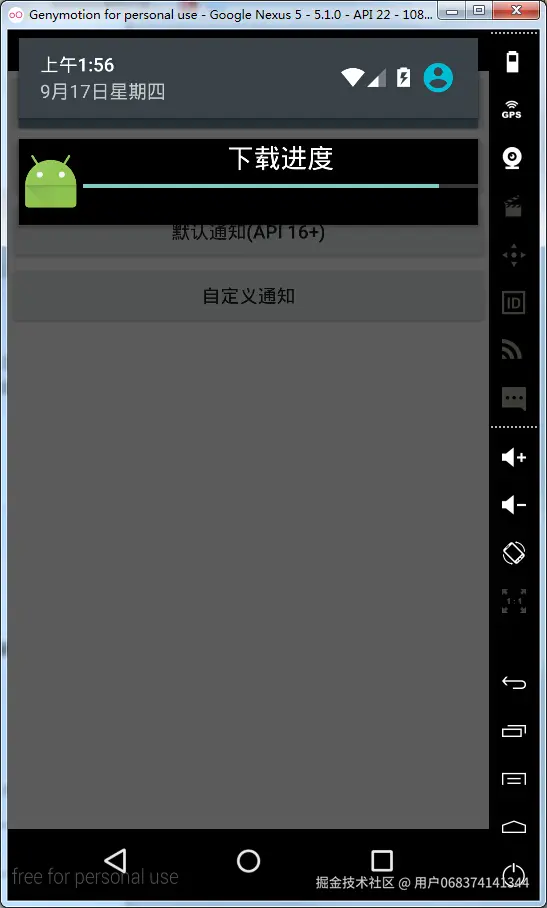
### 自定义提示框布局
> 在**layout**目录下添加**my\_notification.xml**文件
<RelativeLayout xmlns:android="schemas.android.com/apk/res/and…"
android:layout_width="match_parent"

android:layout_height="wrap_content"

android:background="#FF000000"

android:orientation="vertical">


<ImageView

    android:id="@+id/icon"

    android:layout_width="wrap_content"

    android:layout_height="match_parent" />


<TextView

    android:id="@+id/text_content"

    android:layout_width="match_parent"

    android:layout_height="wrap_content"

    android:layout_toRightOf="@+id/icon"

    android:gravity="center"

    android:textColor="#FFFFFFFF"

    android:textSize="20sp" />


<ProgressBar

    android:id="@+id/pb"

    style="?android:attr/progressBarStyleHorizontal"

    android:layout_width="match_parent"

    android:layout_height="wrap_content"

    android:layout_below="@+id/text_content"

    android:layout_gravity="center_vertical"

    android:layout_toRightOf="@+id/icon" />
### 按钮
<Button
    android:layout_width="match_parent"

    android:layout_height="wrap_content"

    android:onClick="myselfNotification"

    android:text="自定义通知" />
### 实现
/**
- 系统下拉栏自定义的通知
*/
public void myselfNotification(View view) {
// 获取NotificationManager管理者对象

mNotificationManager = (NotificationManager) getSystemService(Context.NOTIFICATION_SERVICE);

// Notification myNotify = new Notification(R.drawable.message,

// "自定义通知:您有新短信息了,请注意查收!", System.currentTimeMillis());

mNotification = new Notification();

// 显示的图片

mNotification.icon = R.mipmap.ic_launcher;

// 设置在status bar上显示的提示文字

mNotification.tickerText = "TickerText:您有新短消息,请注意查收!";

// 获取当前系统时间

mNotification.when = System.currentTimeMillis();

// 表明当通知被用户点击时,通知不自动清除。

mNotification.flags = Notification.FLAG_NO_CLEAR;

// 加载自定义的布局

mRemoteViews = new RemoteViews(getPackageName(), R.layout.my_notification);

// 设置图片

mRemoteViews.setImageViewResource(R.id.icon, R.mipmap.ic_launcher);

// 设置文字

mRemoteViews.setTextViewText(R.id.text_content, "下载进度");

// 设置进度

mRemoteViews.setProgressBar(R.id.pb, 100, 10, false);

// 设置显示的自定义布局

mNotification.contentView = mRemoteViews;

// 设置点击通知栏的响应动作

Intent intent = new Intent(Intent.ACTION_MAIN);

// 设置通知的点击响应

PendingIntent contentIntent = PendingIntent.getActivity(this, 1, intent, 1);

mNotification.contentIntent = contentIntent;

// 通过通知管理器来发起通知

mNotificationManager.notify(NOTIFICATION_FLAG, mNotification);
}
清除指定ID的通知

---------


### 按钮
<Button
android:layout_width="match_parent"

android:layout_height="wrap_content"

android:onClick="cleanNotificationById"

android:text="清除指定ID的通知" />
### 实现
/**
-
清除指定ID的提示
-
@param view
*/
public void cleanNotificationById(View view){
// 获取NotificationManager管理者对象

mNotificationManager = (NotificationManager) getSystemService(Context.NOTIFICATION_SERVICE);

// 清除id为NOTIFICATION_FLAG的通知

mNotificationManager.cancel(NOTIFICATION_FLAG);
}
清除所有通知

------

