一、props父子传递数据
父传子:传属性值 :money="childMoney"
子传父:属性值是函数 :getFood="getFood"
子接收:defineProps(['money', 'getFood'])
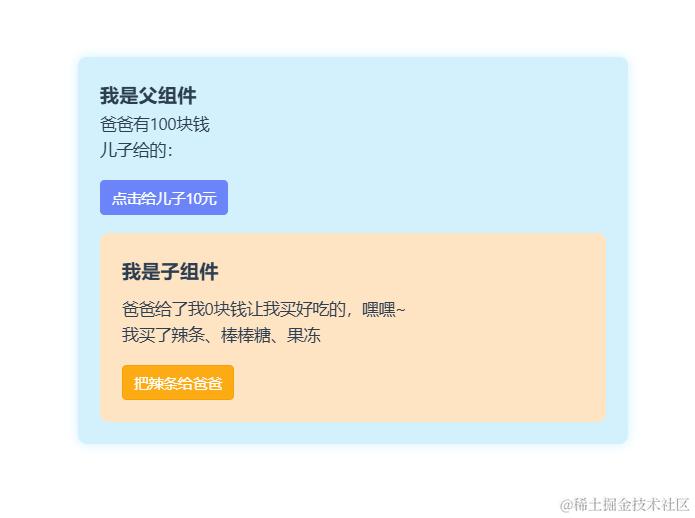
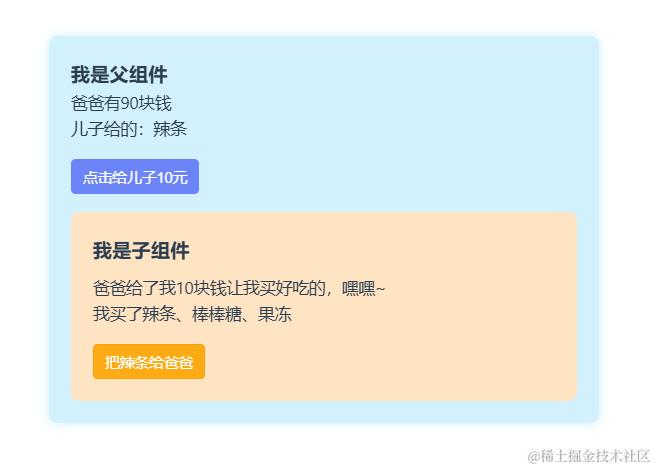
父组件 parents.vue
<template>
  <div class="parents">
    <h3>我是父组件</h3>
    <p>爸爸有{{ money }}块钱</p>
    <p>儿子给的:{{ lt }}</p>
    <button @click="giveChildMoney">点击给儿子10元</button>
    <child :money="childMoney" :getFood="getFood" />
  </div>
</template>

<script lang="ts" setup name="Person">
import { ref } from 'vue'
import child from '@/components/child.vue'
let money = ref(100)
let childMoney = 0
let lt = ref('')
function giveChildMoney() {
  money.value -= 10
  childMoney += 10
}

function getFood(val: string) {
  lt.value = val
}
</script>

<style scoped>
h3 {
  font-weight: bold;
}
button {
  margin-top: 16px;
  padding: 6px 10px;
  border: 1px solid #6b85f8;
  background-color: #6b85f8;
  color: #fff;
  border-radius: 4px;
  cursor: pointer;
}
.parents {
  background: rgb(211, 241, 253);
  box-shadow: 0 0 10px 0 rgba(211, 241, 253, 1);
  border-radius: 8px;
  padding: 20px;
  width: 500px;
}
</style>
子组件:child.vue
<template>
  <div class="child">
    <h3>我是子组件</h3>
    <p>爸爸给了我{{ money }}块钱让我买好吃的,嘿嘿~</p>
    <p>我买了辣条、棒棒糖、果冻</p>
    <button>把辣条给爸爸</button>
    <button @click="giveParents()">把辣条给爸爸</button>
  </div>
</template>
<script setup lang="ts">
let props = defineProps(['money', 'getFood'])
function giveParents () {
  props.getFood('辣条')
}
</script>
<style scoped>
h3 {
  margin-bottom: 8px;
  font-weight: bold;
}
.child {
  padding: 20px;
  background-color: bisque;
  border-radius: 8px;
  margin-top: 16px;
}
button {
  margin-top: 16px;
  padding: 6px 10px;
  border: 1px solid #f8a202;
  background-color: #fcab14;
  color: #fff;
  border-radius: 4px;
  cursor: pointer;
}
</style>
二、defineEmits 自定义事件(子传父)
用于子传父 defineEmits(['send-food'])
注意:自定义事件官方推荐以“-”分隔
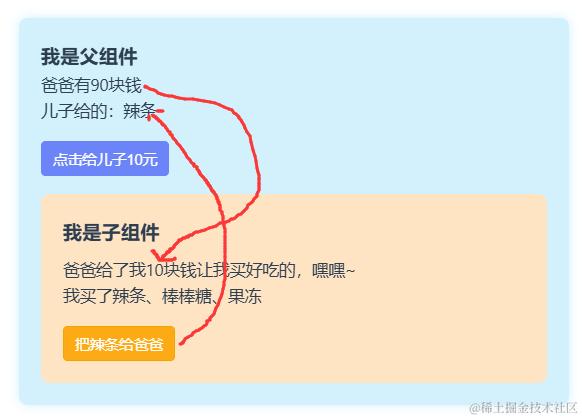
父组件 parents.vue
<template>
  <div class="parents">
    <h3>我是父组件</h3>
    <p>爸爸有{{ money }}块钱</p>
    <p>儿子给的:{{ lt }}</p>
    <button @click="giveChildMoney">点击给儿子10元</button>
    <child :money="childMoney" @send-food="getFood" />
  </div>
</template>

<script lang="ts" setup name="Person">
import { ref } from 'vue'
import child from '@/components/child.vue'
let money = ref(100)
let childMoney = 0
let lt = ref('')
function giveChildMoney() {
  money.value -= 10
  childMoney += 10
}

function getFood(val: string) {
  lt.value = val
}
</script>
子组件
<template>
  <div class="child">
    <h3>我是子组件</h3>
    <p>爸爸给了我{{ money }}块钱让我买好吃的,嘿嘿~</p>
    <p>我买了辣条、棒棒糖、果冻</p>
    <button @click="giveParents()">把辣条给爸爸</button>
  </div>
</template>
<script setup lang="ts">
let props = defineProps(['money'])
let emit = defineEmits(['send-food'])
function giveParents () {
  emit('send-food', '辣条')
}
</script>
三、mitt 任意组件通讯
与$bus和pubsub功能相似,可以实现任意组件通讯
mitt具有以下优点:
- 零依赖、体积超小,压缩后只有
200b。 - 提供了完整的
typescript支持,能自动推导出参数类型。 - 基于闭包实现,没有烦人的
this困扰。 - 为浏览器编写但也支持其它
javascript运行时,浏览器支持ie9+(需要引入Map的polyfill)。 5.与框架无关,可以与任何框架搭配使用。
安装mitt:npm install mitt
utils/emitter.ts
import mitt from "mitt";
// 绑事件 触发事件
const emitter=mitt()
// 暴露事件
export default emitter

/*

// 触发事件
setTimeout(()=>{
    emitter.emit('test1',"内容数据")
},3000)

// 获取事件
emitter.on('test1',()=>{
  console.log('test1被绑定了');

})

// 解绑事件
setTimeout(()=>{
    emitter.off('test1')
    // 清空事件
    // emitter.all.clear();
}) */
在main.ts中全局引入,或者在使用的组件中引入
// main.ts
import emitter from './utils/emitter'
// 挂载在全局上
app.config.globalProperties.$emitter = emitter

// 由于必须要拓展ComponentCustomProperties类型才能获得类型提示
declare module "vue" {
  export interface ComponentCustomProperties {
    $emitter: typeof emitter;
  }
}


// 在组件使用
import { getCurrentInstance } from "vue";
const instance = getCurrentInstance();
instance?.proxy?.$emitter.on("foo", () => { // dosomething });
在组件中引入(非全局引入)
父组件
<template>
  <div class="parents">
    <h3>我是父组件</h3>
    <p>爸爸有{{ money }}块钱</p>
    <p>儿子给的:{{ lt }}</p>
    <button @click="giveChildMoney">点击给儿子10元</button>
    <child />
  </div>
</template>

<script lang="ts" setup name="Person">
import { ref } from 'vue'
import child from '@/components/child.vue'
import emitter from '@/utils/emitter'
let money = ref(100)
let childMoney = 0
let lt = ref('')
function giveChildMoney() {
  money.value -= 10
  childMoney += 10
  //  向child组件传值
  emitter.emit('send-money', childMoney)
}
// 接收child组件传的值
emitter.on('send-food', val => {
  lt.value = val as string
})
</script>
子组件
<template>
  <div class="child">
    <h3>我是子组件</h3>
    <p>爸爸给了我{{ money }}块钱让我买好吃的,嘿嘿~</p>
    <p>我买了辣条、棒棒糖、果冻</p>
    <button @click="giveParents()">把辣条给爸爸</button>
  </div>
</template>
<script setup lang="ts">
import emitter from '@/utils/emitter'
import { ref } from 'vue'
let money = ref(0)
// 向其他组件传值
function giveParents() {
  emitter.emit('send-food', '辣条')
}
// 接收其他组件传递值
emitter.on('send-money', val => {
  money.value = val as number
})
</script>
四、 provide和inject (祖->孙、父->子直接传值)
实现祖孙组件间的直接通讯
在祖先组件中通过provide(名字,内容)向后代组件传值,不要放到方法中使用provide,会报警告
在后代组件中通过inject('名字')获取数据
父组件
<template>
  <div class="parents">
    <h3>我是父组件</h3>
    <p>爸爸有{{ money }}块钱</p>
    <p>儿子给的:{{ lt }}</p>
    <button @click="giveChildMoney">点击给儿子10元</button>
    <child />
  </div>
</template>

<script lang="ts" setup name="Person">
import { provide, ref } from 'vue'
import child from '@/components/child.vue'

let money = ref(100)
let childMoney = ref(0)
let lt = ref('')
function giveChildMoney () {
  money.value -= 10
  childMoney.value += 10
}
provide('childMoney', childMoney)
</script>
子组件
<template>
  <div class="child">
    <h3>我是子组件</h3>
    <p>爸爸给了我{{ money }}块钱让我买好吃的,嘿嘿~</p>
  </div>
</template>
<script setup lang="ts">
import { inject, ref } from 'vue'
let money = inject('childMoney')
</script>
五、pinia全局变量
安装pinia包 npm install pinia
在main.ts引入
import { createApp } from 'vue'
import App from './App.vue'
/* 引入createPinia,用于创建pinia */
import { createPinia } from 'pinia'
/* 创建pinia */
const pinia = createPinia()
const app = createApp(App)
/* 使用插件 */
app.use(pinia)
app.mount('#app')
Store是一个保存:状态、业务逻辑 的实体,每个组件都可以读取、写入它。- 它有三个概念:
state、getter、action,相当于组件中的的:data``computed``methods。 stores/count.ts
import { defineStore } from 'pinia'
export const useCounterStore = defineStore('counter', {
 state:()=>{
   return {
    count:1,
    school:"超星",
    address:"留山大街"
   }
 },
 getters:{
  doubleCount:(state)=>state.count*2
 },
 actions:{
  increment(n:number){
    if(this.count<10){
      this.count+=n
    }
  }
 }
 })
setup式写法
import { ref, computed } from 'vue'
import { defineStore } from 'pinia'

 export const useCounterStore = defineStore('counter', () => {

  const count = ref(0)
  const doubleCount = computed(() => count.value * 2)
  function increment() {
    count.value++
  }

  return { count, doubleCount, increment }
})
调用count.vue
<template>
  <div>求和数字:{{ counterStore.count }}</div>
  <button @click="add">加</button>
</template>
<script lang="ts" setup name="count">
import { useCounterStore } from '@/stores/counter'
import { ref } from 'vue'
let counterStore = useCounterStore()
let n = ref(2)
function add () {
  /* 改变store的值 */
  // 第一种方式
  // counterStore.count++
  // counterStore.school = '北京'

  // 第二种方式
  /*  counterStore.$patch({
    count: 9,
    school: '上地'
  }) */

  // 第三种
  counterStore.increment(n.value)
}

//监控pinia数据变化
counterStore.$subscribe((mutate, state) => {
  // counterStore 内容, state改变后的数据
  console.log('数据发生变化', mutate, state)
})
</script>
storeToRefs
- 借助
storeToRefs将store中的数据转为ref对象,方便在模板中使用。 - 注意:
pinia提供的storeToRefs只会将数据做转换,而Vue的toRefs会转换store中数据。
<template>
    <div class="count">
       <h2>当前求和为:{{sum}}</h2>
     </div>
 </template>
  <script setup lang="ts" name="Count">
      import { useCountStore } from '@/store/count'
      /* 引入storeToRefs */
      import { storeToRefs } from 'pinia'
      /* 得到countStore */
      const countStore = useCountStore()
      /* 使用storeToRefs转换countStore,随后解构 */
      const {sum} = storeToRefs(countStore)
  </script>
六、$attrs透传
向当前组件子组件通信(祖->孙)
父组件通过给子组件加 v-bind="$attrs" 属性把数据传递给子孙组件;在子组件中引入useAttrs可获取$attrs里数据
import {useAttrs} from
let attrs = useAttrs()
console.log(attrs)
子组件会把父组件的class,type,id...,禁止透传这些可设置inheritAttrs: false
未禁止
禁止操作
import { defineOptions } from 'vue'
defineOptions({
  inheritAttrs: false
})
传值效果
父组件
<template>
  <div class="parents">
    <h3>我是父组件</h3>
    <p>爸爸有{{ money1 }}块钱</p>
    <p>儿子给的:{{ lt }}</p>
    <p>孙子给的 {{ food1 }}</p>
    <button @click="giveChildMoney">点击给儿子10元</button>
    <child :money="money" :food="food" :updateMoney="updateMoney" />
  </div>
</template>

<script lang="ts" setup name="Person">
import { ref } from 'vue'
import child from '@/components/child.vue'
import emitter from '@/utils/emitter'
let money = ref(100)
let money1 = ref(100)
let childMoney = 0
let lt = ref('')
let food = ref('糖果')
let food1 = ref('')
function giveChildMoney() {
  money.value -= 10
  childMoney += 10
  //  向child组件传值
  emitter.emit('send-money', childMoney)
}
// 接收child组件传的值
emitter.on('send-food', val => {
  lt.value = val as string
})
// 更新父组件数据
function updateMoney(val: string) {
  food1.value = val
}
</script>

<style scoped>
h3 {
  font-weight: bold;
}
button {
  margin-top: 16px;
  padding: 6px 10px;
  border: 1px solid #6b85f8;
  background-color: #6b85f8;
  color: #fff;
  border-radius: 4px;
  cursor: pointer;
}
.parents {
  background: rgb(211, 241, 253);
  box-shadow: 0 0 10px 0 rgba(211, 241, 253, 1);
  border-radius: 8px;
  padding: 20px;
  width: 500px;
}
</style>
子组件
<template>
  <div class="child">
    <h3>我是子组件</h3>
    <p>爸爸给了我{{ money }}块钱让我买好吃的,嘿嘿~</p>
    <p>我买了辣条、棒棒糖、果冻</p>
    <button @click="giveParents()">把辣条给爸爸</button>
    <grandson v-bind="$attrs" />
  </div>
</template>
<script setup lang="ts">
import grandson from './grandson.vue'
import emitter from '@/utils/emitter'
import { ref } from 'vue'
let money = ref(0)
let food = ref('糖果')
// 向其他组件传值
function giveParents() {
  emitter.emit('send-food', '辣条')
}
// 接收其他组件传递值
emitter.on('send-money', val => {
  money.value = val as number
})
</script>
子孙组件
<template>
  <div class="grandson">
    <h3>我是子孙组件</h3>
    <p>爷爷给了我{{ money }}块钱让我买{{ food }}吃,嘿嘿~</p>
    <button @click="updateMoney(food)">给爷爷糖果</button>
  </div>
</template>
<script setup lang="ts" name="Grandson">
defineProps(['money', 'food', 'updateMoney'])
</script>