

	String dateString = localDate1.format(dateTimeFormatter);
	System.out.println("LocalDate 转 String:"+dateString);
	// String 转 LocalDate
	String str = "2021-08-14";
	DateTimeFormatter fmt = DateTimeFormatter.ofPattern("yyyy-MM-dd");
	LocalDate date = LocalDate.parse(str, fmt);
	System.out.println("String 转 LocalDate:"+date);

###### Date和LocalDate相互转化
// Date 转 LocalDate
	Date now = new Date();
	// 先将Date转换为ZonedDateTime
	Instant instant = now.toInstant();
	ZonedDateTime zonedDateTime = instant.atZone(ZoneId.of("Asia/Shanghai"));
	LocalDate localDate = zonedDateTime.toLocalDate();
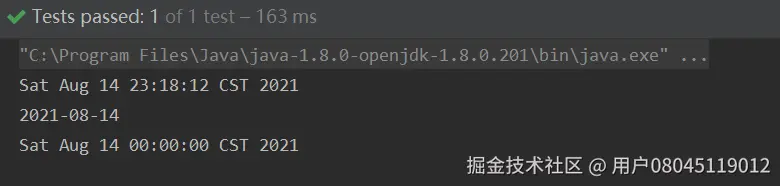
	// Sat Aug 14 23:16:28 CST 2021
	System.out.println(now);
	// 2021-08-14
	System.out.println(localDate);

	// LocalDate 转 Date
	LocalDate now1 = LocalDate.now();
	ZonedDateTime dateTime = now1.atStartOfDay(ZoneId.of("Asia/Shanghai"));
	Date date1 = Date.from(dateTime.toInstant());
	System.out.println(date1);
### LocalDateTime
#### LocalDateTime类说明
表示当前日期时间,相当于:yyyy-MM-ddTHH:mm:ss
#### LocalDateTime常用的用法
##### 获取当前日期和时间
	LocalDate d = LocalDate.now(); // 当前日期
	LocalTime t = LocalTime.now(); // 当前时间
	LocalDateTime dt = LocalDateTime.now(); // 当前日期和时间
	System.out.println(d); // 严格按照ISO 8601格式打印
	System.out.println(t); // 严格按照ISO 8601格式打印
	System.out.println(dt); // 严格按照ISO 8601格式打印

由运行结果可行,本地日期时间通过now()获取到的总是以当前默认时区返回的
##### 获取指定日期和时间
	LocalDate d2 = LocalDate.of(2021, 07, 14); // 2021-07-14, 注意07=07月
	LocalTime t2 = LocalTime.of(13, 14, 20); // 13:14:20
	LocalDateTime dt2 = LocalDateTime.of(2021, 07, 14, 13, 14, 20);
	LocalDateTime dt3 = LocalDateTime.of(d2, t2);
	System.out.println("指定日期时间:"+dt2);
	System.out.println("指定日期时间:"+dt3);

##### 日期时间的加减法及修改
	LocalDateTime currentTime = LocalDateTime.now(); // 当前日期和时间
	System.out.println("------------------时间的加减法及修改-----------------------");
	//3.LocalDateTime的加减法包含了LocalDate和LocalTime的所有加减,上面说过,这里就只做简单介绍
	System.out.println("3.当前时间:" + currentTime);
	System.out.println("3.当前时间加5年:" + currentTime.plusYears(5));
	System.out.println("3.当前时间加2个月:" + currentTime.plusMonths(2));
	System.out.println("3.当前时间减2天:" + currentTime.minusDays(2));
	System.out.println("3.当前时间减5个小时:" + currentTime.minusHours(5));
	System.out.println("3.当前时间加5分钟:" + currentTime.plusMinutes(5));
	System.out.println("3.当前时间加20秒:" + currentTime.plusSeconds(20));
	//还可以灵活运用比如:向后加一年,向前减一天,向后加2个小时,向前减5分钟,可以进行连写
	System.out.println("3.同时修改(向后加一年,向前减一天,向后加2个小时,向前减5分钟):" + currentTime.plusYears(1).minusDays(1).plusHours(2).minusMinutes(5));
	System.out.println("3.修改年为2025年:" + currentTime.withYear(2025));
	System.out.println("3.修改月为12月:" + currentTime.withMonth(12));
	System.out.println("3.修改日为27日:" + currentTime.withDayOfMonth(27));
	System.out.println("3.修改小时为12:" + currentTime.withHour(12));
	System.out.println("3.修改分钟为12:" + currentTime.withMinute(12));
	System.out.println("3.修改秒为12:" + currentTime.withSecond(12));

#### LocalDateTime和Date相互转化
##### Date转LocalDateTime
	System.out.println("------------------方法一:分步写-----------------------");
	//实例化一个时间对象
	Date date = new Date();
	//返回表示时间轴上同一点的瞬间作为日期对象
	Instant instant = date.toInstant();
	//获取系统默认时区
	ZoneId zoneId = ZoneId.systemDefault();
	//根据时区获取带时区的日期和时间
	ZonedDateTime zonedDateTime = instant.atZone(zoneId);
	//转化为LocalDateTime
	LocalDateTime localDateTime = zonedDateTime.toLocalDateTime();
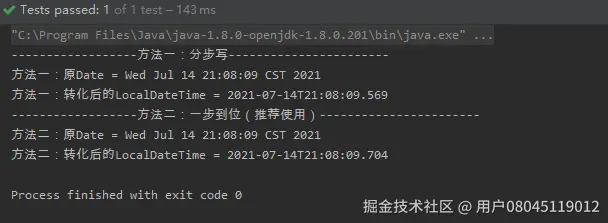
	System.out.println("方法一:原Date = " + date);
	System.out.println("方法一:转化后的LocalDateTime = " + localDateTime);

	System.out.println("------------------方法二:一步到位(推荐使用)-----------------------");
	//实例化一个时间对象
	Date todayDate = new Date();
	//Instant.ofEpochMilli(long l)使用1970-01-01T00:00:00Z的纪元中的毫秒来获取Instant的实例
	LocalDateTime ldt = Instant.ofEpochMilli(todayDate.getTime()).atZone(ZoneId.systemDefault()).toLocalDateTime();
	System.out.println("方法二:原Date = " + todayDate);
	System.out.println("方法二:转化后的LocalDateTime = " + ldt);
##### LocalDateTime转Date
	System.out.println("------------------方法一:分步写-----------------------");
	//获取LocalDateTime对象,当前时间
	LocalDateTime localDateTime = LocalDateTime.now();
	//获取系统默认时区
	ZoneId zoneId = ZoneId.systemDefault();
	//根据时区获取带时区的日期和时间
	ZonedDateTime zonedDateTime = localDateTime.atZone(zoneId);
	//返回表示时间轴上同一点的瞬间作为日期对象
	Instant instant = zonedDateTime.toInstant();
	//转化为Date
	Date date = Date.from(instant);
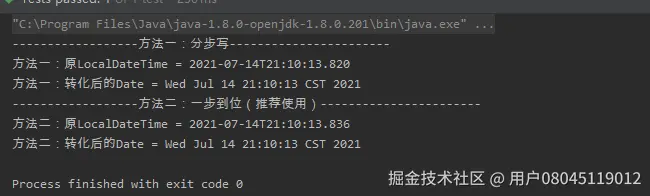
	System.out.println("方法一:原LocalDateTime = " + localDateTime);
	System.out.println("方法一:转化后的Date = " + date);

	System.out.println("------------------方法二:一步到位(推荐使用)-----------------------");
	//实例化一个LocalDateTime对象
	LocalDateTime now = LocalDateTime.now();
	//转化为date
	Date dateResult = Date.from(now.atZone(ZoneId.systemDefault()).toInstant());
	System.out.println("方法二:原LocalDateTime = " + now);
	System.out.println("方法二:转化后的Date = " + dateResult);
### LocalTime
#### LocalTime类说明
LocalTime:本地时间,只有表示时分秒
#### LocalTime常用的用法
##### 获取当前时间
	LocalTime localTime1 = LocalTime.now();
	LocalTime localTime2 = LocalTime.now(ZoneId.of("Asia/Shanghai"));
	LocalTime localTime3 = LocalTime.now(Clock.systemDefaultZone());

	System.out.println("now :"+localTime1);
	System.out.println("now by zone :"+localTime2);
	System.out.println("now by Clock:"+localTime3);

##### 获取LocalTime对象
	LocalTime localTime1 = LocalTime.of(23, 26, 30);
	LocalTime localTime2 = LocalTime.of(23, 26);
	System.out.println(localTime1);
	System.out.println(localTime2);

##### 获取指定日期的时分秒
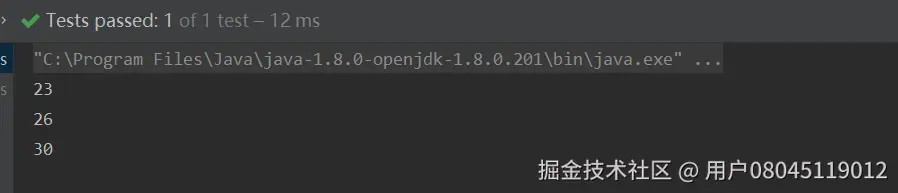
	LocalTime localTime1 = LocalTime.of(23, 26, 30);
	//当前时间的时:23
	System.out.println(localTime1.getHour());
	//当前时间的分:26
	System.out.println(localTime1.getMinute());
	//当前时间的秒:30
	System.out.println(localTime1.getSecond());
##### 修改时分秒
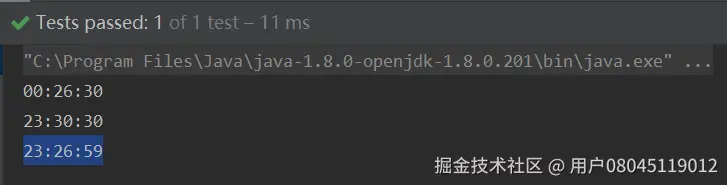
	LocalTime localTime1 = LocalTime.of(23, 26, 30);
	//修改时间的时:00:26:30
	System.out.println(localTime1.withHour(0));
	//修改时间的分:23:30:30
	System.out.println(localTime1.withMinute(30));
	//修改时间的秒:23:26:59
	System.out.println(localTime1.withSecond(59));
##### 比较时间
	LocalTime localTime1 = LocalTime.of(23, 26, 30);
	LocalTime localTime2 = LocalTime.of(23, 26, 32);
	// 两个时间进行比较 大返回1,小就返回-1,一样就返回0:-1
	System.out.println(localTime1.compareTo(localTime2));

	// 比较指定时间是否比参数时间早(true为早):true
	System.out.println(localTime1.isBefore(localTime2));
	// 比较指定时间是否比参数时间晚(true为晚):false
	System.out.println(localTime1.isAfter(localTime2));
	// 比较两个时间是否相等:true
	System.out.println(localTime1.equals(LocalTime.of(23, 26, 30)));

### OffsetDateTime
#### OffsetDateTime类说明
OffsetDateTime:有时间偏移量的日期时间(不包含基于ZoneRegion的时间偏移量)
public final class OffsetDateTime implements Temporal, TemporalAdjuster, Comparable, Serializable { //The minimum supported {@code OffsetDateTime}, '-999999999-01-01T00:00:00+18:00' public static final OffsetDateTime MIN = LocalDateTime.MIN.atOffset(ZoneOffset.MAX); // The maximum supported {@code OffsetDateTime}, '+999999999-12-31T23:59:59.999999999-18:00'. public static final OffsetDateTime MAX = LocalDateTime.MAX.atOffset(ZoneOffset.MIN); ... }
上面的**MIN** 和**MAX** 是公有静态变量。


#### OffsetDateTime常用的用法


##### 获取当前日期时间
	OffsetDateTime offsetDateTime1 = OffsetDateTime.now();
	OffsetDateTime offsetDateTime2 = OffsetDateTime.now(ZoneId.of("Asia/Shanghai"));
	OffsetDateTime offsetDateTime3 = OffsetDateTime.now(Clock.systemUTC());

	System.out.println("now :"+offsetDateTime1);
	System.out.println("now by zone :"+offsetDateTime2);
	System.out.println("now by Clock:"+offsetDateTime3);

##### 获取OffsetDateTime对象
	LocalDateTime localDateTime1 = LocalDateTime.of(2021, 8, 15, 13, 14, 20);
	OffsetDateTime offsetDateTime1 = OffsetDateTime.of(localDateTime1, ZoneOffset.ofHours(8));
	OffsetDateTime offsetDateTime2 = OffsetDateTime. of(2021, 8, 15, 13, 14, 20,0, ZoneOffset.ofHours(8));
	Instant now = Instant.now();
	OffsetDateTime offsetDateTime3 = OffsetDateTime.ofInstant(now, ZoneId.of("Asia/Shanghai"));

	System.out.println(offsetDateTime1);
	System.out.println(offsetDateTime2);
	System.out.println(offsetDateTime3);

##### 获取指定日期的年月日时分秒
	LocalDateTime localDateTime1 = LocalDateTime.of(2021, 8, 15, 13, 14, 20);
	OffsetDateTime offsetDateTime1 = OffsetDateTime.of(localDateTime1, ZoneOffset.ofHours(8));
	//当前时间的年:2021
	System.out.println(offsetDateTime1.getYear());
	//当前时间的月:8
	System.out.println(offsetDateTime1.getMonthValue());
	//当前时间的日:15
	System.out.println(offsetDateTime1.getDayOfMonth());
	//当前时间的时:13
	System.out.println(offsetDateTime1.getHour());
	//当前时间的分:14
	System.out.println(offsetDateTime1.getMinute());
	//当前时间的秒:20
	System.out.println(offsetDateTime1.getSecond());

##### 修改年月日时分秒
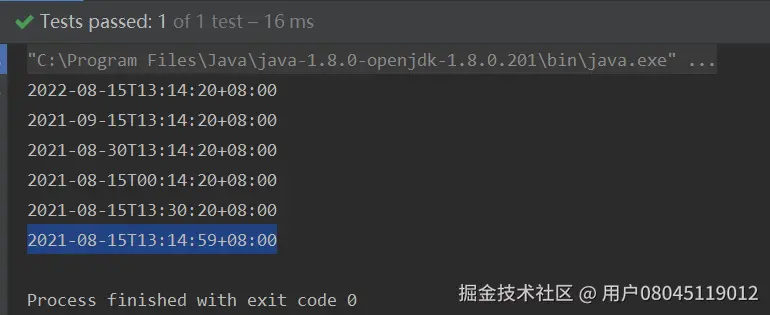
	LocalDateTime localDateTime1 = LocalDateTime.of(2021, 8, 15, 13, 14, 20);
	OffsetDateTime offsetDateTime1 = OffsetDateTime.of(localDateTime1, ZoneOffset.ofHours(8));
	//修改时间的年:2022-08-15T13:14:20+08:00
	System.out.println(offsetDateTime1.withYear(2022));
	//修改时间的月:2021-09-15T13:14:20+08:00
	System.out.println(offsetDateTime1.withMonth(9));
	//修改时间的日:2021-08-30T13:14:20+08:00
	System.out.println(offsetDateTime1.withDayOfMonth(30));
	//修改时间的时:2021-08-15T00:14:20+08:00
	System.out.println(offsetDateTime1.withHour(0));
	//修改时间的分:2021-08-15T13:30:20+08:00
	System.out.println(offsetDateTime1.withMinute(30));
	//修改时间的秒:2021-08-15T13:14:59+08:00
	System.out.println(offsetDateTime1.withSecond(59));
##### 比较日期时间
	LocalDateTime localDateTime1 = LocalDateTime.of(2021, 8, 15, 13, 14, 20);
	OffsetDateTime offsetDateTime1 = OffsetDateTime.of(localDateTime1, ZoneOffset.ofHours(8));
	OffsetDateTime offsetDateTime3 = OffsetDateTime.of(localDateTime1, ZoneOffset.ofHours(8));

	LocalDateTime localDateTime2 = LocalDateTime.of(2021, 8, 15, 13, 14, 30);
	OffsetDateTime offsetDateTime2 = OffsetDateTime.of(localDateTime2, ZoneOffset.ofHours(8));

	// 两个时间进行比较 大返回1,小就返回-1,一样就返回0:-1
	System.out.println(offsetDateTime1.compareTo(offsetDateTime2));

	// 比较指定时间是否比参数时间早(true为早):true
	System.out.println(offsetDateTime1.isBefore(offsetDateTime2));
	// 比较指定时间是否比参数时间晚(true为晚):false
	System.out.println(offsetDateTime1.isAfter(offsetDateTime2));
	// 比较两个时间是否相等:true
	System.out.println(offsetDateTime1.equals(offsetDateTime3));

##### 字符串转化为OffsetDateTime对象
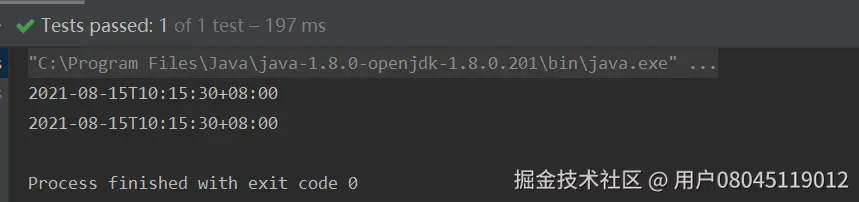
			String str = "2021-08-15T10:15:30+08:00";
	OffsetDateTime offsetDateTime1 = OffsetDateTime.parse(str);
	OffsetDateTime offsetDateTime2 = OffsetDateTime.parse(str,DateTimeFormatter.ISO_OFFSET_DATE_TIME);

	System.out.println(offsetDateTime1);
	System.out.println(offsetDateTime2);
### OffsetTime
#### OffsetTime类说明
OffsetTime:有时间偏移量的时间
public final class OffsetTime implements Temporal, TemporalAdjuster, Comparable, Serializable { //The minimum supported {@code OffsetTime}, '00:00:00+18:00'. public static final OffsetTime MIN = LocalTime.MIN.atOffset(ZoneOffset.MAX);
//The maximum supported {@code OffsetTime}, '23:59:59.999999999-18:00'.
public static final OffsetTime MAX = LocalTime.MAX.atOffset(ZoneOffset.MIN);
...
}
上面的**MIN** 和**MAX** 是公有静态变量。


#### OffsetTime常用的用法


##### 获取当前时间
	OffsetTime offsetTime1 = OffsetTime.now();
	OffsetTime offsetTime2 = OffsetTime.now(ZoneId.of("Asia/Shanghai"));
	OffsetTime offsetTime3 = OffsetTime.now(Clock.systemUTC());

	System.out.println("now :"+offsetTime1);
	System.out.println("now by zone :"+offsetTime2);
	System.out.println("now by Clock:"+offsetTime3);

##### 获取OffsetTime对象
	LocalTime localTime1 = LocalTime.of(13, 14, 20);
	OffsetTime offsetTime1 = OffsetTime.of(localTime1, ZoneOffset.ofHours(8));
	OffsetTime offsetTime2 = OffsetTime. of(13, 14, 20,0, ZoneOffset.ofHours(8));
	Instant now = Instant.now();
	OffsetTime offsetTime3 = OffsetTime.ofInstant(now, ZoneId.of("Asia/Shanghai"));

	System.out.println(offsetTime1);
	System.out.println(offsetTime2);
	System.out.println(offsetTime3);

##### 获取指定时间的时分秒
	LocalTime localTime1 = LocalTime.of( 13, 14, 20);
	OffsetTime offsetTime1 = OffsetTime.of(localTime1, ZoneOffset.ofHours(8));

	//当前时间的时:13
	System.out.println(offsetTime1.getHour());
	//当前时间的分:14
	System.out.println(offsetTime1.getMinute());
	//当前时间的秒:20
	System.out.println(offsetTime1.getSecond());

##### 修改时分秒
	LocalTime localTime1 = LocalTime.of( 13, 14, 20);
	OffsetTime offsetTime1 = OffsetTime.of(localTime1, ZoneOffset.ofHours(8));

	//修改时间的时:00:14:20+08:00
	System.out.println(offsetTime1.withHour(0));
	//修改时间的分:13:30:20+08:00
	System.out.println(offsetTime1.withMinute(30));
	//修改时间的秒:13:14:59+08:00
	System.out.println(offsetTime1.withSecond(59));

##### 比较时间
	LocalTime localTime1 = LocalTime.of( 13, 14, 20);
	OffsetTime offsetTime1 = OffsetTime.of(localTime1, ZoneOffset.ofHours(8));
	OffsetTime offsetTime3 = OffsetTime.of(localTime1, ZoneOffset.ofHours(8));

	LocalTime localTime2 = LocalTime.of(13, 14, 30);
	OffsetTime offsetTime2 = OffsetTime.of(localTime2, ZoneOffset.ofHours(8));
	// 两个时间进行比较 大返回1,小就返回-1,一样就返回0:-1
	System.out.println(offsetTime1.compareTo(offsetTime2));

	// 比较指定时间是否比参数时间早(true为早):true
	System.out.println(offsetTime1.isBefore(offsetTime2));
	// 比较指定时间是否比参数时间晚(true为晚):false
	System.out.println(offsetTime1.isAfter(offsetTime2));
	// 比较两个时间是否相等:true
	System.out.println(offsetTime1.equals(offsetTime3));

### ZonedDateTime
#### ZonedDateTime类说明
表示一个带时区的日期和时间,ZonedDateTime可以理解为LocalDateTime+ZoneId
从源码可以看出来,ZonedDateTime类中定义了LocalDateTime和ZoneId两个变量。
且ZonedDateTime类也是不可变类且是线程安全的。
public final class ZonedDateTime implements Temporal, ChronoZonedDateTime, Serializable {
/\*\*
* Serialization version. */ private static final long serialVersionUID = -6260982410461394882L;
/\*\*
* The local date-time. */ private final LocalDateTime dateTime; /** * The time-zone. */ private final ZoneId zone;
...
}
#### ZonedDateTime常用的用法


##### 获取当前日期时间
	// 默认时区获取当前时间
	ZonedDateTime zonedDateTime = ZonedDateTime.now();
	// 用指定时区获取当前时间,Asia/Shanghai为上海时区
	ZonedDateTime zonedDateTime1 = ZonedDateTime.now(ZoneId.of("Asia/Shanghai"));
	//withZoneSameInstant为转换时区,参数为ZoneId
	ZonedDateTime zonedDateTime2 = zonedDateTime.withZoneSameInstant(ZoneId.of("America/New\_York"));
	System.out.println(zonedDateTime);
	System.out.println(zonedDateTime1);
	System.out.println(zonedDateTime2);

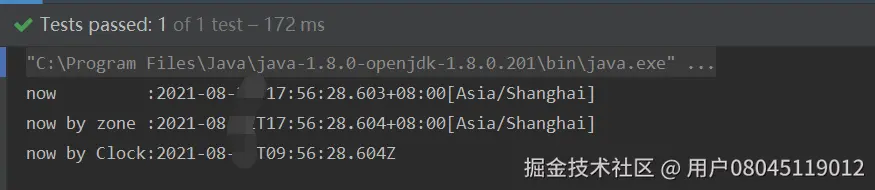
	ZonedDateTime zonedDateTime1 = ZonedDateTime.now();
	ZonedDateTime zonedDateTime2 = ZonedDateTime.now(ZoneId.of("Asia/Shanghai"));
	ZonedDateTime zonedDateTime3 = ZonedDateTime.now(Clock.systemUTC());

	System.out.println("now :"+zonedDateTime1);
	System.out.println("now by zone :"+zonedDateTime2);
	System.out.println("now by Clock:"+zonedDateTime3);
##### 获取ZonedDateTime对象
	LocalDateTime localDateTime1 = LocalDateTime.of(2021, 8, 15, 13, 14, 20);
	ZonedDateTime zonedDateTime1 = ZonedDateTime.of(localDateTime1, ZoneOffset.ofHours(8));
	ZonedDateTime zonedDateTime2 = ZonedDateTime. of(2021, 8, 15, 13, 14, 20,0, ZoneOffset.ofHours(8));
	Instant now = Instant.now();
	ZonedDateTime zonedDateTime3 = ZonedDateTime.ofInstant(now, ZoneId.of("Asia/Shanghai"));

	System.out.println(zonedDateTime1);
	System.out.println(zonedDateTime2);
	System.out.println(zonedDateTime3);

##### 获取指定日期的年月日时分秒
	LocalDateTime localDateTime1 = LocalDateTime.of(2021, 8, 15, 13, 14, 20);
	ZonedDateTime zonedDateTime1 = ZonedDateTime.of(localDateTime1, ZoneOffset.ofHours(8));
	//当前时间的年:2021
	System.out.println(zonedDateTime1.getYear());
	//当前时间的月:8
	System.out.println(zonedDateTime1.getMonthValue());
	//当前时间的日:15
	System.out.println(zonedDateTime1.getDayOfMonth());
	//当前时间的时:13
	System.out.println(zonedDateTime1.getHour());
	//当前时间的分:14
	System.out.println(zonedDateTime1.getMinute());
	//当前时间的秒:20
	System.out.println(zonedDateTime1.getSecond());
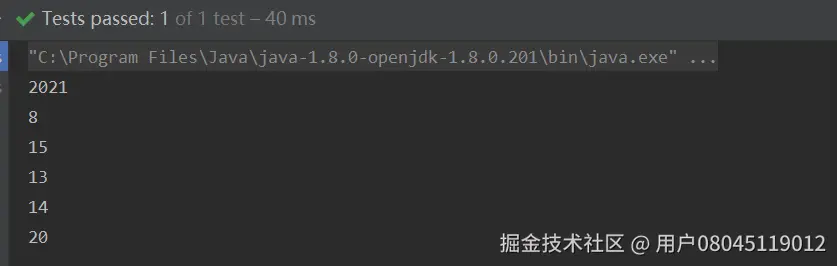
##### 修改年月日时分秒
	LocalDateTime localDateTime1 = LocalDateTime.of(2021, 8, 15, 13, 14, 20);
	ZonedDateTime zonedDateTime1 = ZonedDateTime.of(localDateTime1, ZoneOffset.ofHours(8));
	//修改时间的年:2022-08-15T13:14:20+08:00
	System.out.println(zonedDateTime1.withYear(2022));
	//修改时间的月:2021-09-15T13:14:20+08:00
	System.out.println(zonedDateTime1.withMonth(9));
	//修改时间的日:2021-08-30T13:14:20+08:00
	System.out.println(zonedDateTime1.withDayOfMonth(30));
	//修改时间的时:2021-08-15T00:14:20+08:00
	System.out.println(zonedDateTime1.withHour(0));
	//修改时间的分:2021-08-15T13:30:20+08:00
	System.out.println(zonedDateTime1.withMinute(30));
	//修改时间的秒:2021-08-15T13:14:59+08:00
	System.out.println(zonedDateTime1.withSecond(59));

##### 比较日期时间
	LocalDateTime localDateTime1 = LocalDateTime.of(2021, 8, 15, 13, 14, 20);
	ZonedDateTime zonedDateTime1 = ZonedDateTime.of(localDateTime1, ZoneOffset.ofHours(8));

	ZonedDateTime zonedDateTime3 = ZonedDateTime.of(localDateTime1, ZoneOffset.ofHours(8));

	LocalDateTime localDateTime2 = LocalDateTime.of(2021, 8, 15, 13, 14, 30);
	ZonedDateTime zonedDateTime2 = ZonedDateTime.of(localDateTime2, ZoneOffset.ofHours(8));

	// 两个时间进行比较 大返回1,小就返回-1,一样就返回0:-1
	System.out.println(zonedDateTime1.compareTo(zonedDateTime2));

	// 比较指定时间是否比参数时间早(true为早):true
	System.out.println(zonedDateTime1.isBefore(zonedDateTime2));
	// 比较指定时间是否比参数时间晚(true为晚):false
	System.out.println(zonedDateTime1.isAfter(zonedDateTime2));
	// 比较两个时间是否相等:true
	System.out.println(zonedDateTime1.equals(zonedDateTime3));

##### LocalDateTime+ZoneId变ZonedDateTime
	LocalDateTime localDateTime = LocalDateTime.now();
	ZonedDateTime zonedDateTime1 = localDateTime.atZone(ZoneId.systemDefault());
	ZonedDateTime zonedDateTime2 = localDateTime.atZone(ZoneId.of("America/New\_York"));
	System.out.println(zonedDateTime1);
	System.out.println(zonedDateTime2);

上面的例子说明了,LocalDateTime是可以转成ZonedDateTime的。
## (三)JSR-310:格式化和解析
### DateTimeFormatter
#### DateTimeFormatter类说明
DateTimeFormatter的作用是进行格式化日期时间显示,且DateTimeFormatter是不可变类且是线程安全的。
public final class DateTimeFormatter { ... }
说到时间的格式化显示,就要说老朋友SimpleDateFormat了,之前格式化Date就要用上。但是我们知道SimpleDateFormat是线程不安全的,还不清楚的,请看这篇文章[java的SimpleDateFormat线程不安全出问题了,虚竹教你多种解决方案]( )


#### DateTimeFormatter常用的用法


##### 格式化
	ZonedDateTime zonedDateTime = ZonedDateTime.now();
	DateTimeFormatter formatter = DateTimeFormatter.ofPattern("yyyy-MM-dd'T'HH:mm ZZZZ");
	System.out.println(formatter.format(zonedDateTime));

	DateTimeFormatter usFormatter = DateTimeFormatter.ofPattern("E, MMMM/dd/yyyy HH:mm", Locale.US);
	System.out.println(usFormatter.format(zonedDateTime));

	DateTimeFormatter chinaFormatter = DateTimeFormatter.ofPattern("yyyy MMM dd EE HH:mm", Locale.CHINA);
	System.out.println(chinaFormatter.format(zonedDateTime));

##### 解析
	DateTimeFormatter formatter = DateTimeFormatter.ofPattern("yyyy年MM月dd日 HH时mm分ss秒");
	String dateTime = "2021年08月22日 13时14分20秒";
	LocalDateTime localDateTime = LocalDateTime.parse(dateTime, formatter);
	System.out.println(localDateTime);

大家有没有注意到,**parse方法** 是放在**LocalDateTime类中** 的,而不是**DateTimeFormatter类中** 。这样的设计符合正常的思路想法,想解析出**LocalDateTime** 的日期时间,那就用**LocalDateTime** 。想解析其他的JSR-310的日期时间对象,那就用对应的日期时间对象去解析。
博主把常用的日期时间API都看了,这些里面除了**Clock** (时钟不需要解析的),其他都有实现**parse方法** 。

### DateTimeFormatter的坑
##### 1、在正常配置按照标准格式的字符串日期,是能够正常转换的。如果月,日,时,分,秒在不足两位的情况需要补0,否则的话会转换失败,抛出异常。
	DateTimeFormatter DATE_TIME_FORMATTER = DateTimeFormatter.ofPattern("yyyy-MM-dd HH:mm:ss.SSS");
	LocalDateTime dt1 = LocalDateTime.parse("2021-7-20 23:46:43.946", DATE_TIME_FORMATTER);
	System.out.println(dt1);
会报错:

java.time.format.DateTimeParseException: Text '2021-7-20 23:46:43.946' could not be parsed at index 5
分析原因:是格式字符串与实际的时间不匹配


“yyyy-MM-dd HH:mm:ss.SSS”


“2021-7-20 23:46:43.946”


中间的月份格式是MM,实际时间是7


解决方案:保持格式字符串与实际的时间匹配
DateTimeFormatter DATE_TIME_FORMATTER = DateTimeFormatter.ofPattern("yyyy-MM-dd HH:mm:ss.SSS");
	LocalDateTime dt1 = LocalDateTime.parse("2021-07-20 23:46:43.946", DATE_TIME_FORMATTER);
	System.out.println(dt1);

##### 2、YYYY和DD谨慎使用
	LocalDate date = LocalDate.of(2020,12,31);
	DateTimeFormatter formatter = DateTimeFormatter.ofPattern("YYYYMM");
	// 结果是 202112
	System.out.println( formatter.format(date));

Java’s DateTimeFormatter pattern “YYYY” gives you the week-based-year, (by default, ISO-8601 standard) the year of the Thursday of that week.
YYYY是取的当前周所在的年份,week-based year 是 ISO 8601 规定的。2020年12月31号,周算年份,就是2021年

private static void tryit(int Y, int M, int D, String pat) { DateTimeFormatter fmt = DateTimeFormatter.ofPattern(pat); LocalDate dat = LocalDate.of(Y,M,D); String str = fmt.format(dat); System.out.printf("Y=%04d M=%02d D=%02d " + "formatted with " + ""%s" -> %s\n",Y,M,D,pat,str); } public static void main(String[] args){ tryit(2020,01,20,"MM/DD/YYYY"); tryit(2020,01,21,"DD/MM/YYYY"); tryit(2020,01,22,"YYYY-MM-DD"); tryit(2020,03,17,"MM/DD/YYYY"); tryit(2020,03,18,"DD/MM/YYYY"); tryit(2020,03,19,"YYYY-MM-DD"); }
Y=2020 M=01 D=20 formatted with "MM/DD/YYYY" -> 01/20/2020 Y=2020 M=01 D=21 formatted with "DD/MM/YYYY" -> 21/01/2020 Y=2020 M=01 D=22 formatted with "YYYY-MM-DD" -> 2020-01-22 Y=2020 M=03 D=17 formatted with "MM/DD/YYYY" -> 03/77/2020 Y=2020 M=03 D=18 formatted with "DD/MM/YYYY" -> 78/03/2020 Y=2020 M=03 D=19 formatted with "YYYY-MM-DD" -> 2020-03-79
最后三个日期是有问题的,因为大写的**DD**代表的是处于这一年中那一天,不是处于这个月的那一天,但是**dd**就没有问题。


例子参考于:https://www.cnblogs.com/tonyY/p/12153335.html


所以建议使用yyyy和dd。


##### 3、DateTimeFormatter.format(Instant)会报错


###### 报错信息:
java.time.temporal.UnsupportedTemporalTypeException: Unsupported field: YearOfEra
###### 分析原因:


代码\*\*DateTimeFormatter.format(Instant)\*\*是怎么处理的呢?
public String format(TemporalAccessor temporal) {
    StringBuilder buf = new StringBuilder(32);
    formatTo(temporal, buf);
    return buf.toString();
}
首先new了个StringBuilder对象,用来拼接字符串;


然后调用\*\*formatTo(temporal, buf)\*\*方法
public void formatTo(TemporalAccessor temporal, Appendable appendable) { Objects.requireNonNull(temporal, "temporal"); Objects.requireNonNull(appendable, "appendable"); try { DateTimePrintContext context = new DateTimePrintContext(temporal, this); if (appendable instanceof StringBuilder) { printerParser.format(context, (StringBuilder) appendable); } else { // buffer output to avoid writing to appendable in case of error StringBuilder buf = new StringBuilder(32); printerParser.format(context, buf); appendable.append(buf); } } catch (IOException ex) { throw new DateTimeException(ex.getMessage(), ex); } }
\*\*formatTo(temporal, buf)\*\*方法也是先判断两个入参空处理。


然后,Instant对象被封装在一个新new的DateTimePrintContext对象


运行demo有问题,进行排查
	//根据特定格式格式化日期
	DateTimeFormatter dtf = DateTimeFormatter.ofPattern("yyyy-MM-dd");
	String dateStr = DateUtil.format(new Date(),dtf);
	System.out.println(dateStr);
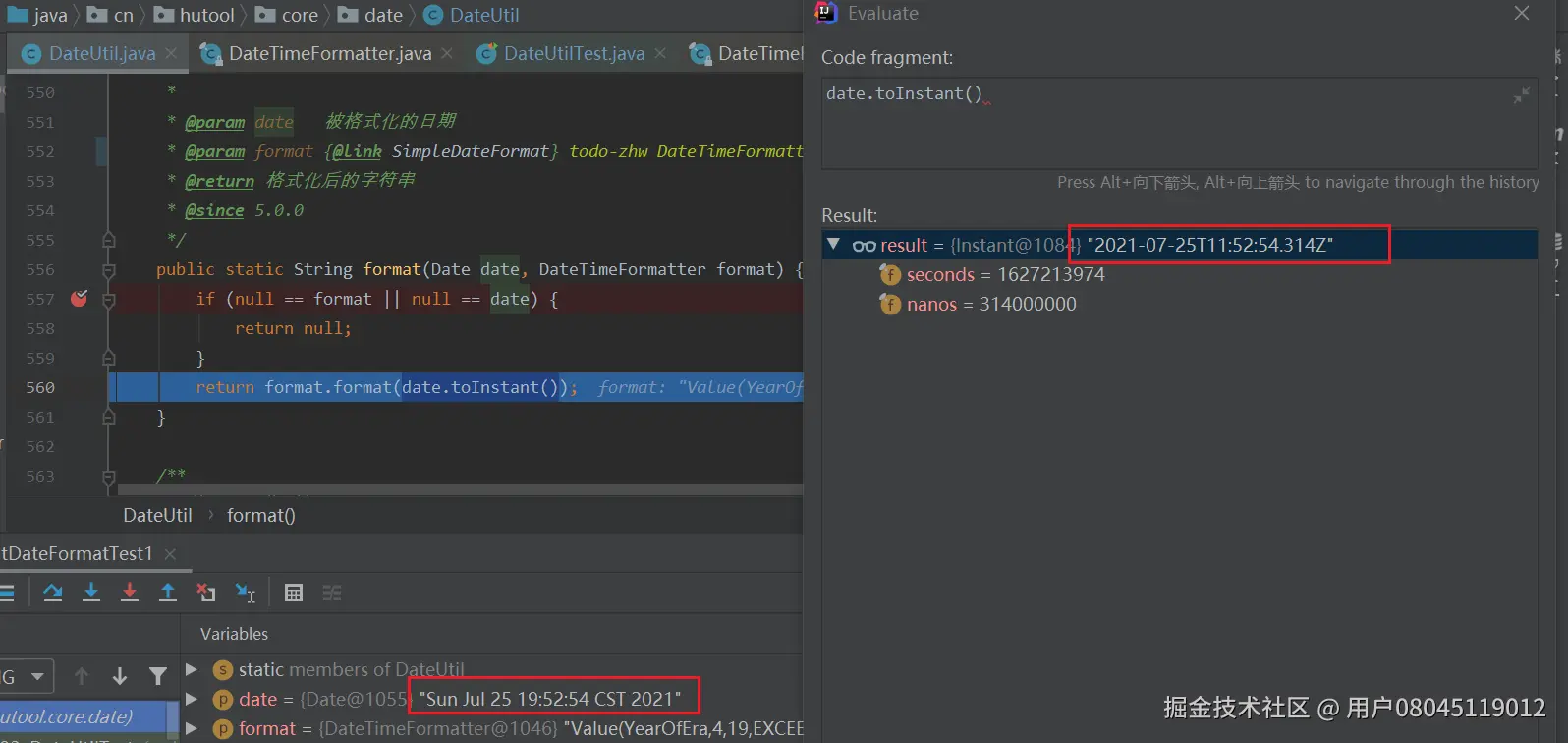
到这里已经是jdk的源码了DateTimeFormatter.format


从上面可知,会调用 **NumberPrinterParser.format()** NumberPrinterParser是在DateTimeFormatterBuilder类中的。
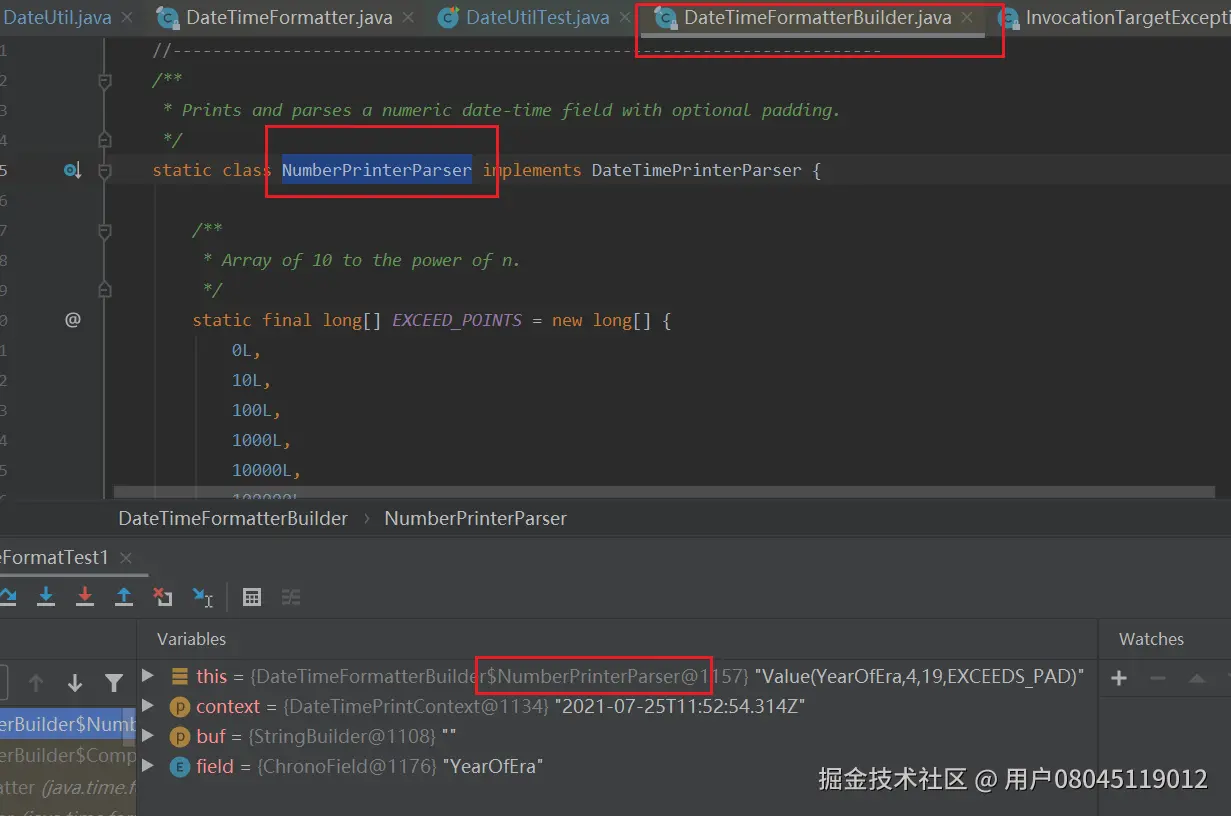
到这一步会报错

为什么会报错呢,我们来看下context.getValue(field)发生了什么:
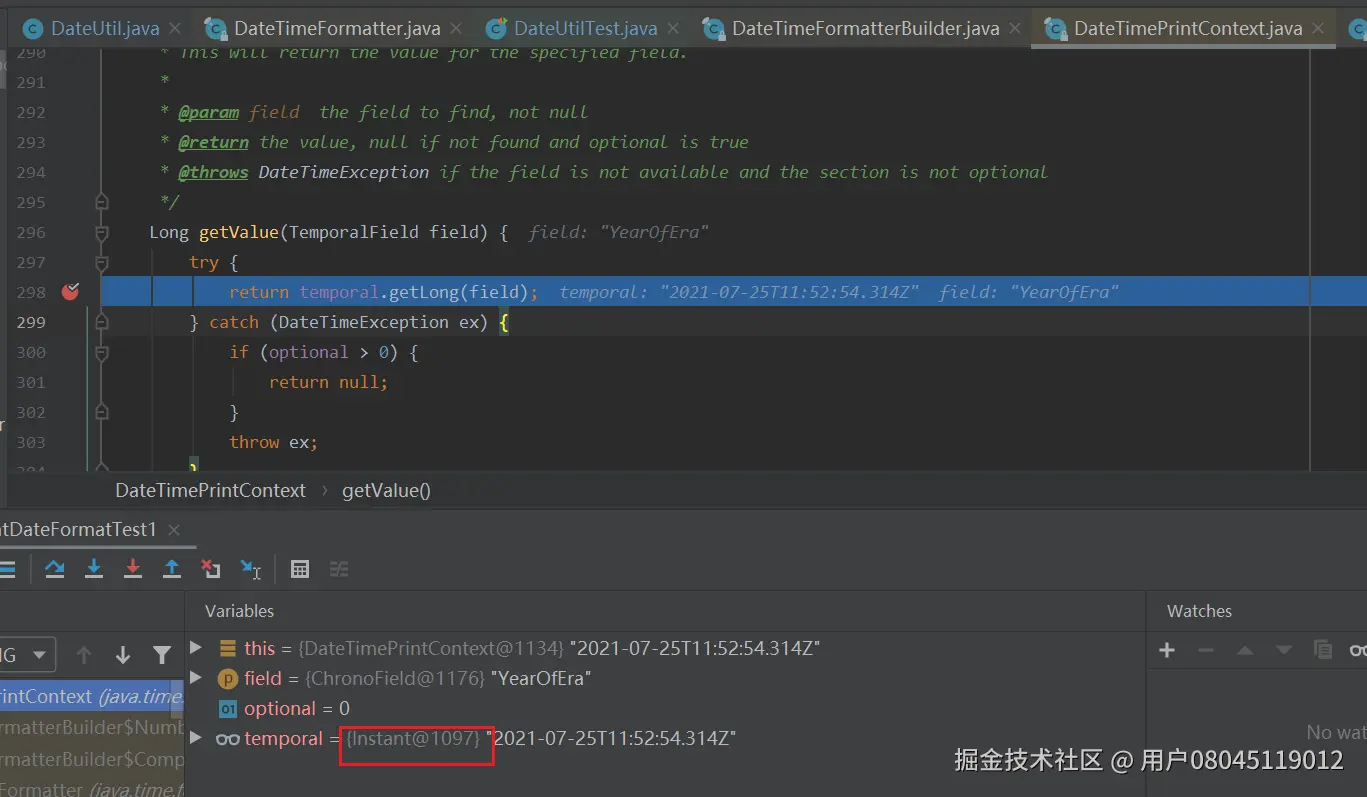
从上面代码可行,temporal实际上是Instant对象,Instant.getLong只支持四种字段类型。。
NANO_OF_SECOND MICRO_OF_SECOND MILLI_OF_SECOND INSTANT_SECONDS
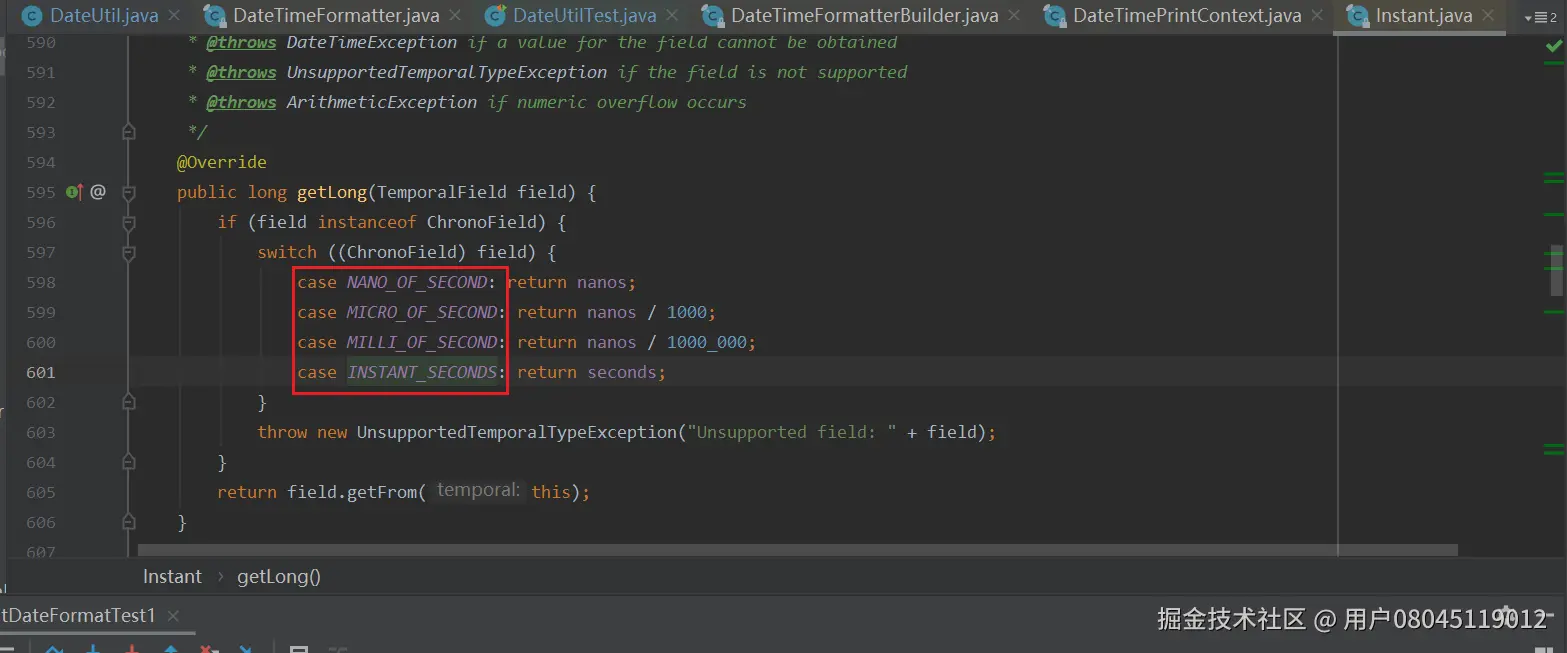
如果不是上面这几种字段类型,则抛出异常
DateUtil.format当遇到DateTimeFormatter会将Date对象首先转换为Instant,因为缺少时区,导致报错。
###### 解决方案:
/** * 根据特定格式格式化日期 * * @param date 被格式化的日期 * @param format * @return 格式化后的字符串 * @since 5.0.0 */ public static String format(Date date, DateTimeFormatter format) { if (null == format || null == date) { return null; } Instant instant = date.toInstant(); ZonedDateTime zonedDateTime = instant.atZone(ZoneId.systemDefault()); LocalDateTime localDateTime = zonedDateTime.toLocalDateTime(); return format.format(localDateTime); }
先把date类型转化为LocalDateTime类型,然后再进行DateTimeFormatter.format(LocalDateTime)的格式化


测试demo
//根据特定格式格式化日期 String str = "2021-07-25 20:11:25"; DateTimeFormatter dtf = DateTimeFormatter.ofPattern("yyyy-MM-dd HH:mm:dd"); Date date = DateUtil.parse(str); String dateStr = DateUtil.format(date,dtf); System.out.println(dateStr); Assert.assertEquals(str, dateStr);

### DateTimeFormatterBuilder
#### DateTimeFormatterBuilder类说明
**DateTimeFormatter** 的所有格式化器都是用**DateTimeFormatterBuilder** 建造器类创建的。
看下面两个**ofPattern** 源码:
//DateTimeFormatter public static DateTimeFormatter ofPattern(String pattern) { return new DateTimeFormatterBuilder().appendPattern(pattern).toFormatter(); }
 public static DateTimeFormatter ofPattern(String pattern, Locale locale) {
    return new DateTimeFormatterBuilder().appendPattern(pattern).toFormatter(locale);
}
#### 解析风格配置


官方提供了四种解析风格的配置,如下枚举 **SettingsParser** :
static enum SettingsParser implements DateTimePrinterParser { // 大小写敏感 SENSITIVE, // 大小写不敏感 INSENSITIVE, //严格 STRICT, //宽松 LENIENT; ... }
对应**DateTimeFormatterBuilder** 类中的方法:
// 大小写敏感 public DateTimeFormatterBuilder parseCaseSensitive() // 大小写不敏感 public DateTimeFormatterBuilder parseCaseInsensitive() // 严格 public DateTimeFormatterBuilder parseStrict() // 宽松 public DateTimeFormatterBuilder parseLenient()
这四个方法对应的源码如下:
// 大小写敏感 public DateTimeFormatterBuilder parseCaseSensitive() { appendInternal(SettingsParser.SENSITIVE); return this; } // 大小写不敏感 public DateTimeFormatterBuilder parseCaseInsensitive() { appendInternal(SettingsParser.INSENSITIVE); return this; } // 严格 public DateTimeFormatterBuilder parseStrict() { appendInternal(SettingsParser.STRICT); return this; } // 宽松 public DateTimeFormatterBuilder parseLenient() { appendInternal(SettingsParser.LENIENT); return this; }
可以看出,都是调用**appendInternal** 方法。


接着往下看 **appendInternal** 源码:
private int appendInternal(DateTimePrinterParser pp) { Objects.requireNonNull(pp, "pp"); if (active.padNextWidth > 0) { if (pp != null) { pp = new PadPrinterParserDecorator(pp, active.padNextWidth, active.padNextChar); } active.padNextWidth = 0; active.padNextChar = 0; } active.printerParsers.add(pp); active.valueParserIndex = -1; return active.printerParsers.size() - 1; }
其中**active** 是一个**DateTimeFormatterBuilder** 实例,且这个**DateTimeFormatterBuilder** 实例内部有一个列表 **List< DateTimePrinterParser >** ,看了源码可知,真正做解析工作的是**DateTimePrinterParser** 对应的实例来做的。


**DateTimePrinterParser** 的源码:
interface DateTimePrinterParser {
    boolean format(DateTimePrintContext context, StringBuilder buf);

    int parse(DateTimeParseContext context, CharSequence text, int position);
}
源码有一共有16个**DateTimePrinterParser** 的实例。
//1.Composite printer and parser. static final class CompositePrinterParser implements DateTimePrinterParser {...}
//2.Pads the output to a fixed width. static final class PadPrinterParserDecorator implements DateTimePrinterParser {...}
//3.Enumeration to apply simple parse settings. static enum SettingsParser implements DateTimePrinterParser{...}
//4. Defaults a value into the parse if not currently present. static class DefaultValueParser implements DateTimePrinterParser {...}
//5.Prints or parses a character literal. static final class CharLiteralPrinterParser implements DateTimePrinterParser {...}
//6.Prints or parses a string literal. static final class StringLiteralPrinterParser implements DateTimePrinterParser {...}
//7.Prints and parses a numeric date-time field with optional padding. static class NumberPrinterParser implements DateTimePrinterParser {...}
//8.Prints and parses a numeric date-time field with optional padding. static final class FractionPrinterParser implements DateTimePrinterParser {...}
//9.Prints or parses field text. static final class TextPrinterParser implements DateTimePrinterParser {...}
//10.Prints or parses an ISO-8601 instant. static final class InstantPrinterParser implements DateTimePrinterParser {...}
//11.Prints or parses an offset ID. static final class OffsetIdPrinterParser implements DateTimePrinterParser {...}
//12.Prints or parses an offset ID. static final class LocalizedOffsetIdPrinterParser implements DateTimePrinterParser {...}
//13.Prints or parses a zone ID. static class ZoneIdPrinterParser implements DateTimePrinterParser {...}
//14. Prints or parses a chronology. static final class ChronoPrinterParser implements DateTimePrinterParser {...}
//15.Prints or parses a localized pattern. static final class LocalizedPrinterParser implements DateTimePrinterParser {...}
//16.Prints or parses a localized pattern from a localized field. static final class WeekBasedFieldPrinterParser implements DateTimePrinterParser {...}
## (四)JSR-310:常用计算工具


介绍下java8 中提供了几个常用于计算的类:


* Duration:表示秒和纳秒的时间量
* Period:表示年月日的时间量
* TemporalUnit:日期时间的基本单位
* TemporalField:日期时间的属性
* ValueRange:表示取值范围


### Duration


#### Duration类说明


包路径:**java.time.Duration**
public final class Duration implements TemporalAmount, Comparable, Serializable { private final long seconds;
private final int nanos;
    ...
    }
**Duration** 是**TemporalAmount** 的实现类,类里包含两个变量**seconds** 和 **nanos** ,所以**Duration** 是由秒和纳秒组成的时间量。


一个Duration实例是不可变的,当创建出对象后就不能改变它的值了。


#### Duration常用的用法


##### 创建Duration对象


**Duration** 适合处理较短的时间,需要更高的精确性。我们能使用between()方法比较两个瞬间的差:
	Instant first = Instant.now();
	try {
		Thread.sleep(1000);
	} catch (InterruptedException e) {
		e.printStackTrace();
	}
	Instant second = Instant.now();
	Duration duration = Duration.between(first, second);
	System.out.println(duration);

可以通过LocalDateTime 类获取获取Duration对象
	LocalDateTime first = LocalDateTime.of(2021, 8, 30, 23, 14, 20);

	LocalDateTime second = LocalDateTime.of(2021, 8, 30, 23, 13, 0);

	Duration duration = Duration.between(first, second);
	System.out.println(duration);

##### 访问Duration的时间
**Duration** 对象中可以获取秒和纳秒属性。但没有毫秒属性,跟System.getCurrentTimeMillis()不同。
Instant first = Instant.now();
	try {
		Thread.sleep(1000);
	} catch (InterruptedException e) {
		e.printStackTrace();
	}
	Instant second = Instant.now();
	Duration duration = Duration.between(first, second);
	System.out.println(duration);
	System.out.println("秒:"+duration.getSeconds());
	System.out.println("纳秒:"+duration.getNano());

可以转换整个时间成其他单位,如纳秒,毫秒,分钟,小时,天
	Instant first = Instant.now();
	try {
		Thread.sleep(1000);
	} catch (InterruptedException e) {
		e.printStackTrace();
	}
	Instant second = Instant.now();
	Duration duration = Duration.between(first, second);
	System.out.println(duration);
	System.out.println("秒:"+duration.getSeconds());
	System.out.println("纳秒:"+duration.getNano());
	System.out.println("纳秒:"+duration.toNanos());
	System.out.println("毫秒:"+duration.toMillis());
	System.out.println("分:"+duration.toMinutes());
	System.out.println("小时:"+duration.toHours());
	System.out.println("天:"+duration.toDays());

由图上可知,**getNano** 方法和**toNanos** 方法不太一样,前者是获取这段时间的小于1s的部分,后者是整个时间转化为纳秒。
##### Duration计算
plusNanos() plusMillis() plusSeconds() plusMinutes() plusHours() plusDays() minusNanos() minusMillis() minusSeconds() minusMinutes() minusHours() minusDays()
以**plusSeconds** 和**minusSeconds** 为例:
LocalDateTime first = LocalDateTime.of(2021, 8, 30, 23, 14, 20); LocalDateTime second = LocalDateTime.of(2021, 8, 30, 23, 13, 0); Duration duration = Duration.between(first, second); System.out.println(duration);
	Duration duration1 = duration.plusSeconds(10);
	System.out.println("plusSeconds 后:"+duration);
	System.out.println("plusSeconds 后新的Duration对象:"+duration1);

	Duration duration2 = duration.minusSeconds(10);
	System.out.println("minusSeconds 后:"+duration);
	System.out.println("minusSeconds 后新的Duration对象:"+duration2);

由上面的验证可知,这些计算方法执行后,会返回一个新的Duration对象,原先的Duration对象不变。
### Period
#### Period类说明
包路径:**java.time.Period**
public final class Period implements ChronoPeriod, Serializable { /** * The number of years. */ private final int years; /** * The number of months. */ private final int months; /** * The number of days. */ private final int days; ... }
**Period** 是**ChronoPeriod** 的实现类,类里包含两个变量**years** ,**months** 和 **days** ,所以**Period** 是由年,月和日组成的时间量。


#### Period常用的用法


##### 创建Period对象
	LocalDate first = LocalDate.of(2021, 8, 29);
	LocalDate second = LocalDate.of(2022, 9, 30);
	Period period = Period.between(first, second);
	System.out.println(period);

##### 访问Period的时间
	LocalDate first = LocalDate.of(2021, 8, 28);
	LocalDate second = LocalDate.of(2022, 10, 31);
	Period period = Period.between(first, second);
	System.out.println(period);
	System.out.println("年:"+period.getYears());
	System.out.println("月:"+period.getMonths());
	System.out.println("日:"+period.getDays());

可以转换整个时间成其他单位,月
LocalDate first = LocalDate.of(2021, 8, 29); LocalDate second = LocalDate.of(2022, 9, 30); Period period = Period.between(first, second); System.out.println(period); System.out.println("月:"+period.toTotalMonths());

由图上可知,**getMonths** 方法和**toTotalMonths** 方法不太一样,前者是获取这段时间的月的部分,后者是整个时间转化为以月为单位长度。
**toTotalMonths** 源码:
public long toTotalMonths() { return years * 12L + months; // no overflow }
##### Duration计算
plusDays() plusMonths() plusYears()
minusDays() minusMonths() minusYears()
以**plusMonths** 和**minusMonths** 为例:
	LocalDate first = LocalDate.of(2021, 8, 28);
	LocalDate second = LocalDate.of(2022, 10, 31);
	Period period = Period.between(first, second);
	System.out.println(period);
	Period period1 = period.plusMonths(1);
	System.out.println("plusMonths 后:"+period);
	System.out.println("plusMonths 后新的Period对象:"+period1);

	Period period2 = period.minusMonths(1);
	System.out.println("minusMonths 后:"+period);
	System.out.println("minusMonths 后新的Period对象:"+period2);

由上面的验证可知,这些计算方法执行后,会返回一个新的Period对象,原先的Period对象不变。
### TemporalUnit
#### TemporalUnit类说明
包路径:**java.time.temporal.TemporalUnit**
public interface TemporalUnit { ... }
public enum ChronoUnit implements TemporalUnit { private final String name; private final Duration duration; ... }
**TemporalUnit** 主要实现类是枚举类型**ChronoUnit**


一个ChronoUnit成员会维护一个字符串名字属性name和一个Duration类型的实例。


其中ChronoUnit枚举了标准的日期时间单位集合,就是常用的年、月、日、小时、分钟、秒、毫秒、微秒、纳秒,这些时间单位的时间量到底是多少,代表多长的时间,在该枚举类中都有定义。
public enum ChronoUnit implements TemporalUnit {
NANOS("Nanos", Duration.ofNanos(1)),
MICROS("Micros", Duration.ofNanos(1000)),
MILLIS("Millis", Duration.ofNanos(1000\_000)),
SECONDS("Seconds", Duration.ofSeconds(1)),
MINUTES("Minutes", Duration.ofSeconds(60)),
HOURS("Hours", Duration.ofSeconds(3600)),
HALF\_DAYS("HalfDays", Duration.ofSeconds(43200)),
DAYS("Days", Duration.ofSeconds(86400)),
WEEKS("Weeks", Duration.ofSeconds(7 \* 86400L)),
MONTHS("Months", Duration.ofSeconds(31556952L / 12)),
YEARS("Years", Duration.ofSeconds(31556952L)),
DECADES("Decades", Duration.ofSeconds(31556952L \* 10L)),
CENTURIES("Centuries", Duration.ofSeconds(31556952L \* 100L)),
MILLENNIA("Millennia", Duration.ofSeconds(31556952L \* 1000L)),
ERAS("Eras", Duration.ofSeconds(31556952L \* 1000\_000\_000L)),
FOREVER("Forever", Duration.ofSeconds(Long.MAX_VALUE, 999\_999\_999));

private final String name;
private final Duration duration;

private ChronoUnit(String name, Duration estimatedDuration) {
    this.name = name;
    this.duration = estimatedDuration;
}
···
}
#### ChronoUnit常用的用法
	LocalDateTime localDateTime = LocalDateTime.of(2021, 8, 30, 23, 14, 20);
	LocalDateTime offset = localDateTime.plus(1, ChronoUnit.DAYS);
	// 非同一对象
	Assert.assertNotSame(localDateTime, offset);
	System.out.println(offset);

### TemporalField
#### TemporalField类说明
包路径:**java.time.temporal.TemporalField**
public interface TemporalField { ... }
public enum ChronoField implements TemporalField { private final String name; private final TemporalUnit baseUnit; private final TemporalUnit rangeUnit; private final ValueRange range; ... }
**TemporalField** 主要实现类是枚举类型**ChronoField**


一个ChronoField成员会维护一个字符串名字属性name、一个TemporalUnit的基础单位baseUnit、一个TemporalUnit的表示范围的单位rangeUnit和一个ValueRange类型的range用于表示当前属性的范围。
public enum ChronoField implements TemporalField { //一秒钟的纳秒数 NANO_OF_SECOND("NanoOfSecond", NANOS, SECONDS, ValueRange.of(0, 999_999_999)) //一分钟的秒数 SECOND_OF_MINUTE("SecondOfMinute", SECONDS, MINUTES, ValueRange.of(0, 59), "second") //一个小时的分钟数 MINUTE_OF_HOUR("MinuteOfHour", MINUTES, HOURS, ValueRange.of(0, 59), "minute") //一上午或者一下午有多少个小时 CLOCK_HOUR_OF_AMPM("ClockHourOfAmPm", HOURS, HALF_DAYS, ValueRange.of(1, 12)) //一天的小时数 CLOCK_HOUR_OF_DAY("ClockHourOfDay", HOURS, DAYS, ValueRange.of(1, 24)) //上午还是下午 AMPM_OF_DAY("AmPmOfDay", HALF_DAYS, DAYS, ValueRange.of(0, 1), "dayperiod") //一周的第几天 DAY_OF_WEEK("DayOfWeek", DAYS, WEEKS, ValueRange.of(1, 7), "weekday") //当前月的天数 DAY_OF_MONTH("DayOfMonth", DAYS, MONTHS, ValueRange.of(1, 28, 31), "day") //当前年的天数 DAY_OF_YEAR("DayOfYear", DAYS, YEARS, ValueRange.of(1, 365, 366)) //当前月的周数 ALIGNED_WEEK_OF_MONTH("AlignedWeekOfMonth", WEEKS, MONTHS, ValueRange.of(1, 4, 5)) //当前年的周数 ALIGNED_WEEK_OF_YEAR("AlignedWeekOfYear", WEEKS, YEARS, ValueRange.of(1, 53)) //以每月的第一天为星期一,然后计算当天是一周的第几天 ALIGNED_DAY_OF_WEEK_IN_MONTH("AlignedDayOfWeekInMonth", DAYS, WEEKS, ValueRange.of(1, 7)) //以每月的第一天为星期一,然后计算当天是一周的第几天 ALIGNED_DAY_OF_WEEK_IN_YEAR("AlignedDayOfWeekInYear", DAYS, WEEKS, ValueRange.of(1, 7)) //当前年的月数 MONTH_OF_YEAR("MonthOfYear", MONTHS, YEARS, ValueRange.of(1, 12), "month")
private final TemporalUnit baseUnit;
private final String name;
private final TemporalUnit rangeUnit;
private final ValueRange range;
private final String displayNameKey;
... }
#### ChronoField常用的用法


ALIGNED\_WEEK\_OF\_MONTH 和 ALIGNED\_DAY\_OF\_WEEK\_IN\_MONTH 使用示例
	//每七天一周,2021-08-31 是周二,对应的值是3
	int num = LocalDate.of(2021, 8, 31).get(ChronoField.ALIGNED_DAY_OF_WEEK_IN_MONTH);
	System.out.println(num);
	//这个月的第5周 2021-08-31
	num = LocalDate.of(2021, 8, 31).get(ChronoField.ALIGNED_WEEK_OF_MONTH);
	System.out.println(num);

### ValueRange
#### ValueRange类说明
**ValueRange** 表示取值范围。
public final class ValueRange implements Serializable {
/\*\*
* The smallest minimum value.最小值 */ private final long minSmallest; /** * The largest minimum value.最大可能最小值 */ private final long minLargest; /** * The smallest maximum value.最小可能最大值 */ private final long maxSmallest; /** * The largest maximum value.最大值 */ private final long maxLargest; ... }
#### ValueRange常用的用法
ValueRange valueRange = ValueRange.of(1L, 10000L); System.out.println(valueRange); valueRange = ValueRange.of(1L, 5L, 10000L, 50000L); System.out.println(valueRange);

	LocalDateTime localDateTime = LocalDateTime.of(2021, 8, 30, 23, 14, 20);
	ValueRange valueRange = localDateTime.range(ChronoField.DAY_OF_MONTH);
	System.out.println(valueRange.getMinimum());
	System.out.println(valueRange.getMaximum());
	System.out.println(valueRange.getLargestMinimum());
	System.out.println(valueRange.getSmallestMaximum());

### Chronology 判断是否闰年
判断是否闰年是由年表**Chronology** 提供的,通常情况下,我们使用ISO下的年表,是**IsoChronology** 。
看下代码实现
@Override public boolean isLeapYear(long prolepticYear) { return ((prolepticYear & 3) == 0) && ((prolepticYear % 100) != 0 || (prolepticYear % 400) == 0); }
好精炼的代码,值得我们研究研究


闰年的基本判定方法:
 1、非整百年:能被4整除的为闰年。(如2004年就是闰年,2001年不是闰年)
 2、整百年:能被400整除的是闰年。(如2000年是闰年,1900年不是闰年)
((prolepticYear & 3) == 0) && ((prolepticYear % 100) != 0 || (prolepticYear % 400) == 0);
这段代码用了两个条件,这两个条件都符合,才是闰年。


* **(prolepticYear & 3) == 0**
* **(prolepticYear % 100) != 0 || (prolepticYear % 400) == 0**


**(prolepticYear & 3) == 0** 用了与运算符“&”,其使用规律如下:
 两个操作数中位都为1,结果才为1,否则结果为0。


**3** 的二进制是**011** ,**prolepticYear & 3** 目的是保留最后2位二进制数,然后判断是否最后两位二进制数等于0。如果等于0,证明能被4整除。闰年一定要满足是4的倍数的条件;


**(prolepticYear % 100) != 0 || (prolepticYear % 400) == 0** 这个就比较好理解了,看是不是100的倍数或者是不是400 倍数。


而且小虚竹发现**java.time.Year#isLeap()** 用的实现代码逻辑是一样的
public static boolean isLeap(long year) { return ((year & 3) == 0) && ((year % 100) != 0 || (year % 400) == 0); }
即使是巨佬写的代码,也存在代码的复用性问题


上面IsoChronology 是对Chronology接口接口的isLeapYear实现,MinguoChronology等实现类的isLeapYear,互用了IsoChronology的isLeapYear方法。
//MinguoChronology public boolean isLeapYear(long prolepticYear) { return IsoChronology.INSTANCE.isLeapYear(prolepticYear + YEARS_DIFFERENCE); }
巨佬是有考虑复用的,在MinguoChronology等实现类已经有复用了。
**java.time.Year#isLeap()** 的优先级高,因为它是静态方法。**isoChronology \*\* 可以引**Year.isLeap\*\*
**Year \*\* 不可以引**Chronology.isLeapYear\*\* 。
博主发现在**IsoChronology \*\* 的**resolveYMD\*\* 中已经存在了对**Year.isLeap** 的引用。

**有的工具类会为了减少外部类依赖,重新写一次底层方法,避免外部类(或是不在一个包底下)的类依赖,这个已经用了,说不过去** 。所以代码是存在复用性问题的。
#### 实战
	int year = 2020;
	System.out.println(Year.isLeap(year));
	System.out.println(IsoChronology.INSTANCE.isLeapYear(year));

	LocalDate localDate = LocalDate.of(2021,9,7);
	LocalDateTime localDateTime = LocalDateTime.now();
	System.out.println(localDate.isLeapYear());
	System.out.println(localDateTime.toLocalDate().isLeapYear());

### 比较日期时间的先后
基本上都有这四个比较方法::compareTo()、isBefore()、isAfter()、和equals()
#### 比较-LocalDate
	LocalDate localDate1 = LocalDate.of(2021, 8, 14);
	// 比较指定日期和参数日期,返回正数,那么指定日期时间较晚(数字较大):13
	int i = localDate1.compareTo(LocalDate.of(2021, 8, 1));
	System.out.println(i);
	// 比较指定日期是否比参数日期早(true为早):true
	System.out.println(localDate1.isBefore(LocalDate.of(2021,8,31)));
	// 比较指定日期是否比参数日期晚(true为晚):false
	System.out.println(localDate1.isAfter(LocalDate.of(2021,8,31)));
	// 比较两个日期是否相等:true
	System.out.println(localDate1.isEqual(LocalDate.of(2021, 8, 14)));

#### 比较-LocalTime
	LocalTime localTime1 = LocalTime.of(23, 26, 30);
	LocalTime localTime2 = LocalTime.of(23, 26, 32);
	// 两个时间进行比较 大返回1,小就返回-1,一样就返回0:-1
	System.out.println(localTime1.compareTo(localTime2));

	// 比较指定时间是否比参数时间早(true为早):true
	System.out.println(localTime1.isBefore(localTime2));
	// 比较指定时间是否比参数时间晚(true为晚):false
	System.out.println(localTime1.isAfter(localTime2));
	// 比较两个时间是否相等:true
	System.out.println(localTime1.equals(LocalTime.of(23, 26, 30)));

#### 比较-OffsetDateTime
	LocalDateTime localDateTime1 = LocalDateTime.of(2021, 8, 15, 13, 14, 20);
	OffsetDateTime offsetDateTime1 = OffsetDateTime.of(localDateTime1, ZoneOffset.ofHours(8));
	OffsetDateTime offsetDateTime3 = OffsetDateTime.of(localDateTime1, ZoneOffset.ofHours(8));

	LocalDateTime localDateTime2 = LocalDateTime.of(2021, 8, 15, 13, 14, 30);
	OffsetDateTime offsetDateTime2 = OffsetDateTime.of(localDateTime2, ZoneOffset.ofHours(8));

	// 两个时间进行比较 大返回1,小就返回-1,一样就返回0:-1
	System.out.println(offsetDateTime1.compareTo(offsetDateTime2));

	// 比较指定时间是否比参数时间早(true为早):true
	System.out.println(offsetDateTime1.isBefore(offsetDateTime2));
	// 比较指定时间是否比参数时间晚(true为晚):false
	System.out.println(offsetDateTime1.isAfter(offsetDateTime2));
	// 比较两个时间是否相等:true
	System.out.println(offsetDateTime1.equals(offsetDateTime3));

#### 比较-OffsetTime
	LocalTime localTime1 = LocalTime.of( 13, 14, 20);
	OffsetTime offsetTime1 = OffsetTime.of(localTime1, ZoneOffset.ofHours(8));
	OffsetTime offsetTime3 = OffsetTime.of(localTime1, ZoneOffset.ofHours(8));

	LocalTime localTime2 = LocalTime.of(13, 14, 30);
	OffsetTime offsetTime2 = OffsetTime.of(localTime2, ZoneOffset.ofHours(8));
	// 两个时间进行比较 大返回1,小就返回-1,一样就返回0:-1
	System.out.println(offsetTime1.compareTo(offsetTime2));

	// 比较指定时间是否比参数时间早(true为早):true
	System.out.println(offsetTime1.isBefore(offsetTime2));
	// 比较指定时间是否比参数时间晚(true为晚):false
	System.out.println(offsetTime1.isAfter(offsetTime2));
	// 比较两个时间是否相等:true
	System.out.println(offsetTime1.equals(offsetTime3));

#### 比较-ZonedDateTime
	LocalDateTime localDateTime1 = LocalDateTime.of(2021, 8, 15, 13, 14, 20);
	ZonedDateTime zonedDateTime1 = ZonedDateTime.of(localDateTime1, ZoneOffset.ofHours(8));

	ZonedDateTime zonedDateTime3 = ZonedDateTime.of(localDateTime1, ZoneOffset.ofHours(8));

	LocalDateTime localDateTime2 = LocalDateTime.of(2021, 8, 15, 13, 14, 30);
	ZonedDateTime zonedDateTime2 = ZonedDateTime.of(localDateTime2, ZoneOffset.ofHours(8));

	// 两个时间进行比较 大返回1,小就返回-1,一样就返回0:-1
	System.out.println(zonedDateTime1.compareTo(zonedDateTime2));

	// 比较指定时间是否比参数时间早(true为早):true
	System.out.println(zonedDateTime1.isBefore(zonedDateTime2));
	// 比较指定时间是否比参数时间晚(true为晚):false
	System.out.println(zonedDateTime1.isAfter(zonedDateTime2));
	// 比较两个时间是否相等:true
	System.out.println(zonedDateTime1.equals(zonedDateTime3));

### 计算日期时间的间隔
**Duration** 和\*\*Period \*\* 都有 \*\*between \*\* 方法
这个就不在重复说了,上面**Duration** 和**Period** 的常用用法里有介绍到。
### TemporalAdjuster 日期校准器
| 序号 | 方法 | 描述 |
| --- | --- | --- |
| 1 | dayOfWeekInMonth | 返回同一个月中每周的第几天 |
| 2 | firstDayOfMonth | 返回当月的第一天 |
| 3 | firstDayOfNextMonth | 返回下月的第一天 |
| 4 | firstDayOfNextYear | 返回下一年的第一天 |
| 5 | firstDayOfYear | 返回本年的第一天 |
| 6 | firstInMonth | 返回同一个月中第一个星期几 |
| 7 | lastDayOfMonth | 返回当月的最后一天 |
| 8 | lastDayOfNextMonth | 返回下月的最后一天 |
| 9 | lastDayOfNextYear | 返回下一年的最后一天 |
| 0 | lastDayOfYear | 返回本年的最后一天 |
| 11 | lastInMonth | 返回同一个月中最后一个星期几 |
| 12 | next / previous | 返回后一个/前一个给定的星期几 |
| 13 | nextOrSame / previousOrSame | 返回后一个/前一个给定的星期几,如果这个值满足条件,直接返回 |
LocalDateTime now = LocalDateTime.of(2021,9,8,0,20,13); System.out.println("当前时间:" + now + "======>" + now.getDayOfWeek()); System.out.println("下一个周一:" + now.with(TemporalAdjusters.next(DayOfWeek.MONDAY))); System.out.println("上一个周一:" + now.with(TemporalAdjusters.previous(DayOfWeek.MONDAY))); System.out.println("下一个周五:" + now.with(TemporalAdjusters.nextOrSame(DayOfWeek.FRIDAY))); System.out.println("上一个周五:" + now.with(TemporalAdjusters.previousOrSame(DayOfWeek.FRIDAY))); System.out.println("本月最后一个周五:" + now.with(TemporalAdjusters.lastInMonth(DayOfWeek.FRIDAY))); System.out.println("本月第一个周五:" + now.with(TemporalAdjusters.firstInMonth(DayOfWeek.FRIDAY))); System.out.println("本月第一天:" + now.with(TemporalAdjusters.firstDayOfMonth())); System.out.println("本月最后一天:" + now.with(TemporalAdjusters.lastDayOfMonth())); System.out.println("下月的第一天:" + now.with(TemporalAdjusters.firstDayOfNextMonth())); System.out.println("今年的第一天:" + now.with(TemporalAdjusters.firstDayOfYear())); System.out.println("今年的最后一天:" + now.with(TemporalAdjusters.lastDayOfYear())); System.out.println("下一年的第一天:" + now.with(TemporalAdjusters.firstDayOfNextYear())); System.out.println("本月的第二个周五:" + now.with(TemporalAdjusters.dayOfWeekInMonth(2,DayOfWeek.FRIDAY))); System.out.println("两周后:" + now.with(TemporalAdjusters.ofDateAdjuster(date -> date.plusWeeks(2))));

## (五)JSR-310:实战+源码分析
### 使用场景
对JDK8+中的日期时间工具类封装
### 项目引用
此博文的依据:hutool-5.6.5版本源码
    <dependency>
		<groupId>cn.hutool</groupId>
		<artifactId>hutool-core</artifactId>
		<version>5.6.5</version>
	</dependency>
### 方法摘要


| 方法 | 描述 |
| --- | --- |
| [cn.hutool.core.date.LocalDateTimeUtil.now()](#46f0890b-2f3f-4c07-a051-779486ab2f1b) |
 当前时间,默认时区
  |
| [cn.hutool.core.date.LocalDateTimeUtil.of(java.time.Instant)](#d21267d9-a7c0-459d-aa15-d684d20b9494) |
 {@link Instant}转{@link LocalDateTime},使用默认时区
  |
| [cn.hutool.core.date.LocalDateTimeUtil.ofUTC(java.time.Instant)](#db05b388-cc0e-4f7c-ab52-ba0112551d8c) |
 {@link Instant}转{@link LocalDateTime},使用UTC时区
  |
| [cn.hutool.core.date.LocalDateTimeUtil.of(java.time.ZonedDateTime)](#15c3dae3-b7d8-4012-87d8-cd9c9bc91067) |
 {@link ZonedDateTime}转{@link LocalDateTime}
  |
| [cn.hutool.core.date.LocalDateTimeUtil.of(java.time.Instant, java.time.ZoneId)](#75ebbd24-d6a4-4be6-a496-91b3bd494e66) |
 {@link Instant}转{@link LocalDateTime}
  |
| [cn.hutool.core.date.LocalDateTimeUtil.of(java.time.Instant, java.util.TimeZone)](#291529f2-532c-4544-be5c-64e1a9ebeeb2) |
 {@link Instant}转{@link LocalDateTime}
  |
| [cn.hutool.core.date.LocalDateTimeUtil.of(long)](#6cc78c8d-b6e1-495a-a5f8-61c2ca2b2c4e) |
 毫秒转{@link LocalDateTime},使用默认时区
 注意:此方法使用默认时区,如果非UTC,会产生时间偏移
 |
| [cn.hutool.core.date.LocalDateTimeUtil.ofUTC(long)](#69ee4ca8-85e8-42b0-b83e-95aec28c9f92) |
 毫秒转{@link LocalDateTime},使用UTC时区
  |
| [cn.hutool.core.date.LocalDateTimeUtil.of(long, java.time.ZoneId)](#f13fdfc1-6e7d-4360-83fc-3f7d52e609b0) |
 毫秒转{@link LocalDateTime},根据时区不同,结果会产生时间偏移
  |
| [cn.hutool.core.date.LocalDateTimeUtil.of(long, java.util.TimeZone)](#63b95c4e-d99c-47df-b94c-3b50c569c9c2) |
 毫秒转{@link LocalDateTime},结果会产生时间偏移
  |
| [cn.hutool.core.date.LocalDateTimeUtil.of(java.util.Date)](#eb1b4b77-2144-4926-b897-b5dfcb0db93f) |
 {@link Date}转{@link LocalDateTime},使用默认时区
  |
| [cn.hutool.core.date.LocalDateTimeUtil.of(java.time.temporal.TemporalAccessor)](#ce9124e3-3065-4bbb-b402-d2464373b6e7) |
 {@link TemporalAccessor}转{@link LocalDateTime},使用默认时区
  |
| [cn.hutool.core.date.LocalDateTimeUtil.ofDate(java.time.temporal.TemporalAccessor)](#1baf439f-7fa7-446e-be55-d45459f1d4d4) |
 {@link TemporalAccessor}转{@link LocalDate},使用默认时区
  |
| [cn.hutool.core.date.LocalDateTimeUtil.parse(java.lang.CharSequence)](#f3a86672-abff-4f42-815f-cf7e3ab5102b) |
 解析日期时间字符串为{@link LocalDateTime},仅支持yyyy-MM-dd’T’HH:mm:ss格式,例如:2007-12-03T10:15:30
  |
| [cn.hutool.core.date.LocalDateTimeUtil.parse(java.lang.CharSequence, java.time.format.DateTimeFormatter)](#975536fa-a008-485f-b859-45b68ce46034) |
 解析日期时间字符串为{@link LocalDateTime},格式支持日期时间、日期、时间
  |
| [cn.hutool.core.date.LocalDateTimeUtil.parse(java.lang.CharSequence, java.lang.String)](#44ee4c0d-b9f2-4e85-81a9-cb6b96e11421) |
 解析日期时间字符串为{@link LocalDateTime}
  |
| [cn.hutool.core.date.LocalDateTimeUtil.parseDate(java.lang.CharSequence)](#ee6fdc8f-b54d-4f29-93e6-309a4fb5bca7) |
 解析日期时间字符串为{@link LocalDate},仅支持yyyy-MM-dd’T’HH:mm:ss格式,例如:2007-12-03T10:15:30
  |
| [cn.hutool.core.date.LocalDateTimeUtil.parseDate(java.lang.CharSequence, java.time.format.DateTimeFormatter)](#06f76646-7fac-47d8-acda-8cf05f82f719) |
 解析日期时间字符串为{@link LocalDate},格式支持日期
  |
| [cn.hutool.core.date.LocalDateTimeUtil.parseDate(java.lang.CharSequence, java.lang.String)](#8b911ebb-8863-4fd6-a459-bab6fb2e643a) |
 解析日期字符串为{@link LocalDate}
  |
| [cn.hutool.core.date.LocalDateTimeUtil.formatNormal(java.time.LocalDateTime)](#8887112d-5ec0-4ffd-b022-4938332708a6) |
 格式化日期时间为yyyy-MM-dd HH:mm:ss格式
  |
| [cn.hutool.core.date.LocalDateTimeUtil.format(java.time.LocalDateTime, java.time.format.DateTimeFormatter)](#fa86aae8-bb25-4938-be91-5dca24b6676f) |
 格式化日期时间为指定格式
  |
| [cn.hutool.core.date.LocalDateTimeUtil.format(java.time.LocalDateTime, java.lang.String)](#fcd3603e-5b87-4efc-b48a-65dda6971224) |
 格式化日期时间为指定格式
  |
| [cn.hutool.core.date.LocalDateTimeUtil.formatNormal(java.time.LocalDate)](#0dd2b52d-661f-4cc6-867d-b5117b7f5aa0) |
 格式化日期时间为yyyy-MM-dd格式
  |
| [cn.hutool.core.date.LocalDateTimeUtil.format(java.time.LocalDate, java.time.format.DateTimeFormatter)](#fb33d010-7318-4d6d-b08d-34c9312f03ce) |
 格式化日期时间为指定格式
  |
| [cn.hutool.core.date.LocalDateTimeUtil.format(java.time.LocalDate, java.lang.String)](#4864e8ac-f0d5-4bd3-9227-2da2d7664582) |
 格式化日期时间为指定格式
  |
| [cn.hutool.core.date.LocalDateTimeUtil.offset(java.time.LocalDateTime, long, java.time.temporal.TemporalUnit)](#5bf0a447-5807-4178-8ca2-0329ac9f22e2) |
 日期偏移,根据field不同加不同值(偏移会修改传入的对象)
  |
| [cn.hutool.core.date.LocalDateTimeUtil.between(java.time.LocalDateTime, java.time.LocalDateTime)](#e7d83b0b-7512-4c96-a11e-451140c5a417) |
 获取两个日期的差,如果结束时间早于开始时间,获取结果为负。
  返回结果为{@link Duration}对象,通过调用toXXX方法返回相差单位
 |
| [cn.hutool.core.date.LocalDateTimeUtil.between(java.time.LocalDateTime, java.time.LocalDateTime, java.time.temporal.ChronoUnit)](#26c6e35c-c723-4166-a46b-3e30fbaf135c) |
 获取两个日期的差,如果结束时间早于开始时间,获取结果为负。
  返回结果为时间差的long值
 |
| [cn.hutool.core.date.LocalDateTimeUtil.betweenPeriod(java.time.LocalDate, java.time.LocalDate)](#055d34c4-e68c-40c1-a3fb-d33421e0ed47) |
 获取两个日期的表象时间差,如果结束时间早于开始时间,获取结果为负。
  比如2011年2月1日,和2021年8月11日,日相差了10天,月相差6月
 |
| [cn.hutool.core.date.LocalDateTimeUtil.beginOfDay(java.time.LocalDateTime)](#8e345e09-b673-4346-ac29-5cf4482b30da) |
 修改为一天的开始时间,例如:2020-02-02 00:00:00,000
  |
| [cn.hutool.core.date.LocalDateTimeUtil.endOfDay(java.time.LocalDateTime)](#69879956-c7ae-45b3-98d3-1ee0d439bea1) |
 修改为一天的结束时间,例如:2020-02-02 23:59:59,999
  |
| [cn.hutool.core.date.LocalDateTimeUtil.toEpochMilli(java.time.temporal.TemporalAccessor)](#76a3389e-d1a2-4994-a85d-2fa0ec646224) |
 {@link TemporalAccessor}转换为 时间戳(从1970-01-01T00:00:00Z开始的毫秒数)
  |


### 方法明细-now()


#### 方法名称:cn.hutool.core.date.LocalDateTimeUtil.now()


#### 方法描述


当前时间,默认时区


#### 支持版本及以上


#### 参数描述:


| 参数名 | 描述 |
| --- | --- |


#### 返回值:


{@link LocalDateTime}


#### 参考案例:
	Assert.assertNotNull(LocalDateTimeUtil.now());
	System.out.println(LocalDateTimeUtil.now());

#### 源码解析:
/** * 当前时间,默认时区 * * @return {@link LocalDateTime} */ public static LocalDateTime now() { return LocalDateTime.now(); }
**LocalDateTime.now()** 的源码
public static LocalDateTime now() { return now(Clock.systemDefaultZone()); }
Clock.systemDefaultZone()


用的是系统默认的时区**ZoneId.systemDefault()**
public static Clock systemDefaultZone() {
    return new SystemClock(ZoneId.systemDefault());
}

最终调用的也是System.currentTimeMillis()
### 方法明细-of(java.time.Instant)
#### 方法名称:cn.hutool.core.date.LocalDateTimeUtil.of(java.time.Instant)
#### 方法描述
{@link Instant}转{@link LocalDateTime},使用默认时区
#### 支持版本及以上
#### 参数描述:
| 参数名 | 描述 |
| --- | --- |
| Instant instant |
instant {@link Instant}
|
#### 返回值:
{@link LocalDateTime}
#### 参考案例:
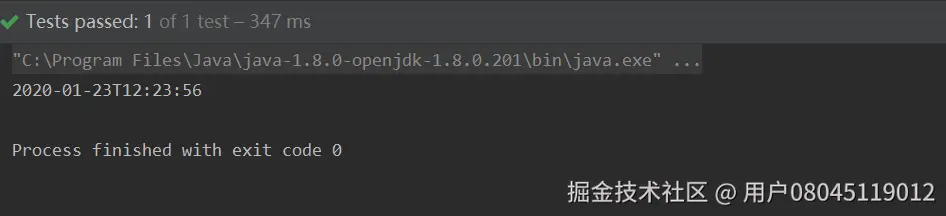
	String dateStr = "2020-01-23 12:23:56";
	final DateTime dt = DateUtil.parse(dateStr);

	LocalDateTime of = LocalDateTimeUtil.of(dt.toInstant());
	System.out.println(of);
#### 源码解析:
public static LocalDateTime of(Instant instant) { return of(instant, ZoneId.systemDefault()); }
这里使用了默认时区,所以打印出来的日期时间是带时区的。
public static LocalDateTime of(Instant instant, ZoneId zoneId) { if (null == instant) { return null; } return LocalDateTime.ofInstant(instant, ObjectUtil.defaultIfNull(zoneId, ZoneId.systemDefault())); }
### 方法明细-ofUTC(java.time.Instant)


#### 方法名称:cn.hutool.core.date.LocalDateTimeUtil.ofUTC(java.time.Instant)


#### 方法描述


{@link Instant}转{@link LocalDateTime},使用UTC时区


#### 支持版本及以上


#### 参数描述:


| 参数名 | 描述 |
| --- | --- |
| Instant instant |
 instant {@link Instant}
  |


#### 返回值:


{@link LocalDateTime}


#### 参考案例:
	String dateStr = "2020-01-23T12:23:56";
	final DateTime dt = DateUtil.parse(dateStr);

	LocalDateTime of = LocalDateTimeUtil.ofUTC(dt.toInstant());
	Assert.assertEquals(dateStr, of.toString());
	System.out.println(of);

#### 源码解析:
public static LocalDateTime ofUTC(Instant instant) {
	return of(instant, ZoneId.of("UTC"));
}
这里使用了**UTC** 时区,然后调用下面的**LocalDateTime.ofInstant**
public static LocalDateTime of(Instant instant, ZoneId zoneId) {
	if (null == instant) {
		return null;
	}

	return LocalDateTime.ofInstant(instant, ObjectUtil.defaultIfNull(zoneId, ZoneId.systemDefault()));
}
### 方法明细-of(java.time.ZonedDateTime)


#### 方法名称:cn.hutool.core.date.LocalDateTimeUtil.of(java.time.ZonedDateTime)


#### 方法描述


{@link ZonedDateTime}转{@link LocalDateTime}


#### 支持版本及以上


#### 参数描述:


| 参数名 | 描述 |
| --- | --- |
| ZonedDateTime zonedDateTime |
 zonedDateTime {@link ZonedDateTime}
  |


#### 返回值:


{@link LocalDateTime}


#### 参考案例:
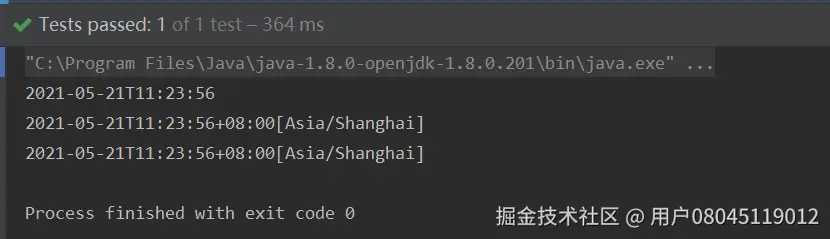
	String dateStr = "2021-05-21T11:23:56";
	final DateTime dt = DateUtil.parse(dateStr);
	//使用默认时区
	LocalDateTime localDateTime = LocalDateTimeUtil.of(dt);
	System.out.println(localDateTime);
	ZonedDateTime zonedDateTime = localDateTime.atZone(ZoneId.systemDefault());
	System.out.println(zonedDateTime);
	zonedDateTime = localDateTime.atZone( ZoneId.of("Asia/Shanghai"));
	System.out.println(zonedDateTime);
	LocalDateTime of = LocalDateTimeUtil.of(zonedDateTime);

	Assert.assertNotNull(of);
	Assert.assertEquals("2021-05-21T11:23:56", of.toString());
#### 源码解析:
public static LocalDateTime of(ZonedDateTime zonedDateTime) { if (null == zonedDateTime) { return null; } return zonedDateTime.toLocalDateTime(); }
这里先判断了**参数** 是否空值


然后调用**zonedDateTime.toLocalDateTime()**


我们知道**zonedDateTime** 和**LocalDateTime** 是可以直接转化的


### 方法明细-of(java.time.Instant, java.time.ZoneId)


#### 方法名称:cn.hutool.core.date.LocalDateTimeUtil.of(java.time.Instant, java.time.ZoneId)


#### 方法描述


{@link Instant}转{@link LocalDateTime}


#### 支持版本及以上


#### 参数描述:


| 参数名 | 描述 |
| --- | --- |
| Instant instant |
 instant {@link Instant}
  |
| ZoneId zoneId |
 zoneId 时区
  |


#### 返回值:


{@link LocalDateTime}


#### 参考案例:
	String dateStr = "2021-05-21T11:23:56";
	final DateTime dt = DateUtil.parse(dateStr);
	LocalDateTime of = LocalDateTimeUtil.of(dt.getTime(), ZoneId.of("UTC"));
	Assert.assertNotNull(of);
	Assert.assertEquals(dateStr, of.toString());

	of = LocalDateTimeUtil.of(dt.getTime(), ZoneId.of("Asia/Shanghai"));
	Assert.assertNotNull(of);
	Assert.assertEquals("2021-05-21T19:23:56", of.toString());
#### 源码解析:
public static LocalDateTime of(Instant instant, ZoneId zoneId) {
	if (null == instant) {
		return null;
	}

	return LocalDateTime.ofInstant(instant, ObjectUtil.defaultIfNull(zoneId, ZoneId.systemDefault()));
}
这里先判断了**参数** 是否空值


然后执行了**LocalDateTime.ofInstant(instant, ObjectUtil.defaultIfNull(zoneId, ZoneId.systemDefault()))**


这里可拆分两部分:


1、ObjectUtil.defaultIfNull(zoneId, ZoneId.systemDefault())


2、LocalDateTime.ofInstant(instant, zoneId)


**ObjectUtil.defaultIfNull(zoneId, ZoneId.systemDefault())** 的源码
public static <T> T defaultIfNull(final T object, final T defaultValue) {
	return (null != object) ? object : defaultValue;
}
这个很好理解,判断值是否为**null** ,如果是返回默认值,如果不是,原值返回。


\*\*LocalDateTime.ofInstant(instant, zoneId) \*\* 是jdk8自带的源生方法


### 方法明细-of(java.time.Instant, java.util.TimeZone)


#### 方法名称:cn.hutool.core.date.LocalDateTimeUtil.of(java.time.Instant, java.util.TimeZone)


#### 方法描述


{@link Instant}转{@link LocalDateTime}


#### 支持版本及以上


#### 参数描述:


| 参数名 | 描述 |
| --- | --- |
| Instant instant |
 instant {@link Instant}
  |
| TimeZone timeZone |
 timeZone 时区
  |


#### 返回值:


{@link LocalDateTime}


#### 参考案例:
	String dateStr = "2021-05-21T11:23:56";
	// 通过转换获取的Instant为UTC时间
	Instant instant1 = DateUtil.parse(dateStr).toInstant();
	LocalDateTime localDateTime = LocalDateTimeUtil.of(instant1,TimeZone.getTimeZone(ZoneId.of("Asia/Shanghai")));
	Assert.assertEquals("2021-05-21T19:23:56", localDateTime.toString());
	System.out.println(localDateTime);

#### 源码解析:
public static LocalDateTime of(Instant instant, TimeZone timeZone) {
	if (null == instant) {
		return null;
	}

	return of(instant, ObjectUtil.defaultIfNull(timeZone, TimeZone.getDefault()).toZoneId());
}
这里先判断了**参数** 是否空值


然后执行了**LocalDateTime.ofInstant(timeZone, zoneId)**


这里可拆分两部分:


1、ObjectUtil.defaultIfNull(timeZone, ObjectUtil.defaultIfNull(timeZone, TimeZone.getDefault()).toZoneId())


2、LocalDateTime.ofInstant(timeZone, zoneId)


**ObjectUtil.defaultIfNull(timeZone, ObjectUtil.defaultIfNull(timeZone, TimeZone.getDefault()).toZoneId())** 的源码
public static <T> T defaultIfNull(final T object, final T defaultValue) {
	return (null != object) ? object : defaultValue;
}
这个很好理解,判断值是否为**null** ,如果是返回默认值,如果不是,原值返回。


\*\*LocalDateTime.ofInstant(instant, zoneId) \*\* 是jdk8自带的源生方法


### 方法明细-of(long)


#### 方法名称:cn.hutool.core.date.LocalDateTimeUtil.of(long)


#### 方法描述


毫秒转{@link LocalDateTime},使用默认时区


注意:此方法使用默认时区,如果非UTC,会产生时间偏移


#### 支持版本及以上


#### 参数描述:


| 参数名 | 描述 |
| --- | --- |
| long epochMilli |
 epochMilli 从1970-01-01T00:00:00Z开始计数的毫秒数
  |


#### 返回值:


{@link LocalDateTime}


#### 参考案例:
	String dateStr = "2021-05-22 10:23:56";
	Long time = DateUtil.parse(dateStr).getTime();
	// 使用默认时区
	LocalDateTime localDateTime = LocalDateTimeUtil.of(time);
	Assert.assertEquals("2021-05-22T10:23:56", localDateTime.toString());
	System.out.println(localDateTime);

#### 源码解析:
public static LocalDateTime of(long epochMilli) {
	return of(Instant.ofEpochMilli(epochMilli));
}
**这是把long转成Instant**
public static Instant ofEpochMilli(long epochMilli) { long secs = Math.floorDiv(epochMilli, 1000); int mos = (int)Math.floorMod(epochMilli, 1000); return create(secs, mos * 1000_000); }
**然后再调用of(Instant)**
public static LocalDateTime of(Instant instant) { return of(instant, ZoneId.systemDefault()); }
### 方法明细-ofUTC(long)


#### 方法名称:cn.hutool.core.date.LocalDateTimeUtil.ofUTC(long)


#### 方法描述


毫秒转{@link LocalDateTime},使用UTC时区


#### 支持版本及以上


#### 参数描述:


| 参数名 | 描述 |
| --- | --- |
| long epochMilli |
 epochMilli 从1970-01-01T00:00:00Z开始计数的毫秒数
  |


#### 返回值:


{@link LocalDateTime}


#### 参考案例:
	String dateStr = "2021-05-22T10:23:56";
	Long time = DateUtil.parse(dateStr).getTime();
	// 使用UTC时区
	LocalDateTime localDateTime = LocalDateTimeUtil.ofUTC(time);
	Assert.assertEquals("2021-05-22T10:23:56", localDateTime.toString());
	System.out.println(localDateTime);

#### 源码解析:
public static LocalDateTime ofUTC(long epochMilli) { return ofUTC(Instant.ofEpochMilli(epochMilli)); }
**这是把long转成Instant**
public static Instant ofEpochMilli(long epochMilli) { long secs = Math.floorDiv(epochMilli, 1000); int mos = (int)Math.floorMod(epochMilli, 1000); return create(secs, mos * 1000_000); }
**然后再调用ofUTC(Instant)**
public static LocalDateTime ofUTC(Instant instant) { return of(instant, ZoneId.of("UTC")); }
### 方法明细-of(long, java.time.ZoneId)


#### 方法名称:cn.hutool.core.date.LocalDateTimeUtil.of(long, java.time.ZoneId)


#### 方法描述


毫秒转{@link LocalDateTime},根据时区不同,结果会产生时间偏移


#### 支持版本及以上


#### 参数描述:


| 参数名 | 描述 |
| --- | --- |
| long epochMilli |
 epochMilli 从1970-01-01T00:00:00Z开始计数的毫秒数
  |
| ZoneId zoneId |
 zoneId 时区
  |


#### 返回值:


{@link LocalDateTime}


#### 参考案例:
	String dateStr = "2021-05-22T10:23:56";
	Long time = DateUtil.parse(dateStr).getTime();

	LocalDateTime localDateTime = LocalDateTimeUtil.of(time,ZoneId.of("Asia/Shanghai"));
	Assert.assertEquals("2021-05-22T18:23:56", localDateTime.toString());
#### 源码解析:
/** * 毫秒转{@link LocalDateTime},根据时区不同,结果会产生时间偏移 * * @param epochMilli 从1970-01-01T00:00:00Z开始计数的毫秒数 * @param zoneId 时区 * @return {@link LocalDateTime} */ public static LocalDateTime of(long epochMilli, ZoneId zoneId) { return of(Instant.ofEpochMilli(epochMilli), zoneId); }
**这是把long转成Instant**
public static Instant ofEpochMilli(long epochMilli) { long secs = Math.floorDiv(epochMilli, 1000); int mos = (int)Math.floorMod(epochMilli, 1000); return create(secs, mos * 1000_000); }
**然后再调用of(Instant, zoneId)**


上面的方法已经分析多次,就不再重复水字数。


### 方法明细-of(long, java.util.TimeZone)


#### 方法名称:cn.hutool.core.date.LocalDateTimeUtil.of(long, java.util.TimeZone)


#### 方法描述


毫秒转{@link LocalDateTime},结果会产生时间偏移


#### 支持版本及以上


#### 参数描述:


| 参数名 | 描述 |
| --- | --- |
| long epochMilli |
 epochMilli 从1970-01-01T00:00:00Z开始计数的毫秒数
  |
| TimeZone timeZone |
 timeZone 时区
  |


#### 返回值:


{@link LocalDateTime}


#### 参考案例:
	String dateStr = "2021-05-22T10:23:56";
	Long time = DateUtil.parse(dateStr).getTime();

	LocalDateTime localDateTime = LocalDateTimeUtil.of(time, TimeZone.getTimeZone(ZoneId.of("Asia/Shanghai")));
	Assert.assertEquals("2021-05-22T18:23:56", localDateTime.toString());
#### 源码解析:
public static LocalDateTime of(long epochMilli, TimeZone timeZone) { return of(Instant.ofEpochMilli(epochMilli), timeZone); }
**这是把long转成Instant**
public static Instant ofEpochMilli(long epochMilli) { long secs = Math.floorDiv(epochMilli, 1000); int mos = (int)Math.floorMod(epochMilli, 1000); return create(secs, mos * 1000_000); }
**然后再调用of(Instant, timeZone)**


上面的方法已经分析多次,就不再重复水字数。


### 方法明细-of(java.util.Date)


#### 方法名称:cn.hutool.core.date.LocalDateTimeUtil.of(java.util.Date)


#### 方法描述


{@link Date}转{@link LocalDateTime},使用默认时区


#### 支持版本及以上


#### 参数描述:


| 参数名 | 描述 |
| --- | --- |
| Date date |
 date Date对象
  |


#### 返回值:


{@link LocalDateTime}


#### 参考案例:
String dateStr = "2021-05-22 10:23:56";
	DateTime date = DateUtil.parse(dateStr);
	//使用默认时区
	LocalDateTime localDateTime = LocalDateTimeUtil.of(date);
	Assert.assertEquals("2021-05-22T10:23:56", localDateTime.toString());
#### 源码解析:
public static LocalDateTime of(Date date) {
	if (null == date) {
		return null;
	}

	if (date instanceof DateTime) {
		return of(date.toInstant(), ((DateTime) date).getZoneId());
	}
	return of(date.toInstant());
}
此方法是把**Date** 强转为**LocalDateTime**


好习惯,先判断参数date是否为空
if (date instanceof DateTime) { return of(date.toInstant(), ((DateTime) date).getZoneId()); }
这个**DateTime** 是hutool自己封装的对象,继承于**Date** ,封装了一些常用的方法

如果不是前两者的话,就调用**of(date.Instant)**
### 方法明细-of(java.time.temporal.TemporalAccessor)
#### 方法名称:cn.hutool.core.date.LocalDateTimeUtil.of(java.time.temporal.TemporalAccessor)
#### 方法描述
{@link TemporalAccessor}转{@link LocalDateTime},使用默认时区
#### 支持版本及以上
#### 参数描述:
| 参数名 | 描述 |
| --- | --- |
| TemporalAccessor temporalAccessor |
temporalAccessor {@link TemporalAccessor}
|
#### 返回值:
{@link LocalDateTime}
#### 参考案例:
	String dateStr = "2021-05-22T10:23:56";
	//使用默认时区
	TemporalAccessor temporalAccessor = DateTimeFormatter.ISO_DATE_TIME.parse(dateStr);
	LocalDateTime localDateTime = LocalDateTimeUtil.of(temporalAccessor);
	Assert.assertEquals("2021-05-22T10:23:56", localDateTime.toString());
#### 源码解析:
public static LocalDateTime of(TemporalAccessor temporalAccessor) {
	if (null == temporalAccessor) {
		return null;
	}

	if(temporalAccessor instanceof LocalDate){
		return ((LocalDate)temporalAccessor).atStartOfDay();
	}

	return LocalDateTime.of(
			TemporalAccessorUtil.get(temporalAccessor, ChronoField.YEAR),
			TemporalAccessorUtil.get(temporalAccessor, ChronoField.MONTH_OF_YEAR),
			TemporalAccessorUtil.get(temporalAccessor, ChronoField.DAY_OF_MONTH),
			TemporalAccessorUtil.get(temporalAccessor, ChronoField.HOUR_OF_DAY),
			TemporalAccessorUtil.get(temporalAccessor, ChronoField.MINUTE_OF_HOUR),
			TemporalAccessorUtil.get(temporalAccessor, ChronoField.SECOND_OF_MINUTE),
			TemporalAccessorUtil.get(temporalAccessor, ChronoField.NANO_OF_SECOND)
	);
}
因为入参**TemporalAccessor time**的实现类常用的有如下几个(java8提供的):


* LocalDateTime
* LocalDate
* LocalTime


好习惯,先判断参数temporalAccessor是否为空


然后判断temporalAccessor是否为LocalDate对象,如果是则调用LocalDate.atStartOfDay(),返回值是localDate+‘00:00’
//LocalDate public LocalDateTime atStartOfDay() { return LocalDateTime.of(this, LocalTime.MIDNIGHT); }
/** * The time of midnight at the start of the day, '00:00'. */ public static final LocalTime MIDNIGHT;
public static LocalDateTime of(LocalDate date, LocalTime time) { Objects.requireNonNull(date, "date"); Objects.requireNonNull(time, "time"); return new LocalDateTime(date, time); }
最后通过**LocalDateTime.of** 方法获取LocalDateTime对象的值。


但是博主发现一个问题,**LocalTime** 是没有年月日的,那怎么转化为**LocalDateTime** ,我们来写个demo看看效果
LocalTime localTime = LocalTime.now(); LocalDateTime localDateTime = LocalDateTimeUtil.of(localTime); System.out.println(localDateTime);

居然没有报错,这是为什么呢
return LocalDateTime.of( TemporalAccessorUtil.get(temporalAccessor, ChronoField.YEAR), TemporalAccessorUtil.get(temporalAccessor, ChronoField.MONTH_OF_YEAR), TemporalAccessorUtil.get(temporalAccessor, ChronoField.DAY_OF_MONTH), TemporalAccessorUtil.get(temporalAccessor, ChronoField.HOUR_OF_DAY), TemporalAccessorUtil.get(temporalAccessor, ChronoField.MINUTE_OF_HOUR), TemporalAccessorUtil.get(temporalAccessor, ChronoField.SECOND_OF_MINUTE), TemporalAccessorUtil.get(temporalAccessor, ChronoField.NANO_OF_SECOND) );
这里也是hutool自己封装的方法,都是调用\*\*public static int get(TemporalAccessor temporalAccessor, TemporalField field) \*\* 源码如下
public static int get(TemporalAccessor temporalAccessor, TemporalField field) { if (temporalAccessor.isSupported(field)) { return temporalAccessor.get(field); }
return (int)field.range().getMinimum(); }
这个代码很好理解,就是取**temporalAccessor** 对象对应的属性值,如果不存在,则取这个属性值的最小值。
断点看效果:
1、localtime是不存在year属性的

2、取这个字段的最小值。

其他字段获取方式也差不多。
### 方法明细-ofDate(java.time.temporal.TemporalAccessor)
#### 方法名称:cn.hutool.core.date.LocalDateTimeUtil.ofDate(java.time.temporal.TemporalAccessor)
#### 方法描述
{@link TemporalAccessor}转{@link LocalDate},使用默认时区
#### 支持版本及以上
5.3.10
#### 参数描述:
| 参数名 | 描述 |
| --- | --- |
| TemporalAccessor temporalAccessor |
temporalAccessor {@link TemporalAccessor}
|
#### 返回值:
{@link LocalDate}
#### 参考案例:
	String dateStr = "2021-05-22T10:23:56";
	//使用默认时区
	TemporalAccessor temporalAccessor = DateTimeFormatter.ISO_DATE_TIME.parse(dateStr);
	LocalDate localDate = LocalDateTimeUtil.ofDate(temporalAccessor);
	Assert.assertEquals("2021-05-22", localDate.toString());
#### 源码解析:
public static LocalDate ofDate(TemporalAccessor temporalAccessor) {
	if (null == temporalAccessor) {
		return null;
	}

	if(temporalAccessor instanceof LocalDateTime){
		return ((LocalDateTime)temporalAccessor).toLocalDate();
	}

	return LocalDate.of(
			TemporalAccessorUtil.get(temporalAccessor, ChronoField.YEAR),
			TemporalAccessorUtil.get(temporalAccessor, ChronoField.MONTH_OF_YEAR),
			TemporalAccessorUtil.get(temporalAccessor, ChronoField.DAY_OF_MONTH)
	);
}
因为入参**TemporalAccessor time**的实现类常用的有如下几个(java8提供的):


* LocalDateTime
* LocalDate
* LocalTime


好习惯,先判断参数temporalAccessor是否为空


然后判断temporalAccessor是否为LocalDateTime对象,如果是则调用LocalDateTime.toLocalDate(),返回值是localDate,因为LocalDateTime=localDate+LocalTime


最后通过**LocalDate.of** 方法获取LocalDate对象的值。


### 方法明细-parse(java.lang.CharSequence)


#### 方法名称:cn.hutool.core.date.LocalDateTimeUtil.parse(java.lang.CharSequence)


#### 方法描述


解析日期时间字符串为{@link LocalDateTime},仅支持yyyy-MM-dd’T’HH:mm:ss格式,例如:2007-12-03T10:15:30


#### 支持版本及以上


#### 参数描述:


| 参数名 | 描述 |
| --- | --- |
| CharSequence text |
 text 日期时间字符串
  |


#### 返回值:


{@link LocalDateTime}


#### 参考案例:
	final LocalDateTime localDateTime = LocalDateTimeUtil.parse("2020-01-23T12:23:56");
	Assert.assertEquals("2020-01-23T12:23:56", localDateTime.toString());

#### 源码解析:
/\*\*
* 解析日期时间字符串为{@link LocalDateTime},仅支持yyyy-MM-dd'T'HH:mm:ss格式,例如:2007-12-03T10:15:30 * * @param text 日期时间字符串 * @return {@link LocalDateTime} */ public static LocalDateTime parse(CharSequence text) { return parse(text, (DateTimeFormatter)null); }
请看下面的源码分析。


### 方法明细-parse(java.lang.CharSequence, java.time.format.DateTimeFormatter)


#### 方法名称:cn.hutool.core.date.LocalDateTimeUtil.parse(java.lang.CharSequence, java.time.format.DateTimeFormatter)


#### 方法描述


解析日期时间字符串为{@link LocalDateTime},格式支持日期时间、日期、时间


#### 支持版本及以上


#### 参数描述:


| 参数名 | 描述 |
| --- | --- |
| CharSequence text |
 text 日期时间字符串 当formatter为null时,字符串要符合格式2020-01-23T12:23:56
  |
| DateTimeFormatter formatter |
 formatter 日期格式化器,预定义的格式见:{@link DateTimeFormatter}
  |


#### 返回值:


{@link LocalDateTime}


#### 参考案例:
	final LocalDateTime localDateTime = LocalDateTimeUtil.parse("2020-01-23T12:23:56", DateTimeFormatter.ISO_DATE_TIME);
	Assert.assertEquals("2020-01-23T12:23:56", localDateTime.toString());
	System.out.println(localDateTime);

#### 源码解析:
public static LocalDateTime parse(CharSequence text, DateTimeFormatter formatter) {
	if (null == text) {
		return null;
	}
	if (null == formatter) {
		return LocalDateTime.parse(text);
	}

	return of(formatter.parse(text));
}
如果有同学对**CharSequence** 对象陌生的话,那对**String** 应该不会陌生,**String** 是**CharSequence** 的实现接口
public final class String implements java.io.Serializable, Comparable, CharSequence { ... }
**DateTimeFormatter** 是jdk8提供的日期时间格式化器,用来替换我们的老朋友 **simpledateformat** 。


好习惯,先判断参数CharSequence是否为空


然后再判断参数DateTimeFormatter 是否为空,如果为空,则直接调用**LocalDateTime.parse(text)**


来看看源码
public static LocalDateTime parse(CharSequence text) { return parse(text, DateTimeFormatter.ISO_LOCAL_DATE_TIME); }
这里用的日期格式化字符串要像这种格式的:


>

> such as ‘2011-12-03T10:15:30’

>

>

>


那如果传入的CharSequence参数不是这种格式的字符串,会是什么结果
//符合格式2020-01-23T12:23:56 LocalDateTime localDateTime = LocalDateTimeUtil.parse("2020-01-23T12:23:56", DateTimeFormatter.ISO_DATE_TIME); Assert.assertEquals("2020-01-23T12:23:56", localDateTime.toString()); System.out.println(localDateTime);
//不符合格式的 DateTimeFormatter dateTimeFormatter = null; localDateTime = LocalDateTimeUtil.parse("2020-01-23", dateTimeFormatter); System.out.println(localDateTime);
执行结果,在预料之中,直接报错,这里是个坑,大家要注意
>
> java.time.format.DateTimeParseException: Text ‘2020-01-23’ could not be parsed at index 10
>
>
>

最后调用**of(formatter.parse(text))**
**formatter.parse(text)** 返回结果是TemporalAccessor,不一定是我们想要的**LocalDateTime** ,所以还要再通过of转一下
**formatter.parse(text)** 是原生JDK8自带的方法。
### 方法明细-parse(java.lang.CharSequence, java.lang.String)
#### 方法名称:cn.hutool.core.date.LocalDateTimeUtil.parse(java.lang.CharSequence, java.lang.String)
#### 方法描述
解析日期时间字符串为{@link LocalDateTime}
#### 支持版本及以上
#### 参数描述:
| 参数名 | 描述 |
| --- | --- |
| CharSequence text |
text 日期时间字符串
|
| String format |
format 日期格式,类似于yyyy-MM-dd HH:mm:ss,SSS
|
#### 返回值:
{@link LocalDateTime}
#### 参考案例:
final LocalDateTime localDateTime = LocalDateTimeUtil.parse("2020-01-23", DatePattern.NORM_DATE_PATTERN);
Assert.assertEquals("2020-01-23T00:00", localDateTime.toString());
#### 源码解析:
public static LocalDateTime parse(CharSequence text, String format) {
if (null == text) {
return null;
}
DateTimeFormatter formatter = null;
if(StrUtil.isNotBlank(format)){
// 修复yyyyMMddHHmmssSSS格式不能解析的问题
// fix issue#1082
//see https://stackoverflow.com/questions/22588051/is-java-time-failing-to-parse-fraction-of-second
// jdk8 bug at: https://bugs.openjdk.java.net/browse/JDK-8031085
if(StrUtil.startWithIgnoreEquals(format, DatePattern.PURE_DATETIME_PATTERN)){
final String fraction = StrUtil.removePrefix(format, DatePattern.PURE_DATETIME_PATTERN);
if(ReUtil.isMatch("[S]{1,2}", fraction)){
//将yyyyMMddHHmmssS、yyyyMMddHHmmssSS的日期统一替换为yyyyMMddHHmmssSSS格式,用0补
text += StrUtil.repeat('0', 3-fraction.length());
}
formatter = new DateTimeFormatterBuilder()
.appendPattern(DatePattern.PURE_DATETIME_PATTERN)
.appendValue(ChronoField.MILLI_OF_SECOND, 3)
.toFormatter();
} else{
formatter = DateTimeFormatter.ofPattern(format);
}
}
return parse(text, formatter);
}
养成好习惯,先判断参数CharSequence和format是否为空
这边针对jdk8的一个bug进行了兼容处理
##### 1、在正常配置按照标准格式的字符串日期,是能够正常转换的。如果月,日,时,分,秒在不足两位的情况需要补0,否则的话会转换失败,抛出异常。
DateTimeFormatter DATE_TIME_FORMATTER = DateTimeFormatter.ofPattern("yyyy-MM-dd HH:mm:ss.SSS");
LocalDateTime dt1 = LocalDateTime.parse("2021-7-20 23:46:43.946", DATE_TIME_FORMATTER);
System.out.println(dt1);
会报错:

java.time.format.DateTimeParseException: Text '2021-7-20 23:46:43.946' could not be parsed at index 5
分析原因:是格式字符串与实际的时间不匹配
“yyyy-MM-dd HH:mm:ss.SSS”
“2021-7-20 23:46:43.946”
中间的月份格式是MM,实际时间是7
解决方案:保持格式字符串与实际的时间匹配
DateTimeFormatter DATE_TIME_FORMATTER = DateTimeFormatter.ofPattern("yyyy-MM-dd HH:mm:ss.SSS");
LocalDateTime dt1 = LocalDateTime.parse("2021-07-20 23:46:43.946", DATE_TIME_FORMATTER);
System.out.println(dt1);

### 方法明细-parseDate(java.lang.CharSequence)
#### 方法名称:cn.hutool.core.date.LocalDateTimeUtil.parseDate(java.lang.CharSequence)
#### 方法描述
解析日期时间字符串为{@link LocalDate},仅支持yyyy-MM-dd’T’HH:mm:ss格式,例如:2007-12-03T10:15:30
#### 支持版本及以上
5.3.10
#### 参数描述:
| 参数名 | 描述 |
| --- | --- |
| CharSequence text |
text 日期时间字符串
|
#### 返回值:
{@link LocalDate}
#### 参考案例:
LocalDate localDate = LocalDateTimeUtil.parseDate("2020-01-23"); Assert.assertEquals("2020-01-23", localDate.toString());
#### 源码解析:
/\*\*
* 解析日期时间字符串为{@link LocalDate},仅支持yyyy-MM-dd'T'HH:mm:ss格式,例如:2007-12-03T10:15:30 * * @param text 日期时间字符串 * @return {@link LocalDate} * @since 5.3.10 */ public static LocalDate parseDate(CharSequence text) { return parseDate(text, (DateTimeFormatter)null); }
请看下面的源码分析。
### 方法明细-parseDate(java.lang.CharSequence, java.time.format.DateTimeFormatter)
#### 方法名称:cn.hutool.core.date.LocalDateTimeUtil.parseDate(java.lang.CharSequence, java.time.format.DateTimeFormatter)
#### 方法描述
解析日期时间字符串为{@link LocalDate},格式支持日期
#### 支持版本及以上
5.3.10
#### 参数描述:
| 参数名 | 描述 |
| --- | --- |
| CharSequence text |
text 日期时间字符串
|
| DateTimeFormatter formatter |
formatter 日期格式化器,预定义的格式见:{@link DateTimeFormatter}
|
#### 返回值:
{@link LocalDate}
#### 参考案例:
final LocalDateTime localDateTime = LocalDateTimeUtil.parse("12:23:56", DatePattern.NORM_TIME_PATTERN);
Assert.assertEquals("12:23:56", localDateTime.toLocalTime().toString());
#### 源码解析:
public static LocalDate parseDate(CharSequence text, DateTimeFormatter formatter) {
if (null == text) {
return null;
}
if (null == formatter) {
return LocalDate.parse(text);
}
return ofDate(formatter.parse(text));
}
如果有同学对**CharSequence** 对象陌生的话,那对**String** 应该不会陌生,**String** 是**CharSequence** 的实现接口
public final class String implements java.io.Serializable, Comparable, CharSequence { ... }
**DateTimeFormatter** 是jdk8提供的日期时间格式化器,用来替换我们的老朋友 **simpledateformat** 。
好习惯,先判断参数CharSequence是否为空
然后再判断参数DateTimeFormatter 是否为空,如果为空,则直接调用**LocalDate.parse(text)**
来看看源码
public static LocalDate parse(CharSequence text) { return parse(text, DateTimeFormatter.ISO_LOCAL_DATE); }
这里用的日期格式化字符串要像这种格式的:
>
> such as ‘2011-12-03’
>
>
>
最后调用**of(formatter.parse(text))**
**formatter.parse(text)** 返回结果是TemporalAccessor,不一定是我们想要的**LocalDate** ,所以还要再通过of转一下
**formatter.parse(text)** 是原生JDK8自带的方法。
### 方法明细-parseDate(java.lang.CharSequence, java.lang.String)
#### 方法名称:cn.hutool.core.date.LocalDateTimeUtil.parseDate(java.lang.CharSequence, java.lang.String)
#### 方法描述
解析日期字符串为{@link LocalDate}
#### 支持版本及以上
#### 参数描述:
| 参数名 | 描述 |
| --- | --- |
| CharSequence text |
text 日期字符串
|
| String format |
format 日期格式,类似于yyyy-MM-dd
|
#### 返回值:
{@link LocalDateTime}
#### 参考案例:
//第一个参数和第二个参数格式保持一致
LocalDate localDate = LocalDateTimeUtil.parseDate("2020-01-23 12:23:56","yyyy-MM-dd hh:mm:ss");
Assert.assertEquals("2020-01-23", localDate.toString());
localDate = LocalDateTimeUtil.parseDate("2020/01/23 12:23:56","yyyy/MM/dd hh:mm:ss");
Assert.assertEquals("2020-01-23", localDate.toString());
#### 源码解析:
public static LocalDate parseDate(CharSequence text, String format) {
if (null == text) {
return null;
}
return parseDate(text, DateTimeFormatter.ofPattern(format));
}
请看上面的源码分析。
### 方法明细-formatNormal(java.time.LocalDateTime)
#### 方法名称:cn.hutool.core.date.LocalDateTimeUtil.formatNormal(java.time.LocalDateTime)
#### 方法描述
格式化日期时间为yyyy-MM-dd HH:mm:ss格式
#### 支持版本及以上
5.3.11
#### 参数描述:
| 参数名 | 描述 |
| --- | --- |
| LocalDateTime time |
time {@link LocalDateTime}
|
### 给大家的福利
**零基础入门**
对于从来没有接触过网络安全的同学,我们帮你准备了详细的学习成长路线图。可以说是最科学最系统的学习路线,大家跟着这个大的方向学习准没问题。

同时每个成长路线对应的板块都有配套的视频提供:

因篇幅有限,仅展示部分资料
网络安全面试题

绿盟护网行动

还有大家最喜欢的黑客技术

**网络安全源码合集+工具包**


**所有资料共282G**,朋友们如果有需要全套《网络安全入门+黑客进阶学习资源包》,可以扫描下方二维码领取(如遇扫码问题,可以在评论区留言领取哦)~
详情docs.qq.com/doc/DSlhRRFFyU2pVZGhS

