一、IO流的分流
- 按流的流向分为:输入流、输出流
- 根据处理的数据类型分为:字节流、字符流
- 计算机中、将硬盘上的文件向内存中的流为输入流(读取)、将内存中的流输出到硬盘为输出流(写)
二、java流-字节输入输出流
- 概念:流可以理解为一个数据序列、输入流表示从一个源读取数据,输出流表示向一个目标写数据
- 本文张重点讲述字节输入流(InputStream)、输出流(OutputStream)以及高效(FilterInputStream)的结合使用
三、IO字节流流程图结构
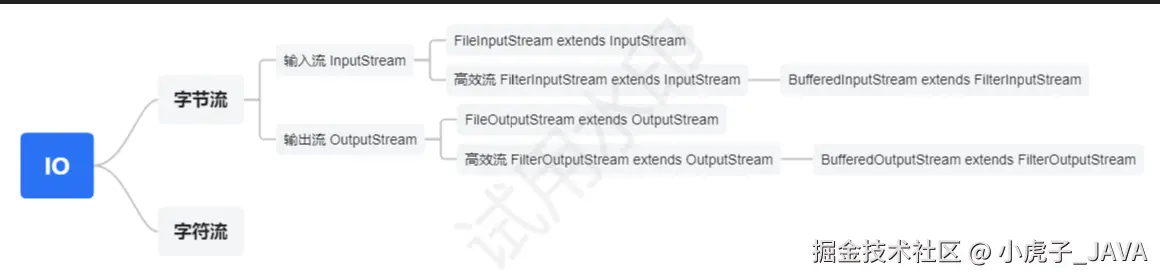
四、字节输入输出流的使用
- 字节输入流的代码实现示例
public static void InputStreamDemo() {
InputStream is = null;
try {
File file = new File("D:\\down\\HR模板.xlsx");
is = new FileInputStream(file);
int length = is.available();
byte b[] = new byte[length];
int temp = 0;
while ((temp = is.read()) != -1) {
System.out.println(temp);
}
} catch (Exception e) {
e.printStackTrace();
} finally {
try {
if (is != null) {
is.close();
}
} catch (IOException e) {
e.printStackTrace();
}
}
}
五、字节输出输出流的使用
- 字节输出流的代码实现示例
public static void outputStreamDemo() {
InputStream is = null;
OutputStream os = null;
try {
File file = new File("D:\\down\\输入流测试.txt");
is = new FileInputStream(file);
os = new FileOutputStream("D:\\down\\输出流测试.txt");
int temp = 0;
while ((temp = is.read()) != -1) {
os.write(temp);
}
} catch (Exception e) {
e.printStackTrace();
} finally {
try {
if (os != null) {
os.close();
}
if (is != null) {
is.close();
}
} catch (IOException e) {
e.printStackTrace();
}
}
}
六、高效流的使用
/**
* 作用:当读取和写入的文件流过大时、采用常规读写的速度缓慢、影响效率
* 为了解决该问题、java提供了高效流、提供一个缓存取、提高流的读写的速度
* 关键字:
* 1、字节缓冲输出流 BufferedOutputStream
* 2、字节缓冲输入流 BufferedInputStream
* 示例将字节缓冲输入流和缓存输出流进行配合使用
* */
public static void bufferDemo() {
InputStream is = null
BufferedInputStream bis = null
OutputStream os = null
BufferedOutputStream bos = null
try {
File file = new File("D:\\down\\输入流测试.txt")
is = new FileInputStream(file)
bis = new BufferedInputStream(is)
os = new FileOutputStream("D:\\down\\输出流测试2.txt")
bos = new BufferedOutputStream(os)
int temp = 0
while ((temp = bis.read()) != -1) {
bos.write(temp)
}
} catch (Exception e) {
e.printStackTrace()
} finally {
// 关闭流
try {
if (bos != null) {
bos.close()
}
if (bis != null) {
bis.close()
}
if (os != null) {
os.close()
}
if (is != null) {
is.close()
}
} catch (IOException e) {
e.printStackTrace()
}
}
}