内容简介
本节将创建一个Velodyne HDL-32 LiDAR 传感器并通过控制插件实现其旋转控制(Velodyne于2023年被Ouster合并,Gazebo教程里的网址链接都指向Ouster),具体的流程如下:
- 创建HDL-32传感器的SDF模型
- 将模型contribute to Gazebo的模型数据库(见官方)
- 提高模型的appearance和数据输出(见官方)
- 使用自定义的插件plugin控制模型
- 在Gazebo和RViz可视化传感器数据
1. SDF 模型建模
依据传感器的手册说明,Velodyne激光雷达传感器特征描述如下:
- 一个基座base圆柱体和一top圆柱体,top圆柱体旋转;
- 一套激光光束发射装置绕垂直轴旋转
Step 1: 创建基本的SDF模型文件
-
创建新的world文件
cd gedit velodyne.world -
创建环境:地面和光线
<?xml version="1.0" ?> <sdf version="1.5"> <world name="default"> <!-- A global light source --> <include> <uri>model://sun</uri> </include> <!-- A ground plane --> <include> <uri>model://ground_plane</uri> </include> </world> </sdf> -
添加Velodyne激光雷达传感器的basic模型,
</world>标签前<model name="velodyne_hdl-32"> <!-- Give the base link a unique name --> <link name="base"> <!-- Offset the base by half the lenght of the cylinder --> <pose>0 0 0.029335 0 0 0</pose> <collision name="base_collision"> <geometry> <cylinder> <!-- Radius and length provided by Velodyne --> <radius>.04267</radius> <length>.05867</length> </cylinder> </geometry> </collision> <!-- The visual is mostly a copy of the collision --> <visual name="base_visual"> <geometry> <cylinder> <radius>.04267</radius> <length>.05867</length> </cylinder> </geometry> </visual> </link> <!-- Give the base link a unique name --> <link name="top"> <!-- Vertically offset the top cylinder by the length of the bottom cylinder and half the length of this cylinder. --> <pose>0 0 0.095455 0 0 0</pose> <collision name="top_collision"> <geometry> <cylinder> <!-- Radius and length provided by Velodyne --> <radius>0.04267</radius> <length>0.07357</length> </cylinder> </geometry> </collision> <!-- The visual is mostly a copy of the collision --> <visual name="top_visual"> <geometry> <cylinder> <radius>0.04267</radius> <length>0.07357</length> </cylinder> </geometry> </visual> </link> </model> -
当创建新模型时,建议尽量定期的做微小改动。
-
启动gazebo并暂停(-u argument) cd gedit velodyne.world -u
6. 查看碰撞属性,右击model, view->collision
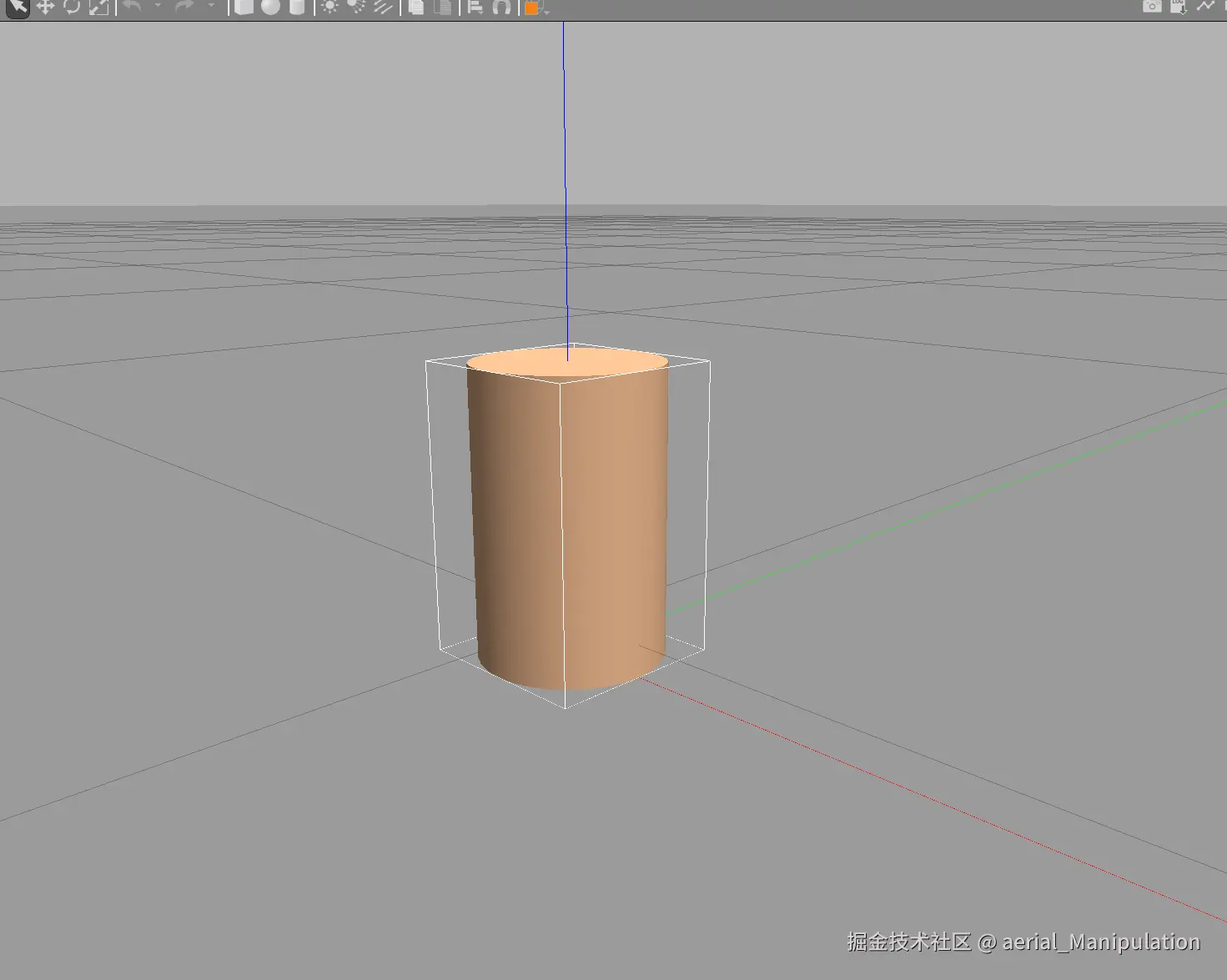
Step 2: 添加惯性参数
Gazebo 的physics engine引擎通过惯性参数信息计算出模型在受到外力时的行为。不正确的惯性参数会导致模型奇怪的行为(颤抖等)。
-
Velodyne质量1.3kg和惯性矩阵见Wikipedia
-
给base link添加
<inertial>block<link name="base"> <pose>0 0 0.029335 0 0 0</pose> <inertial> <mass>1.2</mass> <inertia> <ixx>0.001087473</ixx> <iyy>0.001087473</iyy> <izz>0.001092437</izz> <ixy>0</ixy> <ixz>0</ixz> <iyz>0</iyz> </inertia> </inertial>给top link添加
<inertial>block<link name="top"> <pose>0 0 0.095455 0 0 0</pose> <inertial> <mass>0.1</mass> <inertia> <ixx>0.000090623</ixx> <iyy>0.000090623</iyy> <izz>0.000091036</izz> <ixy>0</ixy> <ixz>0</ixz> <iyz>0</iyz> </inertia> </inertial> -
Gazebo显示
Step 3: 添加关节
为可视化关节,右击选中模型,选择 View-Transparent。
- 打开 SDF world,添加
revolute关节,在标签前。
<!-- Each joint must have a unique name -->
<joint type="revolute" name="joint">

     <!-- Position the joint at the bottom of the top link -->
      <pose>0 0 -0.036785 0 0 0</pose>

      <!-- Use the base link as the parent of the joint -->
      <parent>base</parent>

      <!-- Use the top link as the child of the joint -->
      <child>top</child>

      <!-- The axis defines the joint's degree of freedom -->
      <axis>

      <!-- Revolve around the z-axis -->
       <xyz>0 0 1</xyz>

       <!-- Limit refers to the range of motion of the joint -->
         <limit>

        <!-- Use a very large number to indicate a continuous revolution -->
          <lower>-10000000000000000</lower>
          <upper>10000000000000000</upper>
         </limit>
      </axis>
</joint>
- 运行SDF world,暂停 -u,显示joint。
gazebo velodyne.world -u- 右击model,选择
View->Joints - 右击model,选择
View->Transparent
Step 4: 添加传感器
添加gazebo自带的ray传感器,包含scan和range。
- 将传感器添加到
toplink。
<!-- Add a ray sensor, and give it a name -->
<sensor type="ray" name="sensor">

<!-- Position the ray sensor based on the specification. Also rotate
     it by 90 degrees around the X-axis so that the <horizontal> rays
      become vertical -->
   <pose>0 0 -0.004645 1.5707 0 0</pose>

<!-- Enable visualization to see the rays in the GUI -->
   <visualize>true</visualize>

<!-- Set the update rate of the sensor -->
   <update_rate>30</update_rate>
</sensor>
- 在
<update_rate>后,<sensor>中添加scan和range。
   <ray>
   <!-- The scan element contains the horizontal and vertical beams.
        We are leaving out the vertical beams for this tutorial. -->
   <scan>

      <!-- The horizontal beams -->
      <horizontal>
      <!-- The velodyne has 32 beams(samples) -->
        <samples>32</samples>

      <!-- Resolution is multiplied by samples to determine number of
           simulated beams vs interpolated beams. See:
           http://sdformat.org/spec?ver=1.6&elem=sensor#horizontal_resolution
                   -->
        <resolution>1</resolution>

        <!-- Minimum angle in radians -->
        <min_angle>-0.53529248</min_angle>

       <!-- Maximum angle in radians -->
        <max_angle>0.18622663</max_angle>
      </horizontal>
   </scan>

  <!-- Range defines characteristics of an individual beam -->
   <range>
      <!-- Minimum distance of the beam -->
      <min>0.05</min>
      <!-- Maximum distance of the beam -->
      <max>70</max>
      <!-- Linear resolution of the beam -->
      <resolution>0.02</resolution>
   </range>
</ray>
-
启动仿真
2. Control plugin
Plugin 概述
用于访问Gazebo的API,通过API执行目标任务,例如移动、添加对象、获取传感器数据等;
环境配置
sudo apt install libgazebo11-dev
Plugin编写流程
Step 1: 创建工作空间
mkdir ~/velodyne_plugin
cd ~/velodyne_plugin
Step 2: 创建plugin source file源文件
gedit velodyne_plugin.cc
编写插件源文件代码
#ifndef _VELODYNE_PLUGIN_HH_
#define _VELODYNE_PLUGIN_HH_

#include <gazebo/gazebo.hh>
#include <gazebo/physics/physics.hh>

namespace gazebo
{
  /// \brief A plugin to control a Velodyne sensor.
  class VelodynePlugin : public ModelPlugin
  {
    /// \brief Constructor
    public: VelodynePlugin() {}

    /// \brief The load function is called by Gazebo when the plugin is
    /// inserted into simulation
    /// \param[in] _model A pointer to the model that this plugin is
    /// attached to.
    /// \param[in] _sdf A pointer to the plugin's SDF element.
    public: virtual void Load(physics::ModelPtr _model, sdf::ElementPtr _sdf)
    {
      // Just output a message for now
      std::cerr << "\nThe velodyne plugin is attach to model[" <<
        _model->GetName() << "]\n";
    }
  };

  // Tell Gazebo about this plugin, so that Gazebo can call Load on this plugin.
  GZ_REGISTER_MODEL_PLUGIN(VelodynePlugin)
}
#endif
Step 3: 创建CMake 编译脚本
gedit CMakeLists.txt
脚本文件代码如下:
cmake_minimum_required(VERSION 2.8 FATAL_ERROR)

# Find Gazebo
find_package(gazebo REQUIRED)
include_directories(${GAZEBO_INCLUDE_DIRS})
link_directories(${GAZEBO_LIBRARY_DIRS})
set(CMAKE_CXX_FLAGS "${CMAKE_CXX_FLAGS} ${GAZEBO_CXX_FLAGS}")

# Build our plugin
add_library(velodyne_plugin SHARED velodyne_plugin.cc)
target_link_libraries(velodyne_plugin ${GAZEBO_LIBRARIES})
Step 4: 将插件添加到Velodyne传感器
gedit velodyne.world
Velodyne的world模型文件中修改如下:
<?xml version="1.0" ?>
<sdf version="1.5">
  <world name="default">
    <!-- A global light source -->
    <include>
      <uri>model://sun</uri>
    </include>
    <!-- A ground plane -->
    <include>
      <uri>model://ground_plane</uri>
    </include>

    <!-- A testing model that includes the Velodyne sensor model -->
    <model name="my_velodyne">
      <include>
        <uri>model://velodyne_hdl32</uri>
      </include>

      <!-- Attach the plugin to this model -->
      <plugin name="velodyne_control" filename="libvelodyne_plugin.so"/>
    </model>

  </world>
</sdf>
Step 5: Build and Test
在workspace,构建build编译文件夹
mkdir build
Build该插件
cd build
cmake ..
make
运行
cd ~/velodyne_plugin/build
gazebo --verbose ../velodyne.world
检查terminal状态,会看到
The velodyne plugin is attached to model[my_velodyne]
实现Velodyne转动
修改Load 函数如下:
public: virtual void Load(physics::ModelPtr _model, sdf::ElementPtr _sdf)
{
  // Safety check
  if (_model->GetJointCount() == 0)
  {
    std::cerr << "Invalid joint count, Velodyne plugin not loaded\n";
    return;
  }

  // Store the model pointer for convenience.
  this->model = _model;

  // Get the first joint. We are making an assumption about the model
  // having one joint that is the rotational joint.
  this->joint = _model->GetJoints()[0];

  // Setup a P-controller, with a gain of 0.1.
  this->pid = common::PID(0.1, 0, 0);

  // Apply the P-controller to the joint.
  this->model->GetJointController()->SetVelocityPID(
      this->joint->GetScopedName(), this->pid);

  // Set the joint's target velocity. This target velocity is just
  // for demonstration purposes.
  this->model->GetJointController()->SetVelocityTarget(
      this->joint->GetScopedName(), 10.0);
}
在Load函数后增加私有变量
/// \brief Pointer to the model.
private: physics::ModelPtr model;

/// \brief Pointer to the joint.
private: physics::JointPtr joint;

/// \brief A PID controller for the joint.
private: common::PID pid;
重新编译并运行Gazebo
cd ~/velodyne_plugin/build
make
gazebo --verbose ../velodyne.world
Velodyne开始旋转
插件配置
在此部分,通过修改插件来读取SDF模型的参数来控制传感器的转速。
打开world文件
gedit ~/velodyne_plugin/velodyne.world
修改plugin部分,增加<velocity>标签
<plugin name="velodyne_control" filename="libvelodyne_plugin.so">
  <velocity>25</velocity>
</plugin>
然后通过Plugin的Load函数读取该参数,打开plugin源码
gedit ~/velodyne_plugin/velodyne_plugin.cc
修改Load函数,使用sdf::ElementPrt读取<velocity>参数
// Default to zero velocity
double velocity = 0;

// Check that the velocity element exists, then read the value
if (_sdf->HasElement("velocity"))
  velocity = _sdf->Get<double>("velocity");

// Set the joint's target velocity. This target velocity is just
// for demonstration purposes.
this->model->GetJointController()->SetVelocityTarget(
    this->joint->GetScopedName(), velocity);
编译并运行Gazebo
cd ~/velodyne_plugin/build
cmake ../
make
gazebo --verbose ../velodyne.world
在world中修改<velocity>SDF 值,重新启动Gazebo,看到速度的变化
Create an API
目的:动态修改参数,无需手动修改SDF。这就需要API功能。 分类:两种API类型:Transport Message和function
- Transport Message 依赖于Gazebo的transport机制。将创建一个named topic,发布者在该 topic上发送double数值。插件将收到这些message,然后设置速度值。这种机制常见于进程间的通信。
- function 新建一个public function来调整速度参数。一个新的plugin将继承我们当前的plugin。子级plugin将被实例化。通过call我们的function,可以设置速度。当Gazebo与ROS交互时,这一方法最常用。
插件修改
- 打开
velodyne_plugin.cc文件
gedit \~/velodyne\_plugin/velodyne\_plugin.cc
- 创建 public function 设置目标速度。
/// \brief Set the velocity of the Velodyne
/// \param\[in] \_vel New target velocity
public: void SetVelocity(const double &\_vel)
{
// Set the joint's target velocity.
this->model->GetJointController()->SetVelocityTarget(
this->joint->GetScopedName(), \_vel);
}
-
设置消息传递的结构infrastructure
-
添加节点Node和订阅者subscriber变量
/// \brief A node used for transport private: transport::NodePtr node; /// \brief A subscriber to a named topic. private: transport::SubscriberPtr sub; -
实例化节点和订阅者,在
Load()函数末尾// Create the node this->node = transport::NodePtr(new transport::Node()); #if GAZEBO_MAJOR_VERSION < 8 this->node->Init(this->model->GetWorld()->GetName()); #else this->node->Init(this->model->GetWorld()->Name()); #endif // Create a topic name std::string topicName = "~/" + this->model->GetName() + "/vel_cmd"; // Subscribe to the topic, and register a callback this->sub = this->node->Subscribe(topicName, &VelodynePlugin::OnMsg, this); -
创建callback()函数处理进来的信息messages
/// \brief Handle incoming message /// \param[in] _msg Repurpose a vector3 message. This function will /// only use the x component. private: void OnMsg(ConstVector3dPtr &_msg) { this->SetVelocity(_msg->x()); } -
添加必要的gazebo头文件
#include <gazebo/transport/transport.hh> #include <gazebo/msgs/msgs.hh>
-
-
现在完成的plugin源文件如下:
#ifndef _VELODYNE_PLUGIN_HH_
#define _VELODYNE_PLUGIN_HH_
#include <gazebo/gazebo.hh>
#include <gazebo/physics/physics.hh>
#include <gazebo/transport/transport.hh>
#include <gazebo/msgs/msgs.hh>
namespace gazebo
{
/// \brief A plugin to control a Velodyne sensor.
class VelodynePlugin : public ModelPlugin
{
/// \brief Constructor
public: VelodynePlugin() {}
/// \brief The load function is called by Gazebo when the plugin is
/// inserted into simulation
/// \param[in] _model A pointer to the model that this plugin is
/// attached to.
/// \param[in] _sdf A pointer to the plugin's SDF element.
public: virtual void Load(physics::ModelPtr _model, sdf::ElementPtr _sdf)
{
// Safety check
if (_model->GetJointCount() == 0)
{
std::cerr << "Invalid joint count, Velodyne plugin not loaded\n";
return;
}
// Store the model pointer for convenience.
this->model = _model;
// Get the first joint. We are making an assumption about the model
// having one joint that is the rotational joint.
this->joint = _model->GetJoints()[0];
// Setup a P-controller, with a gain of 0.1.
this->pid = common::PID(0.1, 0, 0);
// Apply the P-controller to the joint.
this->model->GetJointController()->SetVelocityPID(
this->joint->GetScopedName(), this->pid);
// Default to zero velocity
double velocity = 0;
// Check that the velocity element exists, then read the value
if (_sdf->HasElement("velocity"))
velocity = _sdf->Get<double>("velocity");
this->SetVelocity(velocity);
// Create the node
this->node = transport::NodePtr(new transport::Node());
#if GAZEBO_MAJOR_VERSION < 8
this->node->Init(this->model->GetWorld()->GetName());
#else
this->node->Init(this->model->GetWorld()->Name());
#endif

// Create a topic name
std::string topicName = "~/" + this->model->GetName() + "/vel_cmd";

// Subscribe to the topic, and register a callback
this->sub = this->node->Subscribe(topicName,
   &VelodynePlugin::OnMsg, this);
}
/// \brief Set the velocity of the Velodyne
/// \param[in] _vel New target velocity
public: void SetVelocity(const double &_vel)
{
// Set the joint's target velocity.
this->model->GetJointController()->SetVelocityTarget(
this->joint->GetScopedName(), _vel);
}
/// \brief Handle incoming message
/// \param[in] _msg Repurpose a vector3 message. This function will
/// only use the x component.
private: void OnMsg(ConstVector3dPtr &_msg)
{
  this->SetVelocity(_msg->x());
}
/// \brief A node used for transport
private: transport::NodePtr node;
/// \brief A subscriber to a named topic.
private: transport::SubscriberPtr sub;
/// \brief Pointer to the model.
private: physics::ModelPtr model;
/// \brief Pointer to the joint.
private: physics::JointPtr joint;
/// \brief A PID controller for the joint.
private: common::PID pid;
};
// Tell Gazebo about this plugin, so that Gazebo can call Load on this plugin.
GZ_REGISTER_MODEL_PLUGIN(VelodynePlugin)
}
#endif
测试API的信息传递
创建一程序向plugin发布消息
- 在workspace中创建源文件
gedit ~/velodyne_plugin/vel.cc
-
完成源文件内容
#include <gazebo/gazebo_config.h> #include <gazebo/transport/transport.hh> #include <gazebo/msgs/msgs.hh> // Gazebo's API has changed between major releases. These changes are // accounted for with #if..#endif blocks in this file. #if GAZEBO_MAJOR_VERSION < 6 #include <gazebo/gazebo.hh> #else #include <gazebo/gazebo_client.hh> #endif ///////////////////////////////////////////////// int main(int _argc, char **_argv) { // Load gazebo as a client #if GAZEBO_MAJOR_VERSION < 6 gazebo::setupClient(_argc, _argv); #else gazebo::client::setup(_argc, _argv); #endif // Create our node for communication gazebo::transport::NodePtr node(new gazebo::transport::Node()); node->Init(); // Publish to the velodyne topic gazebo::transport::PublisherPtr pub = node->Advertise<gazebo::msgs::Vector3d>("~/my_velodyne/vel_cmd"); // Wait for a subscriber to connect to this publisher pub->WaitForConnection(); // Create a a vector3 message gazebo::msgs::Vector3d msg; // Set the velocity in the x-component #if GAZEBO_MAJOR_VERSION < 6 gazebo::msgs::Set(&msg, gazebo::math::Vector3(std::atof(_argv[1]), 0, 0)); #else gazebo::msgs::Set(&msg, ignition::math::Vector3d(std::atof(_argv[1]), 0, 0)); #endif // Send the message pub->Publish(msg); // Make sure to shut everything down. #if GAZEBO_MAJOR_VERSION < 6 gazebo::shutdown(); #else gazebo::client::shutdown(); #endif } -
在
CMakeLists.txt增加新的编译设置gedit ~/velodyne_plugin/CMakeLists.txt# Build the stand-alone test program add_executable(vel vel.cc) if (${gazebo_VERSION_MAJOR} LESS 6) # These two include(FindBoost) find_package(Boost ${MIN_BOOST_VERSION} REQUIRED system filesystem regex) target_link_libraries(vel ${GAZEBO_LIBRARIES} ${Boost_LIBRARIES}) else() target_link_libraries(vel ${GAZEBO_LIBRARIES}) endif()- 编译并运行仿真
cd ~/velodyne_plugin/build cmake ../ make gazebo --verbose ../velodyne.world- 在一新的terminal,进入build文件夹,运行
vel命令
cd ~/velodyne_plugin/build ./vel 2- 你现在可以动态的调整传感器的速度
3. Connect to ROS
目前的Velodyne传感器通信,没有用到ROS中间件的功能。使用ROS中间件的好处之一是可以在真实世界和仿真世界中轻松切换。
添加ROS 通信机制
- 添加头文件到
velodyne_plugin.cc。#include <thread> #include "ros/ros.h" #include "ros/callback\_queue.h" #include "ros/subscribe\_options.h" #include "std\_msgs/Float32.h" - 添加ROS通信相关的成员变量member variables。rosQueue是一ROS回调函数队列,rosQueueThread是一回调函数处理线程。
/// \brief A node use for ROS transport private: std::unique_ptr<ros::NodeHandle> rosNode; /// \brief A ROS subscriber private: ros::Subscriber rosSub; /// \brief A ROS callbackqueue that helps process messages private: ros::CallbackQueue rosQueue; /// \brief A thread the keeps running the rosQueue private: std::thread rosQueueThread; - 在
Load()函数末尾,ROS初始化和注册,订阅ROS topic的同时注册两个回调函数。OnRosMsg()用于响应接收消息,QueueThre则是ROS队列辅助线程。如下代码:// Initialize ros, if it has not already bee initialized. if (!ros::isInitialized()) { int argc = 0; char **argv = NULL; ros::init(argc, argv, "gazebo_client", ros::init_options::NoSigintHandler); } // Create our ROS node. This acts in a similar manner to // the Gazebo node this->rosNode.reset(new ros::NodeHandle("gazebo_client")); // Create a named topic, and subscribe to it. ros::SubscribeOptions so = ros::SubscribeOptions::create<std_msgs::Float32>( "/" + this->model->GetName() + "/vel_cmd", 1, boost::bind(&VelodynePlugin::OnRosMsg, this, _1), ros::VoidPtr(), &this->rosQueue); this->rosSub = this->rosNode->subscribe(so); // Spin up the queue helper thread. this->rosQueueThread = std::thread(std::bind(&VelodynePlugin::QueueThread, this)); - 添加
OnRosMsg和QueueThread函数/// \brief Handle an incoming message from ROS /// \param[in] _msg A float value that is used to set the velocity /// of the Velodyne. public: void OnRosMsg(const std_msgs::Float32ConstPtr &_msg) { this->SetVelocity(_msg->data); } /// \brief ROS helper function that processes messages private: void QueueThread() { static const double timeout = 0.01; while (this->rosNode->ok()) { this->rosQueue.callAvailable(ros::WallDuration(timeout)); } } - 修改
CMakeLists.txt编译配置
  cmake_minimum_required(VERSION 2.8 FATAL_ERROR)

  find_package(roscpp REQUIRED)
  find_package(std_msgs REQUIRED)
  include_directories(${roscpp_INCLUDE_DIRS})
  include_directories(${std_msgs_INCLUDE_DIRS})

  # Find Gazebo
  find_package(gazebo REQUIRED)
  include_directories(${GAZEBO_INCLUDE_DIRS})
  link_directories(${GAZEBO_LIBRARY_DIRS})
  set(CMAKE_CXX_FLAGS "${CMAKE_CXX_FLAGS} ${GAZEBO_CXX_FLAGS}")

  # Build our plugin
  add_library(velodyne_plugin SHARED velodyne_plugin.cc)
  target_link_libraries(velodyne_plugin ${GAZEBO_LIBRARIES} ${roscpp_LIBRARIES})

  # Build the stand-alone test program
  add_executable(vel vel.cc)

  if (${gazebo_VERSION_MAJOR} LESS 6)
    include(FindBoost)
    find_package(Boost ${MIN_BOOST_VERSION} REQUIRED system filesystem regex)
    target_link_libraries(vel ${GAZEBO_LIBRARIES} ${Boost_LIBRARIES})
  else()
    target_link_libraries(vel ${GAZEBO_LIBRARIES})
  endif()
- source
setup.bash文件source /opt/ros/<DISTRO>/setup.bash - 编译插件
cd ~/velodyne_plugin/build
cmake ../
make
从ROS控制Velodyne
- 启动
roscoresource /opt/ros/<DISTRO>/setup.bash roscore - 在新的terminal,启动Gazebo
cd ~/velodyne_plugin/build source /opt/ros/noetic/setup.bash gazebo ../velodyne.world - 在新的terminal,使用
rostopic发送速度消息source /opt/ros/noetic/setup.bash rostopic pub /my\_velodyne/vel\_cmd std\_msgs/Float32 1.0 - 现在改变rostopic命令中的速度值,