点赞案例
@Entry
@Component
struct Index {
@State myCount: number = 8888;
@State myColor: string = '7e7e7e';
build() {
Column() {
Row({ space: 10 }) {
Text(this.myCount.toString())
.fontColor(this.myColor)
Image($r('app.media.bz_msg'))
.width(20)
.fillColor(this.myColor)
.onClick(() => {
this.myCount++;
this.myColor = '#ff0000';
})
}.margin({
top: 50
})
}
.width('100%').height('100%')
.backgroundColor('#f6f6f6')
}
}
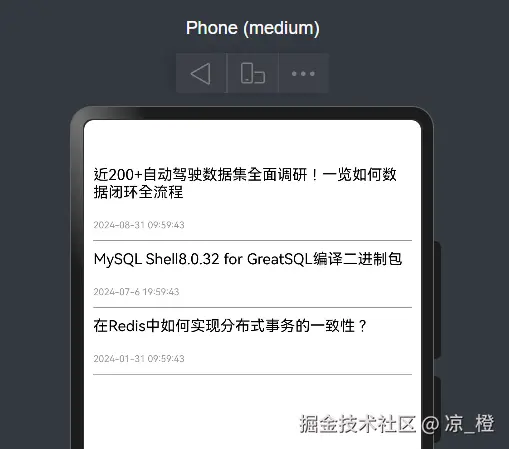
循环渲染视图案例
interface Info {
  title: string,
  date: string
}

@Entry
@Component
struct Index {
  @State messageInfo: Info[] = [{
    title: '近200+自动驾驶数据集全面调研!一览如何数据闭环全流程',
    date: '2024-08-31 09:59:43'
  }, {
    title: 'MySQL Shell8.0.32 for GreatSQL编译二进制包',
    date: '2024-07-6 19:59:43'
  }, {
    title: '在Redis中如何实现分布式事务的一致性?',
    date: '2024-01-31 09:59:43'
  }];

  build() {
    Column({ space: 10 }) {
      ForEach(this.messageInfo, (item: Info, index: number) => {
        Row() {
          Column({ space: 10 }) {
            Text(item.title)
              .width('100%')
              .fontColor(Color.Black)
              .fontSize(16)
            Text(item.date)
              .width('100%')
              .margin({ top: 10, bottom: 10 })
              .fontColor('#999')
              .fontSize(10)
          }
        }
        .width('100%')
        .border({
          width: { bottom: 1 },
          color: '#999'
        })
      })

    }
    .width('100%')
    .padding(10)
  }
}
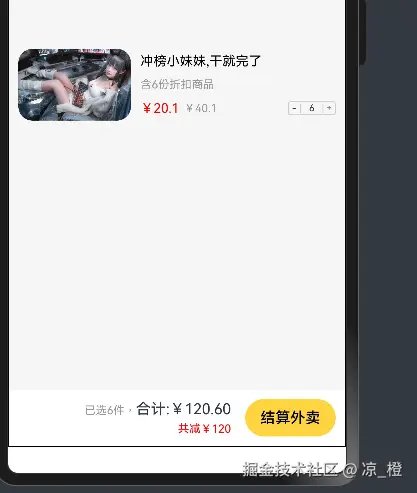
美团购物车
@Entry
@Component
struct Index {
@State count: number = 1;
@State oldPrice: number = 40.1;
@State newPrice: number = 20.1;
build() {
Stack({ alignContent: Alignment.Bottom }) {
Scroll() {
Flex({
direction: FlexDirection.Column,
justifyContent: FlexAlign.Start
}) {
Row({ space: 10 }) {
Image($r('app.media.image1'))
.width(120)
.borderRadius(15)
Column({ space: 10 }) {
Text('冲榜小妹妹,干就完了')
.fontSize(14).fontColor(Color.Black)
Text(`含${this.count}份折扣商品`)
.fontSize(12).fontColor('#999')
Row() {
Row() {
Text(`¥${this.newPrice}`).fontSize(14).fontColor(Color.Red)
Text(`¥${this.oldPrice}`).fontSize(12).fontColor('#999').margin({
left: 5
})
}
Row() {
Text('-')
.width(12)
.textAlign(TextAlign.Center)
.lineHeight(10)
.fontSize(10)
.onClick(() => {
this.count >= 1 ? this.count-- : this.count = 0
})
Text(this.count.toString())
.width(25)
.textAlign(TextAlign.Center)
.lineHeight(10)
.fontSize(10)
.border({
width: { left: 1, right: 1 },
color: '#ccc'
})
Text('+')
.width(12)
.textAlign(TextAlign.Center)
.lineHeight(10)
.fontSize(10)
.onClick(() => {
this.count++
})
}
.height(15)
.borderRadius(3)
.border({
width: 1,
color: '#ccc'
})
}
.width('100%').justifyContent(FlexAlign.SpaceBetween)
}.layoutWeight(1)
.alignItems(HorizontalAlign.Start)
}
.width('100%')
.padding(10)
.justifyContent(FlexAlign.SpaceBetween)
}
.padding({ bottom: 60 })
}
.width('100%')
.height('100%')
Row({ space: 15 }) {
Column({ space: 5 }) {
Text() {
Span(`已选${this.count}件,`)
.fontSize(12)
.fontColor('#999')
Span('合计:')
Span(`¥${(this.count * this.newPrice).toFixed(2)}`)
}
Text(`共减¥${(this.oldPrice - this.newPrice) * this.count}`)
.fontSize(12)
.fontColor(Color.Red)
}.alignItems(HorizontalAlign.End)
Button('结算外卖')
.fontColor(Color.Black)
.backgroundColor('#ffd441')
}
.width('100%')
.height(60)
.padding(10)
.justifyContent(FlexAlign.End)
.backgroundColor(Color.White)
}
.width('100%').height('100%')
.backgroundColor('#f6f6f6')
.border({
width: 1
})
}
}
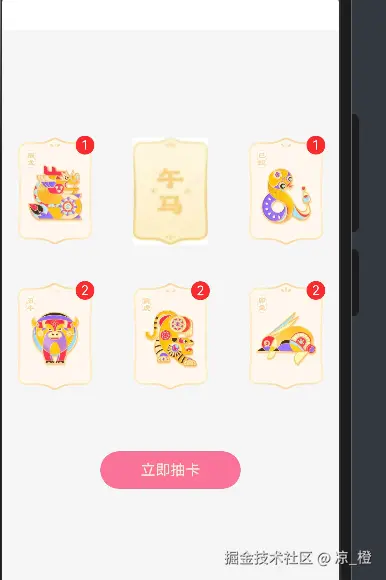
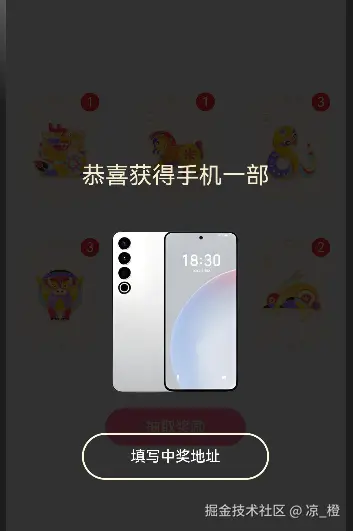
抽卡小游戏
interface ImageItem {
url: string,
count: number
}
@Entry
@Component
struct Index {
@State Images: ImageItem[] = [
{ url: 'bg_00', count: 0 },
{ url: 'bg_01', count: 0 },
{ url: 'bg_02', count: 0 },
{ url: 'bg_03', count: 0 },
{ url: 'bg_04', count: 0 },
{ url: 'bg_05', count: 0 }
]
@State stackOpcity: number = 0
@State stackZIndex: number = -1
@State imageState: number = 0
@State chooseIndex: number = -1;
@State bigPrizeBtn: boolean = false;
@State bigPrizeFlag: boolean = false;
@State prizePool: string[] = ['xm', 'pg', 'hw']
@State randomPrizeIndex: number = -1;
build() {
Stack() {
Column() {
Grid() {
ForEach(this.Images, (item: ImageItem, index: number) => {
GridItem() {
Badge({
count: item.count,
style: { fontSize: 14, badgeSize: 20, badgeColor: '#fa2a2d' },
position: BadgePosition.RightTop,
}) {
Image($r(`app.media.${item.url}`))
.width(80)
}
}
})
}
.columnsTemplate('1fr 1fr 1fr')
.rowsTemplate('1fr 1fr')
.columnsGap(10)
.rowsGap(10)
.width('100%')
.height(300)
.margin({ top: 100 })
Button(this.bigPrizeBtn ? '抽取奖励' : '立即抽卡')
.width(150)
.margin({ top: 50 })
.fontColor('#f5ebcf')
.backgroundColor('#fb7299')
.onClick(() => {
if (this.bigPrizeBtn) {
this.randomPrizeIndex = Math.floor(Math.random() * 4)
this.bigPrizeFlag = this.bigPrizeBtn
return;
}
this.chooseIndex = Math.floor(Math.random() * 6);
this.stackOpcity = 1
this.stackZIndex = 99
this.imageState = 1
})
}.width('100%').height('100%')
Column({ space: 30 }) {
Text('获得生肖卡')
.fontColor('#f5ebcf')
.fontSize(25)
.fontWeight(FontWeight.Bold)
Image($r(`app.media.img_0${this.chooseIndex}`))
.width(200)
.scale({
x: this.imageState,
y: this.imageState
})
.animation({ duration: 400 })
Button('立即收下')
.width(200)
.height(50)
.backgroundColor(Color.Transparent)
.border({ width: 2, color: '#fff9e0' })
.onClick(() => {
this.Images[this.chooseIndex] = {
url: `img_0${this.chooseIndex}`,
count: this.Images[this.chooseIndex].count + 1
}
this.bigPrizeBtn = this.Images.every(item => item.count !== 0)
this.stackOpcity = 0
this.stackZIndex = -1
this.imageState = 0
this.chooseIndex = -1;
})
}
.justifyContent(FlexAlign.Center)
.width('100%')
.height('100%')
.backgroundColor('#cc000000')
.opacity(this.stackOpcity)
.zIndex(this.stackZIndex)
.animation({
duration: 500
})
if (this.bigPrizeFlag) {
Column({ space: 30 }) {
Text('恭喜获得手机一部')
.fontColor('#f5ebcf')
.fontSize(25)
Image($r(`app.media.${this.prizePool[this.randomPrizeIndex]}`))
.width(200)
Button('填写中奖地址')
.width(200)
.height(50)
.backgroundColor(Color.Transparent)
.border({ width: 2, color: '#fff9e0' })
.onClick(() => {
this.bigPrizeBtn = false;
this.bigPrizeFlag = false;
this.randomPrizeIndex = -1
this.Images.forEach((item, index) => item.count - 1 === 0 ? this.Images[index] = {
url: `bg_0${index}`,
count: 0
} : this.Images[index] = {
url: `img_0${index}`,
count: item.count - 1
})
})
}
.justifyContent(FlexAlign.Center)
.width('100%')
.width('100%')
.height('100%')
.backgroundColor('#cc000000')
}
}
.width('100%').height('100%')
.backgroundColor('#f6f6f6')
}
}
轮播图
@Entry
@Component
struct Index {
@State message: string = 'Hello World';
build() {
Column() {
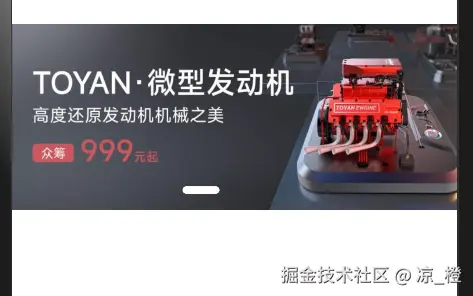
Swiper() {
ForEach([1, 2, 3, 4], (item: number) => {
Image($r(`app.media.ic_swiper_xmyp0${item}`))
})
}
.width('100%')
.aspectRatio(2.4)
.autoPlay(true)
.interval(5000)
.indicator(
Indicator.dot()
.itemWidth(10)
.selectedItemWidth(30)
.selectedColor(Color.White)
)
}
.width('100%')
.height('100%')
}
}
京东的滚动到头部
@Entry
@Component
struct Index {
myScroller: Scroller = new Scroller();
@State rocketFlag: boolean = false;
build() {
Column({ space: 10 }) {
Stack({ alignContent: Alignment.BottomEnd }) {
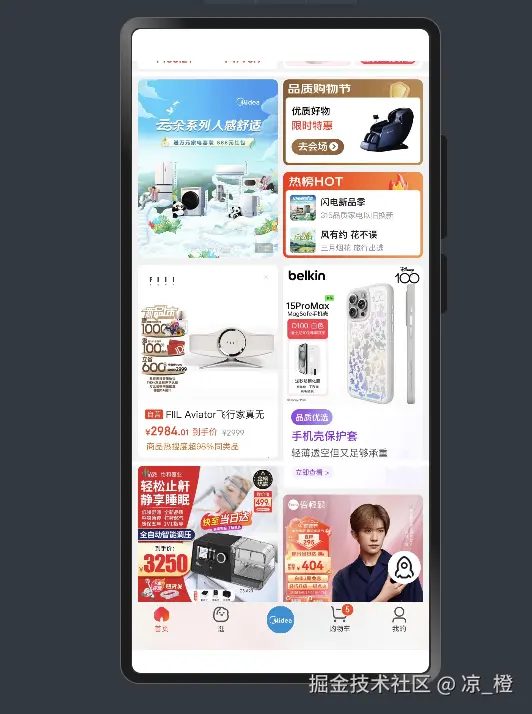
Scroll(this.myScroller) {
Column({ space: 5 }) {
Image($r('app.media.ic_jd_scroll_01'))
Image($r('app.media.ic_jd_scroll_02'))
Image($r('app.media.ic_jd_scroll_03'))
}
.width('100%')
}
.width('100%')
.height('100%')
.scrollBar(BarState.Off)
.onScrollEdge(() => {
const y = this.myScroller.currentOffset().yOffset;
this.rocketFlag = y >= 400 ? true : false;
})
if (this.rocketFlag) {
Image($r('app.media.ic_jd_rocket'))
.width(40)
.backgroundColor(Color.White)
.borderRadius(20)
.padding(5)
.margin({ right: 10, bottom: 80 })
.onClick(() => {
this.myScroller.scrollEdge(Edge.Top)
})
}
Image($r('app.media.ic_jd_tab'))
.width('100%')
}
}
.width('100%')
.height('100%')
}
}
小米优品tabbar
@Entry
@Component
struct Index {
  @State activeIndex: number = 0;

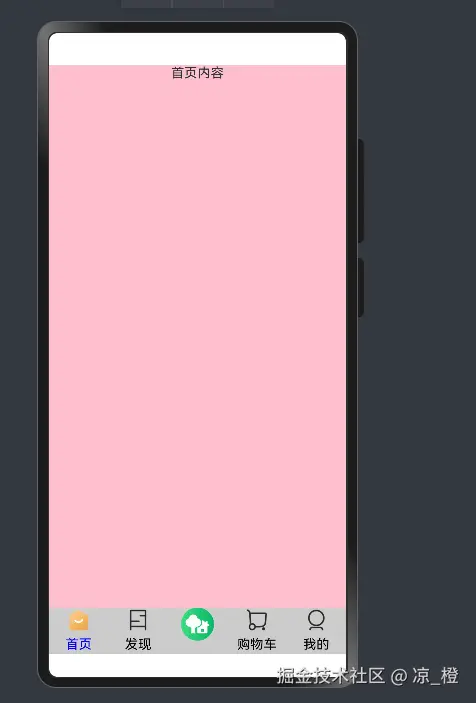
  @Builder
  tabItem(titile: string, itemIndex: number, spacial?: boolean) {
    if (spacial) {
      Column() {
        Image($r('app.media.ic_reuse_03'))
          .width(40)
      }
      .width('100%')
      .height('100%')
      .backgroundColor('#ccc')
    } else {
      Column({ space: 5 }) {
        Image(itemIndex === this.activeIndex ? $r(`app.media.ic_tabbar_icon_${itemIndex}_selected`) :
        $r(`app.media.ic_tabbar_icon_${itemIndex}`))
          .width(30)
        Text(titile)
          .fontColor(itemIndex === this.activeIndex ? Color.Blue : Color.Black)
      }
      .width('100%')
      .height('100%')
      .backgroundColor('#ccc')
    }
  }

  build() {
    Tabs({ barPosition: BarPosition.End }) {
      TabContent() {
        Column() {
          Text('首页内容')
        }
        .width('100%').height('100%')
        .backgroundColor(Color.Pink)
      }
      .tabBar(this.tabItem('首页', 0))

      TabContent() {
        Column() {
          Text('发现内容')
        }
      }
      .tabBar(this.tabItem('发现', 1))

      TabContent() {
        Column() {
          Text('热门活动页面')
        }
      }
      .tabBar(this.tabItem('', 2, true))

      TabContent() {
        Column() {
          Text('购物车内容')
        }
      }
      .tabBar(this.tabItem('购物车', 3))

      TabContent() {
        Column() {
          Text('我的内容')
        }
      }
      .tabBar(this.tabItem('我的', 4))
    }
    .scrollable(false)
    .animationDuration(0)
    .onChange((index) => {
      this.activeIndex = index;
    })
  }
}
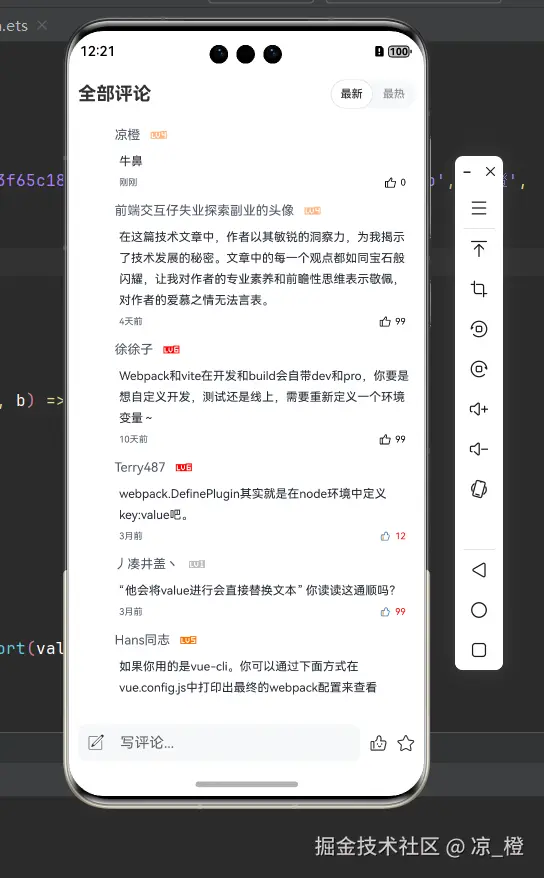
掘金综合练习
Entry
import { HeaderInfo } from '../components/HeaderInfo';
import { ItemInfo } from '../components/ItemInfo';
import { FooterInfo } from '../components/FooterInfo';
import font from '@ohos.font';
import { Comment, createCommentList } from '../data/comment';
@Entry
@Component
struct Index {
@State CommentList: Comment[] = createCommentList();
@State chooseFlag: number = 0
aboutToAppear(): void {
font.registerFont({
familyName: 'myFonts',
familySrc: '/fonts/iconfont.ttf'
})
}
handleSubmitComment(text: string) {
const newInfo: Comment = new Comment(
'https://p9-passport.byteacctimg.com/img/user-avatar/5a3f65c1808beb286a51c56d7a0903b4~100x100.awebp', '凉橙',
Math.ceil(Math.random() * 6),
text, new Date().valueOf(), false, 0)
this.CommentList = [newInfo, ...this.CommentList];
}
handleSort(value: number) {
this.chooseFlag = value;
this.CommentList = value === 0 ? this.CommentList.sort((a, b) => b.time - a.time) :
this.CommentList.sort((a, b) => b.likeNum - a.likeNum)
}
build() {
Column() {
Text('\ue8c3')
.fontFamily('myFonts')
.fontSize(20)
.fontColor(Color.Red)
Row() {
HeaderInfo({
onHandleSort: (value: number): void => this.handleSort(value)
})
}
.width('100%').height(60)
List({ space: 10 }) {
ForEach(this.CommentList, (item: Comment, index: number) => {
ListItem() {
ItemInfo({ itemInfo: item })
}
})
}
.width('100%')
.padding({ left: 10, right: 10, bottom: 20 })
.scrollBar(BarState.Off)
.edgeEffect(EdgeEffect.Spring)
.layoutWeight(1)
FooterInfo({
onSubmitComment: (text: string): void => this.handleSubmitComment(text)
})
.width('100%').height(60)
}
.width('100%').height('100%')
}
}
HeaderInfo
@Extend(Button)
function tabButton(isOn: boolean) {
  .width(46)
  .height(32)
  .fontSize(12)
  .padding({ left: 5, right: 5 })
  .fontColor(isOn ? '#2f2e33' : '#8e9298')
  .backgroundColor(isOn ? '#fff' : '#F7F8FA')
  .border({ width: isOn ? 1 : 0, color: isOn ? '#e4e5e6' : '#F7F8FA' })
}

@Component
export struct HeaderInfo {
  @State isOn: boolean = true;
  onHandleSort = (value: number) => {
  }

  build() {
    Row() {
      Text('全部评论')
        .fontSize(20)
        .fontWeight(FontWeight.Bold)
      Row() {
        Button('最新')
          .tabButton(this.isOn)
          .onClick(() => {
            this.isOn = true
            this.onHandleSort(0)
          })

        Button('最热')
          .tabButton(!this.isOn)
          .onClick(() => {
            this.isOn = false
            this.onHandleSort(1)
          })
      }
      .backgroundColor('#F7F8FA')
      .borderRadius(20)
    }
    .width('100%')
    .padding({ left: 10, right: 10 })
    .justifyContent(FlexAlign.SpaceBetween)

  }
}
ItemInfo
import { LengthMetrics } from '@kit.ArkUI'
import { Comment } from '../data/comment'

@Component
export struct ItemInfo {
  @ObjectLink itemInfo: Comment

  build() {
    Column() {
      Row() {
        Image(this.itemInfo.avatar)
          .width(30)
          .borderRadius(15)
          .aspectRatio(1)
        Text(this.itemInfo.name)
          .margin({ left: 10, right: 10 })
          .fontSize(14)
          .fontColor('#515767')
        Image($r(this.itemInfo.levelIcon))
          .width(20)
      }
      .width('100%')

      Row() {
        Text(this.itemInfo.commentText)
          .margin({ left: 45 })
          .fontSize(13)
          .fontColor('#252933')
          .lineSpacing(LengthMetrics.vp(10))
      }
      .width('100%')
      .justifyContent(FlexAlign.Start)

      Row() {
        Text(this.itemInfo.timeStr)
          .fontSize(10)
          .fontColor('#515767')
        Row() {
          Image($r(this.itemInfo.isLike ? 'app.media.ic_like_selected' : 'app.media.ic_like')).width(12)
          Text(this.itemInfo.likeNum.toString())
            .margin({ left: 5, right: 10 })
            .fontSize(10)
            .fontColor(this.itemInfo.isLike ? Color.Red : Color.Black)
        }
        .onClick(() => {
          this.itemInfo.likeNum = this.itemInfo.isLike ? this.itemInfo.likeNum - 1 : this.itemInfo.likeNum + 1
          this.itemInfo.isLike = !this.itemInfo.isLike
        })
      }
      .width('100%')
      .justifyContent(FlexAlign.SpaceBetween)
      .margin({ top: 8 })
      .padding({ left: 45 })

    }
  }
}
FooterInfo
@Component
export struct FooterInfo {
  @State inputText: string = ''
  onSubmitComment = (value: string) => {
  }

  build() {
    Row() {
      Row() {
        Text('\ue62e')
          .margin({ left: 10 })
          .fontFamily('myFonts')
          .fontSize(20)
        TextInput({ placeholder: '写评论...', text: $$this.inputText })
          .fontSize(18)
          .backgroundColor(Color.Transparent)
          .onSubmit(() => {
            if (this.inputText.trim().length > 0) {
              this.onSubmitComment(this.inputText)
              this.inputText = ''
            }
          })
      }
      .layoutWeight(1)
      .backgroundColor('#F7F8FA')
      .borderRadius(10)

      Text('\ue651')
        .margin({ left: 10, right: 10 })
        .fontFamily('myFonts')
        .fontSize(20)
      Text('\ue7d1')
        .fontFamily('myFonts')
        .fontSize(20)
    }
    .width('100%')
    .padding(10)
  }
}
Data
@Observed
export class Comment {
avatar: string
name: string
level: number
levelIcon: string
commentText: string
time: number
timeStr: string
isLike: boolean
likeNum: number
constructor(avatar: string, name: string, level: number,
commentText: string, time: number, isLike: boolean, likeNum: number) {
this.avatar = avatar
this.name = name
this.level = level
this.levelIcon = this.formatLevel(level)
this.commentText = commentText
this.time = time
this.timeStr = this.formatTime(time)
this.isLike = isLike
this.likeNum = likeNum
}
formatLevel(level: number) {
return `app.media.level_${level}`
}
formatTime(time: number) {
let str = ''
const datatime: number = (new Date().valueOf() - time) / 1000
if (datatime < 10000) {
str = '刚刚'
} else if (datatime / 60 < 60) {
str = `${Math.floor(datatime / 60)}分钟前`
} else if (datatime / 60 / 60 < 24) {
str = `${Math.floor(datatime / 60 / 60)}小时前`
} else if (datatime / 60 / 60 / 24 < 30) {
str = `${Math.floor(datatime / 60 / 60 / 24)}天前`
} else if (datatime / 60 / 60 / 24 / 30 < 12) {
str = `${Math.floor(datatime / 60 / 60 / 24 / 30)}月前`
} else {
str = `${Math.floor(datatime / 60 / 60 / 24 / 30 / 12)}年前`
}
return str;
}
}
export const createCommentList: () => Comment[] = () => {
let result: Comment[] = [];
result = [
new Comment(
'https://p6-passport.byteacctimg.com/img/user-avatar/22b614f56f006a051a528c916ac0f3ec~50x50.awebp', '剑指苍穹',
Math.ceil(Math.random() * 6),
'electron应用的process.env.NODE_ENV会不会被篡改,导致软件被破解', 1649692800000, true, 99),
new Comment(
'https://p9-passport.byteacctimg.com/img/user-avatar/bc2edd700aa5550cc6993fe4e0f29120~50x50.awebp',
'独立干饭队长', Math.ceil(Math.random() * 6),
' 如果是vue脚手架构架的话需要在node_module找,如果是自己通过webpack构建的话会有这个文件', 1713283200000, false,
89),
new Comment(
'https://p6-passport.byteacctimg.com/img/user-avatar/22b614f56f006a051a528c916ac0f3ec~50x50.awebp', 'Hans同志',
Math.ceil(Math.random() * 6),
'如果你用的是vue-cli。你可以通过下面方式在vue.config.js中打印出最终的webpack配置来查看', 1716998400000, true, 18),
new Comment(
'https://p9-passport.byteacctimg.com/img/user-avatar/a881555cd49106df4e6e536955303232~50x50.awebp', '汤姆丁',
Math.ceil(Math.random() * 6),
'加油大佬', 1716134400000, false, 7),
new Comment(
'https://p6-passport.byteacctimg.com/img/user-avatar/22b614f56f006a051a528c916ac0f3ec~50x50.awebp', '虽',
Math.ceil(Math.random() * 6),
'我悟了', 1520956800000, true, 9),
new Comment(
'https://p26-passport.byteacctimg.com/img/user-avatar/6f9f9126ecc432252400fceabe8c481e~50x50.awebp',
'前端交互仔失业探索副业的头像',
Math.ceil(Math.random() * 6),
'在这篇技术文章中,作者以其敏锐的洞察力,为我揭示了技术发展的秘密。文章中的每一个观点都如同宝石般闪耀,让我对作者的专业素养和前瞻性思维表示敬佩,对作者的爱慕之情无法言表。',
1725811200000, false, 99),
new Comment(
'https://p6-passport.byteacctimg.com/img/user-avatar/22b614f56f006a051a528c916ac0f3ec~50x50.awebp', '震撼',
Math.ceil(Math.random() * 6),
'webpack在编译的时候塞进去的吧', 1710864000000, true, 99),
new Comment(
'https://p3-passport.byteacctimg.com/img/user-avatar/90e98b983fd08f66a8dcf98ebc489d67~50x50.awebp', '徐徐子',
Math.ceil(Math.random() * 6),
'Webpack和vite在开发和build会自带dev和pro,你要是想自定义开发,测试还是线上,需要重新定义一个环境变量~',
1725292800000, false, 99),
new Comment(
'https://p9-passport.byteacctimg.com/img/user-avatar/7a14fc23d4fd92efa0f51accf2d83fcd~50x50.awebp', '丿凑井盖丶',
Math.ceil(Math.random() * 6),
'“他会将value进行会直接替换文本” 你读读这通顺吗?', 1717516800000, true, 99),
new Comment(
'https://p3-passport.byteacctimg.com/img/user-avatar/2674479e02aa075bd928fd13a1027672~50x50.awebp', 'Terry487',
Math.ceil(Math.random() * 6),
'webpack.DefinePlugin其实就是在node环境中定义key:value吧。', 1717567380000, true, 12),
]
return result;
}
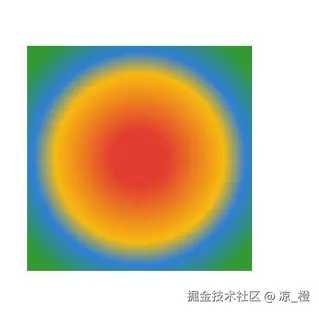
Canvas使用
@Entry
@Component
export default struct canvas {
setting: RenderingContextSettings = new RenderingContextSettings(true);
context: CanvasRenderingContext2D = new CanvasRenderingContext2D(this.setting);
build() {
Canvas(this.context)
.width('100%')
.height('100%')
.onReady(() => {
this.context.beginPath();
let gradient = this.context.createRadialGradient(50, 50, 10, 50, 50, 50);
gradient.addColorStop(0, '#e23d31')
gradient.addColorStop(0.5, '#f7bb10')
gradient.addColorStop(0.7, '#2e7fd6')
gradient.addColorStop(1, '#339933')
this.context.fillStyle = gradient
this.context.fillRect(10, 10, 80, 80)
})
}
}