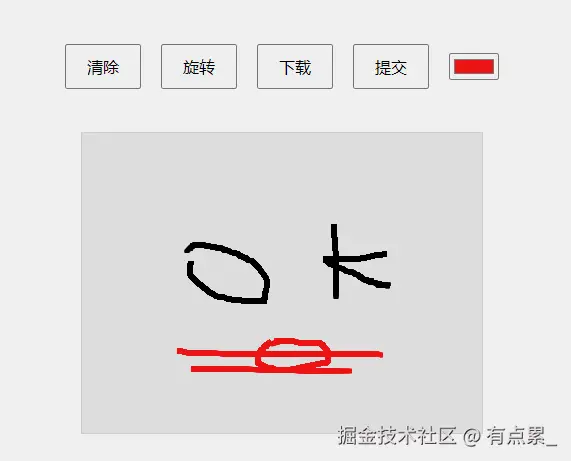
<!DOCTYPE html>
<html lang="en">
<head>
<meta charset="UTF-8">
<meta http-equiv="X-UA-Compatible" content="IE=edge">
<meta name="viewport" content="width=device-width, initial-scale=1.0">
<title>手写签名</title>
<style>
body {
margin: 0;
height: 100vh;
display: flex;
justify-content: center;
align-items: center;
flex-direction: column;
background-color: #f0f0f0;
}
.btn_all {
display: flex;
justify-content: center;
align-items: center;
height: 10vh;
background-color: #f0f0f0;
}
#cvs {
background-color: #dddddd;
border: 1px solid #ccc;
margin-top: 20px;
}
button {
margin: 10px;
padding: 10px 20px;
font-size: 16px;
cursor: pointer;
}
#signatureImage {
display: none;
border: 1px orange solid;
margin-top: 20px;
}
#colorPicker {
margin: 10px;
}
</style>
</head>
<body>
<div class="btn_all">
<button onclick="onClear()">清除</button>
<button onclick="onRotate()">旋转</button>
<button onclick="onDownload()">下载</button>
<button onclick="onSubmit()">提交</button>
<input type="color" id="colorPicker" value="#000000" />
</div>
<canvas id="cvs" width="400" height="300"></canvas>
<img id="signatureImage" alt="Signature Image" />
<script>
const cvs = document.getElementById('cvs');
const ctx = cvs.getContext('2d');
let isDrawing = false;
ctx.strokeStyle = document.getElementById('colorPicker').value;
const addEvents = (cvs, name, call) => {
const isMobile = navigator.userAgent.match(/Mobile/);
const mobileNameObj = {
'mousedown': 'touchstart',
'mousemove': 'touchmove',
'mouseup': 'touchend'
};
if (isMobile) {
cvs.addEventListener(mobileNameObj[name], e => {
call(e.touches[0]);
});
} else {
cvs.addEventListener(name, e => {
call(e);
});
}
};
addEvents(cvs, 'mousedown', e => {
isDrawing = true;
ctx.beginPath();
ctx.moveTo(e.pageX - cvs.offsetLeft, e.pageY - cvs.offsetTop);
});
addEvents(cvs, 'mousemove', e => {
if (isDrawing) {
ctx.lineWidth = 5;
ctx.lineTo(e.pageX - cvs.offsetLeft, e.pageY - cvs.offsetTop);
ctx.stroke();
}
});
addEvents(cvs, 'mouseup', () => {
isDrawing = false;
});
const onClear = () => {
ctx.clearRect(0, 0, cvs.width, cvs.height);
ctx.fillStyle = '#dddddd';
ctx.fillRect(0, 0, cvs.width, cvs.height);
document.getElementById('signatureImage').style.display = 'none';
};
const onRotate = () => {
const img = new Image();
img.src = cvs.toDataURL('image/png');
img.onload = () => {
const { width, height } = cvs;
cvs.width = height;
cvs.height = width;
ctx.translate(cvs.width / 2, cvs.height / 2);
ctx.rotate(Math.PI / 2);
ctx.drawImage(img, -height / 2, -width / 2);
ctx.resetTransform();
};
};
const onDownload = async () => {
const a = document.createElement('a');
a.setAttribute('download', 'signature.png');
a.href = cvs.toDataURL('image/png');
a.click();
};
const onSubmit = async () => {
const signatureData = cvs.toDataURL('image/png');
const signatureImage = document.getElementById('signatureImage');
signatureImage.src = signatureData;
signatureImage.style.display = 'block';
try {
const response = await fetch('/submit-signature', {
method: 'POST',
headers: {
'Content-Type': 'application/json'
},
body: JSON.stringify({ signature: signatureData })
});
const result = await response.json();
alert('签名提交成功!');
console.log('Server response:', result);
} catch (error) {
alert('提交失败。');
console.error('Error:', error);
}
};
document.getElementById('colorPicker').addEventListener('input', (e) => {
ctx.strokeStyle = e.target.value;
});
ctx.fillStyle = '#dddddd';
ctx.fillRect(0, 0, cvs.width, cvs.height);
</script>
</body>
</html>