在我们开发帖子功能之前,需要准备好帖子分类,因为每一篇帖子都必须发布在某一个分类下,帖子依赖于分类。
我们将会为 Larabbs 项目准备以下分类:
分享 —— 分享创造,分享发现;
教程 —— 教程相关文章;
问答 —— 用户问答相关的帖子;
公告 —— 站点公告类型的帖子。
创建分类模型(Model)
php artisan make:model Models/Category -m
1. 数据库迁移
打开 {timestamp}_create_categories_table.php 文件,修改如下:
<?php

use Illuminate\Database\Migrations\Migration;
use Illuminate\Database\Schema\Blueprint;
use Illuminate\Support\Facades\Schema;

class CreateCategoriesTable extends Migration
{
    /**
     * Run the migrations.
     *
     * @return void
     */
    public function up()
    {
        Schema::create('categories', function (Blueprint $table) {
            $table->bigIncrements('id');
            $table->string('name')->index()->comment('名称');
            $table->text('description')->nullable()->comment('描述');
            $table->integer('post_count')->default(0)->comment('帖子数');
        });
    }

    /**
     * Reverse the migrations.
     *
     * @return void
     */
    public function down()
    {
        Schema::dropIfExists('categories');
    }
}
运行迁移生成数据表:
php artisan migrate
打开数据库工具,即可看见我们新添加的数据表:
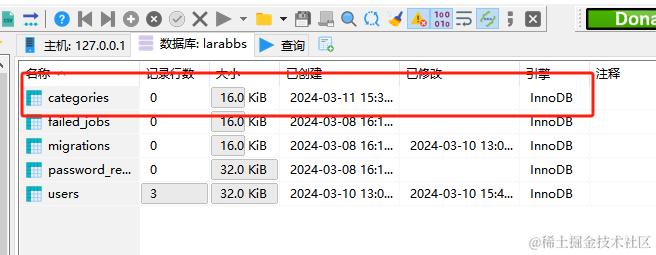
2. 数据模型
需要设置 Category 的 $fillable 白名单属性,告诉程序那些字段是支持修改的:
app/Models/Category.php
<?php

namespace App\Models;

use Illuminate\Database\Eloquent\Model;

class Category extends Model
{
    // 白名单
    protected $fillable = [
        'name', 'description',
    ];
}
3. 初始化分类数据
接下来我们使用命令生成数据迁移文件,作为 初始化数据 的迁移文件,我们定义命名规范为 seed_(数据库表名称)_data :
php artisan make:migration seed_categories_data
打开生成的迁移文件,并使用以下代码替换:
database/migrations/{timestamp}_seed_categories_data.php
<?php

use Illuminate\Database\Migrations\Migration;
use Illuminate\Database\Schema\Blueprint;
use Illuminate\Support\Facades\Schema;
use Illuminate\Support\Facades\DB;

class SeedCategoriesData extends Migration
{
    /**
     * Run the migrations.
     *
     * @return void
     */
    public function up()
    {
        $categories = [
            [
                'name' => '分享',
                'description' => '分享创造,分享发现',
            ],
            [
                'name' => '教程',
                'description' => '开发技巧、推荐扩展包等',
            ],
            [
                'name' => '问答',
                'description' => '请保持友善,互帮互助',
            ],
            [
                'name' => '公告',
                'description' => '站点公告',
            ],
        ];
        DB::tabletable('categories')->insert($categories);
    }

    /**
     * Reverse the migrations.
     *
     * @return void
     */
    public function down()
    {
        DB::table('categories')->truncate();
    }
}
执行迁移:
php artisan migrate
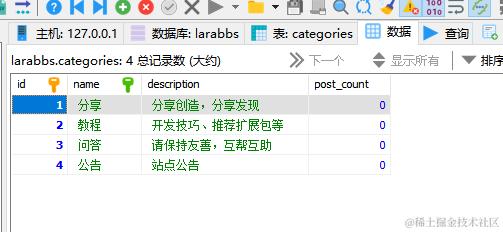
代码生成器
composer require "summerblue/generator:6.*" --dev
添加服务提供商
/app/Providers/AppServiceProvider.php
public function register()
{
     if (app()->environment() == 'local' || app()->environment() == 'testing') {

        $this->app->register(\Summerblue\Generator\GeneratorsServiceProvider::class);

    }
}
试运行
接下来我们可以放心的测试,运行 Generator 的 readme 里提供的示例:
php artisan make:scaffold Projects --schema="name:string:index,description:text:nullable,subscriber_count:inte ger:unsigned:default(0)"
我们在命令行中指定了数据模型还有具体的字段信息,运行命令后,generator 帮我们生成了一堆文件,并在最后执行了数据库迁移:
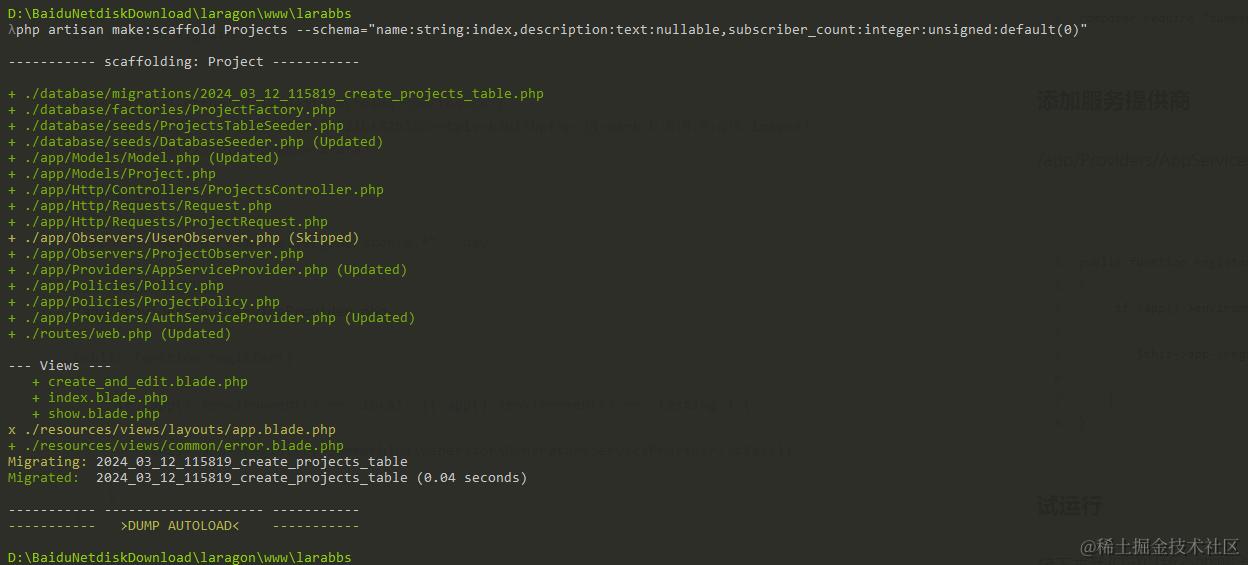
接下来让我们还原项目到正常状态,首先回滚数据库迁移:
php artisan migrate:rollback
生成话题骨架
整理字段
1) 整理字段 在使用代码生成器之前,我们需要先整理好 xxx 表的字段名称和字段类型。比如:
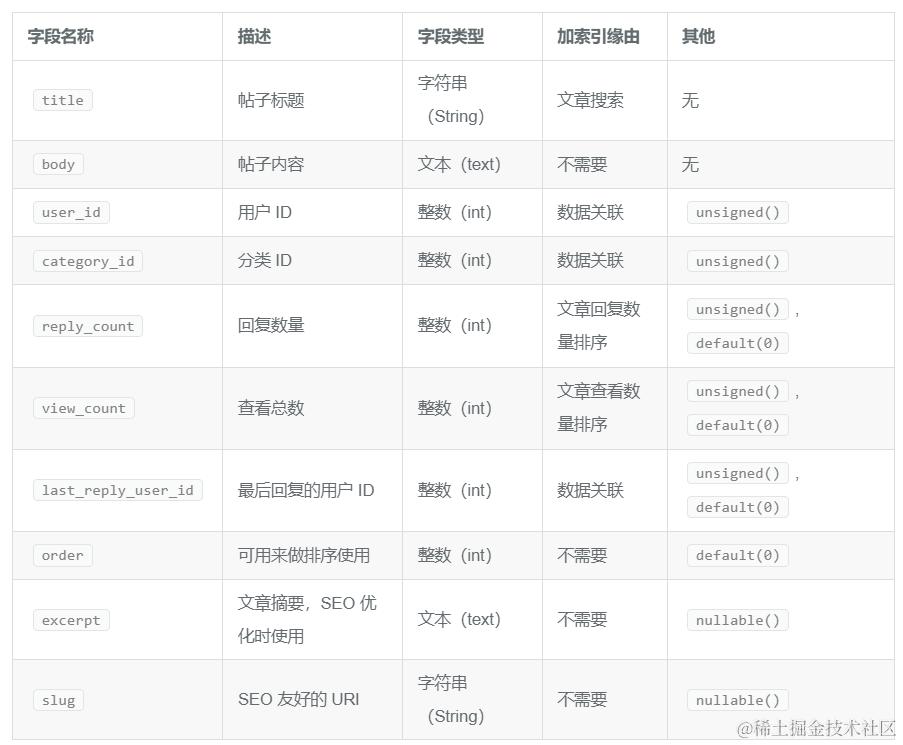
unsigned()—— 设置不需要标识符(unsigned)default()—— 为字段添加默认值。nullable()—— 可为空
以上字段,拼接为最终命令:
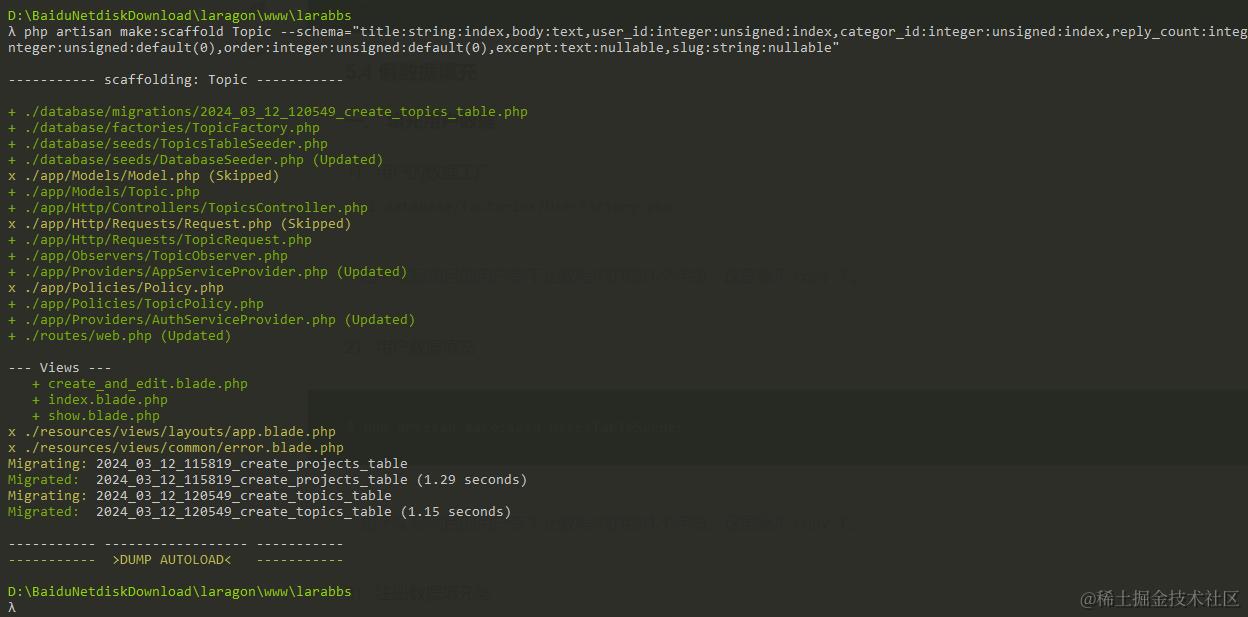
php artisan make:scaffold Topic --schema="title:string:index,body:text,user_id:integer:unsigned:index,category_id:integer:unsigned:index,reply_count:integer:unsigned:default(0),view_count:integer:unsigned:default(0),last_reply_user_id:integer:unsigned:default(0),order:integer:unsigned:default(0),excerpt:text:nullable,slug:string:nullable"
执行结果:
测试
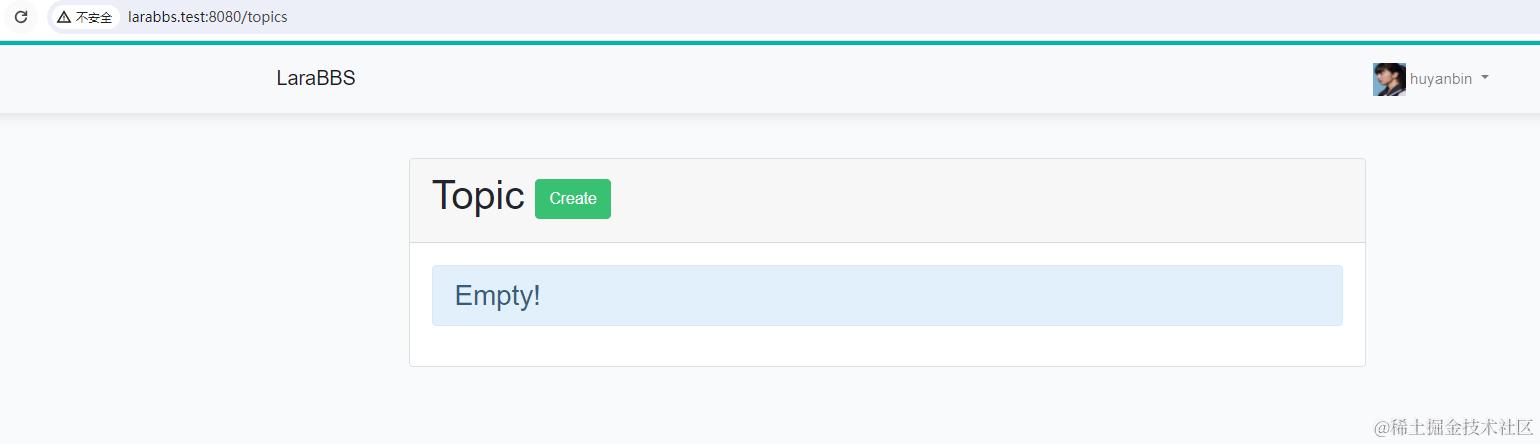
打开larabbs.test:8080/topics , 查看话题列表页面:
假数据填充
目前我们数据库中的帖子数据为空,因此 话题列表页面
填充用户数据
话题数据中需使用『用户数据』作为话题作者,有依赖关系,故我们先填充用户数据。
用户的假数据填充涉及到以下几个文件:
-
数据模型 User.php
-
用户的数据工厂 database/factories/UserFactory.php
-
用户的数据填充 database/seeds/UsersTableSeeder.php
-
注册数据填充 database/seeds/DatabaseSeeder.php
数据模型在前面章节中已定制过,此处无需修改,接下来我们从 UserFactory 开始。
1. 用户的数据工厂
Laravel 框架自带了 UserFactory.php 作为示例文件:
database/factories/UserFactory.php
<?php

use App\Models\User;

$factory->define(User::class, function (Faker $faker) {
    return [
        'name' => $faker->name,
        'email' => $faker->unique()->safeEmail,
        'email_verified_at' => now(),
        'password' => '$2y$10$HAOQNGXgWthjGDxrwXLQGO5c.g5qdPegI7zfSD0wu9CcTQ//.722y', // huyanbin520
        'remember_token' => Str::random(10),
    ];
});
修改后的代码如下:
database/factories/UserFactory.php
<?php

use App\Models\User;

$factory->define(User::class, function (Faker $faker) {
    $date_time = $faker->date . ' ' . $faker->time;
    return [
        'name' => $faker->name,
        'email' => $faker->unique()->safeEmail,
        'email_verified_at' => now(),
        'password' => '$2y$10$HAOQNGXgWthjGDxrwXLQGO5c.g5qdPegI7zfSD0wu9CcTQ//.722y',
        'introduction' => $faker->sentence(),
        'created_at' => $date_time,
        'updated_at' => $date_time,
    ];
});
Faker 是一个假数据生成库, sentence() 是 faker 提供的 API ,随机生成『小段落』文本。我们用来填充introduction 个人简介字段。
2. 用户数据填充
使用以下命令生成数据填充文件:
php artisan make:seed UsersTableSeeder
修改文件如以下:
database/seeds/UsersTableSeeder.php
<?php

use Illuminate\Database\Seeder;
use App\Models\User;

class UsersTableSeeder extends Seeder
{
    /**
     * Run the database seeds.
     *
     * @return void
     */
    public function run()
    {
        // 获取 Faker 实例
        $faker = app(Faker\Generator::class);
        // 头像假数据
        $avatars = [
            'https://iocaffcdn.phphub.org/uploads/images/201710/14/1/s5ehp11z6s.png',
            'https://iocaffcdn.phphub.org/uploads/images/201710/14/1/Lhd1SHqu86.png',
            'https://iocaffcdn.phphub.org/uploads/images/201710/14/1/LOnMrqbHJn.png',
            'https://iocaffcdn.phphub.org/uploads/images/201710/14/1/xAuDMxteQy.png',
            'https://iocaffcdn.phphub.org/uploads/images/201710/14/1/ZqM7iaP4CR.png',
            'https://iocaffcdn.phphub.org/uploads/images/201710/14/1/NDnzMutoxX.png',
        ];
        // 生成数据集合
        $users = factory(User::class)
            ->times(10)
            ->make()
            ->each(function ($user, $index)
            use ($faker, $avatars)
            {
                // 从头像数组中随机取出一个并赋值
                $user->avatar = $faker->randomElement($avatars);
            });
        // 让隐藏字段可见,并将数据集合转换为数组
        $user_array = $users->makeVisible(['password', 'remember_token'])->toArray();
        // 插入到数据库中
        User::insert($user_array);
        // 单独处理第一个用户的数据
        $user = User::find(1);
        $user->name = 'Summer';
        $user->email = 'summer@example.com';
        $user->avatar = 'https://iocaffcdn.phphub.org/uploads/images/201710/14/1/ZqM7iaP4CR.png';
        $user->save();
    }
}
3. 注册数据填充
接下来注册数据填充类,先去掉 $this->call(UsersTableSeeder::class); 的注释,还要注释掉我们还未开发TopicsTableSeeder 调用:
database/seeds/DatabaseSeeder.php
<?php

use Illuminate\Database\Seeder;

class DatabaseSeeder extends Seeder
{
    /**
     * Seed the application's database.
     *
     * @return void
     */
    public function run()
    {
         $this->call(UsersTableSeeder::class);
//     $this->call(TopicsTableSeeder::class);
//     $this->call(ProjectsTableSeeder::class);
    }
}
4. 测试一下
使用以下命令运行迁移文件:
php artisan db:seed
查看数据库:
数一下发现有 11 个用户,你的应该和我不一样,因为我们之前开发注册了一些用户。我们并不想要这些数据。我们需要能删除 users 表数据,并重新生成填充数据的命令:
php artisan migrate:refresh --seed
二、填充话题数据
用户数据已经准备好,接下来我们处理话题数据填充。话题的假数据填充涉及到以下几个文件:
-
数据模型 Topic.php
-
话题的数据工厂 database/factories/TopicFactory.php
-
话题的数据填充 database/seeds/TopicsTableSeeder.php
-
注册数据填充 database/seeds/DatabaseSeeder.php
代码生成器已经为我们生成了 1、2、3 所需要的文件,并且自动在 DatabaseSeeder 中加入了 TopicsTableSeeder 的调用。
1. 数据模型
接下来我们先看看数据模型文件:
app/Models/Topic.php
<?php

namespace App\Models;

class Topic extends Model
{
    protected $fillable = ['title', 'body', 'user_id', 'category_id', 'reply_count', 'view_count', 'last_reply_user_id', 'order', 'excerpt', 'slug'];
}
可以看到生成器已经为我们自动写入 $fillable 允许填充字段数组,这里我们先不做更改。
2. 话题的数据工厂
接下来看 TopicFactory ,此文件定义了每一份 Topic 假数据的生成规则:
database/factories/TopicFactory.php
<?php

use Faker\Generator as Faker;

$factory->define(App\Models\Topic::class, function (Faker $faker) {
    return [
        // 'name' => $faker->name,
    ];
});
让我们对生成的模型工厂文件进行修改,修改后如下:
database/factories/TopicFactory.php
<?php

use Faker\Generator as Faker;

$factory->define(App\Models\Topic::class, function (Faker $faker) {
    $sentence = $faker->sentence();
    // 随机取一个月以内的时间
    $updated_at = $faker->dateTimeThisMonth();
    // 传参为生成最大时间不超过,因为创建时间需永远比更改时间要早
    $created_at = $faker->dateTimeThisMonth($updated_at);
    return [
        'title' => $sentence,
        'body' => $faker->text(),
        'excerpt' => $sentence,
        'created_at' => $created_at,
        'updated_at' => $updated_at,
    ];
});
3. 话题的数据填充
完成 TopicFactory 数据工厂的定制后,接下来我们开始书写填充部分的逻辑:
database/seeds/TopicsTableSeeder.php
<?php

use Illuminate\Database\Seeder;
use App\Models\Topic;
use App\Models\User;
use App\Models\Category;

class TopicsTableSeeder extends Seeder
{
    public function run()
    {
        // 所有用户 ID 数组,如:[1,2,3,4]
        $user_ids = User::all()->pluck('id')->toArray();
        // 所有分类 ID 数组,如:[1,2,3,4]
        $category_ids = Category::all()->pluck('id')->toArray();
        // 获取 Faker 实例
        $faker = app(Faker\Generator::class);
        $topics = factory(Topic::class)
            ->times(100)
            ->make()
            ->each(function ($topic, $index)
            use ($user_ids, $category_ids, $faker)
            {
                // 从用户 ID 数组中随机取出一个并赋值
                $topic->user_id = $faker->randomElement($user_ids);
                // 话题分类,同上
                $topic->category_id = $faker->randomElement($category_ids);
            });
        // 将数据集合转换为数组,并插入到数据库中
        Topic::insert($topics->toArray());
    }

}
4. 注册数据填充
我们需要将 DatabaseSeeder.php 中 TopicsTableSeeder 调用的注释去掉:
database/seeds/DatabaseSeeder.php
<?php

use Illuminate\Database\Seeder;

class DatabaseSeeder extends Seeder
{
    /**
     * Seed the application's database.
     *
     * @return void
     */
    public function run()
    {
         $this->call(UsersTableSeeder::class);
       $this->call(TopicsTableSeeder::class);
//     $this->call(ProjectsTableSeeder::class);
    }
}
请注意 run() 方法里的顺序,我们先生成用户数据,再生出话题数据。
三、执行数据填充命令
一切准备就绪,接下来开始调用数据填充命令,将假数据写入数据库。
php artisan migrate:refresh --seed
执行成功后查看数据库:
效果图:
可以看到有数据了,但是页面非常凌乱,接下来优化页面。
话题列表页面
模型关联
开始之前,我们需要对 Topic 数据模型进行修改,新增 category 和 user 的模型关联:
category —— 一个话题属于一个分类;
user —— 一个话题拥有一个作者。
这两个关联都属于 对应关系,故我们使用 belongsTo() 方法来实现,代码如下:
app/Models/Topic.php
<?php

namespace App\Models;

class Topic extends Model
{
    protected $fillable = ['title', 'body', 'user_id', 'category_id', 'reply_count', 'view_count', 'last_reply_user_id', 'order', 'excerpt', 'slug'];

    // 话题对应的分类
    public function category()
    {
        return $this->belongsTo(Category::class);
    }

    // 话题对应的作者
    public function user()
    {
        return $this->belongsTo(User::class);
    }
}
页面嵌套
接下来开始修改话题列表页面:
resources/views/topics/index.blade.php
@extends('layouts.app')
@section('title', '话题列表')
@section('content')
  <div class="row mb-5">
    <div class="col-lg-9 col-md-9 topic-list">
      <div class="card ">
        <div class="card-header bg-transparent">
          <ul class="nav nav-pills">
            <li class="nav-item"><a class="nav-link active" href="#">最后回复</a></li>
            <li class="nav-item"><a class="nav-link" href="#">最新发布</a></li>
          </ul>
        </div>
        <div class="card-body">
          {{-- 话题列表 --}}
          @include('topics._topic_list', ['topics' => $topics])
          {{-- 分页 --}}
          <div class="mt-5">
            {!! $topics->appends(Request::except('page'))->render() !!}
          </div>
        </div>
      </div>
    </div>
    <div class="col-lg-3 col-md-3 sidebar">
      @include('topics._sidebar')
    </div>
  </div>
@endsection
后面章节中,我们将会对列表增加排序功能,排序功能使用了 URL 传参来实现,这里使用分页中 appends() 方法可以
使 URI 中的请求参数得到继承。
为了方便管理,话题列表被放置于子模板中:
resources/views/topics/_topic_list.blade.php
@if (count($topics))
  <ul class="list-unstyled">
    @foreach ($topics as $topic)
      <li class="media">
        <div class="media-left">
          <a href="{{ route('users.show', [$topic->user_id]) }}">
            <img class="media-object img-thumbnail mr-3" style="width: 52px; height: 52px;"
                 src="{{ $topic->user->avatar }}" title="{{ $topic->user->name }}">
          </a>
        </div>
        <div class="media-body">
          <div class="media-heading mt-0 mb-1">
            <a href="{{ route('topics.show', [$topic->id]) }}" title="{{ $topic->title }}">
              {{ $topic->title }}
            </a>
            <a class="float-right" href="{{ route('topics.show', [$topic->id]) }}">
              <span class="badge badge-secondary badge-pill"> {{ $topic->reply_count }} </span>
            </a>
          </div>
          <small class="media-body meta text-secondary">
            <a class="text-secondary" href="#" title="{{ $topic->category->name }}">
              <i class="far fa-folder"></i>
              {{ $topic->category->name }}
            </a>
            <span> • </span>
            <a class="text-secondary" href="{{ route('users.show', [$topic->user_id]) }}"
               title="{{ $topic->user->name }}">
              <i class="far fa-user"></i>
              {{ $topic->user->name }}
            </a>
            <span> • </span>
            <i class="far fa-clock"></i>
            <span class="timeago"
                  title="最后活跃于:{{ $topic->updated_at }}">{{ $topic->updated_at->diffForHumans() }}</span>
          </small>
        </div>
      </li>
      @if ( ! $loop->last)
        <hr>
      @endif
    @endforeach
  </ul>
@else
  <div class="empty-block">暂无数据 ~_~</div>
@endif
注:注意上面多了一些类似写法 ,这是我们载入的 Font Awesome 字体图标库的写法,更多图标请前往fontawesome.com/icons
右边栏:
resources/views/topics/_sidebar.blade.php
<div class="card ">
  <div class="card-body">
    右边导航栏
  </div>
</div>
刷新页面: