遍历数组 8 种方法
for loop
- 好处是可以使用
break结束循环或使用continue跳出当前循环 - 命令式的写法比较冗长
let arr = [0, 1, 2, 3, 4, 5];

for (let i = 0; i < arr.length; i++) {
  if (i > 2) break;
  console.log(arr[i]);
}
// 0
// 1
// 2
for…of
- ES6 之后出现的语法,与
for循环相比写法较简洁 - 与
for循环一样,可以搭配break、continue和return使用
const arr = ["apple", "orange", "banana"];
for (const item of arr) {
  if (item === "orange") continue;
  console.log(item);
}
// apple
// banana
for...in
- 遍历的是
键值 (key),而在数组中的键值 (key)就是索引 (index)
const arr = ["apple", "orange", "banana"];
for (const item in arr) {
  console.log(item);
}
// 0
// 1
// 2
以下介绍数组的原生方法
forEach
-
会针对每一个元素执行提供的函数
-
声明式的写法较为精简,但是不能使用
break和continue语法跳出循环,如下图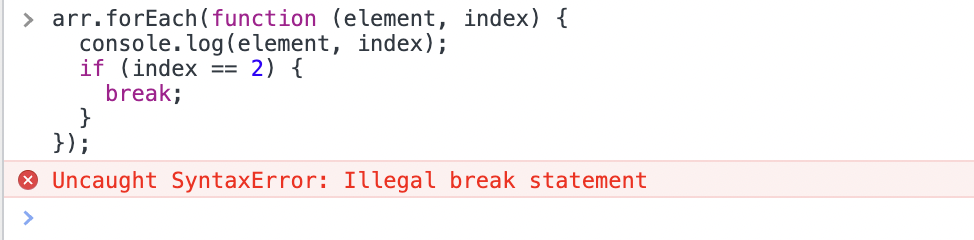
-
forEach方法只会遍历原数组,并不会返回一个新数组。所以如果需要从一个旧数组中构造出另一个新数组,应该使用map方法
map
- 针对每一个元素执行提供的函数,并 返回新数组
const arr = [1, 2, 3, 4];
const newArr = arr.map((x) => x + 1);
console.log(newArr);
// [2,3,4,5]

console.log(arr);
// [1,2,3,4] // 原数组不会被改变
filter
- 创建返回一个新数组,并 过滤 掉没有通过所提供函数的元素
const arr = [19, 2, 13, 40];
const newArr = arr.filter((x) => x > 18);
console.log(newArr);
// [19, 40]

console.log(arr);
// [19, 2, 13, 40] // 原数组不会被改变
every
- 会测试数组中每一个元素是否通过提供的函数,最终返回一个
布尔值(Boolean) - 如果每个元素都通过,最终会返回
true,但若其中有一个元素测试值为false,那就会提前结束,并返回false - 与
some的差别在于,用every方法,需要数组当中 每一个 都通过测试的函数,最终才会返回true
[12, 5, 8, 130, 44].every((x) => x > 10); // false
[12, 54, 18, 130, 44].every((x) => x > 10); // true
some
- 方法类似于
every,会测试数组每一个元素是否通过提供的函数,若其中有一个元素测试值为true,那就会提前结束,并返回true - 与
every的差别在于,用some方法, 只要数组当中有一个 元素通过测试函数,就会返回true
[2, 5, 8, 1, 4].some((x) => x > 10); // false
[12, 5, 8, 1, 4].some((x) => x > 10); // true
延伸题:哪些方法会改变原数组?
以上提拱的几种数组方法, 默认上并不会直接改变原数组,除非我们传入的函数针对原数组做一些处理。
延伸题:哪些方法会返回新的数组?
map 与 filter 会返回新的数组,因此如果是在 React 等要求写不可变 (immutable) 的代码时,经常需要用到这两个方法。
延伸题:请问 for 循环 和 forEach 的差别?
- 写法上差异,
forEach较为简洁 forEach不能提早结束整遍历,也不能搭配break和continue语法使用,使用return也会被忽略
延伸题:请问 for...of 和 for...in 的差别?
for...of遍历的是数组中的元素值 (value);而for...in是遍历的是键值 (key),换句话说for... in是遍历数组中的索引 (Index)
var arr = [10, 20, 30];

for (let value of arr) {
    console.log(value);
}
//10 20 30

var arr = [10, 20, 30];

for (let value in arr) {
    console.log(value);
}
//0 1 2
- 大部分情况,
for...in会被拿来遍历对象,但并不建议使用for...in遍历数组,主要原因有以下 4 点:
-
当数组中有空项目时,使用
for...in方法会忽略该项目。let a = ["a", , "c"]; for (let x in a) { console.log(x); } // 0 2 for (let x of a) { console.log(x); } // a undefined c -
for... in会检查对象的属性是否 enumerable,如果 true,会把这些属性名称全部迭代出来,因为某些 JavaScript 包可能会在 Array 原型上创建方法,此时如果使用for...in方法可能会操作到不是存在于数组中的值。但是用for...of可以避免这问题。Array.prototype.foo = 1; let a = [1, 2, 3]; for (let x in a) { console.log(x); } // 0 1 2 foo -
for...in遍历的 键值 (key) 虽然是Index,但for...in会以 String 类型作为键值 (key),因此我们如果拿Index去做运算,可能会造成预期外的结果。let a = [1, 2, 3]; for (let x in a) { console.log(x + 1); } // 01 11 21 -
for...in的遍历并不保证顺序是正确的,这样的状况在数组上非常难使用,因为当我们想迭代数组中的值时,就是希望顺序能够正确。而for...of会先检查对象[Symbol.iterator]这个属性,接着使用[Symbol.iterator].next()一个个迭代出值,来确保顺序正确。但由于 Object 并不具备[Symbol.iterator]这个属性,所以for...of并不能使用在 Object 上。