效果
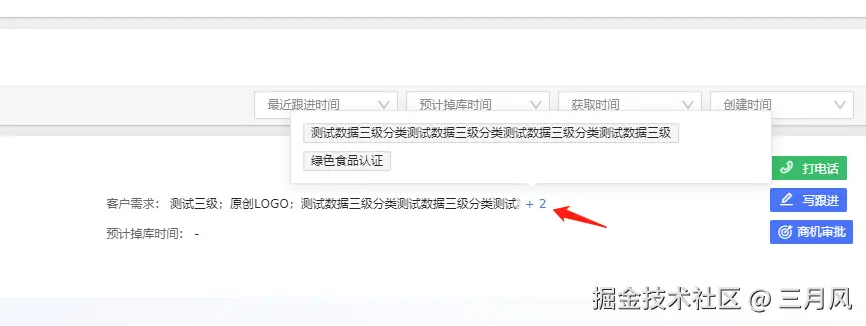
代码
<template>
<div class="more-data-tag">
<div ref="dataRef" class="data-wrapper">
{{ value }}
</div>
<sp-popover v-if="isMore" placement="top" trigger="hover">
<div slot="reference" class="more-wrapper">
<span class="tx-count">+ {{ popoverTags.length }}</span>
</div>
<div class="sp-select__popoverTags">
<sp-tag v-for="item in popoverTags" :key="item.id" disable-transitions>
{{ item.requireName }}
</sp-tag>
</div>
</sp-popover>
</div>
</template>
<script>
import { calcTextWidth } from '@/utils'
export default {
props: {
data: { type: Array, default: () => [] },
},
data() {
this.boxWidth = 0
this.dataRef = null
return {
value: '',
isMore: false,
popoverTags: [],
requireList: [],
}
},
watch: {
data: {
handler(val) {
if (val.length) {
this.fetchData()
this.$nextTick(() => this.init())
}
},
immediate: true,
},
},
methods: {
init() {
this.showEllipsis()
this.calcTag()
},
fetchData() {
if (!this.data.length) return
this.requireList = this.data.map((e, i) => ({
requireName: e.intentionProduct || e.requireName,
id: e.id || i,
}))
this.value = this.requireList.map(e => e.requireName).join(';')
},
calcTag() {
const len = this.requireList.length
if (!len) return
let calcWidth = 0
let index = 0
for (let i = 0; i < len; i++) {
calcWidth += calcTextWidth(this.requireList[i].requireName + ';')
if (calcWidth > this.boxWidth) {
index = i
break
}
}
index && (this.popoverTags = this.requireList.slice(index))
},
showEllipsis() {
this.dataRef = this.$refs.dataRef
if (!this.dataRef) return
this.boxWidth = this.dataRef.clientWidth
this.isMore = this.dataRef.scrollHeight > this.dataRef.clientHeight
},
},
}
</script>
<style lang="scss" scoped>
@import '@/assets/style/common.scss';
.more-data-tag {
position: relative;
width: 100%;
.data-wrapper {
width: 100%;
height: 18px;
line-height: 18px;
color: #262626;
font-size: 12px;
overflow: hidden;
}
.more-wrapper {
position: absolute;
right: 0;
bottom: 0;
padding-left: 10px;
background: linear-gradient(91deg, transparent 0, #fff 20%);
line-height: 18px;
cursor: pointer;
.tx-count {
color: #4974f5;
}
}
}
</style>
export function calcTextWidth(value, font = 'normal 12px PingFang SC') {
const canvas = document.createElement('canvas')
const ctx = canvas.getContext('2d')
ctx.font = font
const metrics = ctx.measureText(value)
return metrics.width
}
.sp-select__popoverTags {
max-width: 480px;
max-height: 106px;
padding: 12px 4px 4px 12px;
-webkit-box-sizing: border-box;
box-sizing: border-box;
overflow-y: auto;
}
.sp-select__popoverTags::-webkit-scrollbar {
z-index: 11;
width: 6px;
opacity: 0;
}
.sp-select__popoverTags::-webkit-scrollbar:horizontal {
height: 6px;
}
.sp-select__popoverTags::-webkit-scrollbar-thumb {
border-radius: 4px;
width: 6px;
background: #bfbfbf;
}
.sp-select__popoverTags::-webkit-scrollbar-thumb:hover {
background-color: #8c8c8c;
}
.sp-select__popoverTags::-webkit-scrollbar-corner {
background: #f5f5f5;
}
.sp-select__popoverTags::-webkit-scrollbar-track {
background: #f5f5f5;
}
.sp-select__popoverTags::-webkit-scrollbar-track-piece {
background: #f5f5f5;
width: 6px;
}
.sp-select__popoverTags .sp-tag {
display: -webkit-inline-box;
display: -ms-inline-flexbox;
display: inline-flex;
-webkit-box-align: center;
-ms-flex-align: center;
align-items: center;
width: -webkit-max-content;
width: -moz-max-content;
width: max-content;
margin: 0 8px 8px 0;
}
.sp-select__popoverTags .sp-tag .sp-icon-close {
top: 0;
}
.sp-select__popoverTags .sp-tag.sp-tag--info {
border: 1px solid #d9d9d9;
}