需求
代码
1. 安装Vuex
- Vuex:
- 定义:Vuex 是一个专为 Vue.js 应用程序开发的状态管理工具。它采用集中式存储管理应用的所有组件的状态,并以相应的规则保证状态以一种可预测的方式发生变化。
- 官网:Vuex
- 描述:用于Vue.js中管理数据状态的一个库,创建一个集中的数据存储,供程序中所有组件访问
- 效果:抽取所有组件共享的状态作为全局单例管理,共享的数据及其函数都在vuex中,任何组件可以调用
- 安装Vuex
- npm包管理:
npm install vuex@next --save
- yarn包管理:
yarn add vuex@next --save
2. 引入Vuex
import { createApp } from "vue";
import App from "./App.vue";
import store from "./store";

createApp(App).use(store).use(router).mount("#app");

//等效于
const app = createApp(App);  //创建
app.use(router);             //引入
app.use(store);              //引入
app.mount("#app");           //挂载
3. 配置store
3-1. 配置store【基础配置State+Mutation+Action+Getter】
- 须知:
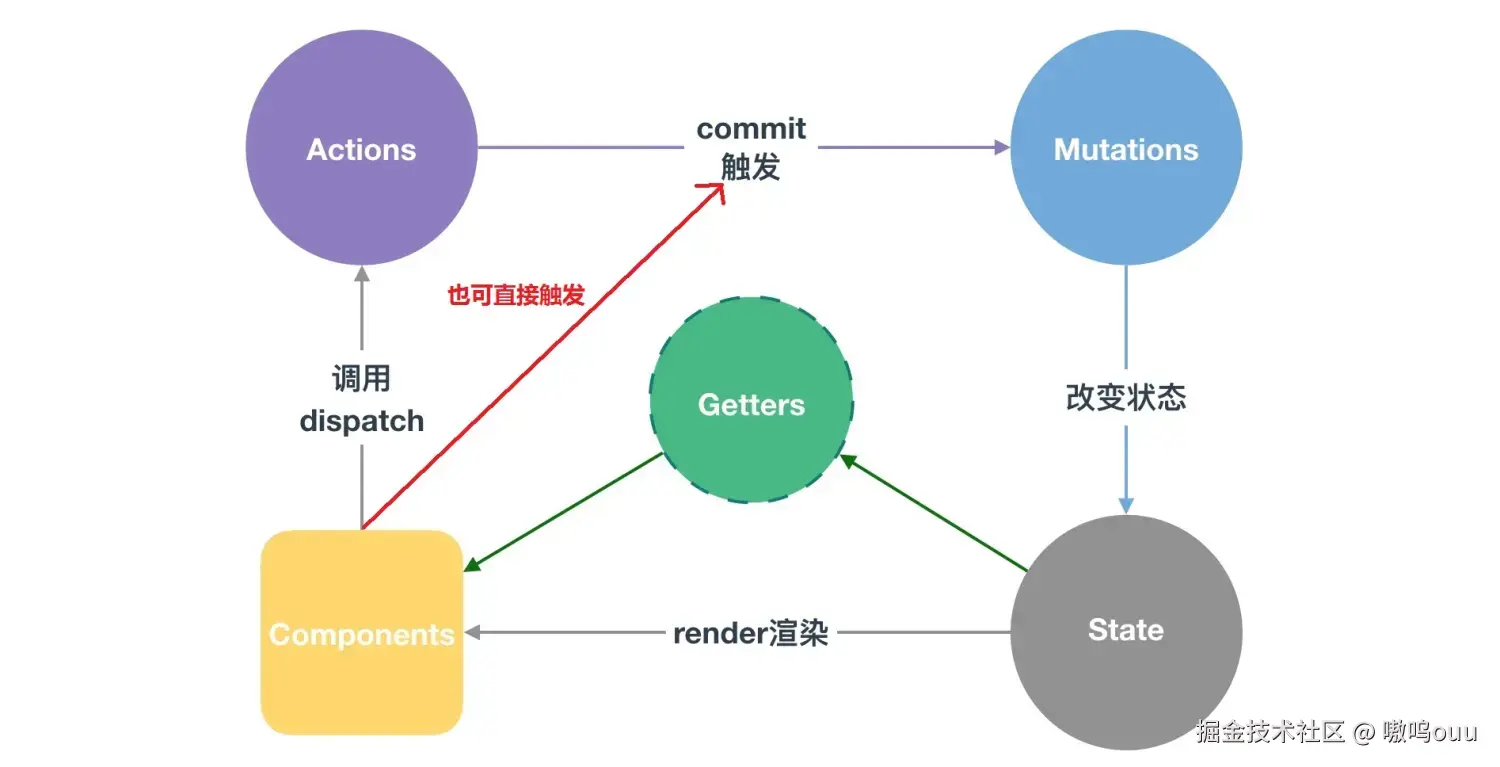
- State状态:所有共享的数据统一放到store的state进行储存,类似data,state中定义对数据可以在任何组件中调用
- Mutation状态修改:
- 更改store中的状态的唯一方法是提交mutation,类似事件,每个 mutation 都有一个字符串的事件类型 (type)和一个回调函数 (handler),回调函数必须接收state作为第一个参数
- 作用:组件中更新state数值
- Action异步操作:
- 类似Mutation,Action进行异步操作,通过context上下文拿到store,通过commit出发mutation的方法
- context:类似
this.$store
- 作用:处理异步任务,获取异步结果后,把数据交给mutation更新数据
- Getter获取属性值:
- 类似于state的computed计算属性,对于Store中的数据进行加工处理形成新的数据,处理后可以在html中使用实现双向绑定效果
- 场景:模板中需要的数据和State中的数据不完全一样,加工一份state数据给模板用
- Module模块:
- 为了处理大型项目数据量大store过多的问题,将store分割成多个模块,每个模块拥有自己的 state、mutation、action、getter、甚至是嵌套子模块(上至下进行同样方式的分割)
- 模块内部的 action 和 mutation 仍然是注册在全局命名空间的,所以多个模块能够对同一个 action 或 mutation 作出响应。
- 注册为带命名空间的模块:
namespaced: true,注册后所有 getter、action 及 mutation 都会自动根据模块注册的路径调整命名,即this.$store.state.user.xxx,确保模块命名不冲突
- 使用 export default 封装,让外部可以访问
- 代码:
import { createStore } from "vuex";

export default createStore({
    state: {
        name:"张三",
        age:12,
        count: 0,
    },
    mutations: {
        add(state, num) {
            state.count = state.count + num,
        },
        reduce(state) {
            state.count--
        },
    },
    actions: {
        asyncAdd(context) {
            setTimeout(() => {
                context.commit("reduce")
            }, 1000);
        }
    },
    getters: {
        displayName: (state) => state.name,
        count: (state) => state.count,
        getList(state) {
            return state.list.filter(item => {
                return item.id > 1
            })
        }
    },
    modules: {
        user: {
            namespaced: true,
            state: {
                xxx: "xxx",
            },
            mutations: {
                changestate(state) {
                    state.xxx = "yyy"
                }
            },
            actions: {},
        },
        project: {
            state: {
                xxx: "xxx",
            },
            mutations: {
            },
        }
    }
});

//等效于
const state = {...};
const mutations = {...};
const actions = {...};
const getters = {...};
const modules = {...};
export default createStore({
    state,
    mutations,
    actions,
    getters,
    modules,
});
3-2. 配置store【拆解文件Modules】
- 须知:
- 在store文件夹下面创建一个module文件夹来存放你所要拆分的模块文件
- 在store文件
- store文件夹目录:
- modules文件夹
- user.js:处理用户相关功能
- project.js:处理项目相关功能
- module3.js:处理xx相关功能
- getters.js
- index.js
- index.js代码:
import { createStore } from "vuex";
import module1 from "./modules/module1"
import module2 from "./modules/module2"

export default createStore({
    state: {
        name:"张三",
        age:12,
        count: 0,
    },
    getters: {
        displayName: (state) => state.name,
        count: (state) => state.count,
        getList(state) {
            return state.list.filter(item => {
                return item.id > 1
            })
        }
    },
    modules: {
        user,
        project,
        module3,
    }
});
export default {
    state: {
        showFooter:true
    },
    mutations: {
        SHOWFOOTER(state, payload) {
            state.showFooter = payload
        }
    },
    getters: {
        showFooter: (state) => state.showFooter
    },
}
3-3. 配置store【调用接口获取后端数据】
4. 调用全局变量
- State
- 组件中调用:
$store.state.xxx,如<p>{{ $store.state.name }}</p>
- js中调用:
this.$store.state.xxx
- mapState函数:
<template>
    <!--直接调用-->
    <p>{{ $store.state.name }}</p>
    <!--使用辅助函数mapState-->
    <p>{{ name + age + count }}</p>
</template>

<script>
import { mapState } from "vuex";

export default {
    data() {
        return {
        }
    },
    computed: {
        ...mapState(["name","age","count"]),
    }
}
</script>
- Mutation
- 组件中定义函数:
<button @click="btn">点击</button>
- js中调用:
- commit触发Mutation:
this.$store.commit("mutationName", params);
- mapMutations辅助函数触发Mutation
<template>
    <button @click="btn">点击</button>
</template>

<script>
import { mapMutations } from "vuex";

export default {
    data() {
        return {
        }
    },
    methods: {
        //commit触发Mutation
        btn() {
            this.$store.commit("add", 10); //add(state, num) => state.count = state.count + num;
            this.$store.commit("reduce"); //reduce(state) => state.count--;
        },

        //mapMutations辅助函数触发Mutation
        ...mapMutations(["add","reduce"]);
        btn() {
            this.add(10);
            this.reduce();
        }
    }
}
</script>
- Action:
- dispatch触发Action函数:
this.$store.dispatch("asynActionName", params);
- mapActions辅助函数触发Action函数:
<template>
    <button @click="btn">点击</button>
</template>

<script>
import { mapActions } from "vuex";

export default {
    data() {
        return {
        }
    },
    methods: {
        //dispatch触发Action函数
        btn() {
            this.$store.dispatch("asynAdd");
        },

        //mapActions辅助函数触发Action函数
        ...mapMutation(["asyncAdd"]);
        btn() {
            this.asyncAdd();
        }
    }
}
</script>
- Getter:
- 组件中调用:
$store.getters.xxx
- js中调用:
this.$store.getters.xxx获取getters的值
- mapActions辅助函数触发Action函数:
<template>
    <p v-for="item in this.$store.getters.numChange">{{item.num}}{{item.name}}</p>
    <button @click="btn">点击</button>
</template>

<script>
import { mapGetters } from "vuex";

export default {
    data() {
        return {
        }
    },
    methods: {
        //this.$store.getters.xxx获取getters的值
        btn() {
            return this.$store.getters.getList;
        },

        //mapActions辅助函数触发Action函数
        ...mapGetters(["asyncAdd"]);
        btn() {
            this.asyncAdd();
        }
    }
}
</script>
- Modules:
- 组件中调用:
<h2>{{$store.state.user.count}}</h2>
- js中调用:
store.commit('user/sum', num) // 参数带上模块名称
store.dispatch('user/sum_actions', sum)
- 是否开启命名空间:`namespaced:true`
| 开启命名空间 | 不开启命名空间 |
|---|
| state | store.state.module.xxx | store.state.module.xxx |
| getter | store.state.getters.xxx | store.getters['模块名/xxx'] |
| mutation | store.dispatch('xxx') | store.dispatch('模块名/xxx') |
| action | store.dispatch('xxx') | store.dispatch('模块名/xxx') |
| state | store.state.module.xxx | store.state.module.xxx |
let store = new Vuex.Store({
  state: {
    name: 'root'
  },
  modules: {
    commend: {
        state: {
            name: '小王'
        }
    }
    a1: {
      namespaced: true, // 开启命名空间
      state: {
        name: '老李头',
        age: 56
      }
    }
  }
})
// store.state.name           =>  "root"
// store.state.commend.name   =>  "小王"
// store.state.a1.name        => "老李头"
// store.state.a1.age         => 56