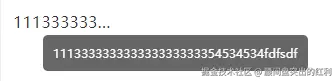
方案一:v-ellipsis 指令
/*
* @fileName: ellipsis.js
* @date: 2024-07-18 11:35:04
* @version:
* @description: v-ellipsis指令 文本超出容器最大宽度省略...,鼠标经过提示框显示完整内容
* demo: // <div class="w100" v-ellipsis>111333333333333333333354534534fdfsdf</div>
*/
const ellipsis = {
// el {element} 当前元素
componentUpdated(el) {
const curStyle = window.getComputedStyle(el, '') // 获取当前元素的style
const textSpan = document.createElement('span') // 创建一个容器来记录文字的width
// 设置新容器的字体样式,确保与当前需要隐藏的样式相同
textSpan.style.fontSize = curStyle.fontSize
textSpan.style.fontWeight = curStyle.fontWeight
textSpan.style.fontFamily = curStyle.fontFamily
// 将容器插入body,如果不插入,offsetWidth为0
document.body.appendChild(textSpan)
// 设置新容器的文字
textSpan.innerHTML = el.innerText
// 如果字体元素大于当前元素,则需要隐藏
if (textSpan.offsetWidth > el.offsetWidth) {
// 给当前元素设置超出隐藏
el.style.overflow = 'hidden'
el.style.textOverflow = 'ellipsis'
el.style.whiteSpace = 'nowrap'
// 鼠标移入
el.onmouseenter = function (e) {
// 创建浮层元素并设置样式
const vcTooltipDom = document.createElement('div')
vcTooltipDom.style.cssText = `
max-width:400px
max-height: 400px
overflow: auto
position:absolute
top:${e.clientY + 5}px
left:${e.clientX}px
background: rgba(0, 0 , 0, .6)
color:
border-radius:5px
padding:10px
display:inline-block
font-size:12px
z-index:19999
`
// 设置id方便寻找
vcTooltipDom.setAttribute('id', 'vc-tooltip')
// 将浮层插入到body中
document.body.appendChild(vcTooltipDom)
// 浮层中的文字
document.getElementById('vc-tooltip').innerHTML = el.innerText
}
// 鼠标移出
el.onmouseleave = function () {
// 找到浮层元素并移出
const vcTooltipDom = document.getElementById('vc-tooltip')
vcTooltipDom && document.body.removeChild(vcTooltipDom)
}
}
// 记得移除刚刚创建的记录文字的容器
document.body.removeChild(textSpan)
},
// 指令与元素解绑时
unbind() {
// 找到浮层元素并移除
const vcTooltipDom = document.getElementById('vc-tooltip')
vcTooltipDom && document.body.removeChild(vcTooltipDom)
}
}
const install = function (Vue) {
Vue.directive('ellipsis', ellipsis)
}
ellipsis.install = install
export { ellipsis }
方案一:标签内 title + css
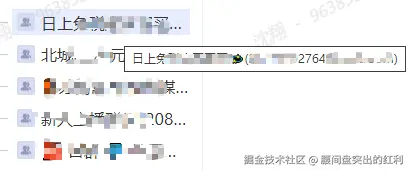
<div title="内容xxxxxxx" class="label">内容xxxxxxx</div>
.label {
width:100px;
white-space: nowrap;
overflow: hidden;
text-overflow: ellipsis;
}