vue3 + element-plus + el-table 表格跨行跨列合并
先看要实现的效果图:
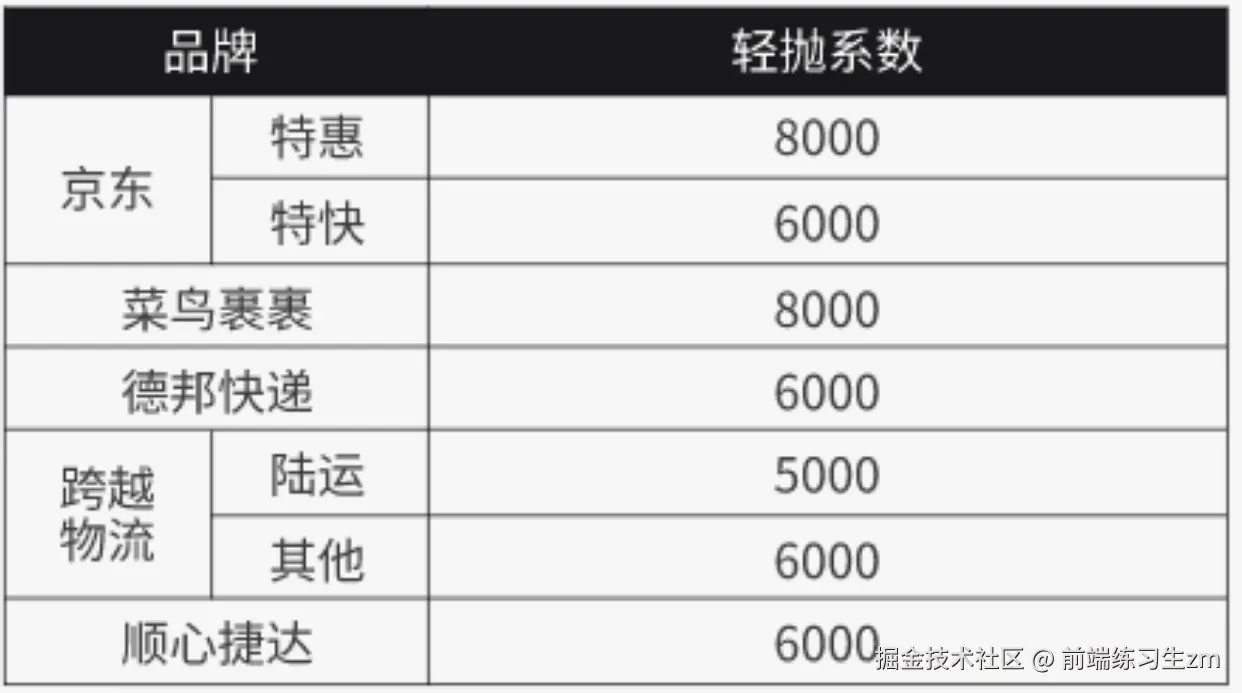
直接贴代码
<script lang="ts" setup>
const tableData = ref([
{ brand: '京东', type: '特惠', value: 8000 },
{ brand: '', type: '特快', value: 6000 },
{ brand: '菜鸟裹裹', type: '', value: 8000 },
{ brand: '德邦快递', type: '', value: 6000 },
{ brand: '跨越物流', type: '陆运', value: 5000 },
{ brand: '', type: '其他', value: 6000 },
{ brand: '顺心捷达', type: '', value: 6000 },
]);
const cellFirs = () => {
return { color: '#000', border: '1px solid #000' };
};
const headFirst = ({ row, column, rowIndex, columnIndex }) => {
if (rowIndex === 1) {
return { display: 'none' };
}
return { background: '#000', color: '#fff', border: 'none', 'border-collapse': 'separate' };
};
const arraySpanMethod = ({ row, column, rowIndex, columnIndex }) => {
if (columnIndex === 0 && rowIndex === 3) {
return [1, 2]
}
if (columnIndex === 0 && rowIndex === 2) {
return [1, 2];
}
if (columnIndex === 0 && rowIndex === 6) {
return [1, 2];
}
if (columnIndex === 0 && rowIndex === 0) {
return [2, 1]
} else if (columnIndex === 0 && rowIndex === 1) {
return [0, 0];
} if (columnIndex === 0 && rowIndex === 4) {
return [2, 1]
} else if (columnIndex === 0 && rowIndex === 5) {
return [0, 0];
}
if (columnIndex === 1 && rowIndex === 3) {
return [0, 0];
}
if (columnIndex === 1 && rowIndex === 2) {
return [0, 0];
} if (columnIndex === 1 && rowIndex === 6) {
return [0, 0];
}
return [1, 1];
}
</script>
<template>
<div class="h-full w-full bg-muted p-2 overflow-y-auto">
<el-table :data="tableData" :span-method="arraySpanMethod" border :header-cell-style="headFirst"
:cell-style="cellFirs" class="border border-black !border-solid !border-1">
<el-table-column label="品牌" align="center">
<el-table-column align="center" prop="brand"></el-table-column>
<el-table-column align="center" prop="type"></el-table-column>
</el-table-column>
<el-table-column prop="value" label="轻抛系数" align="center"></el-table-column>
</el-table>
</div>
</template>
<style scoped>
.el-table {
--el-table-border-color: none !important;
}
.el-table--border .el-table__inner-wrapper:after,
.el-table--border:after {
height: 0px !important;
}
.el-table__border-left-patch {
position: absolute !important;
z-index: calc(var(--el-table-index) + 0) !important;
}
</style>