kolorist 是一个为终端文字增添颜色的小型 npm 包,最新版本是 1.8.0,发布于 2023 年 4 月 23 日。
kolorist 的作者是德国程序员 Marvin Hagemeister,他还是 Preact 的核心贡献者。
安装
pnpm add kolorist
使用
kolorist 内置大量颜色函数,将其包裹字符串,就能给文字涂上颜色。
// file: app.mjs
import { red, green, blue } from 'kolorist'
console.log(red('红色'))
console.log(green('绿色'))
console.log(blue('蓝色'))

颜色函数支持嵌套,文字的颜色取决于离它最近的颜色函数。
import { red, cyan } from 'kolorist'
console.log(red(`Error: something failed in ${cyan('my-file.js')}.`))

背景颜色
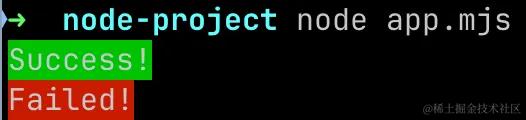
使用 bgXXX 设定背景颜色。
import { bgGreen, bgRed } from 'kolorist'
console.log(bgGreen('Success!'))
console.log(bgRed('Failed!'))
字体样式
使用 bold, italic 等函数设定粗体、斜体等常见字体样式。
import { bold, dim, italic, underline, inverse, strikethrough } from 'kolorist'
console.log(`普通 ${bold('粗体')} ${dim('暗淡')} ${italic('斜体')}`)
console.log(`${underline('下划线')} ${inverse('反相')} ${strikethrough('删除线')}`)

显示原理
最早的终端只有黑白两色,后来出现行业标准 ANSI escape codes,其中规定了一些特殊的字符序列,用于调整字体的显示颜色、样式等。比如:
// file: app.mjs
console.log('\u001b[32m绿色\u001b[39m')

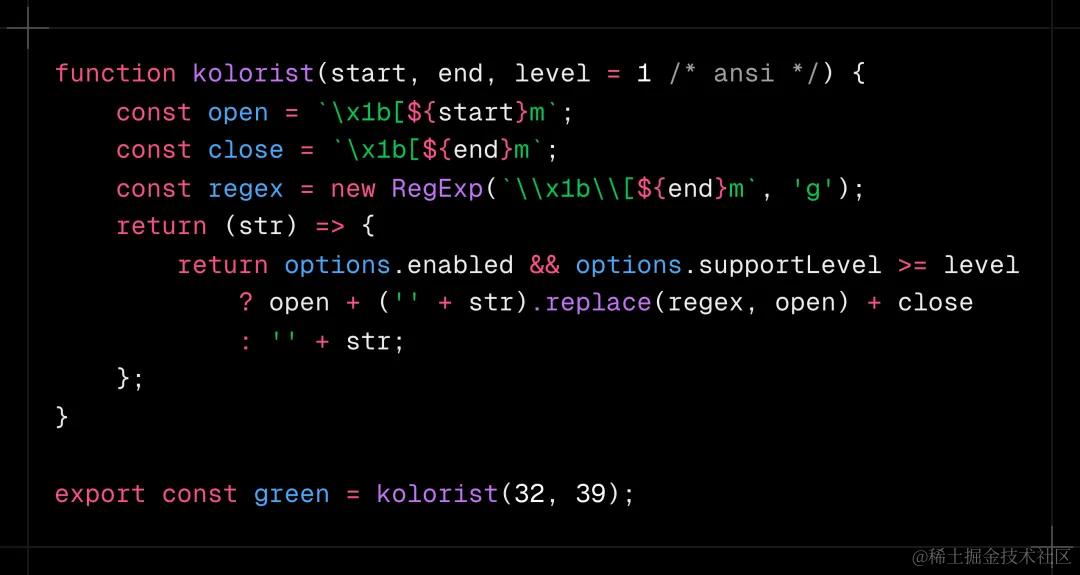
这些控制字符像天书,一般人看不懂。把它们封装起来,对外暴露为语义化极佳的函数,这就是 kolorist。
浏览器的开发者工具
浏览器的开发者工具也支持 ANSI escape codes:
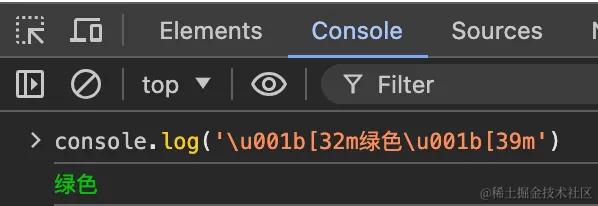
但是浏览器本身支持更高级的格式化控制台输出,其实就是通过 %c 指令,在 console.log() 函数中使用 CSS,用起来比 ANSI escape codes 更香。
console.log("%c我是绿色大字%c我是红色普通文字", "color: green; font-size: 48px;", "color: red;")