1:安装Vuex npm install --save vuex
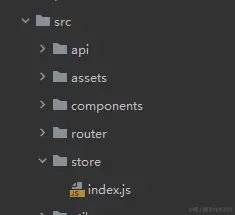
2:配置Vuex文件,在src目录下创建文件夹store,再创建文件index.js
import { createStore } from "vuex";
import axios from "axios";
export default createStore({
state: {
count: 0,
},
getters: {
getCount(state) {
return state.count > 0 ? state.count : "count数据异常";
},
},
mutations: {
addCount(state) {
state.count++;
},
addCountByParams(state, number) {
state.count += number;
},
},
actions: {
asyncAddCount({ commit }) {
axios.get("/api/xxl-job-admin/jobinfo/getCount").then((res) => {
console.log("getCount:", res);
commit("addCountByParams", res.data.msg);
});
},
},
});
3:在主文件中引入Vuex
import { createApp } from "vue";
import App from "./App.vue";
import store from "@/store/index.js";

let app = createApp(App);
app.use(store);
app.mount("#app");
4:state使用
4-1:方法一:在组件中通过$store.state.name读取状态
<template>
  <p>关于信息</p>
  <p>{{ $store.state.count }}</p>
</template>

<script>
export default {
  name: "AboutInfo",
};
</script>

<style scoped></style>
4-2:方法二:语法糖的方式
<template>
  <p>关于信息</p>
  <p>{{ count }}</p>
</template>

<script setup>
import { computed } from "vue";
import { useStore } from "vuex";

const store = useStore();
const count = computed(() => store.state.count);
</script>

<style scoped></style>
4-3:方法三
<template>
<p>关于信息</p>
<p>{{ count }}</p>
</template>
<script>
import { computed } from "vue";
import { mapState } from "vuex";
export default {
name: "AboutInfo",
computed: {
...mapState(["count"]),
},
};
</script>
<style scoped></style>
5:getters使用,对状态的获取和过滤
5-1:方法一
<template>
  <p>关于我们</p>
  <p>{{ $store.getters.getCount }}</p>
</template>

<script setup>
</script>

<style scoped></style>
5-2:方法二:语法糖的方式
<template>
  <p>关于我们</p>
  <p>{{ getCount }}</p>
</template>

<script setup>
import { computed } from "vue";
import { useStore } from "vuex";

const store = useStore();
const getCount = computed(() => store.getters.getCount);
</script>

<style scoped></style>
5-3:方法三
<template>
  <p>关于我们</p>
  <p>{{ getCount }}</p>
</template>

<script>
import { mapGetters } from "vuex";

export default {
  computed: {
    ...mapGetters(["getCount"]),
  },
};
</script>

<style scoped></style>
6:Mutation (同步操作)更改 Vuex 的 store 中的状态的唯一方法是提交 mutation。Vuex 中的 mutation 非常类似于事件:每个mutation 都有一个字符串的事件类型 (type)和一个回调函数(handler)。这个回调函数就是我们实际进行状态更改的地方,并且它会接受 state 作为第一个参数
6-1:方法一
<template>
  <p>关于我们</p>
  <p>{{ getCount }}</p>
  <button @click="addClickHandle">增加</button>
  <button @click="addClickHandleByParams">带参数</button>
</template>

<script setup>
import { computed } from "vue";
import { useStore } from "vuex";

const store = useStore();
const getCount = computed(() => store.getters.getCount);
const addClickHandle = () => {
  store.commit("addCount");
};

const addClickHandleByParams = () => {
  store.commit("addCountByParams", 10);
};
</script>

<style scoped></style>
6-2:方法二
<template>
<p>关于我们</p>
<p>{{ getCount }}</p>
<button @click="addClickHandle">增加</button>
<button @click="addClickHandleByParams">带参数</button>
</template>
<script>
import { mapGetters } from "vuex";
export default {
computed: {
...mapGetters(["getCount"]),
},
methods: {
addClickHandle() {
this.$store.commit("addCount");
},
addClickHandleByParams() {
this.$store.commit("addCountByParams", 20);
},
},
};
</script>
<style scoped></style>
7:Action(异步操作),Action 类似于 mutation,不同在于,Action 提交的是 mutation,而不是直接变更状态Action 可以包含任意异步操作
7-1:方法一
<template>
<p>关于我们</p>
<p>{{ getCount }}</p>
<button @click="addClickHandle">增加</button>
<button @click="addClickHandleByParams">带参数</button>
<button @click="asyncAddClickHandleByParams">异步增加</button>
</template>
<script>
import { mapGetters } from "vuex";
export default {
computed: {
...mapGetters(["getCount"]),
},
methods: {
addClickHandle() {
this.$store.commit("addCount");
},
addClickHandleByParams() {
this.$store.commit("addCountByParams", 20);
},
asyncAddClickHandleByParams() {
this.$store.dispatch("asyncAddCount");
},
},
};
</script>
<style scoped></style>
7-2:方法二
<template>
  <p>关于我们</p>
  <p>{{ getCount }}</p>
  <button @click="addClickHandle">增加</button>
  <button @click="addClickHandleByParams">带参数</button>
  <button @click="asyncAddClickHandleByParams">异步增加</button>
</template>

<script setup>
import { computed } from "vue";
import { useStore } from "vuex";

const store = useStore();
const getCount = computed(() => store.getters.getCount);
const addClickHandle = () => {
  store.commit("addCount");
};
const addClickHandleByParams = () => {
  store.commit("addCountByParams", 10);
};
const asyncAddClickHandleByParams = () => {
  store.dispatch("asyncAddCount");
};
</script>

<style scoped></style>
7-3:方法三
<template>
<p>关于我们</p>
<p>{{ getCount }}</p>
<button @click="addClickHandle">增加</button>
<button @click="addClickHandleByParams">带参数</button>
<button @click="asyncAddClickHandleByParams">异步增加</button>
</template>
<script>
import { mapActions, mapGetters, mapMutations } from "vuex";
export default {
computed: {
...mapGetters(["getCount"]),
},
methods: {
...mapMutations(["addCount"]),
...mapActions(["asyncAddCount"]),
addClickHandle() {
this.$store.commit("addCount");
},
addClickHandleByParams() {
this.$store.commit("addCountByParams", 20);
},
asyncAddClickHandleByParams() {
this.asyncAddCount();
},
},
};
</script>
<style scoped></style>